

Scenario
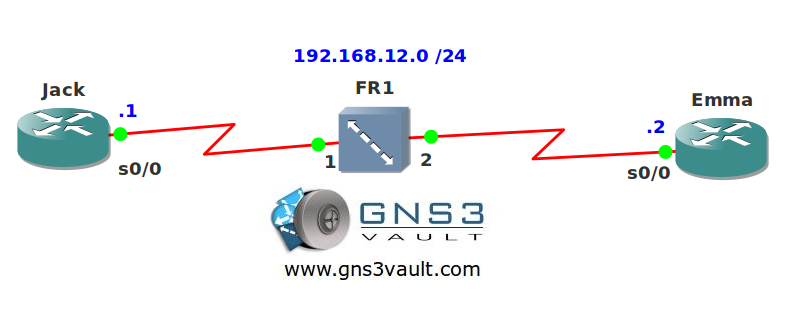
Jack and Emma are using an old frame-relay switch to connect their routers. Unfortunately they are unable to get any connection. Think you can help them out?
Goal:
- All IP addresses have been preconfigured for you.
- Disable frame relay inverse ARP.
- Configure frame relay mappings so the routers can ping each other.
- Frame relay should support broadcast emulation.
It took me 1000s of hours reading books and doing labs, making mistakes over and over again until I mastered all the protocols for CCNA.
Would you like to be a master of networking too? In a short time without having to read 900 page books or google the answers to your questions and browsing through forums?
I collected all my knowledge and created a single ebook for you that has everything you need to know to become a master of CCNA.
You will learn all the secrets about routers, frame-relay, inverse ARP and more.
Does this sound interesting to you? Take a look here and let me show you how to Master CCNA!
IOS:
c3640-jk9s-mz.124-16.bin
Topology:
Video Solution:
Configuration Files
You need to register to download the GNS3 topology file. (Registration is free!)Once you are logged in you will find the configuration files right here.

The How to Master series helps you to understand complex topics like spanning-tree, VLANs, trunks, OSPF, EIGRP, BGP and more.
Written by René Molenaar - CCIE #41726


I can ping each router. Here is my configuration . Anyone is welcome to let me know if I am missing something
Jack
interface Serial0/0
ip address 192.168.12.1 255.255.255.0
encapsulation frame-relay
serial restart-delay 0
frame-relay map ip 192.168.12.2 102 broadcast
no frame-relay inverse-arp
Emma
interface Serial0/0
ip address 192.168.12.2 255.255.255.0
encapsulation frame-relay
serial restart-delay 0
frame-relay map ip 192.168.12.1 201 broadcast
no frame-relay inverse-arp
Hi Jawed,
That’s it…disable Inverse ARP and create those frame-relay maps. Adding the broadcast keyword is a good idea if you want to run any protocols using broadcast or multicast over your frame-relay network.
Rene