

Scenario:
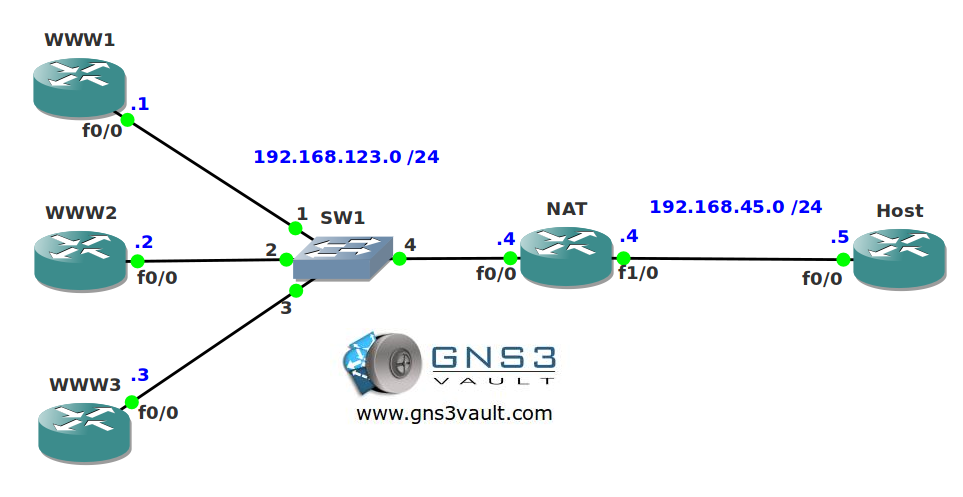
You are working as a networking trainee and in your pasttime you enjoy troubleshooting networks. Your roommate has a huge website and has bought multiple webservers to host the website. He doesn’t have any more money for a decent load balancer so he asks you if you know any other method to share traffic along the webservers. Let’s see if you can keep your balance…
Goal:
- All IPv4 addresses have been preconfigured for you.
- Static routes have been configured on the webservers and the host for full connectivity.
- Configure HTTP server on all webservers.
- Whenever router host sends an IP packet to IP address 192.168.45.100 port 80 it should be load-balanced using round-robin among the webservers.
IOS:
c3640-jk9s-mz.124-16.bin
Topology:
Video Solution:
Configuration Files
You need to register to download the GNS3 topology file. (Registration is free!)Once you are logged in you will find the configuration files right here.

Do you want your CCNA or CCNP Certificate?
The How to Master series helps you to understand complex topics like spanning-tree, VLANs, trunks, OSPF, EIGRP, BGP and more.
Written by René Molenaar - CCIE #41726


Hi Rene,
I have used below cmd’s, but still translation is not working for me, show some light here pls.
interface FastEthernet0/0
ip address 192.168.123.4 255.255.255.0
ip nat inside
ip virtual-reassembly
duplex auto
speed auto
!
interface FastEthernet1/0
ip address 192.168.45.4 255.255.255.0
ip nat outside
ip virtual-reassembly
duplex auto
speed auto
ip nat pool WWW 192.168.123.1 192.168.123.3 prefix-length 24 type rotary
ip nat inside destination list 25 pool WWW
!
access-list 25 permit 192.168.45.100
Additional to my below comments.
Below configuration are added in NAT router
Here’s an example that should work:
[code]
interface FastEthernet0/0
ip nat inside
!
interface FastEthernet1/0
ip nat outside[/code]
[code]ip nat pool ROTATE prefix-length 24 type rotary
address 192.168.123.1 192.168.123.1
address 192.168.123.2 192.168.123.2
address 192.168.123.3 192.168.123.3[/code]
[code]ip nat inside destination list BALANCE pool ROTATE[/code]
[code]ip access-list extended BALANCE
permit tcp any host 192.168.45.100 eq www[/code]
[code]ip alias 192.168.45.100 80[/code]
Haven’t tried it yet, I’ll try to do the video asap.
Many thanks Rene.
your welcome!
Great lab Rene, I never knew this was possible.. Does this replace the need for a load balancer solution like an F5?
Very neat feature, can be used on cheap routers for load-balancing.
not everyone can afford a 6500 switch. thanks for the tip Rene!
what is "ip alias" ?
its performed hardware with ASIC?