

Scenario:
You and a colleague network administrator were talking about the scalability and flapping network issues that you have encountered in the past. Especially the stories about EIGRP stuck-in-active make you shiver…On your network you are using EIGRP as a routing protocol, and you have heard that summarization and stub routers might solve some of your problems….time for some good old lab action!
Goal:
- Achieve full connectivity, every IP Address should be pingable from any router.
- When you ping 1.1.1.1 from R4 it should take the path through R2.
- Change the EIGRP Metrics so load/reliability are also used in addition to bandwidth and delay.
- Disable EIGRP auto-summary.
- Create 4 extra loopbacks on R3:
Loopback10: 172.16.0.1 /24
Loopback11: 172.16.1.1 /24
Loopback12: 172.16.2.1 /24
Loopback13: 172.16.3.1 /24 - Advertise these networks in EIGRP, the routing table on R1,R2 and R4 should only show a single entry for these networks: 172.16.0.0/22
- Create a default route on R1, if you look at the routing table on R2,R3 or R4 it should show the default route pointing to R1.
- Change the bandwidth on R2 on FastEthernet0/0 to 100. Make sure you only see 1 entry for the 1.1.1.0 network in R4.
- Without modifying R2, make sure R4 has 2 entries for the 1.1.1.0 network, one by going through R2, the other one through R3. only use EIGRP or bandwidth commands to achieve this.
- Enable authentication between R1 and R2:
key-chain: CISCO
key-string: PASSWORD - Disable the link between R3 and R4.
- Make sure that when you type ‘shutdown’ on Loopback1 at R2, R1 will not send a QUERY to R3. (hint: to check this, do a ‘debug eigrp packets query reply)
It took me 1000s of hours reading books and doing labs, making mistakes over and over again until I mastered all the routing protocols for CCNP.
Would you like to be a master of routing too? In a short time without having to read 900 page books or google the answers to your questions and browsing through forums?
I collected all my knowledge and created a single ebook for you that has everything you need to know to become a master of routing.
You will learn all the secrets about OSPF, EIGRP, BGP and more.
Does this sound interesting to you? Take a look here and let me show you how to Master CCNP ROUTE
IOS:
c3640-jk9s-mz.124-16.bin
Topology:
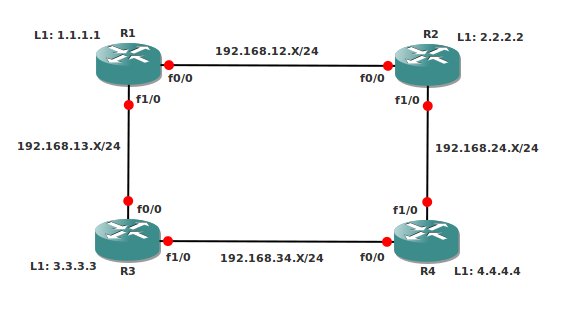
Configuration Files
You need to register to download the GNS3 topology file. (Registration is free!)Once you are logged in you will find the configuration files right here.

The How to Master series helps you to understand complex topics like spanning-tree, VLANs, trunks, OSPF, EIGRP, BGP and more.
Written by René Molenaar - CCIE #41726


Hi Rene,
Advertise these networks in EIGRP, the routing table on R1,R2 and R4 should only show a single entry for these networks: 172.16.1.0/22
Shouldn’t it be 172.16.0.0/22??
Thanks,
Satya
Hi Satya,
You are totally right…I just changed it in the lab, thanks for mentioning this!
Rene
[quote]When you ping 1.1.1.1 from R4 it should take the path through R2.[/quote]
is that means to create static route for 1.1.1.1 from R4.
[quote]Change the EIGRP Metrics so load/reliability are also used in addition to bandwidth and delay.[/quote]
What is the command for metric change?
Is that [b]ip route 0.0.0.0 0.0.0.0 next hop/interface[/b]
[quote]Change the bandwidth on R2 on FastEthernet0/0 to 100[/quote]
How to change the bandwidth on R2 on Interface fa0/0?
Thank You!!
sorry that static route command is for 1st one not for the EIGRP metric
[quote]When you ping 1.1.1.1 from R4 it should take the path through R2[/quote]
You can use the metrics to influence routing decisions, for EIGRP it’s bandwidth and delay.
[quote]Change the EIGRP Metrics so load/reliability are also used in addition to bandwidth and delay[/quote]
You need to change this under the EIGRP process, use “metric weights tos k1 k2 k3 k4 k5” for this.
[quote]Change the bandwidth on R2 on FastEthernet0/0 to 100[/quote]
U need the “bandwidth” command on the interface for this.
Create a default route on R1, if you look at the routing table on R2,R3 or R4 it should show the default route pointing to R1.
How do we do this?
@Rene
Is there any config file included on this lab?
One way to advertise a default route with EIGRP is as following:
1) Create a static route 0.0.0.0/0 towards the Null0 interface.
2) Advertise or Redistribute this into EIGRP.
Rene,
Could you talk a bit more on this? On the default route? (I know what a default route is) I’m not seeing how to do this, as I keep getting it confused with OSPF, and RIP.
I’ve tried to implement this on the interface. I’ve tried to set the gateway of last resort. I’ve ended up advertising network 0.0.0.0 in the EIGRP Process, (but that doesn’t make any sense).
And now I’m getting lost in all the details… Cisco’s site isn’t helping either. Can you, or someone speak to this?
What really could help is the final configs for this excellant lab. (No, truly! I may be pulling my hair on this step, but its been sooooo fun to play with this one in GNS3 and disable things to see what happens. 🙂 ) I think if I saw it in the plain of day it would make sense. I can’t see the forest for the tree’s on this one.
Thanks!
I’ll create the video and solution for this lab soon, I have a bit more time on my hands now the last TSHOOT book is finished. About the default route for EIGRP, this is what you can do:
[b]
Option 1:[/b]
[code]
Router(config)#interface fa0/0
Router(config-if)#ip summary-address eigrp 1 0.0.0.0 0.0.0.0
[/code]
[b]
Option 2:[/b]
[code]
Router(config)#ip route 0.0.0.0 0.0.0.0 null 0
Router(config)#router eigrp 1
Router(config-router)#network 0.0.0.0
[/code]
Or instead of the network command you can use the redistribute command.
You can also take a look at the EIGRP default network command. I have a different lab for that one.
thanks.
I think we have to redistribute.
by going through R2, the other one through R3. only use EIGRP commands to achieve this.”
should i use the variance command?
if so i used it and even set all routers to a value of 128 and i’m still not getting 2 entries.
any advice?
@Avi I Just changed the goal so you can use bandwidth as well if you like. In order to have 2 entries in the routing table you’ll need to use the variance command. The other path however has to be a feasible successor…make sure you see both entries in the EIGRP topology table.
Rene
Hi Rene,
i can’t make the other path feasible succesor.
i’ve tried changing BW on R3 int fa 0/0 and it just won’t work but when the BW is equal i get 2 succesors.
how can i make the other way a feasible succesor?
thx
Hi Avi,
Let me try to explain the feasible successor rule:
1) The best path is called the “successor”.
2) The backup path is called the “feasible successor”…but it has to pass a certain rule.
3) The “total distance” from your router to the destination is called the “feasible distance”.
4) Your EIGRP neighbors will tell you how far it is for them to reach the destination, this is called the “Advertised Distance”.
5) In order to become a “feasible successor” the “advertised distance” has to be lower than the “feasible distance” of the successor”. Or in plain english…the eigrp neighbor you want to use as a backup has to be closer to the destination than your best route. Otherwise it’s possible that this backup path goes through you…(keep in mind, EIGRP is a distance vector protocol).
Take a piece of paper and write down some routers and metrics, see if you can determine on paper which router will be the successor / feasible successors and then try it on your real setup. The metric numbers on real routers are very high so kinda annoying to work with.
Have fun 🙂
i already knew the rules of EIGRP and did things correctly so i searched the web and i found out that some more people had the same problem and they needed to do the clear ip eigrp neighbors command so i did it and it works fine!
another question i have is about stub.
i configured R3 as stub but R1 still sends query messages can you explain this?
thanks for your time 🙂
Hi Avi,
Great that it works…:) About the stub…that’s weird, If you configure R3 as a stub you see it kills the neighbor adjacency between R1 and R3?
Post the config for R1 and R3 if you can (EIGRP relevant part) and the output of the debug. On the forum you can add attachments if you want to show the full config, might be easier than the comments here. I’ll take a look at it.
Rene
Re: “Advertise these networks in EIGRP, the routing table on R1,R2 and R4 should only show a single entry for these networks: 172.16.0.0/22”
On R3, I advertised the 4 loopbacks with (using the wildcard mask to get the /22):
R3(config-router)#network 172.16.0.0 0.0.3.255
On R1,R2,R4, when I Rx#show IP route (output from R4 shown):
172.16.0.0/24 is subnetted, 4 subnets
D 172.16.0.0 [90/156160] via 192.168.34.3, 00:00:29, FastEthernet0/0
D 172.16.1.0 [90/156160] via 192.168.34.3, 00:00:29, FastEthernet0/0
D 172.16.2.0 [90/156160] via 192.168.34.3, 00:00:29, FastEthernet0/0
D 172.16.3.0 [90/156160] via 192.168.34.3, 00:00:29, FastEthernet0/0
Any thoughts why I am not seeing just the 172.16.0.0/22 single entry?
@MikeG, you need to create a manual summary advertisement to avoid seeing the individual subnets.
Route from R3 to 1.1.1.1 is obviously good, but why doesn’t it pass it on to R4. Tried dropping bandwidth down on R4 f1/0 no effect except larger metrics for same route.
Ive actually tried shutting down f0/0 on R4 and although there neighborship there is no route for 1.1.1.1 . Can you help me out on this as I really can’t see why its behaving like this ?
I see I don’t have a video for this one yet, time to create one…
@MikeG using the network command only determines [b]what[/b] you are going to advertise. It will only advertise whatever you have on the interface, it’s not going to summarize anything for you…that’s what you have the summary command for. Since you have a network command with a wildcard that matches those networks they are advertised. Are you following me?
@Oliver is the entry not even in the EIGRP topology table? Does it pass the feasible successor rule? (AD Feasible Successor < FD Successor route?)
Re: “Advertise these networks in EIGRP, the routing table on R1,R2 and R4 should only show a single entry for these networks: 172.16.0.0/22”
Thanks Whoolio & Rene for your comments. I believe I’ve got it.
On R3, I kept the same advertisement for the 4 loopbacks (just to remind me about wildcard masks):
R3(config-router)#network 172.16.0.0 0.0.3.255
As anticipated, I got same result with classful advertisement:
R3(config-router)#network 172.16.0.0
On R3-F0/0, I added the manual summary for the 4 172.16.0.1-172.16.3.1 loopbacks:
R3(config-if)#ip summary-address eigrp 65000 172.16.0.1 255.255.252.0
Note that the actual command that showed up in Running-Config was:
ip summary-address eigrp 65000 172.16.0.0 255.255.252.0 5
With summaries, I thought I had to specify my lowest addr, but looks like I didn’t need the .1
Note, too, that the IOS added a 5 to the end of the command, the default EIGRP Summary admin dist.
Because I had not added the summary to R3-F1/0 yet, I had this interesting result on R1:
R1# show IP route
172.16.0.0/16 is variably subnetted, 5 subnets, 2 masks
D 172.16.0.0/24 [90/161280] via 192.168.12.2, 00:00:08, FastEthernet0/0
D 172.16.0.0/22 [90/156160] via 192.168.13.3, 00:19:07, FastEthernet1/0
D 172.16.1.0/24 [90/161280] via 192.168.12.2, 00:00:08, FastEthernet0/0
D 172.16.2.0/24 [90/161280] via 192.168.12.2, 00:00:08, FastEthernet0/0
D 172.16.3.0/24 [90/161280] via 192.168.12.2, 00:00:08, FastEthernet0/0
Note the left over routes coming the long way around thru R4 & R2-F0/0 (higher metric).
On R3-F1/0, I added the same manual summary for the 4 172.16.0.1-172.16.3.1 loopbacks:
R3(config-if)#ip summary-address eigrp 65000 172.16.0.1 255.255.252.0
And finally, the desired result on R1 & R4:
R1# show IP route
172.16.0.0/22 is subnetted, 1 subnets
D 172.16.0.0 [90/156160] via 192.168.13.3, 00:26:20, FastEthernet1/0
R4# show IP route
172.16.0.0/22 is subnetted, 1 subnets
D 172.16.0.0 [90/156160] via 192.168.34.3, 00:01:26, FastEthernet0/0
One last question on this topic, Shouldn’t I see an admin dist of 5 on R1,R2,R4 because of the default EIGRP Summary admin dist of 5?
Hi Mike,
Let me give you an answer to your questions/comments. I think this is useful for everyone studying EIGRP.
[quote]On R3, I kept the same advertisement for the 4 loopbacks (just to remind me about wildcard masks):
R3(config-router)#network 172.16.0.0 0.0.3.255
As anticipated, I got same result with classful advertisement:
R3(config-router)#network 172.16.0.0[/quote]
The network command is a bit funky so let me explain it a bit. It does 2 things:
A) Activate EIGRP on the interface.
B) Advertise the network that is configured on the interface.
It doesn’t summarize for us (that’s what we have summarization commands for). If you type in a network command then it will activate/advertise EIGRP on all interfaces that fall within the range of the network command. I think you got this Mike so this is more for everyone else that’s wondering
[quote]On R3-F0/0, I added the manual summary for the 4 172.16.0.1-172.16.3.1 loopbacks:
R3(config-if)#ip summary-address eigrp 65000 172.16.0.1 255.255.252.0
Note that the actual command that showed up in Running-Config was:
ip summary-address eigrp 65000 172.16.0.0 255.255.252.0 5
With summaries, I thought I had to specify my lowest addr, but looks like I didn’t need the .1
Note, too, that the IOS added a 5 to the end of the command, the default EIGRP Summary admin dist.[/quote]
Look closely at the subnetmask you configured:
255.255.252.0
If you use this subnetmask it means we have the following subnets in the 172.16.0.0 range:
Subnet #1 172.16.0.0
Subnet #2 172.16.4.0
Subnet #3 172.16.8.0
Subnet #4 172.16.12.0
etc etc.
172.16.0.1 is an IP address that falls within the first subnet. By typing in the IP address and subnetmask your router knows which subnet you are talking about and instead of giving you an error it will put the correct one in the config.
[b]administrative distance[/b] is always [b]local[/b]. It’s not a value that is advertised between routers.
[quote]Because I had not added the summary to R3-F1/0 yet, I had this interesting result on R1:
R1# show IP route
172.16.0.0/16 is variably subnetted, 5 subnets, 2 masks
D 172.16.0.0/24 [90/161280] via 192.168.12.2, 00:00:08, FastEthernet0/0
D 172.16.0.0/22 [90/156160] via 192.168.13.3, 00:19:07, FastEthernet1/0
D 172.16.1.0/24 [90/161280] via 192.168.12.2, 00:00:08, FastEthernet0/0
D 172.16.2.0/24 [90/161280] via 192.168.12.2, 00:00:08, FastEthernet0/0
D 172.16.3.0/24 [90/161280] via 192.168.12.2, 00:00:08, FastEthernet0/0
Note the left over routes coming the long way around thru R4 & R2-F0/0 (higher metric).[/quote]
This is a good example of most specific routing. You are receiving the summary on one interface and the more specific routes through the other interface.
[quote]One last question on this topic, Shouldn’t I see an admin dist of 5 on R1,R2,R4 because of the default EIGRP Summary admin dist of 5? ;D[/quote]
Administrative distance is only local for each router.
@MikeG,
Regarding your query..
You need to summarise under the outgoing interface for the other routers to see 172.16.0.0/22
these should do the trick
int f0/0
ip summary-address eigrp (asn no.) 172.16.0.0 255.255.252.0
and again for
int f1/0
ip summary-address eigrp (asn no.) 172.16.0.0 255.255.252.0
hi
also i got a problem about the goal which should use “variance”
i changed bnadwidth of the R2 f0/0 to 100 after i cant see the way through the 1.1.1.1 over R2 even in the “show ip eigrp top all-links”
as i know i should see the all links in the topology even it s not feasible router for the destination
do u have any idea ?
I’ll upload the solution to this lab this week so you can check it. If you are unsure about variance you can watch some of the other EIGRP videos I have…I explain variance in them as well.
1.Without modifying R2, make sure R4 has 2 entries for the 1.1.1.0 network, one by going through R2, the other one through R3. only use EIGRP or bandwidth commands to achieve this.
2.Make sure that when you type ‘shutdown’ on Loopback1 at R2, R1 will not send a QUERY to R3. (hint: to check this, do a ‘debug eigrp packets query reply)
Also when doing authentication do you need to do the ip authentication mode eigrp # command on the interfaces?
Thanks.
Hello Howard,
[quote]1.Without modifying R2, make sure R4 has 2 entries for the 1.1.1.0 network, one by going through R2, the other one through R3. only use EIGRP or bandwidth commands to achieve this. [/quote]
By default EIGRP will only place one successor router (best path) in it’s routing table. If there are two equal paths it will do load-balancing and you’ll see two entries in the routing table. Besides checking for the successor EIGRP will look if there’s a feasible successor (backup path). You won’t find the feasible successor in the routing table until the successor fails.
EIGRP however can do “unequal load-balancing” which means it can load balance over the successor and one or more feasible successors. You’ll have to use the [b]variance[/b] command to enable unequal load-balancing. If you configure this correctly R4 will have two paths to reach 1.1.1.0 /24.
[quote]2.Make sure that when you type ‘shutdown’ on Loopback1 at R2, R1 will not send a QUERY to R3. (hint: to check this, do a ‘debug eigrp packets query reply) [/quote]
When EIGRP loses a successor route and has no feasible successors it will send a query to its neighbors for the lost prefix. Take a look at the EIGRP Stub feature to see how it influences the query process.
[quote]Also when doing authentication do you need to do the ip authentication mode eigrp # command on the interfaces? [/quote]
Here’s an example for EIGRP MD5 Authentication:
http://gns3vault.com/EIGRP/eigrp-md5-authentication.html
You need a key-chain and two interface commands:
key chain YOURKEYCHAINNAME
key 1
key-string PASSWORD
Interface Serial0/0
ip authentication mode eigrp 12 md5
ip authentication key-chain eigrp 12 YOURKEYCHAINNAME
Router EIGRP 12
network x.x.x.x
I hope this helps you!
Rene
Thanks Rene, great site.
RE:Make sure that when you type ‘shutdown’ on Loopback1 at R2, R1 will not send a QUERY to R3. (hint: to check this, do a ‘debug eigrp packets query reply)
I am not able to find a solution to this. Can you please assist? My guess was to configure R3 as a stub, but when I shut down the loopback of R1 I find that R3 still “Ensues” an EIGRP QUERY.
@Howard Thanks Howard!
@Tim565ty Configuring R3 as a stub *should* be the answer to this question. An EIGRP stub router shouldn’t receive any queries when a neighbor loses a successor router.
If you do a debug on R3 what do you exactly see?
R3(config)#int lo0
R3(config-if)#shut
R2#sh ip eigrp neighbors de fa0/0
IP-EIGRP neighbors for process 1
H Address Interface Hold Uptime SRTT RTO Q Seq
(sec) (ms) Cnt Num
0 192.168.12.1 Fa0/0 10 00:00:30 57 1458 0 60
Version 12.4/1.2, Retrans: 0, Retries: 0, Prefixes: 2
Stub Peer Advertising ( CONNECTED SUMMARY ) Routes
Suppressing queries
=====
R1#sh run | b router
router eigrp 1
redistribute connected
network 0.0.0.0
metric weights 0 1 0 1 1 1
no auto-summary
eigrp stub connected summary
============================
!On R1
*Mar 1 00:35:01.159: EIGRP: Enqueueing QUERY on FastEthernet1/0 iidbQ un/rely 0/1 serno 53-53
*Mar 1 00:35:01.163: EIGRP: Enqueueing QUERY on FastEthernet1/0 nbr 192.168.13.3 iidbQ un/rely 0/0 peerQ un/rely 0/0 serno 53-53
*Mar 1 00:35:01.171: EIGRP: Sending QUERY on FastEthernet1/0
*Mar 1 00:35:01.171: AS 1, Flags 0x0, Seq 62/0 idbQ 0/0 iidbQ un/rely 0/0 serno 53-53
*Mar 1 00:35:01.179: EIGRP: Enqueueing QUERY on FastEthernet0/0 iidbQ un/rely 0/1 serno 53-53
*Mar 1 00:35:01.183: EIGRP: Enqueueing QUERY on FastEthernet0/0 nbr 192.168.12.2 iidbQ un/rely 0/0 peerQ un/rely 0/0 serno 53-53
*Mar 1 00:35:01.183: EIGRP: Sending QUERY on FastEthernet0/0
I’ll take a look at this. Your stub is configured to advertise the connected and summary routes.
Once I’ll record the video I’ll debug it and see what is going on….to be continued!
Hello, i have a problem i can open the topologie because i hav’nt the IOS of the router 3640 (c3640-jk9s-mz.124-16.bin)
Hi Mouhi,
You don’t have to use the exact same IOS version…any other 3640 image *should* do the job.
Rene
can anyone help me. I’m trying to config r3 as a stub router.
If i do
R1#show ip eigrp neighbor detail
IP-EIGRP neighbors for process 100
H Address Interface Hold Uptime SRTT RTO Q Seq Type
(sec) (ms) Cnt Num
0 192.168.13.3 Fa1/0 10 00:00:55 521 3126 0 96
Version 12.2/1.2, Retrans: 1, Retries: 0
Stub Peer Advertising ( CONNECTED SUMMARY ) Routes
1 192.168.12.2 Fa0/0 12 00:20:46 32 200 0 111
Version 12.2/1.2, Retrans: 4, Retries: 0
R1 sees that R3 is a stub but If I shut R2 loopback interface I still get queries…Its strange.
01:08:02: EIGRP: Enqueueing QUERY on FastEthernet0/0 iidbQ un/rely 0/1 serno 146-146
01:08:02: EIGRP: Sending QUERY on FastEthernet0/0
01:08:02: AS 100, Flags 0x0, Seq 104/0 idbQ 0/0 iidbQ un/rely 0/0 serno 146-146
01:08:02: EIGRP: Received REPLY on FastEthernet0/0 nbr 192.168.13.1
01:08:02: AS 100, Flags 0x0, Seq 159/104 idbQ 0/0 iidbQ un/rely 0/0 peerQ un/rely 0/0
R3#show run | inc eigrp
router eigrp 100
eigrp stub connected summary
Why is R3 still getting queries from the f0/0 interface?
hey Rene
do you have the solution for this lab??
would you mind uploading it
thank you and sorry for my english
Yes I will do it asap.
If you disable auto-summary you will not see only show a single entry for these networks: 172.16.0.0/22 on R1,R2, R4
Hi Rene,
Could you please provide me with the solution because this lab does not have a video.
Thank you so much
Hello all,
regarding the stub feature of R3 it seems to be working for me…
R1#
*Mar 1 00:24:02.751: EIGRP: Received QUERY on FastEthernet0/0 nbr 192.168.12.2
*Mar 1 00:24:02.755: AS 1, Flags 0x0, Seq 78/0 idbQ 0/0 iidbQ un/rely 0/0 peerQ un/rely 0/0
*Mar 1 00:24:02.771: EIGRP: Enqueueing QUERY on FastEthernet1/0 iidbQ un/rely 0/1 serno 61-61
*Mar 1 00:24:02.775: EIGRP: Enqueueing QUERY on FastEthernet1/0 nbr 192.168.13.3 iidbQ un/rely 0/0 peerQ un/rely 0/0 serno 61-61
*Mar 1 00:24:02.783: EIGRP: Enqueueing QUERY on FastEthernet0/0 iidbQ un/rely 0/1 serno 61-61
*Mar 1 00:24:02.787: EIGRP: Enqueueing QUERY on FastEthernet0/0 nbr 192.168.12.2 iidbQ un/rely 0/0 peerQ un/rely 0/0 serno 61-61
*Mar 1 00:24:02.791: EIGRP: Sending QUERY on FastEthernet0/0
*Mar 1 00:24:02.795: AS 1, Flags 0x0, Seq 82/0 idbQ 0/0 iidbQ un/rely 0/0 serno 61-61
*Mar 1 00:24:02.867: EIGRP: received packet with MD5 authentication, key id = 1
*Mar 1 00:24:02.867: EIGRP: Received REPLY on FastEthernet0/0 nbr 192.168.12.2
*Mar 1 00:24:02.867: AS 1, Flags 0x0, Seq 79/82 idbQ 0/0 iidbQ un/rely 0/0 peerQ un/rely 0/0
*Mar 1 00:24:02.879: EIGRP: Enqueueing REPLY on FastEthernet0/0 nbr 192.168.12.2 iidbQ un/rely 0/1 peerQ un/rely 0/0 serno 62-62
*Mar 1 00:24:02.887: EIGRP: Sending REPLY on FastEthernet0/0 nbr 192.168.12.2
*Mar 1 00:24:02.891: AS 1, Flags 0x0, Seq 83/79 idbQ 0/0 iidbQ un/rely 0/0 peerQ un/rely 0/1 serno 62-62
*Mar 1 00:24:02.971: EIGRP: received packet with MD5 authentication, key id = 1
*Mar 1 00:24:03.199: EIGRP: Received QUERY on FastEthernet1/0 nbr 192.168.13.3
*Mar 1 00:24:03.199: AS 1, Flags 0x0, Seq 55/0 idbQ 0/0 iidbQ un/rely 0/0 peerQ un/rely 0/0
*Mar 1 00:24:03.211: EIGRP: Enqueueing REPLY on FastEthernet1/0 nbr 192.168.13.3 iidbQ un/rely 0/1 peerQ un/rely 0/0 serno 64-64
*Mar 1 00:24:03.223: EIGRP: Sending REPLY on FastEthernet1/0 nbr 192.168.13.3
*Mar 1 00:24:03.227: AS 1, Flags 0x0, Seq 86/55 idbQ 0/0 iidbQ un/rely 0/0 peerQ un/rely 0/1 serno 64-64
*Mar 1 00:24:07.359: EIGRP: received packet with MD5 authentication, key id = 1
R1#
The debug is on R1 and it shows that a query to R3 (fa1/0) is enqued, but I never see a sent packet!
R3 queries R1 for a feasible successor, hence the reply to fa1/0.
I don’t think I am missing something in the debug.
R3 config:
router eigrp 1
network 3.3.3.0 0.0.0.255
network 172.16.0.0 0.0.3.255
network 192.168.13.0
network 192.168.34.0
metric weights 0 1 1 1 1 0
no auto-summary
eigrp stub connected summary
I am too interested in watching the video…
Great lab but I resolved it by using the ip summary address command along with a leak map. I also used an offset list.
Hello,
Could You please clarify how to achieve this goal:
• Without modifying R2, make sure R4 has 2 entries for the 1.1.1.0 network, one by going through R2, the other one through R3. only use EIGRP or bandwidth commands to achieve this.
How to do it with bandwidth is obvious. But what a way to make it with eigrp commands only, without intrusion in R2 config? So, when we set BW on R2 to 100kbps, R2 won’t anounce 1.1.1.1 route to the R4 because of FC rule. The route throutght 192.168.12.X became FS and route throutght 192.168.24.X became S. So there is only route to 1.1.1.1 in R4’s topology table via 192.168.34.X. There is no chance to set up variance on R4, it won’t work.
Is there any video for this topology??
Last Question :::
Make sure that when you type ‘shutdown’ on Loopback1 at R2, R1 will not send a QUERY to R3. (hint: to check this, do a ‘debug eigrp packets query reply …………..Can u help me on this
Hi Rene, Solved the lab.. Thanks alot and congrats for the great work.
Hello. Will you be posting a video "how to complete" on this EIGRP intermediate lab?
thanks,
Tom
Please upload video or some solution in pdf. Thanks
Awesome LAB!! It took me a bit to figure it out. I had to put my thinking hat. Your E-book is pretty good. It cuts to the chase. Good Job.
Thanks for your comment 🙂
i love these lab thanks rene 🙂
Thanks 🙂
Rene
Please Upload the Solution of this One.
Hi all,
This stub feature is confusing me, this is the debug output i get on R3:
R3(config-router)#
*Mar 1 01:12:21.815: EIGRP: Enqueueing QUERY on FastEthernet0/0 iidbQ un/rely 0/1 serno 149-149
*Mar 1 01:12:21.819: EIGRP: Enqueueing QUERY on FastEthernet0/0 nbr 192.168.13.1 iidbQ un/rely 0/0 peerQ un/rely 0/0 serno 149-149
To me that says I am receiving QUERY packets.
i’ve tried eigrp stub and eigrp stub connected summary
This is what i get on eigrp stub:
R3(config-router)#
*Mar 1 01:18:23.811: EIGRP: Enqueueing QUERY on FastEthernet0/0 iidbQ un/rely 0/1 serno 180-180
*Mar 1 01:18:23.815: EIGRP: Enqueueing QUERY on FastEthernet0/0 nbr 192.168.13.1 iidbQ un/rely 0/0 peerQ un/rely 0/0 serno 180-180
*Mar 1 01:18:23.823: EIGRP: Sending QUERY on FastEthernet0/0
*Mar 1 01:18:23.823: AS 100, Flags 0x0, Seq 167/0 idbQ 0/0 iidbQ un/rely 0/0 serno 180-180
*Mar 1 01:18:23.875: EIGRP: Received REPLY on FastEthernet0/0 nbr 192.168.13.1
*Mar 1 01:18:23.879: AS 100, Flags 0x0, Seq 215/167 idbQ 0/0 iidbQ un/rely 0/0 peerQ un/rely 0/0
And this is what i get on eigrp stub connected summary
R3(config-router)#
*Mar 1 01:19:42.303: EIGRP: Enqueueing QUERY on FastEthernet0/0 iidbQ un/rely 0/1 serno 194-194
*Mar 1 01:19:42.307: EIGRP: Enqueueing QUERY on FastEthernet0/0 nbr 192.168.13.1 iidbQ un/rely 0/0 peerQ un/rely 0/0 serno 194-194
*Mar 1 01:19:42.311: EIGRP: Sending QUERY on FastEthernet0/0
*Mar 1 01:19:42.311: AS 100, Flags 0x0, Seq 177/0 idbQ 0/0 iidbQ un/rely 0/0 serno 194-194
*Mar 1 01:19:42.347: EIGRP: Received REPLY on FastEthernet0/0 nbr 192.168.13.1
*Mar 1 01:19:42.351: AS 100, Flags 0x0, Seq 233/177 idbQ 0/0 iidbQ un/rely 0/0 peerQ un/rely 0/0
Any thoughts?
I think you want to be looking at the output from R1 instead of R3 🙂
ಠ_ಠ
Has anyone tried using the Passive Interface command instead of the stub feature? It seems to accomplish the last objective in the lab. Here is my output from R1 after making fa0/0 on R3 a passive interface.
R1#
*Mar 1 04:57:19.542: EIGRP: Received QUERY on FastEthernet0/0 nbr 192.168.12.2
*Mar 1 04:57:19.546: AS 200, Flags 0x0, Seq 193/0 idbQ 0/0 iidbQ un/rely 0/0 peerQ un/rely 0/0
*Mar 1 04:57:19.570: EIGRP: Enqueueing REPLY on FastEthernet0/0 nbr 192.168.12.2 iidbQ un/rely 0/1 peerQ un/rely 0/0 serno 152-152
*Mar 1 04:57:19.582: EIGRP: Sending REPLY on FastEthernet0/0 nbr 192.168.12.2
*Mar 1 04:57:19.586: AS 200, Flags 0x0, Seq 191/193 idbQ 0/0 iidbQ un/rely 0/0 peerQ un/rely 0/1 serno 152-152
R1#
Rene,
I would like to mention that when you summerize the extra loops on R3 on the interface level with:
ip summery-address 172.16.0.0 255.255.252.0
then you need to do it on both exiting interfaces of R3 (fa0/0 and fa1/0),because if you only do it on one of them, you still end up seeing all the infividual loops in the routing table of the other routers because the other interface of R3 is still sending the extra loops out!
"Change the bandwidth on R2 on FastEthernet0/0 to 100. Make sure you only see 1 entry for the
1.1.1.0 network in R4."
When u say one entry u mean when i do show ip route or when i do show ip eig topo?
and for the last question, should i do Stub and how can i make it stub for the interface connected to R3 and not stub to R2, is that possible, and if i did passive intf will that be enough?
Thanks for your help
Hai Rene,
If you have got the video for this lab, Can you please upload it.
Many thanks.
hi Rene,
is the below log correct for last goal, Please confirm.
•Make sure that when you type ‘shutdown’ on Loopback1 at R2, R1 will not send a QUERY to R3. (hint: to check this, do a ‘debug eigrp packets query reply)
*Mar 1 01:15:19.179: EIGRP: Enqueueing QUERY on FastEthernet0/0 iidbQ un/rely 0/1 serno 133-133
*Mar 1 01:15:19.187: EIGRP: Enqueueing QUERY on FastEthernet0/0 nbr 192.168.13.1 iidbQ un/rely 0/0 peerQ un/rely 0/0 serno 133-133
*Mar 1 01:15:19.191: EIGRP: Sending QUERY on FastEthernet0/0
*Mar 1 01:15:19.195: AS 100, Flags 0x0, Seq 125/0 idbQ 0/0 iidbQ un/rely 0/0 serno 133-133
*Mar 1 01:15:19.343: EIGRP: Received REPLY on FastEthernet0/0 nbr 192.168.13.1
*Mar 1 01:15:19.347: AS 100, Flags 0x0, Seq 165/125 idbQ 0/0 iidbQ un/rely 0/0 peerQ un/rely 0/0
R3#
Make sure that when you type ‘shutdown’ on Loopback1 at R2, R1 will not send a QUERY to R3. (hint: to check this, do a ‘debug eigrp packets query reply)
i’m not able to solve this problem…please help..!!
Change the EIGRP Metrics so load/reliability are also used in addition to bandwidth and delay.
Without modifying R2, make sure R4 has 2 entries for the 1.1.1.0 network, one by going through R2, the other one through R3. only use EIGRP or bandwidth commands to achieve this.
Create a default route on R1, if you look at the routing table on R2,R3 or R4 it should show the default route pointing to R1.
i’m not able to solve this 3 problems also….please help Sir…!!
Will you create a video solution for this lab soon?
enter your message here…[quote=mohit.12]Make sure that when you type ‘shutdown’ on Loopback1 at R2, R1 will not send a QUERY to R3. (hint: to check this, do a ‘debug eigrp packets query reply)
i’m not able to solve this problem…please help..!![/quote]
I think you need to configure R3 as stub router. So R1 and R4 won’t ask R3 for any routes.
[quote=mohit.12]Change the EIGRP Metrics so load/reliability are also used in addition to bandwidth and delay.
Without modifying R2, make sure R4 has 2 entries for the 1.1.1.0 network, one by going through R2, the other one through R3. only use EIGRP or bandwidth commands to achieve this.
Create a default route on R1, if you look at the routing table on R2,R3 or R4 it should show the default route pointing to R1.
i’m not able to solve this 3 problems also….please help Sir…!![/quote]
One way to make a equal routes by setting equal bandwidth on second path.
Hello Rene,
I am stucking in last question : " Make sure that when you type ‘shutdown’ on Loopback1 at R2, R1 will not send a QUERY to R3. (hint: to check this, do a ‘debug eigrp packets query reply)"
could you please hint me i have already tried stub. but when i shut loopback interface on R1 or r2 getting query massage.
Where are the Router Configs for this Lab?
My thoughts exactly. I’m running the latest version of GNS3 and it doesn’t appear to import to import the configs even though all of routers are imported properly. In previous labs I just copied and pasted startup configs for the initial lab but this one there is none available. I can deduce some things from the network diagram however loopback interfaces and other oddball initial configuration options I have no clue about. Please help.
Running Ubuntu Server 14.04 with basic gnome GUI.
Thanks,
When you ping 1.1.1.1 from R4 it should take the path through R2.
For this to happen using the interface bandwidth command, you need to change the bandwidth come R4 interface F0/0. Before doing this you will see two paths to get to 1.1.1.0/24 on R1.
output for: show ip route
======================
1.1.1.0 [90/158720] via 192.168.34.1, 00:00:01, FastEthernet0/0
[90/158720] via 192.168.24.1, 00:00:01, FastEthernet1/0
When you lower the bandwidth on R4 interface F0/0 the only path that shows up is this:
1.1.1.0 [90/158720] via 192.168.24.1, 00:16:51, FastEthernet1/0
Hi very amazing Lab
Thanks Rene
i just want sombody explain me the last Question in this Lab for maintaning [b]Query [/b]request????
thnks
enter your message here…
99% of this lab i have done. Excep this line
Create a default route on R1, if you look at the routing table on R2,R3 or R4 it should show the default route pointing to R1.
R4 is not point to R1 it is point
D* 0.0.0.0/0 [90/26606737] via 192.168.24.2, 00:02:12, FastEthernet1/0
Any hint to do i tried to change bandwidth and delay but nothing worked..
Rene,
I can’t find the ios c3640-jk9s-mz.124-16.bin from Cisco site so i am using 3660 with ios c3660-i-mz.124-25d.bin to do your labs. The problem is when i try to open your topology map it looks for the c3640 image which i don’t have. Do you have configurations of the lab? or is there workaround to open the topology map in GNS3? Thanks.
YK
Lab done……
***CONFIG OF R1***
!
!
version 12.4
service timestamps debug datetime msec
service timestamps log datetime msec
no service password-encryption
!
hostname R1
!
boot-start-marker
boot-end-marker
!
!
no aaa new-model
memory-size iomem 5
!
!
ip cef
no ip domain lookup
!
!
!
!
key chain cisco
key 1
key-string password
!
!
!
!
!
!
!
!
!
!
!
!
!
!
!
!
interface Loopback0
ip address 1.1.1.1 255.0.0.0
shutdown
!
interface Ethernet0/0
ip address 192.168.12.1 255.255.255.0
ip authentication mode eigrp 100 md5
ip authentication key-chain eigrp 100 cisco
half-duplex
!
interface Ethernet0/1
ip address 192.168.13.1 255.255.255.0
half-duplex
!
interface Ethernet0/2
no ip address
shutdown
half-duplex
!
interface Ethernet0/3
no ip address
shutdown
half-duplex
!
router eigrp 100
redistribute static metric 100 1000 255 255 1500
network 1.0.0.0
network 192.168.12.0
network 192.168.13.0
network 192.168.24.0
network 192.168.34.0
network 0.0.0.0
metric weights 0 1 1 1 1 0
no auto-summary
!
no ip http server
!
ip forward-protocol nd
ip route 0.0.0.0 0.0.0.0 Null0
!
!
!
!
!
control-plane
!
!
!
!
!
!
!
!
!
line con 0
exec-timeout 0 0
logging synchronous
line aux 0
line vty 0 4
login
!
!
end
*****R2****
!
!
version 12.4
service timestamps debug datetime msec
service timestamps log datetime msec
no service password-encryption
!
hostname Router
!
boot-start-marker
boot-end-marker
!
!
no aaa new-model
memory-size iomem 5
!
!
ip cef
!
!
!
!
key chain cisco
key 1
key-string password
!
!
!
!
!
!
!
!
!
!
!
!
!
!
!
!
interface Loopback0
ip address 2.2.2.2 255.0.0.0
shutdown
!
interface Ethernet0/0
bandwidth 100
ip address 192.168.12.2 255.255.255.0
ip authentication mode eigrp 100 md5
ip authentication key-chain eigrp 100 cisco
half-duplex
!
interface Ethernet0/1
ip address 192.168.24.1 255.255.255.0
half-duplex
!
interface Ethernet0/2
no ip address
shutdown
half-duplex
!
interface Ethernet0/3
no ip address
shutdown
half-duplex
!
router eigrp 100
network 2.0.0.0
network 192.168.12.0
network 192.168.13.0
network 192.168.24.0
network 192.168.34.0
metric weights 0 1 1 1 1 0
no auto-summary
!
ip http server
!
ip forward-protocol nd
!
!
!
!
!
control-plane
!
!
!
!
!
!
!
!
!
line con 0
line aux 0
line vty 0 4
login
!
!
end
*****R3*****
!
!
version 12.4
service timestamps debug datetime msec
service timestamps log datetime msec
no service password-encryption
!
hostname Router
!
boot-start-marker
boot-end-marker
!
!
no aaa new-model
memory-size iomem 5
!
!
ip cef
!
!
!
!
!
!
!
!
!
!
!
!
!
!
!
!
!
!
!
interface Loopback0
ip address 3.3.3.3 255.0.0.0
!
interface Loopback1
ip address 172.16.0.1 255.255.255.0
!
interface Loopback2
ip address 172.16.1.1 255.255.255.0
!
interface Loopback3
ip address 172.16.2.1 255.255.255.0
!
interface Loopback4
ip address 172.16.3.1 255.255.255.0
!
interface Ethernet0/0
ip address 192.168.13.2 255.255.255.0
ip summary-address eigrp 100 172.16.0.0 255.255.252.0 5
shutdown
half-duplex
!
interface Ethernet0/1
bandwidth 1000
ip address 192.168.34.1 255.255.255.0
ip summary-address eigrp 100 172.16.0.0 255.255.252.0 5
shutdown
half-duplex
!
interface Ethernet0/2
no ip address
shutdown
half-duplex
!
interface Ethernet0/3
no ip address
shutdown
half-duplex
!
router eigrp 100
network 3.0.0.0
network 172.16.0.0
network 192.168.12.0
network 192.168.13.0
network 192.168.24.0
network 192.168.34.0
metric weights 0 1 1 1 1 0
no auto-summary
!
ip http server
!
ip forward-protocol nd
!
!
!
!
!
control-plane
!
!
!
!
!
!
!
!
!
line con 0
line aux 0
line vty 0 4
login
!
!
end
*****R4*****
!
!
version 12.4
service timestamps debug datetime msec
service timestamps log datetime msec
no service password-encryption
!
hostname Router
!
boot-start-marker
boot-end-marker
!
!
no aaa new-model
memory-size iomem 5
!
!
ip cef
!
!
!
!
!
!
!
!
!
!
!
!
!
!
!
!
!
!
!
interface Loopback0
ip address 4.4.4.4 255.0.0.0
!
interface Ethernet0/0
bandwidth 100
ip address 192.168.34.2 255.255.255.0
shutdown
half-duplex
!
interface Ethernet0/1
ip address 192.168.24.2 255.255.255.0
shutdown
half-duplex
!
interface Ethernet0/2
no ip address
shutdown
half-duplex
!
interface Ethernet0/3
no ip address
shutdown
half-duplex
!
router eigrp 100
network 4.0.0.0
network 192.168.12.0
network 192.168.13.0
network 192.168.24.0
network 192.168.34.0
metric weights 0 1 1 1 1 0
no auto-summary
!
ip http server
!
ip forward-protocol nd
!
!
!
!
!
control-plane
!
!
!
!
!
!
!
!
!
line con 0
line aux 0
line vty 0 4
login
!
!
end
kindly check it, and do let me know if there is any issue..
This looks good, but technically you do not need to specify the metric when you’re redistributing from EIGRP to EIGRP, also
you could also have done the following
ip route 0.0.0.0 0.0.0.0 null0
with the network 0.0.0.0 under the eigrp process, you would have met the requirement,
Again, your solution is fine, but there’s not requirement to advertise the prefix as External (which has and AD of 170), so no need to use the redistribute command.
by advertise the default route under the eigrp process you’re advertising the prefix as EIGRP Internal (AD 90).
Cheers
***CONFIG OF R1***
hostname R1
router eigrp 100
redistribute static metric 100 1000 255 255 1500
network 1.0.0.0
network 192.168.12.0
network 192.168.13.0
[color=fuchsia]network 192.168.24.0
network 192.168.34.0[/color]
network 0.0.0.0
metric weights 0 1 1 1 1 0
no auto-summary
!
*****R2****
router eigrp 100
network 2.0.0.0
network 192.168.12.0
[color=red]network 192.168.13.0[/color]
network 192.168.24.0
[color=red]network 192.168.34.0[/color]
metric weights 0 1 1 1 1 0
no auto-summary
!
*****R3*****
router eigrp 100
network 3.0.0.0
network 172.16.0.0
[color=red]network 192.168.12.0[/color]
network 192.168.13.0
[color=red] network 192.168.24.0[/color]
network 192.168.34.0
metric weights 0 1 1 1 1 0
no auto-summary
!
i
*****R4*****
!
!
router eigrp 100
network 4.0.0.0
[color=red]network 192.168.12.0[/color]
[color=red]network 192.168.13.0[/color]
network 192.168.24.0
network 192.168.34.0
metric weights 0 1 1 1 1 0
no auto-summary
[/quote]
Why are you advertising these networks??? They are not directly connected
Goal(s)
7) Create a default route on R1, if you look at the routing table on R2,R3 or R4 it should show the default route pointing to R1.
8) Change the bandwidth on R2 on FastEthernet0/0 to 100. Make sure you only see 1 entry for the 1.1.1.0 network in R4.
Issue – When I advertise a summary/ defaut route on R1 this replaces the routing table entry for 1.1.1.1 on R4.
Section of the config on R1:
interface Loopback1
ip address 1.1.1.1 255.255.255.255
interface FastEthernet0/0
ip address 192.168.12.1 255.255.255.0
ip summary-address eigrp 1 0.0.0.0 0.0.0.0 5
interface FastEthernet1/0
ip address 192.168.13.1 255.255.255.0
router eigrp 1
network 1.1.1.0 0.0.0.255
network 192.168.12.0
network 192.168.13.01
Routing table from R4:
R4>sh ip route
Gateway of last resort is 192.168.24.2 to network 0.0.0.0
D 192.168.12.0/24 [90/30720] via 192.168.24.2, 00:00:41, FastEthernet1/0
1.0.0.0/32 is subnetted, 1 subnets
D 1.1.1.1 [90/158720] via 192.168.34.3, 00:00:41, FastEthernet0/0
D 192.168.13.0/24 [90/30720] via 192.168.34.3, 00:00:41, FastEthernet0/0
2.0.0.0/32 is subnetted, 1 subnets
D 2.2.2.2 [90/156160] via 192.168.24.2, 00:00:43, FastEthernet1/0
3.0.0.0/32 is subnetted, 1 subnets
D 3.3.3.3 [90/156160] via 192.168.34.3, 00:00:41, FastEthernet0/0
4.0.0.0/8 is variably subnetted, 2 subnets, 2 masks
C 4.4.4.4/32 is directly connected, Loopback1
D 4.0.0.0/8 is a summary, 00:00:48, Null0
C 192.168.24.0/24 is directly connected, FastEthernet1/0
172.16.0.0/22 is subnetted, 1 subnets
D 172.16.0.0 [90/156160] via 192.168.34.3, 00:00:47, FastEthernet0/0
C 192.168.34.0/24 is directly connected, FastEthernet0/0
D* 0.0.0.0/0 [90/33280] via 192.168.24.2, 00:00:47, FastEthernet1/0
Originally I was advertising a candidate default route out of both Fa interfaces on R1. When I did this, the routes previously visible to 1.1.1.1 disappeared, although connectivity was still good to 1.1.1.1 via the default route. The current configuration illustrates the issue – one route to 1.1.1.1 is still visible (via the R1 Fa1/0 interface), but the second route previously visible to 1.1.1.1 via R1 Fa0/0 has gone, ‘replaced’ via the default candidate route.
I would have expected 1.1.1.1 to remain in the routing table as the more specific route. Any offers ?
* Change the bandwidth on R2 on FastEthernet0/0 to 100. Make sure you only see 1 entry for the 1.1.1.0 network in R4.
On router4, i gave command
eigrp1
maxium-path1 and it shows me on entry towards 1.1.1.1
have you a video solution, pls
[quote]Change the bandwidth on R2 on FastEthernet0/0 to 100. Make sure you only see 1 entry for the 1.1.1.0 network in R4.
Without modifying R2, make sure R4 has 2 entries for the 1.1.1.0 network, one by going through R2, the other one through R3. only use EIGRP or bandwidth commands to achieve this.[/quote]
Why on R4 I do not see path via R2?
[quote]R4#SH IP EI to all
IP-EIGRP Topology Table for AS(1)/ID(192.16.34.4)
Codes: P – Passive, A – Active, U – Update, Q – Query, R – Reply,
r – reply Status, s – sia Status
P 1.0.0.0/8, 2 successors, FD is 30820, serno 136
via 192.16.24.2 (30820/28260), FastEthernet1/0
via 192.16.34.3 (30820/28260), FastEthernet0/0
[b]P 1.1.1.0/24, 1 successors, FD is 158820, serno 138
via 192.16.34.3 (158820/156260), FastEthernet0/0[/b]
P 2.2.2.0/24, 1 successors, FD is 156260, serno 120
via 192.16.24.2 (156260/128257), FastEthernet1/0
P 4.4.4.0/24, 1 successors, FD is 128257, serno 15
via Connected, Loopback4
P 172.16.0.0/22, 1 successors, FD is 156260, serno 135
via 192.16.34.3 (156260/128257), FastEthernet0/0
P 192.16.24.0/24, 1 successors, FD is 28260, serno 58
via Connected, FastEthernet1/0
P 192.16.12.0/24, 1 successors, FD is 33380, serno 137
via 192.16.34.3 (33380/30820), FastEthernet0/0
via 192.16.24.2 (25705512/25702952), FastEthernet1/0
P 192.16.13.0/24, 1 successors, FD is 30820, serno 134
via 192.16.34.3 (30820/28260), FastEthernet0/0
P 192.16.34.0/24, 1 successors, FD is 28260, serno 13
via Connected, FastEthernet0/0[/quote]
same doubt here. showing all-links, why don’t we see route to 1.1.1.0/24 through R2?
By setting the bandwidth to 100 on R2 Fa0/0, you are essentially killing that route. Keep in mind that if you don’t specify any bandwidth on a FastEthernet interface, EIGRP will use a value of 10,000 for the purpose of calculating a metric. So when you put the bandwidth of 100 on R2 Fa0/0, not only will R4 go through R3 to get to the R1 loopback, but R2 will use the route through R4 for that same network. Since distance vector protocols only advertise routes that are actually in the routing table of a router, and because of split horizon, R2 doesn’t advertise 1.1.1.0 to R4.
I think in order to fulfill the conditions of the lab, bandwidth tweaking needs to happen on more than one interface in the topology.
I set the bandwidth on both interfaces, do i need to disable spli horizon?
I downloaded the lab but there are no config files in the .zip. Any idea why?
Hey Rene,
Thanks for this Brilliant Lab.
I did all of the goals except for the last one, the stub one.
R3 instead of being a stub gets queries by R1. Have a look.
R1 :
Enqueueing QUERY on FastEthernet0/0 nbr 192.168.13.3 iidbQ un/rely 0/0 peerQ un/rely 0/0 serno 65-65
*Mar 1 01:18:48.823: EIGRP: Enqueueing QUERY on FastEthernet1/0 nbr 192.168.12.2 iidbQ un/rely 0/0 peerQ un/rely 0/0 serno 65-65
*Mar 1 01:18:48.823: EIGRP: Sending QUERY on FastEthernet1/0
*Mar 1 01:18:48.827: AS 1, Flags 0x0, Seq 73/0 idbQ 0/0 iidbQ un/rely 0/0 serno 65-65
*Mar 1 01:18:49.011: EIGRP: received packet with MD5 authentication, key id = 1
*Mar 1 01:18:49.015: EIGRP: Received REPLY on FastEthernet1/0 nbr 192.168.12.2
*Mar 1 01:18:49.015: AS 1, Flags 0x0, Seq 91/73 idbQ 0/0 iidbQ un/rely 0/0 peerQ un/rely 0/0
*Mar 1 01:18:49.031: EIGRP: Enqueueing REPLY on FastEthernet1/0 nbr 192.168.12.2 iidbQ un/rely 0/1 peerQ un/rely 0/0 serno 66-66
*Mar 1 01:18:49.039: EIGRP: Sending REPLY on FastEthernet1/0 nbr 192.168.12.2
*Mar 1 01:18:49.039: AS 1, Flags 0x0, Seq 75/91 idbQ 0/0 iidbQ un/rely 0/0 peerQ un/rely 0/1 serno 66-66
*Mar 1 01:18:49.111: EIGRP: Received QUERY on FastEthernet0/0 nbr 192.168.13.3
*Mar 1 01:18:49.111: AS 1, Flags 0x0, Seq 63/0 idbQ 0/0 iidbQ un/rely 0/0 peerQ un/rely 0/0
*Mar 1 01:18:49.127: EIGRP: Enqueueing REPLY on FastEthernet0/0 nbr 192.168.13.3 iidbQ un/rely 0/1 peerQ un/rely 0/0 serno 68-68
*Mar 1 01:18:49.135: EIGRP: Sending REPLY on FastEthernet0/0 nbr 192.168.13.3
*Mar 1 01:18:49.135: AS 1, Flags 0x0, Seq 77/63 idbQ 0/0 iidbQ un/rely 0/0 peerQ un/rely 0/1 serno 68-68
R3 :
*Mar 1 01:18:46.291: EIGRP: Enqueueing QUERY on FastEthernet0/0 iidbQ un/rely 0/1 serno 74-74
*Mar 1 01:18:46.295: EIGRP: Enqueueing QUERY on FastEthernet0/0 nbr 192.168.13.1 iidbQ un/rely 0/0 peerQ un/rely 0/0 serno 74-74
*Mar 1 01:18:46.299: EIGRP: Sending QUERY on FastEthernet0/0
*Mar 1 01:18:46.299: AS 1, Flags 0x0, Seq 63/0 idbQ 0/0 iidbQ un/rely 0/0 serno 74-74
*Mar 1 01:18:46.371: EIGRP: Received REPLY on FastEthernet0/0 nbr 192.168.13.1
*Mar 1 01:18:46.375: AS 1, Flags 0x0, Seq 77/63 idbQ 0/0 iidbQ un/rely 0/0 peerQ un/rely 0/0
Hi Rene
How do you acheive this :
•Create a default route on R1, if you look at the routing table on R2,R3 or R4 it should show the default route pointing to R1.
R2 has 2 paths, you cannot set a default route when there are 2 paths to a network, it works only with stub routers with one exit interface,
I cannot get eh feasabile successor route to show up in the topology table of r4, is there anything i should check ?
Create a default route first as :
ip route 0.0.0.0 0.0.0.0 null 0
and then under the eigrp process, do the following :
redistribute static metric [k-values] (note that the metric values could be anything random).
Have a look at the routing tables of R2, R3 and R4. You should have a "D EX" route pointing to the default route.
Hope that helped.
[quote=bsimon]Hi Rene
How do you acheive this :
•Create a default route on R1, if you look at the routing table on R2,R3 or R4 it should show the default route pointing to R1.
where is the viedo of EIGRP Intermediate
Can anyone help with the last one
I am totally stuck on it thanks
Hey bsimon,
This is the easiest. I hope you studied about EIGRP Stub feature.
That is it.
The objective says – "R1 will not send a QUERY to R3". That’s the key sentence.
You want to limit the query domain so do the following –
Go over to R3. Under the eigrp process, type –
eigrp stub.
And done.
Hope that helped.
[color=green]EIGRP: Received QUERY on FastEthernet0/0 nbr 192.168.12.2
*Mar 1 07:06:49.902: AS 1, Flags 0x0, Seq 192/0 idbQ 0/0 iidbQ un/rely 0/0 peerQ un/rely 0/0
*Mar 1 07:06:49.926: EIGRP: Enqueueing REPLY on FastEthernet0/0 nbr 192.168.12.2 iidbQ un/rely 0/1 peerQ un/rely 0/0 serno 110-110
*Mar 1 07:06:49.934: EIGRP: Sending REPLY on FastEthernet0/0 nbr 192.168.12.2
*Mar 1 07:06:49.934: AS 1, Flags 0x0, Seq 172/192 idbQ 0/0 iidbQ un/rely 0/0 peerQ un/rely 0/1 serno 110-110[/color]
i have made R1 intrerface fa1/0
as passive…. i think it is workingg …..noww
[quote]Make sure that when you type ‘shutdown’ on Loopback1 at R2, R1 will not send a QUERY to R3. (hint: to check this, do a ‘debug eigrp packets query reply)[/quote]
But it seems that R1 is sending a query to R3…I don’t understand why…i shut down r3’s F1/0 interface and still it sent the query. Am i doing something wrong here….??? Please help. Here’s the debug output
[code]*Mar 1 03:05:45.535: EIGRP: received packet with MD5 authentication, key id = 1
*Mar 1 03:05:45.535: EIGRP: Received QUERY on FastEthernet0/0 nbr 192.168.12.2
*Mar 1 03:05:45.535: AS 100, Flags 0x0, Seq 102/0 idbQ 0/0 iidbQ un/rely 0/0 peerQ un/rely 0/0
*Mar 1 03:05:45.547: EIGRP: Enqueueing QUERY on FastEthernet1/0 iidbQ un/rely 0/1 serno 74-74
*Mar 1 03:05:45.551: EIGRP: Enqueueing QUERY on FastEthernet1/0 nbr 192.168.13.3 iidbQ un/rely 0/0 peerQ un/rely 0/0 serno 74-74
*Mar 1 03:05:45.559: EIGRP: Sending QUERY on FastEthernet1/0
*Mar 1 03:05:45.563: AS 100, Flags 0x0, Seq 85/0 idbQ 0/0 iidbQ un/rely 0/0 serno 74-74
*Mar 1 03:05:45.567: EIGRP: Enqueueing QUERY on FastEthernet0/0 iidbQ un/rely 0/1 serno 74-74
*Mar 1 03:05:45.575: EIGRP: Enqueueing QUERY on FastEthernet0/0 nbr 192.168.12.2 iidbQ un/rely 0/0 peerQ un/rely 0/0 serno 74-74
*Mar 1 03:05:45.575: EIGRP: Sending QUERY on FastEthernet0/0
*Mar 1 03:05:45.575: AS 100, Flags 0x0, Seq 86/0 idbQ 0/0 ii
R1#dbQ un/rely 0/0 serno 74-74
*Mar 1 03:05:45.591: EIGRP: Received REPLY on FastEthernet1/0 nbr 192.168.13.3
*Mar 1 03:05:45.595: AS 100, Flags 0x0, Seq 102/85 idbQ 0/0 iidbQ un/rely 0/0 peerQ un/rely 0/0
*Mar 1 03:05:45.611: EIGRP: Enqueueing REPLY on FastEthernet0/0 nbr 192.168.12.2 iidbQ un/rely 0/1 peerQ un/rely 0/0 serno 75-75
*Mar 1 03:05:45.619: EIGRP: Sending REPLY on FastEthernet0/0 nbr 192.168.12.2
*Mar 1 03:05:45.619: AS 100, Flags 0x0, Seq 87/102 idbQ 0/0 iidbQ un/rely 0/0 peerQ un/rely 0/1 serno 75-75
[/code]
Hi dreadkitkat, try to configure R3 as stub received-only.
There’s no youtube clip for this?
Video solution…. plz…
Hi Rene,
To stop the query from r1 to r3 when the loop back of r2 is shut down ,what i did is made the r3 into a stub connected.But when i debug it using debug eigrp packet query. what i found was the query is still sending to r3 why is that?
any other solution?
i too did R3 eigrp stub…and this is the result on R1:
"*Sep 24 19:22:27.555: EIGRP: received packet with MD5 authentication, key id = 1
R1#
*Sep 24 19:22:31.859: EIGRP: received packet with MD5 authentication, key id = 1
*Sep 24 19:22:32.839: EIGRP: received packet with MD5 authentication, key id = 1
*Sep 24 19:22:32.839: EIGRP: Received QUERY on FastEthernet0/0 nbr 192.168.12.2
*Sep 24 19:22:32.843: AS 100, Flags 0x0:(NULL), Seq 130/0 interfaceQ 0/0 iidbQ un/rely 0/0 peerQ un/rely 0/0
*Sep 24 19:22:32.843: Handling TLV: 242 42 for 0 route: 2.2.2.0/24
*Sep 24 19:22:32.863: EIGRP: Enqueueing REPLY on FastEthernet0/0 nbr 192.168.12.2 tid 0 iidbQ un/rely 0/1 peerQ un/rely 0/0 serno 87-87
*Sep 24 19:22:32.875: EIGRP: Sending REPLY on FastEthernet0/0 nbr 192.168.12.2 tid 0
*Sep 24 19:22:32.875: AS 100, Flags 0x0:(NULL), Seq 107/130 interfaceQ 0/0 iidbQ un/rely 0/0 peerQ un/rely 0/1 serno 87-87
R1#
*Sep 24 19:22:32.951: EIGRP: Received QUERY on FastEthernet1/0 nbr 192.168.13.3
*Sep 24 19:22:32.955: AS 100, Flags 0x0:(NULL), Seq 83/0 interfaceQ 0/0 iidbQ un/rely 0/0 peerQ un/rely 0/0
*Sep 24 19:22:32.955: Handling TLV: 242 42 for 0 route: 2.2.2.0/24
*Sep 24 19:22:32.971: EIGRP: Enqueueing REPLY on FastEthernet1/0 nbr 192.168.13.3 tid 0 iidbQ un/rely 0/1 peerQ un/rely 0/0 serno 89-89
*Sep 24 19:22:32.983: EIGRP: Sending REPLY on FastEthernet1/0 nbr 192.168.13.3 tid 0
*Sep 24 19:22:32.983: AS 100, Flags 0x0:(NULL), Seq 110/83 interfaceQ 0/0 iidbQ un/rely 0/0 peerQ un/rely 0/1 serno 89-89"
it seems it works…it gets querys but it doesn’t forward the querys to the other interface, it sends only the reply back….
on R1
"passive-interface f1/0" will solve this problem
on R1
"passive-interface f1/0" will solve this problem
Change the bandwidth on R2 on FastEthernet0/0 to 100. Make sure you only see 1 entry for the 1.1.1.0 network in R4 ? ? ? ? ? .
Gateway of last resort is 192.168.24.1 to network 0.0.0.0
D 192.168.12.0/24 [90/33380] via 192.168.34.1, 00:00:23, FastEthernet0/ 0
1.0.0.0/32 is subnetted, 1 subnets
D 1.1.1.1 [90/158820] via 192.168.34.1, 00:00:41, FastEthernet0/0
D 192.168.13.0/24 [90/30820] via 192.168.34.1, 00:00:41, FastEthernet0/ 0
2.0.0.0/32 is subnetted, 1 subnets
D 2.2.2.2 [90/156260] via 192.168.24.1, 00:17:04, FastEthernet1/0
3.0.0.0/32 is subnetted, 1 subnets
D 3.3.3.3 [90/156260] via 192.168.34.1, 00:00:41, FastEthernet0/0
4.0.0.0/32 is subnetted, 1 subnets
C 4.4.4.4 is directly connected, Loopback0
C 192.168.24.0/24 is directly connected, FastEthernet1/0
172.16.0.0/24 is subnetted, 4 subnets
D 172.16.0.0 [90/156260] via 192.168.34.1, 00:00:43, FastEthernet0/0
D 172.16.1.0 [90/156260] via 192.168.34.1, 00:00:47, FastEthernet0/0
D 172.16.2.0 [90/156260] via 192.168.34.1, 00:00:47, FastEthernet0/0
D 172.16.3.0 [90/156260] via 192.168.34.1, 00:00:47, FastEthernet0/0
C 192.168.34.0/24 is directly connected, FastEthernet0/0
D* 0.0.0.0/0 [90/25708072] via 192.168.24.1, 00:00:18, FastEthe
Hi,
on step 8:
Change the bandwidth on R2 on FastEthernet0/0 to 100. Make sure you only see 1 entry for the 1.1.1.0 network in R4.
Without modifying R2, make sure R4 has 2 entries for the 1.1.1.0 network, one by going through R2, the other one through R3. only use EIGRP or bandwidth commands to achieve this.
I am unable to accomplish UNEQUAL LOAD-BALANCING.
I struggled with this myself. I immediately realized that I would have to adjust the bandwidth on an interface on the path through R3 to match the change made on R2 so the route metrics would end up close enough to each other to both remain in the topo table. My mistake was that I put the bandwidth 100 command on R3 fa0/0. This will not allow the route thru R2 to remain in the topopogy table because the change did not cause the advertised distance from R3 to change. So I set the bandwidth on fa0/0 on R3 to default and added the bandwidth 100 command to fa1/0 on R3 and I got success. Then I changed the variance on R4 to 2 and that achieved unequal cost load balancing.
Regarding the last goal:
The fact that even after configuring R3 to be stub router it continues to receive Query packets from R1 is because R1 doesn’t understand Stub TLVs received from R3. It just ignores them. Upgrading the IOS may help.
However, the stub router will immediately reply “inaccessible” to any QUERY packets, and will not continue to propagate them.
So, I believe this conf is ok:
R3#show run | s router
router eigrp 1
network 0.0.0.0
metric weights 0 1 1 1 1 0
no auto-summary
[b]eigrp stub connected summary[/b][color=red][/color]
Hey all,
Correct me if I’m wrong but I believe zdormanjones is correct on why you will not see the route 1.1.1.0 thru R2 with the show ip eigrp topology all-links, is because it is a split horizon issue. The route for 1.1.1.0 is being receive on R2 on both interfaces, since the toplogy is a ring. If you do a no ip eigrp split horizon on either interface it will then show up on R4 all-links.
Let me know,
Thanks,
JIm
This lab was awesome Rene! I think a video solution would be great to confirm any doubts on configurations though!
Hi Rene
As already mentioned by ,dreadkitka, making R3 STUB not solving the problem and R3 still receiving query messages
R_3#
*Mar 1 03:15:03.655: EIGRP: Enqueueing QUERY on FastEthernet0/0 iidbQ un/rely 0/1 serno 132-132
*Mar 1 03:15:03.663: EIGRP: Enqueueing QUERY on FastEthernet0/0 nbr 192.168.13.1 iidbQ un/rely 0/0 peerQ un/rely 0/0 serno 132-132
*Mar 1 03:15:03.667: EIGRP: Sending QUERY on FastEthernet0/0
*Mar 1 03:15:03.671: AS 1, Flags 0x0, Seq 145/0 idbQ 0/0 iidbQ un/rely 0/0 serno 132-132
*Mar 1 03:15:03.715: EIGRP: Received REPLY on FastEthernet0/0 nbr 192.168.13.1
*Mar 1 03:15:03.719: AS
Would be grateful for your explanation
Hello imi6969,
From your debug output above I believe this is intended behavior as stub routers (R3) will still send queries when they lose a route and don’t have an FS.
Non stub routers (R1) will send "replies" to the queries from stub routers otherwise the stub router wouldn’t be able to re-populate its routing table.
You should probably run a debug on R1 for just queries and make sure you are not querying R3. "debug eigrp packet query".
Please let me know if this helps…
config files are not present . please check
Hi
where is the solution to this lab please.
Thank you
when I type R1# debug eigrp packets query reply
It show me only that out put
‘
*Mar 1 00:40:47.563: EIGRP: received packet with MD5 authentication, key id = 1
*Mar 1 00:40:51.815: EIGRP: received packet with MD5 authentication, key id = 1
*Mar 1 00:40:56.311: EIGRP: received packet with MD5 authentication, key id = 1
*Mar 1 00:41:00.687: EIGRP: received packet with MD5 authentication, key id = 1
*Mar 1 00:41:05.015: EIGRP: received packet with MD5 authentication, key id = 1
*Mar 1 00:41:09.423: EIGRP: received packet with MD5 authentication, key id = 1
*Mar 1 00:41:13.891: EIGRP: received packet with MD5 authentication, key id = 1
*Mar 1 00:41:18.547: EIGRP: received packet with MD5 authentication, key id = 1
*Mar 1 00:41:23.143: EIGRP: received packet with MD5 authentication, key id = 1
*Mar 1 00:41:27.695: EIGRP: received packet with MD5 authentication, key id = 1
*Mar 1 00:41:32.259: EIGRP: received packet with MD5 authentication, key id = 1
*Mar 1 00:41:37.059: EIGRP: received packet with MD5 authentication, key id = 1
*Mar 1 00:41:41.603: EIGRP: received packet with MD5 authentication, key id = 1
*Mar 1 00:41:46.015: EIGRP: received packet with MD5 authentication, key id = 1
*Mar 1 00:41:50.319: EIGRP: received packet with MD5 authentication, key id = 1
*Mar 1 00:41:55.279: EIGRP: received packet with MD5 authentication, key id = 1
*Mar 1 00:41:59.991: EIGRP: received packet with MD5 authentication, key id = 1
*Mar 1 00:42:04.787: EIGRP: received packet with MD5 authentication, key id = 1
*Mar 1 00:42:09.531: EIGRP: received packet with MD5 authentication, key id = 1
*Mar 1 00:42:13.951: EIGRP: received packet with MD5 authentication, key id = 1’
Any suggestions?
Hi Rene! have you had a chance to complete a video for this lab? Thanks
hi …. i am new bie .. i want to downloads your lab whenever i create my account and click on next button . i got message invalid token. please help me to accessing your labs.
thanks
Regarding last point.
“Make sure that when you type ‘shutdown’ on Loopback1 at R2, R1 will not send a QUERY to R3. (hint: to check this, do a ‘debug eigrp packets query reply)”
On Cisco www we can read:
With EIGRP running on a network, the passive-interface command stops both outgoing and incoming routing updates, since the effect of the command causes the router to stop sending and receiving hello packets over an interface.
My conclusions:
One and only truly correct solution is to create distribution list 🙂
Corect me if Im wrong 😀
Regarding last point.
“Make sure that when you type ‘shutdown’ on Loopback1 at R2, R1 will not send a QUERY to R3. (hint: to check this, do a ‘debug eigrp packets query reply)”
I am confused, what is the point ?? and can’t find your video solution either…ps advice! 🙂
Hi.. just try to configure EIGRP, I got this alert : Neighbor 192.168.34.3 not on common subnet for FastEthernet0/0 , how to resolve it? thanks
Hi.. just try to configure EIGRP, I got this alert : Neighbor 192.168.34.3 not on common subnet for FastEthernet0/0 , how to resolve it? thanks
OK. R3 eigrp stub and debug packets issue is tricky one. It is not a IOS old version bug. I tried it with c3640-ik9s-mz.124-25d.bin
I think, the last lab goal should be rephrased or reworked.
Here is what I found after some research.
[quote]… while a stub router routinely answers with destination unreachable to all queries, the stub functionality does not prevent it from sending queries itself.[/quote]
http://packetlife.net/blog/2010/mar/22/understanding-eigrp-queries/
http://www.cisco.com/en/US/technologies/tk648/tk365/technologies_white_paper0900aecd8023df6f.html
https://learningnetwork.cisco.com/thread/7258
https://learningnetwork.cisco.com/thread/62507
http://www.configrouter.com/topic/clarification-on-eigrp-stub-query-scoping
Hello guys, and Rene
i am just at the very first part of this lab and stuck on the connectivity 😳
R2 —192.168.24.x — R4
I have tried different addresses within the same range, bounced the interfaces also right click the routers and changed the console port values.
I have configured both interfaces on each router to see if they were inverted
The IOS both the routers Cisco 3640
Could it be a bug …?
it suppose to be R2 fa1/0 directly connected to R4 fa0/0
R2
interface FastEthernet0/0
ip address 192.168.24.2 255.255.255.0
shutdown<<<<<<<< duplex auto speed auto ! interface FastEthernet1/0 ip address 192.168.24.2 255.255.255.0 duplex auto speed auto R4 interface FastEthernet0/0 ip address 192.168.24.3 255.255.255.0 duplex auto speed auto ! interface FastEthernet1/0 ip address 192.168.24.4 255.255.255.0 shutdown<<<<<<<< duplex auto speed auto ping from R4 to R2 Router#ping 192.168.24.2 Type escape sequence to abort. Sending 5, 100-byte ICMP Echos to 192.168.24.2, timeout is 2 seconds: ..... Success rate is 0 percent (0/5) Router#ping 192.168.24.3<<<<<<<< R4 pining itself Type escape sequence to abort. Sending 5, 100-byte ICMP Echos to 192.168.24.3, timeout is 2 seconds: !!!!! Success rate is 100 percent (5/5), round-trip min/avg/max = 1/4/8 ms PS: no even after completing the first part of the configuration with EIGRP on the fourth routers i get to ping any address at R4 Thanks in advance.
I have carryon with the configuration, thinking that a solution could be further but … i do also get the error mentioned from another users “not in common subnet for fa0/0 and fa1/0”
Any suggestions ?
R2
interface Loopback1
ip address 2.2.2.2 255.255.255.0
!
interface FastEthernet0/0
ip address 192.168.12.2 255.255.255.0
duplex auto
speed auto
!
interface FastEthernet1/0
ip address 192.168.24.1 255.255.255.0
duplex auto
speed auto
!
router eigrp 1
network 2.2.2.0 0.0.0.255
network 192.168.12.0
network 192.168.24.0
no auto-summary
!
ip http server
no ip http secure-server
!
!
–More–
*Mar 1 01:32:51.383: IP-EIGRP(Default-IP-Routing-Table:1): Neighbor 192.168.34.2 not on common subnet for FastEthernet1/0
*Mar 1 01:33:05.247: IP-EIGRP(Default-IP-Routing-Table:1): Neighbor 192.168.34.2 not on common subnet for FastEthernet1/0
*Mar 1 01:33:19.311: IP-EIGRP(Default-IP-Routing-Table:1): Neighbor 192.168.34.2 not on common subnet for FastE! 0
control-plane
!
!
Router(config-router)#end
Router#wr
*Mar 1 01:33:30.971: %SYS-5-CONFIG_I: Configured from console by console
Building configuration…
[OK]
Router#
*Mar 1 01:33:33.791: IP-EIGRP(Default-IP-Routing-Table:1): Neighbor 192.168.34.2 not on common subnet for FastEthernet1/0
*Mar 1 01:33:47.175: IP-EIGRP(Default-IP-Routing-Table:1): Neighbor 192.168.34.2 not on common subnet for FastEthernet1/0
*Mar 1 01:34:01.075: IP-EIGRP(Default-IP-Routing-Table:1): Neighbor 192.168.34.2 not on
R3
interface Loopback1
ip address 3.3.3.3 255.255.255.0
!
interface FastEthernet0/0
ip address 192.168.13.2 255.255.255.0
duplex auto
speed auto
!
interface FastEthernet1/0
ip address 192.168.34.1 255.255.255.0
duplex auto
speed auto
!
router eigrp 1
network 3.3.3.0 0.0.0.255
network 192.168.13.0
network 192.168.34.0
no auto-summary
!
ip http server
no ip http secure-server
!!
–More–
*Mar 1 01:39:14.471: IP-EIGRP(Default-IP-Routing-Table:1): Neighbor 192.168.24.2 not on common subnet for FastEthernet1/0
*Mar 1 01:39:28.555: IP-EIGRP(Default-IP-Routing-Table:1): Neighbor 192.168.24.2 not on common subnet for FastEthernet1/0
R4
interface Loopback1
ip address 4.4.4.4 255.255.255.0
!
interface FastEthernet0/0
ip address 192.168.24.2 255.255.255.0
duplex auto
speed auto
!
interface FastEthernet1/0
ip address 192.168.34.2 255.255.255.0
duplex auto
speed auto
!
router eigrp 1
network 4.4.4.0 0.0.0.255
network 192.168.24.0
network 192.168.34.0
no auto-summary
!
ip http server
no ip http secure-server
!
!
!
!
!
–More–
*Mar 1 01:13:38.355: IP-EIGRP(Default-IP-Routing-Table:1): Neighbor 192.168.34.1 not on common subnet for FastEthernet0/0
*Mar 1 01:13:51.263: IP-EIGRP(Default-IP-Routing-Table:1): Neighbor 192.168.24.1 not on common subnet for FastEthernet1/0
*Mar 1 01:14:01.827: IP-EIGRP(Default-IP-Routing-Table:1): Neighbor 192.168.34.1 not on common subnet for FastEthernet0/0
*Mar 1 01:14:15.127: IP-EIGRP(Default-IP-Routing-Table:1): Neighbor 192.168.24.1 not on common subnet for FastEthernet1/0
Thanks
“When you ping 1.1.1.1 from R4 it should take the path through R2.”
I used a route-map on R4 to change the bandwidth on prefix 1.1.1.0/24 so the preferred path is through R2 😀
Great Lab Renee, any chance of a video solution!? Thanks for the hard work!
i can not solve the last one.
2010 – > 2014,
nobody could make a solution vídeo?
Do you have a specific question?
Hi,
Some doubts about the stub part..
When I enabled stub on R3 with eigrp stub cmd I’m getting the following debug
EIGRP: Enqueueing QUERY on FastEthernet0/0 iidbQ un/rely 0/1 serno 130-130
EIGRP: Enqueueing QUERY on FastEthernet0/0 nbr 192.168.13.1 iidbQ un/rely 0/0 peerQ un/rely 0/0 serno 130-130
EIGRP: Sending QUERY on FastEthernet0/0
AS 100, Flags 0x0, Seq 101/0 idbQ 0/0 iidbQ un/rely 0/0 serno 130-130
EIGRP: Received REPLY on FastEthernet0/0 nbr 192.168.13.1
AS 100, Flags 0x0, Seq 130/101 idbQ 0/0 iidbQ un/rely 0/0 peerQ un/rely 0/0
Why I’m getting the reply query on f0/0? Am I missing something?
R3 is a stub, which means others cannot query R3. R3 can still query other routes, and in your case, it looks like R3 queried R1 and received a reply. Remember that in many deployments, a stub router still needs to query the upstream devices for topology changes, but the opposite is not true.
100 Perc Solution and in very simple words
R1
Router eigrp 1
No auto-summary
Network 0.0.0.0
Int f0/0
delay 1
int f1/0
delay 1
ip route 0.0.0.0 0.0.0.0 Null0
//ip route 0.0.0.0 0.0.0.0 null0
with the network 0.0.0.0 under the eigrp process, you would have met the requirement//
Config t
key chain CISCO
key 1
key-string PASSWORD
end
config t
int f0/0
ip authentication mode eigrp 1 md5
ip authentication key-chain eigrp 1 CISCO
router eigrp 1
passive-interface FastEthernet1/0
debug eigrp packets query reply
R2
Router eigrp 1
No auto-summary
Network 0.0.0.0
Int range f0/0 – f1/0
delay 1
Int f0/0
bandwidth 100
Config t
key chain CISCO
key 1
key-string PASSWORD
end
config t
int f0/0
ip authentication mode eigrp 1 md5
ip authentication key-chain eigrp 1 CISCO
int lo 1
shut
R3
Router eigrp 1
No auto-summary
Network 0.0.0.0
Int range f0/0 – f1/0
ip summary-address eigrp 1 172.16.0.0 255.255.252.0
int f0/0
delay 1
Int f1/0
Bandwidth 100
debug eigrp packets query reply
R4
Router eigrp 1
No auto-summary
Network 0.0.0.0
Int f1/0
delay 1
int f0/0
bandwidth 100
any question you want to ask email me : mateenamc@gmail.com
hey thanks for the answer , but i think everyone was under the assumption (including me that it was a stub that we needed to configure)
you are answer is right
but just to know is it possible for a ‘stub- based answer’ for this last question
I tried to make r3 stub (default), and r2 recive only stub, that didnt work.
thanks for help
abin
NOTE:I Want expand on the above
the result of passive interface didnt work for me as
http://www.cisco.com/c/en/us/support/docs/ip/enhanced-interior-gateway-routing-protocol-eigrp/13675-16.html
When the passive-interface command is used in EIGRP, the router cannot form neighbor adjacencies on the interface, or send or receive routing updates. But, if you want the outgoing routing updates alone be suppressed but the inbound updates continue to be received (and the routers still continue to be neighbors), then use the distribute-list command:
R1(config)#access-list 20 deny any
R1(config)#router eigrp 1
R1(config-router)#no passive-interface serial 0
R1(config-router)#distribute-list 20 out serial 0
but the weird thing even that result didn’t work for me, is it an issue with the ios????
RENE help
if you want i will send PDF file to your email address, just let me know
Hello all. Was there ever a video solution provided for this lab? Usually a video will help explain as you go along thus eliminating such a long stream and trail.
Usually a Stub router is a router which is a end router(i.e. end router of a branch from where Head quarter router is connected.)
I think this topology itself does not allow the R3 router to be behaved properly as a Stub router, as R3 is connected with both R1 and R4 and that is why R3 is still get queried .
Thanks Rene, your Ebook and the LAb both are amazing. A solution would be great as people are getting confuses and it’s been frustrating that we have not able to get a solution for this for last for years. 🙂
Look carefully. R3 was never queried. The design does not matter; if a router is an EIGRP stub, it will never be queried.
Something is killing me, please help!
When I lower bandwidth on r2’s fa0/0 interface to 100 the topology table of r4 changes from:
P 1.1.1.0/24, 2 successors, FD is 158720
via 192.168.24.1 (158720/156160), FastEthernet1/0
via 192.168.34.1 (158720/156160), FastEthernet0/0
to
P 1.1.1.0/24, 1 successors, FD is 158720
via 192.168.34.1 (158720/156160), FastEthernet0/0
so the qustion is why does the route
via 192.168.24.1 (158720/156160), FastEthernet1/0
disappear instead of just changing the values of FD/AD??? And why in the topology table of r1 we still have two routes to 4.4.4.0:
P 4.4.4.0/24, 2 successors, FD is 158720
via 192.168.12.2 (158720/156160), FastEthernet0/0
via 192.168.13.2 (158720/156160), FastEthernet1/0
with same values for FD/AD instead of just one route as in the topology table of r4? And why are the values equal although I changed bandwidth on r2’s fa0/0? Isn’t that the purpose of changing K values? Why is the topology table of r4 losing one route and the topology of r1 doesn’t and because of what rule is r4 losing one route instead of having two routes in its topology table but with different FD/AD?
Thanks a lot!!!
R2 is probably routing through R4 to reach R1 now. Therefore, R4 cannot consider R2 at all for reachability to R1 without the route going active. That is my best guess having not done this lab myself. Check R2 topology table to see if it prefers R4 to reach R1. R4 routing towards R1 via R2 could cause a loop in that case.
Metrics are asymmetric. Changing BW on one end of a link does not affect the other. R1 still sees the path to R4 as equidistant via R2 and R3.
You did not modify K values. Never confuse metric inputs (bw, delay, etc) with K-values. K-values are just constants used to multiply metric inputs to determine the composite metric.
hello dainiel
1. the reason that 2nd route will not appear in the topology table is becouse it didnt became a F.successor
becouse the AD of 2nd route is higher than the FD of the successor (158720 in ur case)
to resolve this increase the bandwith on the INT fa0/0.
2. about route that didnt changed to 4.4.4.4 realy wired, try to clear eigrp process.
3. there is anther way to make R4 to chose R2 to reach 1.1.1.1 and its is by apllaying route-map for 1.1.1.1 that sets and tracks next hop address
2. is wrong, bandwith command has only local sagnificant.
so bandwith command also needed to be implamanted on R1 interface
Not so. EIGRP by default uses the minimum bandwidth along the path for its composite metric, so it does have global significant within an EIGRP AS. Changing BW or delay (or any IGP cost really) on one side of the link and not the other will likely cause routing asymmetry, but this is not a problem in and of itself. The requirements did not specify how the return traffic must be routed.
Hi Rene, could you check the startup config archive. I have downloaded it but the only file in the archive seems to be the .gns3 topology file…. Am i missing something?
$ unzip -l eigrp-intermediate-startup-configs.zip
Archive: eigrp-intermediate-startup-configs.zip
Length Date Time Name
——— ———- —– —-
8421 2014-11-14 11:26 eigrp-intermediate-startup-configs/eigrp-intermediate-startup-configs.gns3
——— ——-
8421 1 file
I’m using GNS31.1 on Ubuntu 14.04 LTS
Thanks
Just a short question – why after changing BW on R2’s fa0/0 to 100kbit R4 stops loadbalancing to 1.1.1.0 but R1 doesn’t stop loadbalancing to 4.4.4.0. I really don’t get it!! 🙁 Some bug in GNS3??
Stuck here too, I think the problem is that when you change the bandwidth on R2 this effects route selection and seems to be removing R2 route from the topology table on R4. I assume this is because of the feasibility conditions but im not 100% sure as I cant see how the bandwidth command would effect it in this way.
Be great if anybody could enlighten me!
Not sure how to make R4 ping 1.1.1.1 by taking the R2 route. Using the variance command has no effect on R4 because I have two successors in my routing table having the same feasible distance. I don’t want to change the metrics because I’ll be changing it later during the exercise and I don’t want to mess with the whole lab experience. Am I missing anything.
I also noticed the same thing for another EIGRP lab I was doing. All 3 routes are successor routes with the same feasible distance and the variance command has no effect b/c from what I understand, the variance command is applied to the FD of the successor.
I didn’t know there was a configuration file I could download for this lab. I’ve been using packet tracer for this lab. Hopefully this will work, but I’ll be revisiting if I have any issues.
You are supposed to change the EIGRP metrics so it takes the proper path. You can use whatever metric component (bw, delay) you like.
is there any solution for this lab yet
i wanna make sure that what i accomplish i right or not
and i am still stick in step of see 1.1.1.0 from another root
please anybody put a video solution
Can’t achieve this bit (below), unless taking off bandwidth from R2 F0/0 in previous task.
Without modifying R2, make sure R4 has 2 entries for the 1.1.1.0 network, one by going through R2, the other one through R3. only use EIGRP or bandwidth commands to achieve this.
Default Route to R1 from R4:
R4#sh ip route 1.1.1.1
Routing entry for 1.1.1.1/32
Known via “eigrp 1”, distance 90, metric 158820, type internal
Redistributing via eigrp 1
Last update from 192.168.34.3 on FastEthernet0/0, 00:00:25 ago
Routing Descriptor Blocks:
192.168.34.3, from 192.168.34.3, 00:00:25 ago, via FastEthernet0/0
Route metric is 390123, traffic share count is 49
Total delay is 5200 microseconds, minimum bandwidth is 10000 Kbit
Reliability 255/255, minimum MTU 1500 bytes
Loading 1/255, Hops 2
* 192.168.24.2, from 192.168.24.2, 00:00:25 ago, via FastEthernet1/0
Route metric is 158820, traffic share count is 120
Total delay is 5200 microseconds, minimum bandwidth is 100000 Kbit
Reliability 255/255, minimum MTU 1500 bytes
Loading 1/255, Hops 2
On R3, while shutting R2 L0 when R3 was stub, we see no enquiry were received on R3 from R1, but were sent from R3 to R1.
R3#
*Mar 1 02:41:37.703: EIGRP: Enqueueing QUERY on FastEthernet1/0 iidbQ un/rely 0/1 serno 155-155
*Mar 1 02:41:37.707: EIGRP: Enqueueing QUERY on FastEthernet1/0 nbr 192.168.13.1 iidbQ un/rely 0/0 peerQ un/rely 0/0 serno 155-155
*Mar 1 02:41:37.707: EIGRP: Sending QUERY on FastEthernet1/0
*Mar 1 02:41:37.707: AS 1, Flags 0x0, Seq 150/0 idbQ 0/0 iidbQ un/rely 0/0 serno 155-155
*Mar 1 02:41:37.743: EIGRP: Received REPLY on FastEthernet1/0 nbr 192.168.13.1
*Mar 1 02:41:37.743: AS 1, Flags 0x0, Seq 155/150 idbQ 0/0 iidbQ un/rely 0/0 peerQ un/rely 0/0
R3#
Great Lab Rene, But a video solution will be much appreciated Cheers !!!!