

Scenario:
Company XYZ decided to upgrade their network to Cisco only equipment and implement the EIGRP routing protocol. It’s up to you to get the job done!
Goal:
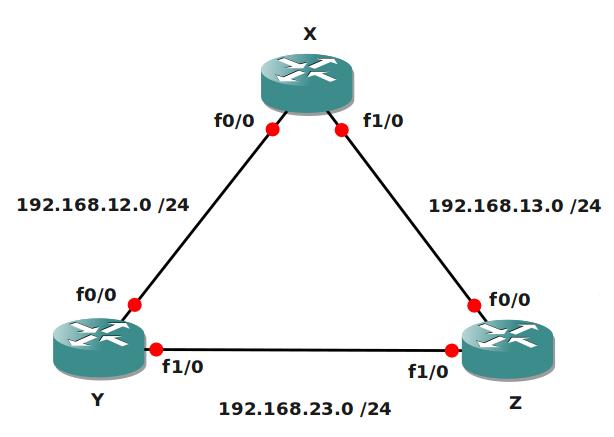
- Configure all IP addresses as specified in the topology.
- Create 3 loopback interfaces:
Router X: 172.16.1.0 /24
Router Y: 172.16.2.0 /24
Router Z: 172.16.3.0 /24 - Configure EIGRP on all routers, use AS number 100. Achieve full connectivity
- You notice that when you start a ping from router Y’s loopback to the loopback of router X that this is not possible, you need to fix the problem.
- Change the bandwidth so traffic from router Z to router Y’s loopback interface uses the link between X and Z.
- Change the EIGRP configuration on all routers so load and reliability are also used as metrics.
- RouterX: create a summary towards Router Y and Z for the 172.16.1.0 /24 network. It should appear as 172.16.0.0 /16.
- Configure EIGRP authentication on all routers:
Key-Chain: XYZ
Key-ID: 1
Password: vault - Create key-ID 2 in the XYZ key-chain and configure a accept and send-lifetime.
Key-ID 1: valid from 1 June 2010 till 14 June 2010.
Key-ID 2: valid from 14 June 2010 till 28 June 2010.
It took me 1000s of hours reading books and doing labs, making mistakes over and over again until I mastered all the protocols for CCNA.
Would you like to be a master of networking too? In a short time without having to read 900 page books or google the answers to your questions and browsing through forums?
I collected all my knowledge and created a single ebook for you that has everything you need to know to become a master of CCNA.
You will learn all the secrets about EIGRP, authentication and more.
Does this sound interesting to you? Take a look here and let me show you how to Master CCNA!
IOS:
c3640-jk9s-mz.124-16.bin
Topology:
Video Solution:
Configuration Files
You need to register to download the GNS3 topology file. (Registration is free!)Once you are logged in you will find the configuration files right here.

The How to Master series helps you to understand complex topics like spanning-tree, VLANs, trunks, OSPF, EIGRP, BGP and more.
Written by René Molenaar - CCIE #41726


looking for good gns3 lab to improve my performance
thanks,
karl
well, what kind of labs are you looking for?
Change the bandwidth so traffic from router Z to router Y uses the link between X and Z.
C 172.16.3.0/24 is directly connected, Loopback0
C 192.168.23.0/24 is directly connected, FastEthernet1/0
Change only the bandwidth will affect nothing because this routes have lower costs.
The Metric EIGRP uses is based on bandwidth and delay by default. By playing around with the bandwidth you can influence routing. Try to reach the loopback of router Y from router Z and influence this.
Of course the directly connected networks you can’t change since it has an administrative distance of 0.
Good luck 🙂
not getting this point [quote]Change the bandwidth so traffic from router Z to router Y’s loopback interface uses the link between X and Z.[/quote]
How to execute command for this ? :'(
Fix not on common subnet, EIGRP…
http://www.cisco.com/en/US/tech/tk365/technologies_configuration_example09186a0080093f09.shtml
Bandwidth can be configured on the interface. Not on common subnet errors you will see when you have 2 routers not in the same subnet ;D
@Rene … thanks a lot .. have successfully completed lab.
Cheers!!
Thanks,
Rajdeep
How to do this ?
Change the EIGRP configuration on all routers so load and reliability are also used as metrics.
unable to load labs into gns3 receive error below. Please help thanks
203-Bad number of parameters (1 with min/max=2/2)
*** Error: errors during loading of the topology file, please correct them
Warning: using localhost in your topology file is not recommended
Local working directory /tmp cannot be found for hypervisor localhost:7200, use working directory C:Usersjamesr01DocumentsGNS3 projets instead
Local IOS image /Data/IOS Images/c3640-jk9s-mz.124-16.bin cannot be found for hypervisor localhost:7200, use image C:Usersjamesr01Downloadsc3640-ik9o3s-mz.124-25b.bin instead
*** Warning: received dynamips server error:
203-Bad number of parameters (1 with min/max=2/2)
*** Warning: received dynamips server error:
203-Bad number of parameters (1 with min/max=2/2)
*** Warning: received dynamips server error:
203-Bad number of parameters (1 with min/max=2/2)
*** Error: errors during loading of the topology file, please correct them
Warning: using localhost in your topology file is not recommended
Local working directory /tmp cannot be found for hypervisor localhost:7200, use working directory C:Usersjamesr01DocumentsGNS3 projets instead
Local IOS image /Data/IOS Images/c3640-jk9s-mz.124-16.bin cannot be found for hypervisor localhost:7200, use image C:Usersjamesr01Downloadsc3640-ik9o3s-mz.124-25b.bin instead
*** Warning: received dynamips server error:
203-Bad number of parameters (1 with min/max=2/2)
*** Warning: received dynamips server error:
203-Bad number of parameters (1 with min/max=2/2)
*** Warning: received dynamips server error:
203-Bad number of parameters (1 with min/max=2/2)
*** Error: errors during loading of the topology file, please correct
I got the same error. Turns out the ios image location has to be properly mentioned in the topology file.
My comeplted lab file: [url]http://www.saheliruppage.info/ccie/EIGRPBeginner.7z?attredirects=0&d=1[/url]
For everyone who encounters this error, I just created this article how to fix it:
[url]http://gns3vault.com/FAQ/203-bad-number-of-parameters-1-with-minmax22.html[/url]
Good work for all of us to see.Keep it up Bro.Can you direct me the link of video for Beginner EIGRP? Thanks.
Hello David,
I’m silly that I missed this one, will record it ASAP and put it online.
Rene
Did AS 10 for all 3 router and advertise eigrp on 3 routers.
All routers where able to ping themselves.Can I see any debug output?
sample config of R2:
!
hostname R2
!
boot-start-marker
boot-end-marker
!
!
no aaa new-model
memory-size iomem 5
!
!
ip cef
!
interface Loopback0
ip address 172.16.2.1 255.255.255.0
!
interface FastEthernet0/0
ip address 192.168.12.2 255.255.255.0
duplex auto
speed auto
!
interface FastEthernet1/0
ip address 192.168.23.1 255.255.255.0
duplex auto
speed auto
!
router eigrp 10
network 172.16.0.0
network 192.168.12.0
network 192.168.23.0
auto-summary
!
ip http server
no ip http secure-server
!
!
control-plane
!
line con 0
logging synchronous
line aux 0
line vty 0 4
!
!
end
dear:
i am big fun of your work i would be glad if u male solution video for all EIGRP,OSPF, an routing IGP
Hi,
Where can i watch the video for this lab?
guys, this is not directly related to the topic..but had a little problem lately on how to save my gns3 labs then load it..but i had it sorted out…just curious on the working folder that is created after you save a project…what is that folder for? when opening up a project, we just need to import the configs right? and has nothing to do with the working folder? what are the uses of the files in the working folder?
Hello Rito,
I haven’t recorded the solution yet. What part are you stuck on?
You only need the the topology .NET file and the configs. You don’t need the working directory. I’m not 100% sure what it is used for but I believe to save your “disk” files and such files. Just forget about the “working” folder 😀
Hi Rene,
I have a couple of questions here. 🙂
-when setting up loopback addresses on the 3 routers, are the commands:
ip address 172.16.x.0 255.255.255.0 on each router or do you assign a host? I’m confused because my configurations were 172.16.x.0 255.255.255.0, but when i checked the attached zip file and run the configurations, the loopback addresses were 172.16.x.x with /24 mask
“You notice that when you start a ping from router Y’s loopback to the loopback of router X that this is not possible, you need to fix the problem.”
-Is this resolved by changing the mask of the 3 loopbacks to /32 (i was able to ping all the loopback addresses, with my 3 loopbacks set to 172.16.x.0 /24 originally, by changing the mask to /32)
“Change the bandwidth so traffic from router Z to router Y’s loopback interface uses the link between X and Z.”
-I tried increasing the bandwidth of f0/0 on router Z but the traffic still goes through f1/0 on router Z.
“Change the EIGRP configuration on all routers so load and reliability are also used as metrics.”
-Can you show how is this done?
Hi Rito,
[quote]-when setting up loopback addresses on the 3 routers, are the commands:
ip address 172.16.x.0 255.255.255.0 on each router or do you assign a host? I’m confused because my configurations were 172.16.x.0 255.255.255.0, but when i checked the attached zip file and run the configurations, the loopback addresses were 172.16.x.x with /24 mask [/quote]
If you create a loopback interface you can configure an IP address just like a normal interface. You need to type 172.16.X.X /24 because that’s an IP address. 172.16.X.0 / 24 would be a network address.
[quote]”You notice that when you start a ping from router Y’s loopback to the loopback of router X that this is not possible, you need to fix the problem.”
-Is this resolved by changing the mask of the 3 loopbacks to /32 (i was able to ping all the loopback addresses, with my 3 loopbacks set to 172.16.x.0 /24 originally, by changing the mask to /32) [/quote]
EIGRP by default will auto-summarize meaning any 172.16.X.X /24 network will be advertised as 172.16.0.0 /16. This will cause trouble if you try to ping from one router to another. Changing the subnet mask will not help if you have “auto-summary” enabled.
[quote]”Change the bandwidth so traffic from router Z to router Y’s loopback interface uses the link between X and Z.”
-I tried increasing the bandwidth of f0/0 on router Z but the traffic still goes through f1/0 on router Z. [/quote]
EIGRP by default will use bandwidth and delay as its metric. You can take a look at the current best route (successor) to see what the metric is. Play around with the bandwidth until another route has a better metric and you will see a change.
[quote]”Change the EIGRP configuration on all routers so load and reliability are also used as metrics.”[/quote]
You need to change the K-values. Under the EIGRP configuration you can use the [quote]metric weights[/quote] command to enable them:
K1 = bandwidth
K2 = load
K3 = delay
K4 = reliability
K5 = MTU
Hello Rene,
first of all thanks for the lab which I’m enjoying doing it and learning new stuff. I found some videos missing in the lab, can you upload it please.
thanks again,
Shyam
Hi Rene,
Thanks for this. I’ll check this out.
Am I supposed to manually summarize the EIGRP routes?
Example:
ip summary-address eigrp 100 172.16.0.0 255.255.255.0
I could not ping any 172.168 route with auto-summary even with router 2 shut down.
Which step do you mean? This one?
[quote]You notice that when you start a ping from router Y’s loopback to the loopback of router X that this is not possible, you need to fix the problem.[/quote]
Once auto-summary is enabled you might face routing issues because networks are advertised as 172.16.0.0/16.
You could disable auto-summary but creating a specifix summary yourself can also solve the issue.
I was registered today at this site and is really awesome!.
Thanks a lot for the material.
Thanks for your comment and your welcome 🙂
Hey RENE,
Thanks for you efforts…you are doing a great job… just keep it up..[b] i am big fan of you [/b]
Thanks 🙂
Hi Rene,
If the formula for the eigrp metric is as below:
metric = [K1 * bandwidth + (K2 * bandwidth) / (256 – load) + K3 * delay] * [K5 / (reliability + K4)]
Then shouldn’t you enable both K5 and k4 to put reliability in the picture?
Hi Paskoul,
These are the K values:
K1 = bandwidth
K2 = load
K3 = delay
K4 = reliability
K5 = MTU
So K4 should be enabled…
Rene
Hi
Would it be ok if you could upload the rest of the video? I just want to know how you Configure EIGRP authentication.
TIA.
Yes i’ll fix this one.
Nice beginner EIGRP Lab! However, there is some mi-information about the K values. First, MTU is [i]not[/i] part of the metric calculation. It is sent in the updates, and used as a tiebreaker as a last resort, but it is not in the metric equation.
Secondly, the K values are not equal to BW, Load, Delay and Reliability. The K values are simply multipliers that are applied to these parameters, and these multipliers can be adjusted with the “metric weights” command. For example, in this video, Rene adjusted the BW of one of the interfaces to 10 in order to influence the routing table. This directly changed the BW parameter of the interface, and therefor of the route. Later on, he entered the command in the “router eigrp 100” mode:
[b]metric weight 0 1 1 1 1 0[/b]
This set the K1 to 1 (which is the default). It [i]did not[/i] set bandwidth to 1. What good would it do to set the bandwidth value to 1 for the entire EIGRP process? All the K values do is set the weighting of the parameters… Another way to think of it is that the K values determine the importance of a parameter. The higher you set the K value, the more important the associated parameter. Here is the formula that shows which K values apply to which parameters:
[b]metric = [K1 * bandwidth + (K2 * bandwidth) / (256 – load) + K3 * delay] * [K5 / (reliability + K4)][/b]
Thirdly, K5 is 0 by default. Notice in the above formula that if K5=0, then the whole metric calculation is equal to 0… So, if K5=0, then the last part of the equation is not used. If you need reliability to be a factor in the metric calculation, then K5 must something other than 0. Setting K4 does nothing to the equation if K5 is still 0.
Finally, as shown in the last point, K5 is not MTU. Again, what good would it do to set the MTU for the entire EIGRP process? There is no use in considering the MTU, or any other parameter, if it is the same for every route in the topology!
To sum up, BW, Load, Delay, Reliability, and MTU are parameters that describe routes in the EIGRP topology table. When a route is advertised to an EIGRP neighbor, these parameters are included. The receiving router then uses the K values (configured with the “metric weights” command), along with the received parameters, in the metric formula, to come up with the metric of the route.
Good elaboration on the K values, this will be helpful to people. Thanks!
There should be another parameter in the EIGRP topology database —— “Hop count”. According to wikipedia , “EIGRP associates six different vector metrics with each route and considers only four of the vector metrics in computing the Composite metric”, (http://en.wikipedia.org/wiki/Enhanced_Interior_Gateway_Routing_Protocol) , you can also find “Hop count” in the update packet of EIGRP if you capture it with wireshark.
In this lab, I think the metric weight should be 0 1 1 1 1 1 , “An important and unintuitive fact is that if K5 is set to zero, the term {K5/(K4 + Reliability)} is not used (i.e. taken as 1)”
Pls upload full video. Thanks.
Dear sir.
Pls upload full movie… this video can get only on (Change the EIGRP configuration on all routers so load and reliability are also used as metrics.) there is any more explanation on movie plz upload full explanation …
Rene,
I’m really enjoying the video’s and your solution set. Its really helping crystallize the info in my mind.
I did note that though (as many noted) the video on YouTube freezes at 13:40 the audio does not, and goes on for the full 22 mins.
It also occurs to me I can go watch your video to “EIGRP MD5 Authentication” too! 🙂
Many thanks for all the hours you’ve put in to this. We’ll be good friends by the time I’ve finished the CCNP! 🙂 Thx again, this place is phenomenal!
interface f1/0
ip summary-address eigrp 100 172.16.0.0 255.255.0.0
is this for the goal "RouterX: create a summary towards Router Y and Z for the 172.16.1.0 /24 network" it appeared as 172.16.0.0 /16 to me
thx for tihs
hi
i need little help here . i m not able to run that topology is show some error
BAD NUMBER OF PARAMETER (1 WITH MIN/MAX=2/2)
hello Rene
thanks for the effort you do and this great site you made
i wanted to ask about this lab what’s the purpose of having a key 2
without a key-string command
or you meant to have the same key string vault with different accept and send lifetimes
thanks
Hey Rene,
Ik ben een beginner en ik wil mezelf graag ontwikkelen in Cisco.
Ik krijg het alleen niet voor elkaar om een lab te openen?
Ligt het eraan omdat ik windows 8 heb? of doe ik iets verkeerds?
Alvast bedankt,
Greetz
I
Hi Rene ,
Is there any way to check the existing K.Values ?? suppose we changed it default.
enter your message here…
just an FYI… the video ends at 13:40 (the audio continues without video) even though the advertised length is 22:32.
Thanks for putting together such a great resource!
i have watched it few minutes ago, it works great. maybe sth is wrong with your network cxn. try to refresh the page
Hi, thank you for the video! i have a problem with EIGRP, i configured [b]DMVPN[/b], for dynamic routing i use[b] EIGRP[/b], but when i type: [b]sh ip eigrp nei[/b], it just shows:[b] IP-EIGRP neighbors for process 1[/b]. i repeated the configuration many times but it still doesn’t work. i hope you help me. thank you
HI RENE JUST FINISHED THIS LAB BUT I WANT TO AS REGARDS EIGRP AUTHENTICATION, I ENABLED EIGRP AUTHENTICATION ON ALL INTERFACES…IS THAT RIGHT
Dear Sir ,
i can’t get the full video lesson . it just go only to 13:40.
wht is the solution of and next challenge .
Can i get the solution of the whole Scenario ?
pls . reply .
RouterX: create a summary towards Router Y and Z for the 172.16.1.0 /24 network. It should appear as 172.16.0.0 /16.
Configure EIGRP authentication on all routers:
solution :
interface FastEthernet0/ ?
ip summary-address eigrp 100 172.16.0.0 255.255.0.0
Configure EIGRP authentication on all routers:
Key-Chain: XYZ
Key-ID: 1
Password: vault
Solution :
key chain XYZ
-key 1
-key-string
– key-string 7 vault
Create key-ID 2 in the XYZ key-chain and configure a accept and send-lifetime.
Key-ID 1: valid from 1 June 2010 till 14 June 2010.
[color=black][color=red]
solution :
[/color]
R1(config-keychain-key)#time 02:32:11 June 1 2010 02:22:31 June 14 2010 [/color][color=red][/color]
I wish I had TELESCOPIC eyes to learn from these videos.
This is good for a lab, but Cisco highly recommends that you not do it in a live environment, as it greatly complicates the metric algorithm, slowing down your router:
Change the EIGRP configuration on all routers so load and reliability are also used as metrics.
The last part of video does not work correctly.
http://www.youtube.com/watch?v=Z9vO4tGo-xw
This guy has taken your topology and explained it .
You can SUE him.
HEY great work you are doing
just one doubt regarding how to load the final config files it is not loading one by one in each router i specified path correctly
Thank you veru much for the labs. I really love them and they are vital to practice all the concepts learned.
I watched the video here, but it looks like part of it is missing.
At least by me it only shows 13m40s and it goes up to changing the EIGRP metrics.
How about the rest ?
Something is wrong with the video. It only goes to 13 and some minutes…can you fix this?
Great lab, but your video goes only up to 13:40
CAn you explain about how router calculate default delay on interface like on fast Ethernet and serial interface ?:?:
I guess I’m just dumb but in the config files that are in Notepad….they just open up in one long line of config that doesn’t just copy and paste in the global config mode. I tried word wrap which condenses in a big paragraph but still doesn’t work.
Are we to just read this and try and interpret the breaks in the commands and sort it that way or just read it and try to type in what we can?
I’ve searched the FAQ’s and forum but didnt see this being asked….hence why im probablyjust a big dummy…lol….
When i load the topology.net file in GNS3 I get routers named Bates, Bond, OHara, Dobbs, and Corleone. I do not get routers named X,Y, and Z
The video at first switched between your console and the browser or document page but as you began the step before authentication, it stayed on the document screen and did not again show the console so I missed all that you typed from the step before authentication until the end. Am I doing something wrong?
thanks.
Great LABs man!!!
Hello my friend, did you delete the topologies ?
I just checked and the topology + config files are still here? 🙂
Yes, it is true, sorry. 🙂
I didn’t realise the topology was inside of “EIGRP Beginner – Startup Configuration” zip files link, thanks!
I hope you don’t give up the development of this site. It is helping me to reach my CCIE exam next year. Congratulations and I would like to help you to keep this site always up!
thanks,
Hi Onildo,
No problem. I’m still working on the website, next to my other website (http://networklessons.com). That one should also be helpful for your CCIE.
Good luck!
Rene
Hello Rene
I HAVE PROBLEM IN THIS LAB WHEN I TYPE COMMAND NETWORK WITHOUT WILD CARD MASK THE EIGRP IS NOT WORKING FOR EXAMPLE NETWORK 192.168.0.0 AND NETWORK 172.16.0.0 THE EIGRP IS NOT WORKING
If you do not specify a wildcard mask then the classful network mask is used by default. Use show ip eigrp interfaces to see where EIGRP is enabled.
Thank you very much Rene …..Adil From Afghanistan
Cannot see any video after 14 minutes just the sound
Greetings Rene,
Just a silly quick question, does it matter which router you place the summary address on? Or should you be able to place it on any router and still be able to ping the loopbacks since regardless of which router summary the address is on, as long as it is apart of EIGRP 100 should be advertised out it’s interface so that the negihbors can learn about the summary address?
It really depends on the topology. Summarization has a number of benefits, mostly scoping the query domain (something that isn’t a beginner topic) so you’ll want to place it as close to the routes being summarized as possible, so that maximal number of routers use the summary.
thanks nice lab.
didn’t complete the key-id part since the solution-video is broken..
thanks again.
Hello, anyone knows how to set putty for gns3 so that, I can open a single windows with all console?
because to me open all windows console per router…..
People, i didn’t understand the lesson below.
“You notice that when you start a ping from router Y’s loopback to the loopback of router X that this is not possible, you need to fix the problem.”
When I configured EIGRP on all routers, the problem didn’t happen to me.
Appreciate all the effort you put into this, thanks a mill