

Scenario:
For this lab you need REAL hardware. You can’t use switches in GNS3!
You only need layer 2 switches for this lab. The Cisco Catalyst 2950 or higher will work.
The school you work for has a flat network design and they only use layer 2 switches. One of the teachers built the network in his own time but he has no clue what he exactly did. There is only one VLAN and there have been issues with applications that generate too much broadcast traffic. It’s up to you to segment the network and implement some VLANs.
Goal:
- Create the following VLANs and configure the correct names:
- VLAN 10: name Engineering.
- VLAN 20: name Marketing.
- VLAN 30: name Research.
- VLAN 40: name Sales.
- VLAN 50: name Management.
- Configure fa0/1 on SW1 as an access interface in VLAN 10.
- Configure fa0/2 on SW2 as an access interface in VLAN 20.
- One of the links between SW1 and SW2 should use ISL encapsulation.
- One of the links between SW2 and SW3 is not allowed to dynamically negotiate a trunking protocol.
- One of the links between SW1 and SW3 should never send any DTP messages.
- Only VLAN 1,10 and VLAN 20 are allowed between SW1 and SW2.
- Only VLAN 1,10,20,40 and 50 are allowed between SW2 and SW3.
- The native VLAN between SW1 and SW3 should be VLAN 50 on both links.
It took me 1000s of hours reading books and doing labs, making mistakes over and over again until I mastered all the switch protocols for CCNP.
Would you like to be a master of switching too? In a short time without having to read 900 page books or google the answers to your questions and browsing through forums?
I collected all my knowledge and created a single ebook for you that has everything you need to know to become a master of switching.
You will learn all the secrets about VLANs, trunks and more.
Does this sound interesting to you? Take a look here and let me show you how to Master CCNP SWITCH
IOS:
Basic IOS for the switches should be sufficient. No special features needed.
Topology:
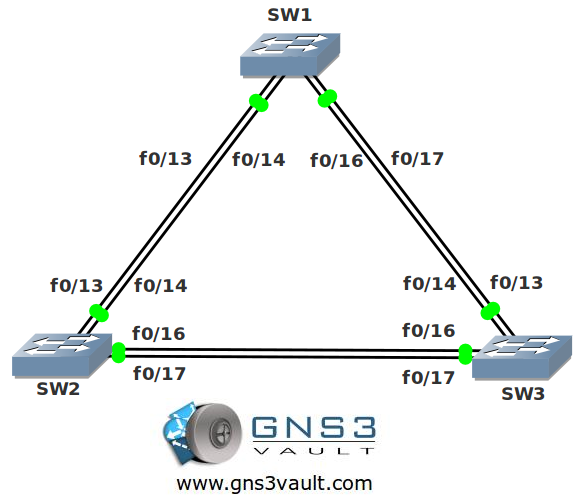
Video Solution:
Configuration Files
You need to register to download the GNS3 topology file. (Registration is free!)Once you are logged in you will find the configuration files right here.

The How to Master series helps you to understand complex topics like spanning-tree, VLANs, trunks, OSPF, EIGRP, BGP and more.
Written by René Molenaar - CCIE #41726


Here is a workarround for emulating switches in GNS3 using routers c2691 routers
http://www.youtube.com/watch?feature=endscreen&NR=1&v=6BNSy1A5pS8
Thanks for sharing this. Keep in mind many of the switch commands are unavailable or slightly different. Using "real" switches is still the best way to go for CCNP. For CCNA packet tracer is a good choice.
Good lab, but I cannot change the trunk encapsulation on my 2950. I have a 3550 and it works just fine. I looked into it and according to Cisco’s website the 2950 does not support DTP. I did go to Cisco’s website and download the latest IOS too but that didn’t work either. Any ideas?
You cannot change the encapsulation on a 2950, it only supports dot1.q, but the 2950 does support DTP. But both ends have to agree on negotiating of the trunk. You can verify what’s running with a "sh int f0/1 sw" just use the correct interface name your trying to test. You can hard code it trunk, use dynamic desirable or auto. But the other side has to agree to be a trunk with the correct mode of operation.
I found that you do not need to add each VLAN seperately (steps 11 & 12) I used
switchport trunk allowed vlan 1,10,20 (for step 11)
🙂
instructions say : “The Cisco Catalyst 2950 or higher will work.” but 2950s don’t support ISL ???
Hi Garrey,
Good comment, you are right they don’t 🙂 Still the 2950s are great / cheap L2 switches that are good for CCNA. Only ISL won’t work.
Rene
What is the benefits of double links between switches in this topology and real life ? Is there any sample lesson for it?
Fault tolerance and load sharing are the main motivations for it.
thank you allot
It is very nice lab and useful
thanks
Thanks for the lab. It helped me to grasp some of the concepts with vlans although I still need to work on them before they become second nature for me. I downloaded the final configs but how can i open them? I thought maybe through Notepad but it doesn’t work. Keep up the great work.
hey buddies i am using 3040 IOS but ISL not supported………plz tel me which IOS is Appropriate……
I dont think ISL is supported on any of the router platforms supported by dynamips.
R1(vlan)#vlan 10
VLAN 10 added:
Name: VLAN0010
R1(vlan)#
R1(vlan)#
R1(vlan)#
R1(vlan)#
R1(vlan)#
R1(vlan)#exit
% not enough space on flash to store vlan database. trying squeeze…
% error squeezing flash – (No device available)
Error on database apply 40: NV storage failure
Use ‘abort’ command to exit
R1(vlan)#
R1(vlan)#
R1(vlan)#
R1(vlan)#
R1(vlan)#
R1(vlan)#
R1(vlan)#erase
R1(vlan)#erase
R1(vlan)#erase flash
R1(vlan)#abort
R1(vlan)#abort
Aborting….
R1#
R1#
R1#
R1#eras
R1#erase flash
R1#erase flash:
Erasing the flash filesystem will remove all files! Continue? [confirm]
%Error erasing flash: (No device available)
plz tell me any solution ………
Try to increase the memory for the router under the preferences menu
I know I’m coming in late but…
to be more precise, under the “Disks” section of your configuration, put 16 MBs of memory into the PCMCIA Disk0 Size: window. Do this anytime you’ll be using VLANS.