

Scenario:
For this lab you need REAL hardware. You can’t use switches in GNS3!
You need at least Catalyst 2950 switches for this lab.
Medieval corporation is specialized in enhancing security for switched networks. You as one of the network engineers in the security team are working on a switched network of one of your customers. You want to enhance security by making sure the network will not accept any inferior root bridges.
Goal:
- Configure SW2 as the root bridge for VLAN 1.
- Configure SW3 to have a spanning tree priority of 4096 for VLAN 1.
- Ensure SW1 does not accept SW3 as a root bridge.
It took me 1000s of hours reading books and doing labs, making mistakes over and over again until I mastered all the switch protocols for CCNP.
Would you like to be a master of switching too? In a short time without having to read 900 page books or google the answers to your questions and browsing through forums?
I collected all my knowledge and created a single ebook for you that has everything you need to know to become a master of switching.
You will learn all the secrets about spanning-tree, root guard and more.
Does this sound interesting to you? Take a look here and let me show you how to Master CCNP SWITCH
IOS:
Basic IOS for the switches should be sufficient. No special features needed.
Topology:
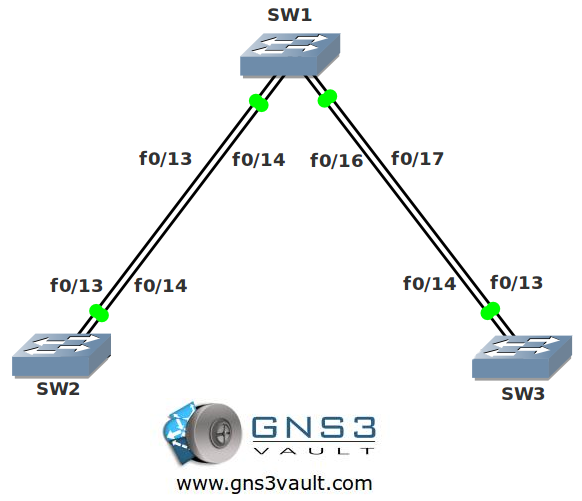
Video Solution:
Configuration Files
You need to register to download the GNS3 topology file. (Registration is free!)Once you are logged in you will find the configuration files right here.

The How to Master series helps you to understand complex topics like spanning-tree, VLANs, trunks, OSPF, EIGRP, BGP and more.
Written by René Molenaar - CCIE #41726


Hi Rene,
where is the final configuration?
thank you
I enter the spanning-tree guard root command on SW1, why did it cause ping to fail between SW1 vlan 1 ip & SW3 vlan 1 ip? Even the hosts connected to SW1 & SW3 fails to ping each other?
interface FastEthernet0/16
switchport trunk encapsulation dot1q
switchport mode trunk
spanning-tree guard root
!
interface FastEthernet0/17
switchport trunk encapsulation dot1q
switchport mode trunk
spanning-tree guard root