

Scenario:
You are the leading network engineer of an international reptile and insects museum. Recently the museum has been experiencing trouble with their switched network due to loops. Up to you to optimize the spanning tree configuration!
Goal:
- Create VLAN 10,20,30 and 40 on all switches.
- Who is the root bridge for VLAN 10 and why?
- Make sure switch Ant is the root bridge for VLAN 10, switch Bee should be the backup in case switch Ant fails. You are not allowed to use the priority command.
- Make sure switch Bee is the root bridge for VLAN 20, switch Ant should be the backup in case switch Bee fails. You are not allowed to use the priority command.
- Make sure switch Butterfly is the root bridge for VLAN 30, switch Grasshopper should be the backup in case switch Butterfly fails. You are not allowed to use the spanning-tree root command.
- Make sure switch Grasshopper is the root bridge for VLAN 40, switch Butterfly should be the backup in case switch Butterfly fails. You are not allowed to use the spanning-tree root command.
- Change the hello timer on all switches for VLAN 10 to 4 seconds.
- Make sure switch Grasshopper does not use FastEthernet 1/1 to reach the root bridge in VLAN 10, you are not allowed to shutdown the interfaces.
- Make sure switch Grasshopper uses FastEthernet 1/3 to reach the root bridge in VLAN 20.
- In the future there will be a workstation connected to switch Bee’s FastEthernet f1/4. Make sure it goes to forwarding mode immediately.
It took me 1000s of hours reading books and doing labs, making mistakes over and over again until I mastered all the protocols for CCNA.
Would you like to be a master of networking too? In a short time without having to read 900 page books or google the answers to your questions and browsing through forums?
I collected all my knowledge and created a single ebook for you that has everything you need to know to become a master of CCNA.
You will learn all the secrets about spanning-tree, port roles, root bridge election and more.
Does this sound interesting to you? Take a look here and let me show you how to Master CCNA!
IOS:
c3725-adventerprisek9-mz.124-15.T7.bin
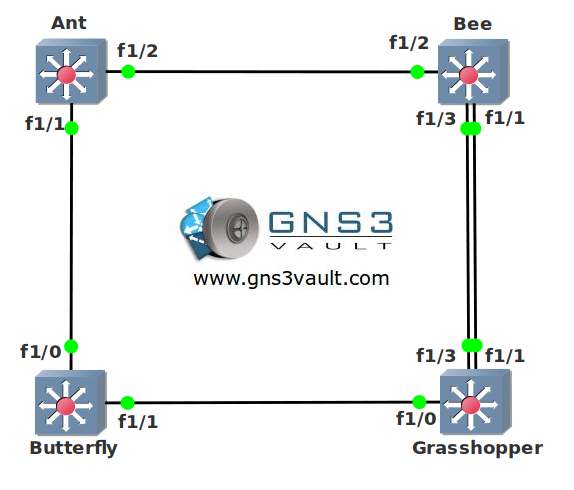
Topology:
Video Solution:
Configuration Files
You need to register to download the GNS3 topology file. (Registration is free!)Once you are logged in you will find the configuration files right here.

The How to Master series helps you to understand complex topics like spanning-tree, VLANs, trunks, OSPF, EIGRP, BGP and more.
Written by René Molenaar - CCIE #41726


Getting following error while opening. please help
[IMG]http://i55.tinypic.com/21e3s75.png[/IMG]
show vlans vs. show vlan in ICND2 book
switchport command does not seem to exist
using ios c3725-adventerprisek9_ivs-mz.124-15.T13
could not get suggested ios c3640-jk9s-mz.124-16.bin to work
got error hardware/software mismatch
Ive read somewhere else on this site that there was an issue
with emulating switching, I assumed it was fixed with this lab.
Please clarify.
-wbl
hi wbl,
The commands for the switch module are a bit different than a real switch. This is why i dislike using “switching” stuff in GNS3 because you are learning commands that you would normally not use.
Nevertheless it gives people a chance to practice spanning-tree using GNS3 instead of real hardware.
You need to use “show vlan-switch” instead. By the way did you use my topology or built it yourself? If you built it yourself you need to make sure you don’t click and drag the FastEthernet interfaces but choose “manual” when selecting the interfaces. Otherwise you are using the router interfaces and not the NM-16SW interfaces.
Let me know how it works for you, did you see my video as an example?
I used the c3725-adventerprisek9-mz.124-15.T7.bin image for this lab, by accident i specified the 3640 image but that’s an error ;D
Let me know how it goes ok?
Rene
I do not have the 3725 image. I do have the 3640 and 2600 images. Can the lab be reconfigured with the 3640 image, otherwise this lab is useless to me. Thanks!!
You can use the NM-16SW switch module also for the 3640 routers. Just recreate the topology using your 3640s and you are ready to go.
Hi Rene,
I’m following your video, however, I can’t get the result, “Spanning tree instance for VLAN 10 does not exist.”, or any other vlan number when i type, “show spanning-tree vlan 10” or any vlan number.
i meant, it shows that output when i type the show command. it wouldn’t show the spanning tree result for the vlan.
i don’t know if this is the correct solution but i found out that I have to set the links to the switches as trunks in order for me to get the commands to work. 🙂
thanks…this helps alot.
Hello Rito,
It’s my fault ;D I created the vlans for this lab but they are not saved in the config but in the vlan database which isn’t saved by default on GNS3.
Easiest solution is to create the vlans yourself, just type in:
vlan 10
vlan 20
vlan 30
vlan 40
exit
Then check them by using the [b]’show vlan-switch'[/b] command.
And yes it’s a good idea to check if the links between the ‘switches’ are in trunk mode.
to rectify this issue : try to execute the following commands :
Switch1#erase flash:
Switch1#squeeze flash:
Switch1(config)#vtp file nvram:vlan.dat
switch1#wr
to check your vlan database location do the following :
Switch1(config)#dir nvram:
if it is there then you won’t be loosing your vlan database configuration after your dynamips is reloaded..
Using VTP transparent is also a good idea, It will save the VLAN information in the running-config.
1.vlan 10
vlan 20
vlan 30
vlan 40
2.show spanning-tree vlan 10, the lowest MAC will be come root for vlan 10.
3.ANT: spanning-tree vlan 10 root priority
BEE: spanning-tree vlan 10 root secondary
4.BEE: spanning-tree vlan 20 root priority
ANT: spanning-tree vlan 20 root secondary
5.Butterfly: spanning-tree vlan 30 priority 4096
Grasshopper: spanning-tree vlan 30 priority 8192
6.Grasshopper: spanning-tree vlan 40 priority 4096
Butterfly: spanning-tree vlan 40 priority 8192
7.ANT: spanning-tree vlan 10 hello-time 4
8.BEE: interface fastethernet 1/3
spanning-tree vlan 10 port-priority 64
9.BEE: interface fastethernet 1/3
spanning-tree vlan 20 port-priority 64
10.BEE: interface fastethernet 1/4
spanning-tree portfast
Any of you guys have trouble starting all 4 swouters? lol I can get 3 of them booted up but when I turn on the 4th one I lose connection to all of them. It says unable to connect to local host 127.0.0.1
it’s only this LAB as all the other multi router labs I have open and start up just fine…
Hi Rene,
used c3725-adventerprisek9-mz124-25 but couldn’t use cost or port priority as the options weren’t there. But good lab all the same.
Hi Rene,
Thanks for the lab.
Javier
hi rene,
Your topology are not uptodate for New version , i download it but it is not opening , it is just greyed out, please update it or let me know how to open it , i have GNS3 version 1.2.1
thank
hi rene there is no topology file in above files…..
I have a dumb question 🙂
I am using this topology i and i have made every switch to be a difference root bridge for a single vlan. Yet all the ports on the switches are in forwarding mode for every vlan i have created on them. Any idea where is my mistake?
Tnx.
if i used ios : c3725-adventerprisek9-mz.124-15.T7.bin create switch
the command create vlan is :
Sw#vlan database
sw(vlan)#vlan 10