

Scenario:
You are a freelance network engineer and one of your customers has an old network based on the RIP routing protocol. This networks needs some tuning so it’s time to use some more advanced RIP tricks.
Goal:
- All IP addresses are preconfigured as specified in the topology picture.
- Configure RIP version 2 on all routers, make sure it does no summarization by itself.
- Advertise all networks in RIP, including the loopback interfaces. Achieve full connectivity.
- After using a debug on Router Fred, you notice that RIP is sending updates towards the loopback interfaces. Disable this.
- The link between Router Wilma and Betty is not allowed to send RIP traffic by using broadcast or multicast.
- When you start a ping from Router Wilma to 4.4.4.4 you notice the traffic is being sent down the slow serial-link, change the RIP configuration on Router Betty so the Fast Ethernet links will be used. You are not allowed to shutdown the serial link.
- Create a new loopback10 interface on router Betty, use IP address 44.44.44.44 /24
- Change the configuration on Router Fred so pings to 44.44.44.44 will be sent only through the serial link, not through the link towards Barney.
- Change the configuration on Router Wilma and Betty so only triggered updates are sent on the serial link.
- Configure Router Wilma so RIP V1 updates are sent towards Fred. You are not allowed to change the RIP version on Fred.
- Configure authentication between Router Barney and Betty:
key-chain: VAULT
key-id: 1
key-string: FREE - Create 4 loopback interfaces on router Betty:
Loopback1: 172.16.0.1 /24
Loopback2: 172.16.1.1 /24
Loopback3: 172.16.2.1 /24
Loopback4: 172.16.3.1 /24 - Configure a summary on Router Barney so Router Fred will have a 172.16.0.0/22 entry in it’s routing table.
It took me 1000s of hours reading books and doing labs, making mistakes over and over again until I mastered all the protocols for CCNA.
Would you like to be a master of networking too? In a short time without having to read 900 page books or google the answers to your questions and browsing through forums?
I collected all my knowledge and created a single ebook for you that has everything you need to know to become a master of CCNA.
You will learn all the secrets about RIP version 1/2, authentication and more.
Does this sound interesting to you? Take a look here and let me show you how to Master CCNA!
IOS:
c3640-jk9s-mz.124-16.bin
Topology:
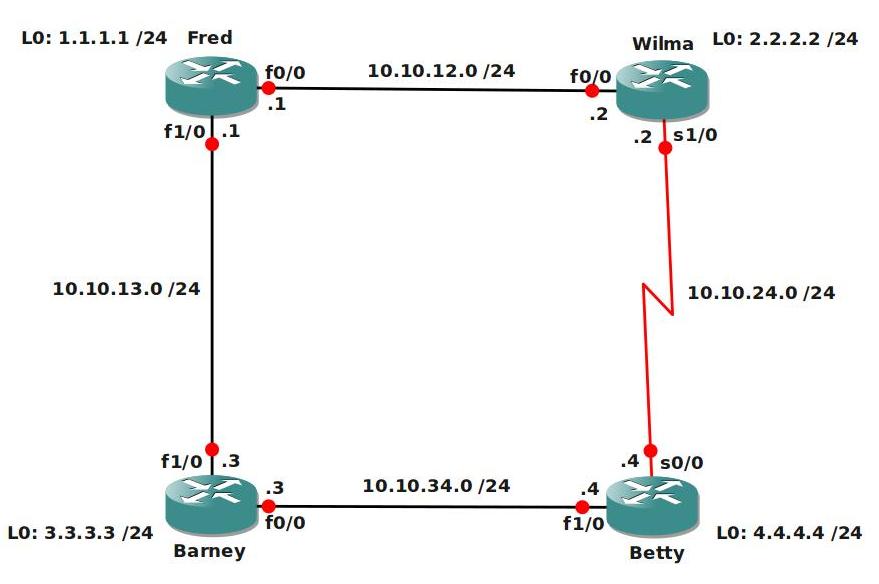
Video Solution:
Configuration Files
You need to register to download the GNS3 topology file. (Registration is free!)Once you are logged in you will find the configuration files right here.

The How to Master series helps you to understand complex topics like spanning-tree, VLANs, trunks, OSPF, EIGRP, BGP and more.
Written by René Molenaar - CCIE #41726


i am wondering if the sequence of required steps all reply on each other
OR
is there some steps that need a reset of the configuration to the base Lab Config ?
this idea came to me after reading this point
“-Change the configuration on Router Fred so pings to 4.4.4.4 will be sent only through the serial link, not through the link towards Barney.”
which contradicts – in my humble opinion – with its preceding point
“-When you start a ping from Router Wilma to 4.4.4.4 you notice the traffic is being sent down the slow serial-link, change the RIP configuration on Router Betty so the Fast Ethernet links will be used. You are not allowed to shutdown the serial link.”
So can you – please – tell me if this is due to my ignorance of the possibility to achieve the lab requirement or is it true that both requirements have some sort of contradiction ?
thank you
Hi Shareef,
Excuse me…I made an error in this lab, you are totally right.
The labs are made so you don’t have to revert back to the default config or something.
I changed the lab so you need to add an extra loopback on router Betty with a different IP address. Then you can influence the router to increase the metric for this prefix.
Thanks for noticing and the comment!
Rene
Hello
thank you for your prompt response
i will try to post my solutions for the lab in the Forum – RIP section
if you would have enough time to comment on those ; it would be quite grateful
Regards
Shareef
Hi Shareef,
You posted quite some stuff in the forum 🙂 I’ll take a look at your solutions for sure…maybe today, otherwise in the weekend probably. Thanks for sharing!
Rene
Dear Rene
thanks to you 🙂 don’t worry about time , i am not a hurry but i just need to have criticism from a person whom i know is capable of finding the points where i was short to think or to know the best solution
Shareef
Where can i get the solutions for all the labs
Cyril
there are no formal solutions made by Rene for all the labs [except the MPLS Youtube Video(s)]
the suggestion was to propose solutions thus give Rene less time to prepare his formal Video solution
i am currently working on this Advanced RIP lab ; and my proposed solutions are in the Forum – RIP section
please feel free to criticize or question my solutions
Shareef
Excellent lab!!!
My config´s:
***** Fred *****
!
!
interface Loopback0
ip address 1.1.1.1 255.255.255.0
!
interface FastEthernet0/0
ip address 10.10.12.1 255.255.255.0
ip rip receive version 1
speed 100
full-duplex
!
interface FastEthernet0/1
ip address 10.10.13.1 255.255.255.0
speed 100
full-duplex
!
router rip
version 2
passive-interface Loopback0
offset-list 1 in 5 FastEthernet0/1
network 1.0.0.0
network 10.0.0.0
no auto-summary
!
access-list 1 permit 44.44.44.0 0.0.0.255
***** Wilma *****
!
interface Loopback0
ip address 2.2.2.2 255.255.255.0
!
interface FastEthernet0/0
ip address 10.10.12.2 255.255.255.0
ip rip send version 1
speed 100
full-duplex
!
interface Serial0/0
ip address 10.10.24.2 255.255.255.0
ip rip triggered
clock rate 2000000
!
interface FastEthernet0/1
no ip address
shutdown
duplex auto
speed auto
!
router rip
version 2
passive-interface Serial0/0
passive-interface Loopback0
offset-list 1 in 5 Serial0/0
network 2.0.0.0
network 10.0.0.0
neighbor 10.10.24.4
no auto-summary
!
access-list 1 permit 4.4.4.0 0.0.0.255
***** Barney *****
key chain VAULT
key 1
key-string FREE
!
!
!
interface Loopback0
ip address 3.3.3.3 255.255.255.0
!
interface FastEthernet0/0
ip address 10.10.34.3 255.255.255.0
ip rip authentication mode md5
ip rip authentication key-chain VAULT
speed 100
full-duplex
!
interface FastEthernet0/1
ip address 10.10.13.3 255.255.255.0
ip summary-address rip 172.16.0.0 255.255.252.0
speed 100
full-duplex
!
router rip
version 2
passive-interface Loopback0
network 3.0.0.0
network 10.0.0.0
no auto-summary
***** Betty
!
!
key chain VAULT
key 1
key-string FREE
!
!
!
!
!
!
interface Loopback0
ip address 4.4.4.4 255.255.255.0
!
interface Loopback100
ip address 44.44.44.44 255.255.255.0
!
interface Loopback101
ip address 172.16.0.1 255.255.255.0
!
interface Loopback102
ip address 172.16.1.1 255.255.255.0
!
interface Loopback103
ip address 172.16.2.1 255.255.255.0
!
interface Loopback104
ip address 172.16.3.1 255.255.255.0
!
interface FastEthernet0/0
ip address 10.10.34.4 255.255.255.0
ip rip authentication mode md5
ip rip authentication key-chain VAULT
speed 100
full-duplex
!
interface Serial0/0
ip address 10.10.24.4 255.255.255.0
ip rip triggered
clock rate 2000000
!
interface FastEthernet0/1
no ip address
shutdown
duplex auto
speed auto
!
router rip
version 2
timers basic 30 180 0 240
passive-interface Serial0/0
passive-interface Loopback0
network 4.0.0.0
network 10.0.0.0
network 44.0.0.0
network 172.16.0.0
neighbor 10.10.24.2
no auto-summary
Only difference the md5 authentication in the RIP process between Barney in Betty 😉
Hello all
I am new here and been wondering how to create the loopbacks. Any help willl be really appreciated.
According to the lab, does it mean i have to create 4 loopback adapters for router betty on my physical pc?
Loopbacks should be created on router Betty…a loopback is just like any interface which can be created by using “interface loopback x” command. Where X = loopback number…
There is nothing in the configs folder of the RIP Advanced.zip file.
Thanks I’ll fix it.
hi all i am new student in CCNA recently i completed only LAN technology including
Switch [port sec., VTP, STP, Vlans] and Router [Static Routing, Default Routing ,RIP V2 , EIGRP ]. so Rene what kind of LAB Practice will you suggest me ?
Hi Hemant,
I would suggest to take a look at this article:
http://gns3vault.com/198-ccna-labs.html
Those are all the labs you should do for CCNA and in what order. If you feel anything is missing just let me know ok?
Rene
This lab does not come with the current config with the IP addressing on it.
Hey Rene,
The configs folder for this lab is empty, could you perhaps fix it?
I used the image above and configured the IP addressing my self and then did a Cop run start (wr mem) and then exported them to my folder my self. If you do not do save the config first GNS3 will lock up on you. I just used the configuration picture provided and configed up the interfaces.
i have finished the lab and watched the video, it was great and thank you. I do have one issue the final.cfg files is actualy the initial config files so you need to move the .cfg files from final config to the RIP Advanced config and then upload the final config files please. I want to check my configs to the final config files.
The below has the following error.
When you start a ping from Router Wilma to 4.4.4.4 you notice the traffic is being sent down the slow serial-link, change the RIP configuration on Router [b]Betty[/b] so the Fast Ethernet links will be used. You are not allowed to shutdown the serial link.
that should be Router [b]Wilma[/b]
BTW, Great site and great labs! I’ve done everyone of the RIP labs and got to give you props.
Thanks
I’ll fix the errors with the configuration files, glad to hear that you guys enjoyed it anyway! 8)
I just downloaded this lab and there are no preset configs for the routers. The config file is empty and the router just boots into the initial configuration dialog.
I fixed them now 🙂
Hello Rene,
Thank you for this video!
I just noticed that when we change the RIP configuration for the destination 4.4.4.4 to send traffic via the Fast Ethernet links we should do it on both Betty and Wilma routers. So it comes back same way. Otherwise there will be unwanted asymmetric routing.
Folks,
If you download this lab and your routers going into setup mode and not reading the configuration this rectified things for me. Just open the topology.net file in a text editor and make the following changes to the Routers. It’s running perfectly for me so far.
[[ROUTER Barney]]
model = 3640
console = 2003
aux = 2110
slot0 = NM-1FE-TX
f0/0 = Betty f1/0
slot1 = NM-1FE-TX
f1/0 = Fred f1/0
[b] cnfg = configs/Barney.cfg[/b]
x = -349.0
y = 145.0
hx = -0.328427124752
hy = 42.1751442129
[[ROUTER Fred]]
model = 3640
console = 2001
aux = 2108
slot0 = NM-1FE-TX
f0/0 = Wilma f0/0
slot1 = NM-1FE-TX
f1/0 = Barney f1/0
[b] cnfg = configs/Fred.cfg[/b]
x = -349.0
y = -151.0
[[ROUTER Betty]]
model = 3640
console = 2004
aux = 2107
slot0 = NM-4T
s0/0 = Wilma s1/0
slot1 = NM-1FE-TX
f1/0 = Barney f0/0
[b] cnfg = configs/Betty.cfg[/b]
x = -37.2045814642
y = 145.878679656
hx = 12.7426406871
hy = 43.5893577752
[[ROUTER Wilma]]
model = 3640
console = 2002
aux = 2109
slot0 = NM-1FE-TX
f0/0 = Fred f0/0
slot1 = NM-4T
s1/0 = Betty s0/0
[b] cnfg = configs/Wilma.cfg[/b]
x = -30.2548339959
y = -148.292893219
Regards
Michael O’Leary
Worked for this as well. Excellent!
Thanks for sharing. What type of scripting is it?
Another great RIP lab 🙂
I can’t seem to get "ip rip triggered" working properly. It does stop sending the updates across the serial link between Betty and Wilma as expected…
BUT, the routers on each end do not mark the routes as "permanent" in the RIP database, and the routes eventually time out and disappear. From the output in the solution video, the same thing seems to be happening there. Anybody else see this, or have an idea why?
Could someone please clarify why I’m getting the following results?
traceroute from barney to wilma and vice versa showing me some strange output. Here’s the ip route for Fred and the traceroute
Barney#sh ip route
Codes: C – connected, S – static, R – RIP, M – mobile, B – BGP
D – EIGRP, EX – EIGRP external, O – OSPF, IA – OSPF inter area
N1 – OSPF NSSA external type 1, N2 – OSPF NSSA external type 2
E1 – OSPF external type 1, E2 – OSPF external type 2
i – IS-IS, su – IS-IS summary, L1 – IS-IS level-1, L2 – IS-IS level-2
ia – IS-IS inter area, * – candidate default, U – per-user static route
o – ODR, P – periodic downloaded static route
Gateway of last resort is not set
1.0.0.0/8 is variably subnetted, 2 subnets, 2 masks
R 1.1.1.0/24 [120/1] via 10.10.13.1, 00:00:17, Ethernet0/0
R 1.0.0.0/8 [120/2] via 10.10.34.4, 00:00:03, Ethernet0/1
R 2.0.0.0/8 [120/2] via 10.10.34.4, 00:00:03, Ethernet0/1
[120/2] via 10.10.13.1, 00:00:17, Ethernet0/0
Wilma#sh run | include offset
offset-list 1 in 5 Serial1/0
Wilma#sh ip rou
Wilma#sh ip route
Codes: C – connected, S – static, R – RIP, M – mobile, B – BGP
D – EIGRP, EX – EIGRP external, O – OSPF, IA – OSPF inter area
N1 – OSPF NSSA external type 1, N2 – OSPF NSSA external type 2
E1 – OSPF external type 1, E2 – OSPF external type 2
i – IS-IS, su – IS-IS summary, L1 – IS-IS level-1, L2 – IS-IS level-2
ia – IS-IS inter area, * – candidate default, U – per-user static route
o – ODR, P – periodic downloaded static route
Gateway of last resort is not set
1.0.0.0/8 is variably subnetted, 2 subnets, 2 masks
R 1.1.1.0/24 [120/1] via 10.10.12.1, 00:00:16, Ethernet0/0
R 1.0.0.0/8 [120/4] via 10.10.12.1, 00:00:16, Ethernet0/0
2.0.0.0/24 is subnetted, 1 subnets
C 2.2.2.0 is directly connected, Loopback0
3.0.0.0/24 is subnetted, 1 subnets
R 3.3.3.0 [120/2] via 10.10.24.4, 00:00:17, Serial1/0
[120/2] via 10.10.12.1, 00:00:16, Ethernet0/0
To reach 2.2.2.2 from Barney, there’s 2 routes with the same hop count and likewise, from Wilma to Barney, 3.3.3.3 has 2 routes w/ same hop count as well. I’m not sure I’ve done anything incorrectly per your lab to come up w/ this result or if it’s expected behavior.
Wilma#tra
Wilma#traceroute 3.3.3.3
Type escape sequence to abort.
Tracing the route to 3.3.3.3
Barney router rip config:
router rip
version 2
passive-interface Loopback0
network 3.0.0.0
network 10.0.0.0
no auto-summary
Wilma router rip config:
router rip
version 2
passive-interface Loopback0
offset-list 1 in 5 Serial1/0
network 2.0.0.0
network 10.0.0.0
neighbor 10.10.24.4
Thanks in advance.
-Ren
Wilma#traceroute 3.3.3.3
Type escape sequence to abort.
Tracing the route to 3.3.3.3
1 10.10.24.4 92 msec
10.10.12.1 68 msec
10.10.24.4 56 msec
2 10.10.13.3 92 msec
10.10.34.3 92 msec
10.10.13.3 92 msec
Wilma#
Barney#traceroute 2.2.2.2
Type escape sequence to abort.
Tracing the route to 2.2.2.2
1 10.10.34.4 92 msec
10.10.13.1 92 msec
10.10.34.4 60 msec
2 10.10.12.2 88 msec
10.10.24.2 88 msec
10.10.12.2 60 msec
Hi Rene,
I’ve downloaded lab but there no configs. Could you please check it?
Thank you.
Hi Rene,
I downloaded the initial lab config, but there are no configs in the router. Please verify.
Thanks
anybody would likely to comment on Ip rip triggered ?
after giving this command…. no trigger updates are send via serial link… if any of link goes down ( putting on shut ) on any router.. no triggered update is sent… and full connectivity also goes down..please help about ip rip triggered
Can you please explain why you are putting the offset command inboud on router Wilma? In the requirements you wrote to put it on router Betsy. I tried putting it with inboud and it doesnt work. Any ideas?