

Scenario:
You are one of the member of a underground organization with special abilities. Your ability is being able to take the form of an IP packet and work your way through the network with your mind. You want to ensure some of the traffic streams are able to make a reservation in the network to ensure there is enough bandwidth.
Goal:
- All IP addresses have been preconfigured for you.
- OSPF has been preconfigure for full connectivity.
- Configure the link between router Mystique and Beast with a bandwidth of 256Kbps.
- Enable RSVP on all interfaces in the network. Ensure RSVP can use the highest bandwidth on the link between router Mystique and Beast but a single flow should have a maximum of 96Kbps.
- Configure router Magneto as the Designated Subnetwork Bandwidth Manager.
- Configure 512KBps for RSVP flows for network 192.168.123.0 /24.
- Configure router Magneto so it tells router Xavier and Mystique not to send more than 70Kbyte/sec for non-RSVP traffic.
- You can test your configuration by making reservations from router Xavier and Magneto.
IOS:
c3640-jk9s-mz.124-16.bin
Topology:
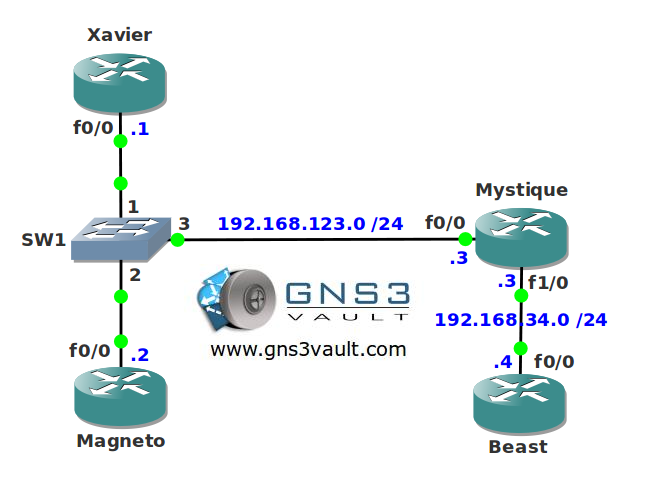
Configuration Files
You need to register to download the GNS3 topology file. (Registration is free!)Once you are logged in you will find the configuration files right here.

Do you want your CCNA or CCNP Certificate?
The How to Master series helps you to understand complex topics like spanning-tree, VLANs, trunks, OSPF, EIGRP, BGP and more.
Written by René Molenaar - CCIE #41726


Link: RSVP SBM IOS Config guide
http://www.cisco.com/en/US/docs/ios/12_2/qos/configuration/guide/qcfsbm_ps1835_TSD_Products_Configuration_Guide_Chapter.html
http://www.cisco.com/en/US/docs/ios/12_2/qos/configuration/guide/qcfsbm.pdf
"Configure 512KBps for RSVP flows for network 192.168.123.0 /24."
With this are we looking to configure the interfaces on that subnet with the 75% default but 512kbps per flow?
"You can test your configuration by making reservations from router Xavier and Magneto."
Can you explain this. I think I have my configuration all setup, just not entirely sure how to test it.
i have exception detection error , can i have any document that explaining how to run this lap please
Do you have a video for this lab ??? or a solution config ?
i can’t see file config ,
I don’t have a solution for this lab yet…still on the todo list. There’s an example on the Cisco website however that should help you.
Hello,
This would be my first contribution to this site for that I have been following and reading his book and doing his labs. I think they are helping me a lot. I think the following will be the most close solution for this lab:
Mystique
———–
interface FastEthernet0/0
ip address 192.168.123.3 255.255.255.0
duplex auto
speed auto
ip rsvp bandwidth 512 512
!
interface FastEthernet1/0
bandwidth 256000
ip address 192.168.34.3 255.255.255.0
duplex auto
speed auto
ip rsvp bandwidth 192000 192000
ip rsvp burst policing 700
!
end
Beast
——-
interface FastEthernet0/0
bandwidth 256000
ip address 192.168.34.4 255.255.255.0
duplex auto
speed auto
ip rsvp bandwidth 192000 192000
ip rsvp burst policing 700
!
end
Magneto
———-
interface FastEthernet0/0
ip address 192.168.123.2 255.255.255.0
duplex auto
speed auto
ip rsvp bandwidth 512 512
ip rsvp dsbm candidate 100
ip rsvp dsbm non-resv-send-limit rate 7000
ip rsvp dsbm non-resv-send-limit burst 14000
ip rsvp dsbm non-resv-send-limit peak 7000
!
end
and where is Wolverine? 😀
Hi, pls check my config.
Xavier(config)#do sh run | s interface|rsvp
interface FastEthernet0/0
ip address 192.168.123.1 255.255.255.0
duplex auto
speed auto
ip rsvp bandwidth 192 96
ip rsvp dsbm non-resv-send-limit peak 70
Xavier(config)#do sh ip rsvp sbm
Interfac DSBM Addr DSBM Priority DSBM candidate My Priority
Fa0/0 192.168.123.2 127 no 64
Magneto(config)#do sh run | s interface|rsvp
interface FastEthernet0/0
ip address 192.168.123.2 255.255.255.0
duplex auto
speed auto
ip rsvp bandwidth 192 96
ip rsvp dsbm candidate 127
Magneto(config)#do sh ip rsvp sbm
Interfac DSBM Addr DSBM Priority DSBM candidate My Priority
Fa0/0 192.168.123.2 127 yes 127
Mystique(config-if)#do sh run | s interface|rsvp
interface FastEthernet0/0
ip address 192.168.123.3 255.255.255.0
duplex auto
speed auto
ip rsvp bandwidth 192 96
ip rsvp dsbm non-resv-send-limit peak 70
Mystique(config-if)#do sh ip rsvp sbm
Interfac DSBM Addr DSBM Priority DSBM candidate My Priority
Fa0/0 192.168.123.2 127 no 64