

Scenario:
As a famous adventurer you are well known for your discoveries. Every time you make an archaeological treasure you send the acquired information to your father’s router. His router is an older model and has problems keeping up with the incoming data. Let’s see if your networking adventures are just as fun…
Goal:
- All IP addresses have been preconfigured for you.
- OSPF has been configured to ensure full reachibility.
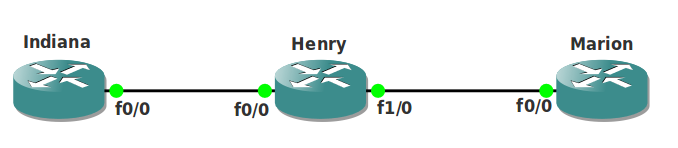
- Configure router Henry’s input software queue to 12 packets on fastethernet 0/0.
- Configure router Henry’s output software queue to 24 packets on fastethernet 1/0.
- Configure router Henry’s hardware queue to be 20 packets.
- Use the ‘show interfaces fastethernet 0/0 | include queue’ command to check your configuration.
- Optional: test your configuration by using the ping command, ‘ping 192.168.23.3 repeat 99999 timeout 0 size 1500’ from router Indiana. You can see the queue fill up on router Henry.
IOS:
c3640-jk9o3s-mz.124-16.bin
Topology:
Video Solution:
Configuration Files
You need to register to download the GNS3 topology file. (Registration is free!)Once you are logged in you will find the configuration files right here.

Do you want your CCNA or CCNP Certificate?
The How to Master series helps you to understand complex topics like spanning-tree, VLANs, trunks, OSPF, EIGRP, BGP and more.
Written by René Molenaar - CCIE #41726


Hi Rene, I don’t understand the goal of the lab. Are you mean traffic shaping?
Hello Embaga,
You are one step too far with your thinking 🙂 It’s a very easy lab meant for the interface…you can change the hardware-queue (tx-ring) and the input & output buffer…you need to search for the interface commands, nothing fancy 8)
Hi Rene,
thanks, sometimes things are easier than they appear. I understood it
guys !!!!!!!! please help me out i wasnt successful with the labs !!!!!!!!! please send me the entire configuration !!!!!!!!
Hi Rene, is it possible for you to setup a video for this lab? That would help alot!
Thanks!
video please post the lab configuration it will be really help full than this!!!!
I’ll create a video when i have time…keep in mind the site is non-profit and i do it in spare time 😉
Anyway…i can give you the solution for now:
1) TX-Ring is your hardware-queue, you can change it by using the ‘tx-ring-limit’ interface configuration command.
2) The Hold-queue is also set on an interface by using the ‘hold-queue’ command.
That’s all there is to it.
Hi all,
Can you please share more labs on qos?. I am preparing for R&S and it will help a lot for the labs.
Thanks in advance.
Kinda late to reply but I have a lot of QoS labs now.
I would point out that in my experience, with the timeout command missing, I couldn’t seem to overload the router queue with the ping test but it is easy to confirm via the sh interface that the queue limits have changed – not sure why I couldn’t overload the queues but ah well
Thanks for sharing this. Keep in mind GNS3 + creating congestion is a funky combination since it doesn’t offer "real" throughput. It’s great to test all the QoS commands but to see real performance it might be better to use a real router / switch and send real traffic through them.