

Scenario:
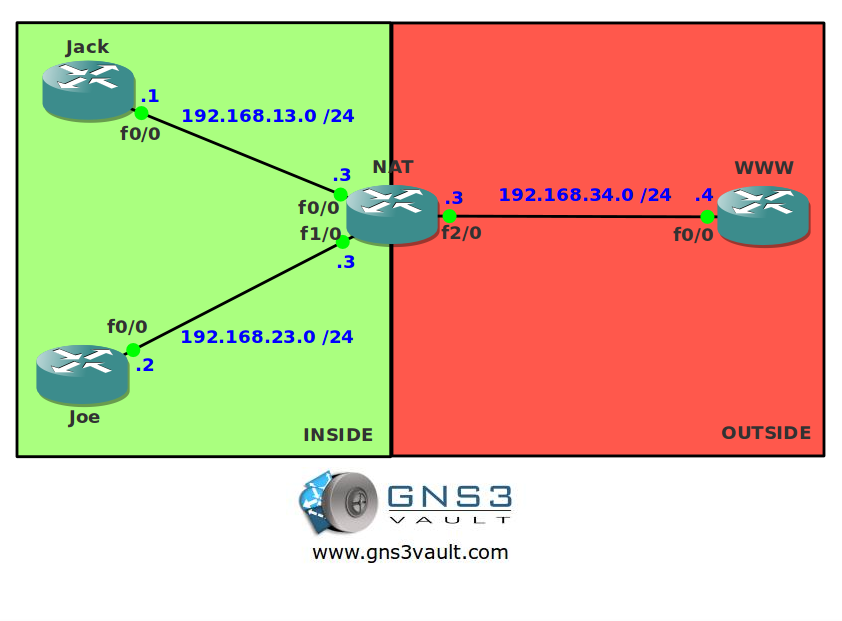
Your friends Jack and Joe recently switched to a new Internet provider and instead of getting a single public IP address they have received multiple global IP addresses. To make sure all global IP addresses are used they ask you to configure NAT Dynamic for them. Action time!
Goal:
- All IPv4 addresses have been preconfigured for you.
- IP Routing has been disabled and a default gateway is configured on router Jack, Joe and WWW.
- Configure a pool for NAT Dynamic called “GNS3VAULT”. The range of IP addresses you received from the Internet Provider is 172.16.0.1 – 172.16.0.100.
- Configure NAT Dynamic so when router Jack or Joe connect to router WWW they are translated to one of the IP addresses in the pool.
It took me 1000s of hours reading books and doing labs, making mistakes over and over again until I mastered all the protocols for CCNA.
Would you like to be a master of networking too? In a short time without having to read 900 page books or google the answers to your questions and browsing through forums?
I collected all my knowledge and created a single ebook for you that has everything you need to know to become a master of CCNA.
You will learn all the secrets about NAT, PAT and more.
Does this sound interesting to you? Take a look here and let me show you how to Master CCNA!
IOS:
c3640-jk9s-mz.124-16.bin
Topology:
Video Solution:
Configuration Files
You need to register to download the GNS3 topology file. (Registration is free!)Once you are logged in you will find the configuration files right here.

The How to Master series helps you to understand complex topics like spanning-tree, VLANs, trunks, OSPF, EIGRP, BGP and more.
Written by René Molenaar - CCIE #41726


[i]Configure a pool for NAT Dynamic called “GNS3VAULT”. The range of IP addresses you received from the Internet Provider is 172.16.0.1 – 172.16.0.100[/i]
I’m having trouble understanding the above statement. Is the tutorial asking us to allocate the NAT pool from IP range 172.16.0.1 – 172.16.0.100 ?
It seems to me that the NAT pool should be in the outside interface’s subnet. I can successfully complete the lab if IPs are allocated the 192.168.34.0/24 subnet.
[quote]Configure a pool for NAT Dynamic called “GNS3VAULT”. The range of IP addresses you received from the Internet Provider is 172.16.0.1 – 172.16.0.100
I’m having trouble understanding the above statement. Is the tutorial asking us to allocate the NAT pool from IP range 172.16.0.1 – 172.16.0.100 ? [/quote]
That’s right strasser. You can use NAT to translate to IP addresses on your outside interface but also something completely different. You can translate the inside addresses to a pool with the 172.16.0.1 – 100 range.
Just a little different to spice things up
;D
hey rene,.
can you upload the solution of this lab??
i need it
sorry for my english
I just uploaded it to Youtube, will add it to the article + final configs today.
thank you very much Rene
Your welcome I hope it’s helpful to you.
Nice & simple but great if like me you are refreshing stuff you don’t work with very often.
GNS3 is an awesome platform to do the network practicing
Hi Rene,
End points are not pinging for me. All interfaces are up and I can ping everywhere from NAT but edge devices can not ping past next hop.
Ray
Show us your nat translation table, and your relevant NAT configs.