

Scenario:
As the senior network engineer for “Groceries ‘r’ Us” you are responsible for all routing within the company. Every now and then you have links that are still in the up/up state but you are unable to send any IP packets over them. You also would like something that could generate different traffic streams like RTP to simulate VoIP or HTTP. You heard good things about IP SLA so you decide to build a lab and test some things…
Goal:
- All IP addresses have been preconfigured for you.
- OSPF has been configured for full connectivity.
- Configure router Lettuce to send ICMP echo packets to IP address 4.4.4.4 every 9 seconds. It should never stop.
- Configure router Cucumber to send DNS request packets to IP address 1.1.1.1 every 8 seconds. It should never stop.
- Configure router Pickle to send G711 packets to IP address 2.2.2.2 port 16384 with a codec-size of 160 bytes with an interval of 20ms. It should never stop.
- Configure router Cucumber to respond to the G711 packets.
- Configure router Tomato to send G729 packets to IP address 3.3.3.3 port 16374 with a codec-size of 20 bytes. It should never stop.
- Configure router Pickle to respond to the G729 packets.
- Configure router Lettuce to send HTTP GET packets to IP address 192.168.34.4 every 60 seconds.
IOS:
c3640-jk9o3s-mz.124-16.bin
Topology:
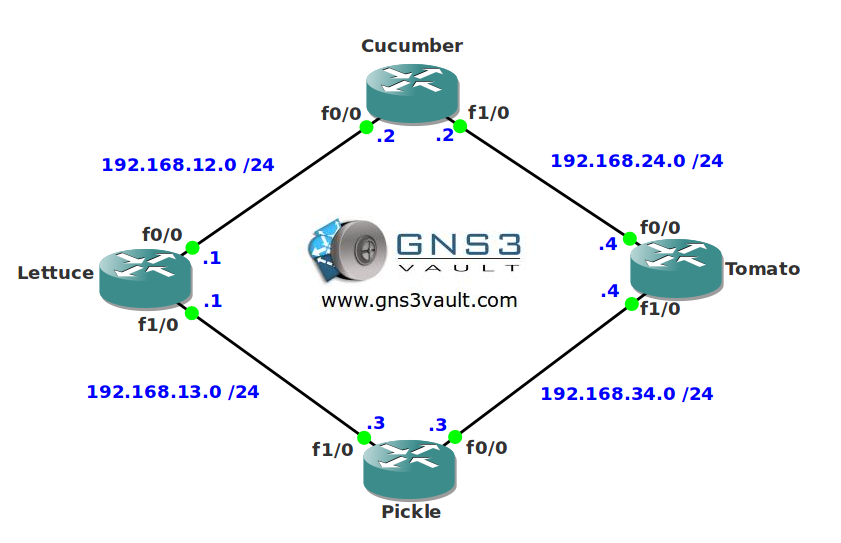
Video Solution:
Configuration Files
You need to register to download the GNS3 topology file. (Registration is free!)Once you are logged in you will find the configuration files right here.

Do you want your CCNA or CCNP Certificate?
The How to Master series helps you to understand complex topics like spanning-tree, VLANs, trunks, OSPF, EIGRP, BGP and more.
Written by René Molenaar - CCIE #41726


Thanks for the IP SLA lab. I am going to give it a go. I want to ipmliment this in our enviroment and this will be of great help.
Thanks for all you time and effort!!
Mike
Hi Mike,
Your welcome. Keep in mind you can use IP SLA in combination with many things, VRRP, HSRP, GLBP, routing protocols. Everything that works with Object tracking.
If you have a good real life example after implementing it I’d love to hear it
Rene8)
Hi Rene,
Found the following while doing this lab:
1. Not working
1.1. The IP SLA operations using “timeout 0” never reached an OK state but stayed down.
[code]
Bilbo#sh ip sla mon stat 2
Round trip time (RTT) Index 2
Latest RTT: NoConnection/Busy/Timeout
Latest operation start time: *00:11:58.799 UTC Fri Mar 1 2002
Latest operation return code: Timeout
Number of successes: 0
Number of failures: 90
Operation time to live: Forever
[/code]
1.2. The config is as follows:
[code]
ip sla monitor 2
type echo protocol ipIcmpEcho 192.168.24.4 source-interface Serial2/0
timeout 0
frequency 3
ip sla monitor schedule 2 life forever start-time now
[/code]
1.3. Debug output
[code]
Bilbo#deb ip sla monitor trace 2
IP SLA Monitor TRACE debugging for entry 2 is on
Bilbo#
*Mar 1 00:08:37.799: IP SLA Monitor(2) Scheduler: Starting an operation
*Mar 1 00:08:37.803: IP SLA Monitor(2) echo operation: Sending an echo operation
*Mar 1 00:08:37.807: IP SLA Monitor(2) echo operation: Timeout
*Mar 1 00:08:37.811: IP SLA Monitor(2) Scheduler: Updating result
Bilbo#
[/code]
2. Worked
Increasing the timeout value to a reasonable level as expected from the operation in question.
[code]
ip sla monitor 1
type echo protocol ipIcmpEcho 192.168.24.4 source-interface Serial2/0
timeout 150
frequency 10
ip sla monitor schedule 1 life forever start-time now
[/code]
Reference:
[url]http://www.cisco.com/en/US/docs/ios/ipsla/command/reference/sla_05.html#wp1074927[/url]
From the website –
[quote]
timeout (IP SLA)
To set the amount of time a Cisco IOS IP Service Level Agreements (SLAs) operation waits for a response from its request packet, use the timeout (IP SLA) command in the appropriate submode of IP SLA configuration, auto IP SLA MPLS configuration, IP SLA auto Ethernet configuration, IP SLA monitor configuration or IP SLA template parameters configuration mode. To return to the default value, use the no form of this command.
timeout milliseconds
no timeout
Syntax Description
milliseconds
Length of time the operation waits to receive a response from its request packet, in milliseconds (ms). Range is 0 to 604800000.
We recommend that the value of the milliseconds argument be based on the sum of both the maximum round-trip time (RTT) value for the packets and the processing time of the IP SLAs operation.[/quote]
Seems like setting the “timeout 0” would actually render the operation unusable.
This would require peer verification?
Thanks a stack
groete
Marthin
Hi Marthin,
I see you configured one router for IP SLA. Did you set the other for "ip sla monitor responder" ?
Rene
Hey Rene,
I think Martin is right. If you try to enable the responder on router Tomato (4.4.4.4) with timeout value = 0, then the operation would not work because it would timeout at 0 seconds. When I tried to follow your solution and set the timeout to 0, the operation did not work. But, when I left the timeout to value to default (I think its 5 seconds), the operation worked….
What do you think ??
Hi Shaheer,
I haven’t given it much thought yet but it’s probably correct. I assumed a timeout of 0 would probably mean "never timeout" but I think that’s not the case.
Rene
Hi Rene
Are you have a LAB about Failover dual link from 2 different ISP, with IP SLA and PBR??
Thanks
Hi Rene,
I’m trying to implement the ip sla by the frame relay
here is my topology
[img]http://i.imgur.com/PVAdKgh.jpg[/img]
I’m sending g711 packets from R1 to R5
there is a traffic that succesfully sent to R5. The question is, why didn’t it detect any latency
this is the ip sla statistics output
[code]R1#sh ip sla monitor statistics
Round trip time (RTT) Index 1
Latest RTT: 27 ms
Latest operation start time: *00:47:29.315 UTC Fri Mar 1 2002
Latest operation return code: OK
RTT Values
Number Of RTT: 993
RTT Min/Avg/Max: 1/27/60 ms
[b]Latency one-way time milliseconds
Number of one-way Samples: 0
Source to Destination one way Min/Avg/Max: 0/0/0 ms
Destination to Source one way Min/Avg/Max: 0/0/0 ms[/b]
Jitter time milliseconds
Number of SD Jitter Samples: 992
Number of DS Jitter Samples: 992
Source to Destination Jitter Min/Avg/Max: 0/9/44 ms
Destination to Source Jitter Min/Avg/Max: 0/12/44 ms
Packet Loss Values
Loss Source to Destination: 0 Loss Destination to Source: 0
Out Of Sequence: 0 Tail Drop: 1 Packet Late Arrival: 993
Voice Score Values
Calculated Planning Impairment Factor (ICPIF): 1
MOS score: 4.34
Number of successes: 133
Number of failures: 3
Operation time to live: Forever
[/code]
this is the configuration of each routers
[b]R1[/b]
[quote]ip sla monitor 1
type jitter dest-ipaddr 5.5.5.5 dest-port 16384 codec g711alaw codec-size 160
timeout 0
frequency 1
ip sla monitor schedule 1 life forever start-time now
!
!
interface Loopback0
ip address 1.1.1.1 255.255.255.255
!
interface Serial0/0
ip address 10.10.10.1 255.255.255.0
ip hello-interval eigrp 10 5
ip hold-time eigrp 10 15
encapsulation frame-relay
serial restart-delay 0
frame-relay map ip 10.10.10.2 102 broadcast
frame-relay map ip 10.10.10.3 103 broadcast
frame-relay map ip 10.10.10.4 104 broadcast
!
router eigrp 10
network 1.0.0.0
network 10.0.0.0
no auto-summary
[/quote]
[b]R2[/b]
[quote]interface Loopback0
ip address 2.2.2.2 255.255.255.255
!
interface Serial0/0
ip address 10.10.10.2 255.255.255.0
ip hello-interval eigrp 10 5
ip hold-time eigrp 10 15
encapsulation frame-relay
serial restart-delay 0
frame-relay map ip 10.10.10.1 201 broadcast
frame-relay map ip 10.10.10.3 201
frame-relay map ip 10.10.10.4 201
!
[/quote]
[b]R3[/b]
[quote]interface Loopback0
ip address 3.3.3.3 255.255.255.255
!
interface Serial0/0
ip address 10.10.10.3 255.255.255.0
ip hello-interval eigrp 10 5
ip hold-time eigrp 10 15
encapsulation frame-relay
serial restart-delay 0
frame-relay map ip 10.10.10.1 301 broadcast
frame-relay map ip 10.10.10.2 301
frame-relay map ip 10.10.10.4 301
!
[/quote]
[b]R4[/b]
[quote]interface Loopback0
ip address 4.4.4.4 255.255.255.255
!
interface Serial0/0
ip address 10.10.10.4 255.255.255.0
ip hello-interval eigrp 10 5
ip hold-time eigrp 10 15
encapsulation frame-relay
serial restart-delay 0
frame-relay map ip 10.10.10.1 401 broadcast
frame-relay map ip 10.10.10.2 401
frame-relay map ip 10.10.10.3 401
!
[/quote]
[b]R5[/b]
[quote]ip sla monitor responder
!
!
interface Loopback0
ip address 5.5.5.5 255.255.255.255
!
interface FastEthernet0/0
ip address 20.20.20.4 255.255.255.0
duplex auto
speed auto
!
interface FastEthernet1/0
ip address 30.30.30.6 255.255.255.0
duplex auto
speed auto
!
interface FastEthernet2/0
ip address 40.40.40.8 255.255.255.0
duplex auto
speed auto
!
router eigrp 10
network 5.0.0.0
network 20.0.0.0
network 30.0.0.0
network 40.0.0.0
no auto-summary
!
[/quote]
Regards,
Rudolf
dear sir,
thank you for your efforts.
just one thing please, when I download labs, the topology text is changing than the original !
what can I do to solve this, I have up to date GNS3 version.
thanks
Is this lab a little too advance for CCNP level ? Or am I just not well prepared for this 😐
I would say no. He tells you exactly what to do with every parameter and doesn’t make you do any reverse math. A harder question: “configure a probe to measure MOS using a medium complexity compressed codec”.