

GNS3 is a Graphical frontend for Dynamips / Dynagen which is a powerfull network emulator. An emulator means that you can run the real networking software on other hardware than what it is meant for. Maybe you have seen or worked with products like VMWare, Virtualbox or Microsoft Hyper-V. These products let you run operating systems like Microsoft Windows, Linux or even Mac Os X on your machine in a “virtual” computer.
GNS3 lets you do the same thing for Cisco IOS, Juniper routers (by using Qemu) and even the Cisco ASA Firewall. GNS3 is the graphical frontend for Dynagen / Dynamips. If you were using Dynagen or Dynamips you had to build your labs using configuration files, using a graphical tool like GNS3 makes things a bit easier. You can click and drag some routers to your screen, hit a start button and you can start labbing.
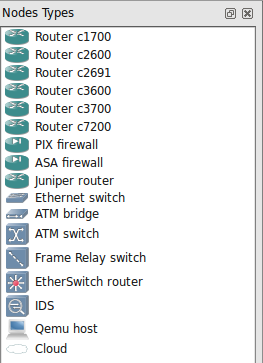
As you can see on the picture at the left side there are many routers you can choose from. Keep in mind I said “routers”, it’s impossible to emulate a Cisco Catalyst Switch in GNS3. A great deal of the CCNA, CCNP or CCIE studying is done on routers which makes GNS3 a great tool to study.
There are other options like Packet Tracer from Cisco which is a simulator, the downside of a simulator is that it does not have all the commands and is not always 100% accurate with the real thing. An emulator will give you the same commands as you have on real router. Remember that GNS3 is only meant for studying in a lab since it does not produce the same throughput as a real router, you can get around 1.000 packets per second which is nothing compared to a real physical router.
Besides routers you can see in the picture that you are able to run the Cisco ASA Firewall, Juniper routers, there’s an ethernet switch but it’s “simulated” and can only do vlans and there’s a Frame Relay switch.
There’s also a “EtherSwitch Router” but this is a router with the NM-16SW module for switch ports. It adds some “switching” capabilities but is nowhere as complete as having a real switch like the Cisco 2950 or 3550/3560.
The Qemu Host lets you add some virtual operating systems, there’s a Linux host you can download which has a browser and some other tools.
Last but not least there’s the “Cloud” icon which lets you connect your routers to your physical or virtual network cards. This is a very cool feature since now you can connect your routers to a Virtual Machine running Windows or even connect your routers to the Internet.
GNS3Vault only offers labs that you can use, credit for creation of the GNS3 and Dynamips / Dynagen software is for the people that spent a lot of time developing this. If you want to start working with GNS3 you should go to the main site and download the latest installation file:
Other useful websites are:
http://7200emu.hacki.at (Forum discussing dynamips and gn3)
http://dyna-gen.sourceforge.net (Dynagen)
http://ipflow.utc.fr/blog (Dynamips Blog)
GNS3 is available for Windows, Linux and Mac OS. Performance will be slightly better in Linux but won’t be significant if you are running it on modern hardware.
Last thing to mention, all labs on GNS3Vault have a GNS3 file which you can download, this will be the topology and includes the startup-configs to get you going.
Have fun!

The How to Master series helps you to understand complex topics like spanning-tree, VLANs, trunks, OSPF, EIGRP, BGP and more.
Written by René Molenaar - CCIE #41726


Had a question about the images, I have been trying to get the images that you outline in the labs, but for the most part I can only find slight new versions. Will these labs still work with different IOS images?
Thanks
Hello,
I installed GNS3 ver 0.8.4. All of the routers are grayed out except for the c3700 router. When I setup a topology and try to start the router/s, I get the following error:
R1: error from server 127.0.0.1:7200: 209-unable to start VM instance ‘R1’
Any ideas what may be going wrong? Thanks for your help.
Hello Rene,
Good afternoon, I have been watching your labs for CCNP HSRP & VRRP . for some reason, I can’t ping both side across the Ethernet switches. I am sure the mapping of the ports are my issues. Another issue I am having is that you pre-configs I can on these mention configs will not load on my IMAC. Please advise if you can. By the way, I did look at the file on pre -configures
Thank you.
I’m new to GNS3. can any one tell me which Cisco IOS I should use to do all the labs
Thank you
Taslim
Hi Talim,
There are two images that I used for all images:
c3640-jk9s-mz.124-16.bin
c3725-adventerprisek9-mz.124-15.T7.bin
Any 3640 of 3725 with the advanced enterprise features should do the job though.
Rene