

This is something I had in mind for quite some time but today I finally created the CCNP TSHOOT topology for GNS3. The topology that is used for the exam has been released by Cisco so it’s not a secret or anything. This is pretty cool because it means you can start troubleshooting the same network you will face for your exam! To save you the trouble I have rebuilt the whole topology in GNS3 which is 95% the same as the Cisco example, there are some minor differences:
- It’s impossible to use all CCNP switching commands in GNS3. I have used the NM16-SW module so we do have trunks and portchannels. We can’t play with different trunk types (dynamic desirable, dynamic auto and such) or play with PAGP or LACP. Make sure you practice on this before you take on the exam!
- Don’t forget if you want to see vlans on the NM16-SW modules you need to use the show vlan-switch command!
- If you download the official Cisco PDF with the topology you will see that the interface + port channel numbers might be different. Not a big problem but something you should keep in mind.
- I had to manually change some IPv6 link-local addresses because they were the same on all serial interfaces.
- There are 13 routers to run so make sure your IDLEPC value is correct. I’m using the 3725 routers (because of the NM16-SW modules).
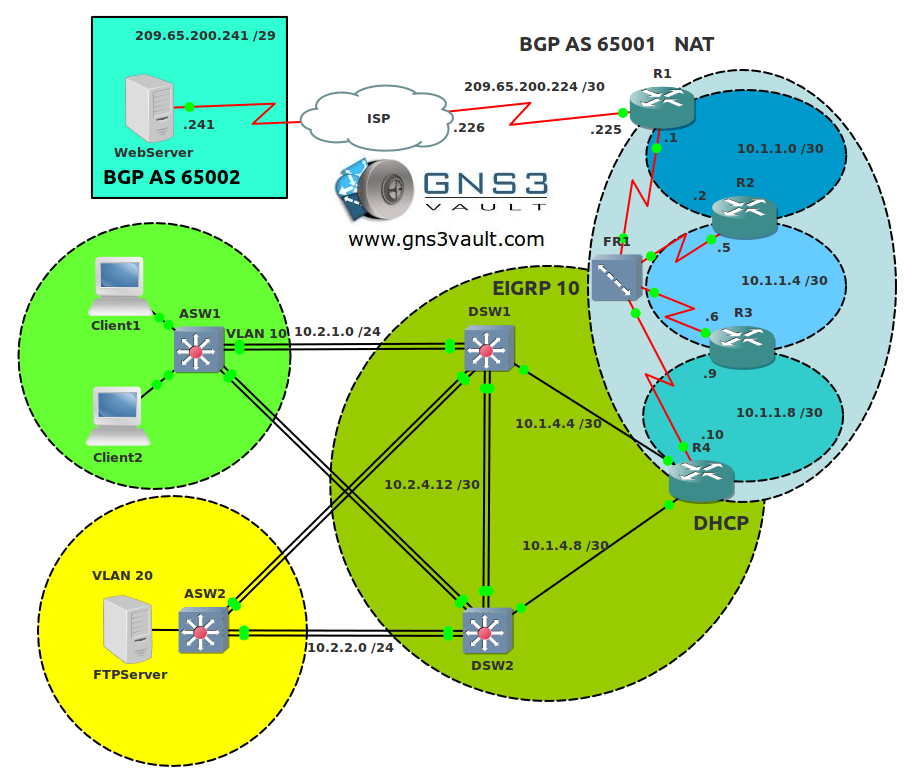
The complete topology has been preconfigured for you. All routing protocols, redistribution, vlans etc are 100% configured. This is the topology the way it is meant to be. I highly recommend you to study this topology to ensure you know what is going on and how things are connected. Download the GNS3 file and the Cisco TSHOOT Exam Topology PDF and look at them thoroughly. It’s a good idea to draw your own network diagram.
Having said that, let me explain the topology a little:
- Client1, Client2, FTP Server and Web Server are routers with “IP routing” disabled. This turns them into hosts with a default gateway.
- Client1 and Client2 receive their IP address through DHCP. They are in VLAN 10.
- ASW1 and ASW2 are access layer switches with trunks (etherchannels) to DSW1 and DSW2.
- DSW1 and DSW2 are distribution layer switches. HSRP has been configured to act as a gateway for Client1 and Client2 in VLAN 10.
- EIGRP AS 10 has been configured on DSW1, DSW2 and R4.
- R1,R2,R3 and R4 are running OSPF. They are connected by using frame-relay point-to-point subinterfaces. I recommend to take a look at the different DLCI numbers that are in use.
- R4 is also the DHCP server for VLAN 10. DSW1 and DSW2 have been configured to relay DCHP discover messages.
- R1 has been configured with BGP AS 65001 and peers with the ISP router that uses BGP AS 65002.
- R1 has been configured for NAT so all hosts within the private ranges 10.0.0.0/8 and 192.168.0.0/16 are able to access AS 65002.
- The ISP router advertises network 209.65.200.241 /29 through BGP to AS 65001.
- You might notice Client1 and Client2 are unable to reach the Web Server. This is because OSPF AREA 34 is blocking the external LSAs (BGP is redistributed into OSPF on R1). I left it this way but keep it in mind.
IOS:
c3725-
It’s a very good idea to start this topology and play around a bit. Check how and why things are working. I will be releasing new labs with troubleshooting tickets that are based on this topology very soon.
Have fun! If you have any questions please leave a comment or drop a message in the forum.
Configuration Files & Exam Topology
You need to register to download the GNS3 topology file. (Registration is free!)Once you are logged in you will find the configuration files right here.

The How to Master series helps you to understand complex topics like spanning-tree, VLANs, trunks, OSPF, EIGRP, BGP and more.
Written by René Molenaar - CCIE #41726


Hi Rene, where is the link to download the GNS3 file? This site is amazing! Thanks.
you need to create an account i had the same problem 🙂
Just donated to say thanks for the whole site but especially this lab as I just passed TSHOOT and I am now a CCNP 8)
It was good to practice in a very similar environment to the exam and having the lab pre-setup was a great time saver – much prefer learning to messing about with basic topology!
Now looking forward to using the many other labs to help practice for whatever the next cert I go for is or just to learn technologies. Seeing how many labs have been addded I may be some time! 😮
I didn’t thank you before…so better late then never 🙂 Thanks for your support and great to hear you passed your CCNP and enjoy my material.
Good luck on your next track! (CCIP maybe? :P)
Thankyou so much for building this for us. I’ve used a ton of Renee’s labs as my primary study tool for certs. The port channels didn’t work out for me but easily fixed by using only one interface. Adding area 34 no-summery to R3 will fix the issue with client1 not pinging the webserver. I should be taking TSHOOT next month. So I’ll be wiping out the configs of the routers and starting the configuration over to get better familiarized with the topology.
I’d really enjoy a few broken version of this lab for troubleshooting purposes.
Thanks again Rene
Thanks for your comment 🙂 Good to hear you enjoy it! I’m thinking about releasing a couple of broken TSHOOT labs or I might do something alike for my next book "How to master CCNP TSHOOT". not sure yet!
Hi Rene
Thank you so much for the lab, and thank you Jeff for you help finding the problem , after set up the configuration under ospf 1 router 3 area 34 nssa no-summary
I can ping from both client 1 and client 2 to the server.
Best Regards
Glad you like it 🙂
hi which IOs version is used in this lab for routers please guide me I am on new on this site.
Hi Faisal,
Just added the IOS filename to the article, this is the one I used:
c3640-jk9s-mz.124-16.bin
awesome i would request u to post more topologys on TShoot so we can brush up our skill……………………hope u start
I will for sure.
Hi it gives me this error [b]203-bad number of parameters (1 with min/max=2/2)[/b]
I tried [url=http://gns3vault.com/Faq/203-bad-number-of-parameters-1-with-minmax22.html]this[/url] but it did not help. Are there any other ways to fix this problem?
Hi Chris,
If you open up a new forum topic I can help you with this, i’ll need two things:
– topology.net file of a lab you created yourself.
– my topology.net file that you edited.
Rene
Hi Rene!
Thanks for reply.
I will do it now.
[url=http://gns3vault.com/Forum/GNS3-/-Dynamips-QA/A-problem-with-opening-the-GNS3-labs.html]here[/url] is the topic I have created. Please help.
I receive a connection lost msg via GNS3. Any ideas?
Connection lost to Dynamips? What IOS are you using?
Rene, the same IOS as you have listed.
All your other labs open just fine. Just the TSHOOT.
I have 16gb of RAM and a quad core proc. Should open just fine.
Did you get this resolved?
Hi Rene ,
I also have same problem ..
I have changed topology text ..
we have multiple tcp ports on the topology file 7200 , 7201,7202 and 7203
I think this is the problem
some help , plz ?
excellent job Rene…. keep it up!
[color=aqua][url=]http://bit.ly/HVs0ZW[/url][/color]
Unable to load any xxx.net file and that i’m facing whenever i load the file of TSHOOT, if you please give me the step which i’m missing for
[url=]http://bit.ly/HVs0ZW[/url]
I’m facing that problem whenever i load the TSHOOT.net file
kindly provide the help
Did you get it working? What did you try already so far?
Are you able to run any of my other labs?
Hi Rene,
would really appreciate if you can help me running this Lab.unable to load the topology in GNS3 getting error.i have created the sub folders still the same please help
Thanks,
Rk
figured it out after reading the comments from Rene and Chris_Simson.
Thanks guys
RK
hi Rene,
From your config on DSW1, how come you have Po2? Thought it should only have Po1-3-5? Thanks.
Hmm let me check, DSW1 only should have PO13,PO14 and PO12 according to the Cisco topology.
Hi Rene, sorry for asking too many questions. Is it possible to configure portchannel between DSW1 and DSW2 with ipv6? Because based from TSHOOT topology it does have portchannel on it. I have tried but it seems im getting L2 error. Not sure if you can make it work….. Thanks!
Yes that shouldn’t be any problem. What if you copy/paste my portchannel from the configuration and change it? Keep in mind there’s a difference between layer 2 and layer 3 etherchannels.
enter your message here…[quote=ReneMolenaar]Yes that shouldn’t be any problem. What if you copy/paste my portchannel from the configuration and change it? Keep in mind there’s a difference between layer 2 and layer 3 etherchannels.[/quote]
Hi Rene, you are right. Im having problem with L3 etherchannel. Im not able to enter this command….
!
interface Port-channel3
description DS1 to DS2
no switchport
ip address 10.2.4.13 255.255.255.252
ipv6 address 2026::3:1/122
ipv6 rip TSHOOT enable
!
!
interface FastEthernet1/13
no switchport
no ip address
channel-group 3 mode on
!
interface FastEthernet1/14
no switchport
no ip address
channel-group 3 mode on
!
Not sure if my config is correct 🙂
I just looked it up. The NM-16SW module doesn’t support L3 etherchannels…
http://forum.gns3.net/topic2242.html
https://learningnetwork.cisco.com/thread/35616
Too bad!
So how you recommend to avoid this situation? Now there is loop in your topology, for example, VLAN 10 – loop between ASW1, DSW1 and DSW2.
Hi
I downloaded GNS Layer 3 Tapology for Tshoot exam and also downloaded image "c3640-jk9s-mz.124-16.image".
When I run tapology I recieve the following error.
[b]Local IOS image /DATA/GNS3/IOS/C3640-JK.BIN cannot be found for hypervisor 127.0.0.1:7200.[/b]Can anyone advice how to rectify this problem.
Mahmood
Hi Mahmood,
Take a look at this link:
http://gns3vault.com/Faq/203-bad-number-of-parameters-1-with-minmax22.html
It fixes most of the issues.
Rene
Weird question to ask. Do this topology file work on the newest verision of GNS3. Since I uninstalled and installed the newest verision the .net file opens GNS3 but then closes.
Next I open gns3
Open>topolgy.net file
but message displays Open permission denied.
I figured it out.
I opened topology with notepad and edited all the config locations.
excellent.
Where can I download the IOS c3640-jk9s-mz.124-16.bin image for the CCNP TSHOOT GNS3 Topology? I can’t open the file without it and GNS3 is not allowing substitutions.
OK saw the previous comments, I’ll follow the link. Thxs.
[quote=angipp01]I figured it out.
I opened topology with notepad and edited all the config locations.[/quote]
Hi Angpipp01,
May I ask what did you change in the topology file? I’m also experiencing the same problem as what you have experience before. I also tried to edit based on what you said. I change the path for the config but I’m not sure if that was what you have change. hope you can help. thanks!
You should create a new project in GNS3, click and drag 2 routers and connect them to each other. Save it and then open the topology.net file that it created in notepad. Compare it to mine and make the appropriate changes so the folder names are similar. That should work.
where do I find tshoot topology based on GNS3 for all tickets?
This is the topology that is used in the TSHOOT exam. I don’t have any tickets at the moment but I’ll add them in the future.
Many thanks for supplying this configuration.
I made a few changes to my topology surrounding HSRP, added tracking and decrementing commands in. I also broke down the ACL on R1 into separate sequences in order to test the permit/denys for the 10.x.x.x range. I also added loopback interfaces for R1, R2, R3, R4 🙂
Thanks again,
Danny
Thanks for your message Danny. I tried to re-create it to match the Cisco topology as close as possible but it’s of course great to add/change things yourself. My advice is to get very familiar with the topology and understand how everything works.
This is awesome, thanks!
Thanks!
A little tip.
If clients 1/2 we be unable to ping HSRP virtual interface then shutdown interface VLAN 1 on DSW1/2.
Hi, came across this website a few days ago and i haven’t stopped wondering where i have been all the while! the resources are simply magnificent (for those of us who engage in self study). I have recently completed the CCNP route and switch exams so i’m currently preparing for the T-shoot. I have downloaded the lab topology but i seem to have a bit of an issue in using it…when i import the config into the topology, only the router configs are loaded, i do not have any joy with the ASW and DSW. i have the relevant router 3640 IOS. Kindly advise, was it designed that way or is there something i am doing wrong? I await your prompt response & pls do keep up the good work.
Hi Wada,
Thanks for your message. The ASW and DSW devices do have a configuration, just open the CFG files in notepad/wordpad and you’ll see it. Not sure why they don’t open but you can just copy/paste them to your routers manually?
Keep in mind the ASW and DSW devices are routes with the NM16 switch module. They can’t do the exact same thing as real switches but VLANS and Etherchannels are supported.
Rene
Hi, thanks a lot for your reply. I would do that right away. I’m aware of the limitations of the switch on GNS3 but it should suffice for the CCNP at least. Cheers.
How to download this file Rene.I dont see any link…
I forgot to publish the attachments (DOH!) but they are there now.
Hi Rene
Please help. I have changed the image , idle pc and workingdir and this time around the hypervisor loads to 100 percent but shortly after that it says connection lost. I cant figure out where I am going wrong. Please help. I have tried both the 3725 and 3640 images but it looks like the 3725 is the right image to use according to the "model" field under the router name. Please assist in resolving my issue.
What IOS images are you using? The exact same as I am using?
Thanks man for your great effort
You are welcome!
thanks to a great man whose name is renee molenaar
Renee thanks for this! Great lab.
I though I’d add few notes though for those who attempt this with real switches.
I am currently preparing for CCIE so I thought I’d give this a go just to see how rusted I was. I had no major problems doing the lab apart from the following:
My real switches are 3550s – If you attempt to run HSRPv2, you won’t be able to ping the virtual IP!! I spent 1.5 hours just on that until I gave up and googled the issue only to find this is a bug! Quite annoying as I was timing myself to finish this lab!
So, please do yourself a favour and run HSRPv1 instead!
I strongly recommend this lab not for configuration purposes, rather for troubleshooting – specially if you successfuly stop yourself from using versions of “show run”
And one more thing … if you need to configs for 3550s let me know. I also have a nice (I think) visio diagram. Enjoy!
Good Day Renne,
I donot have a IOS file, please advise how to download this file.
Also, getting error "Couldnot connect to server", while launching the topology file in GNS3. Please comment.
I download the required IOS and after loading the topology, following error is occured, please assist.
"Connecting R4 f2/0 to DSW2 f0/0 resulted in:
206-unable to create UDP NIO
Warning: Connecting ISP s0/1 to Webserver s0/0 resulted in:
206-unable to create UDP NIOWarning: Connecting ASW1 f1/2 to DSW1 f1/2 resulted in:
206-unable to create UDP NIO"
Hi Rene,
I am one of the many who have real equipment but love using GNS3 and your labs.
1. do you know where I can get or can you provide the switch configs for tshoot lab so I and others can load them into my real switches. Then we can connect them to the GNS3 lab via a cloud.
2. are you planning to doing trouble shooting labs using GNS3 routers and supping switch configs for people with real switches.
Keep up the good work and I will be donating again as I love what you are doing.
I had to add:
ASW1#vlan database
ASW1(vlan)#vlan 10
VLAN 10 added:
Name: VLAN0010
etc on appropriate NM16E-SW modules before anything started to happen…which would make sense, sometimes even on a real switch as the startup config isn’t the vlan.dat. No idea how that works in GNS3.
Glancing over it, it looks like the usual great work Rene delivers, real slick looking diagram. Thanks a lot.
p.s. on R4 I changed fa1/0 and fa2/0 to Fa0/0 and fa0/1 to reflect the cisco Tshoot topology….(schoonheidsfoutje;).
Using: c3725-adventerprisek9-mz.124-15.T10.image on GNS.0.8.3. mac-osx
Is Po12 (from the cisco diagram) or Po3 in the GNS topology a layer 3 portchannel (etherchannel)?, Seems that way as no vlans are assigned. Any thoughts?
Cheers,
Rene, Do we have the ability to print the entire book in paperback form, or is it all online.
I just study better, when I have the materials in front of me.
Kevin
Thanks for creating this, but how are you guys pinging from the clients? I just get "Unrecognized host or address, or protocol not running."
I assume this is because there is no ip routing or IP address assigned to VLAN 1 or similar?
BTW if anyone has "connection lost to dyamips" errors, double check your console/aux port numbers in the config files and that you have associated external hypervisors configured in GNS3. Also check your working directories and IOS image paths are correct in the config file.
Just downloaded the topology and find out no clients are getting ip adds. Did you find out what going on?
thnx
Ahh drivin me banana’s!
I’m using the c3725-adventerprisek9-mz.124-12.bin image.
I have changed the workingdir, image and idlepc values to match my own but upon getting to 100% of loading the topology I get the "connection lost" dynamips error message.
Any thoughts would be much appreciated.
See my meesage above. I had the same issue. It’s due to the external hypervisors being missing make sure you create the matching localhost ports (both UDP and TCP) under external hypervisors tab in "IOS images and hypervisors" in GNS3
The console and aux ports in the config file must match those in your external hypervisor settings.
I actually created 4 hypervisors and changed all the ports in the config file to be more logical.
Thank you very much Zefal and for such a speedy response!
I’m pretty sure I know what to do though possibly a stupid question coming… can each router in the config have the same aux and con ports?
[url=http://i232.photobucket.com/albums/ee6/Daneasca/gns_zps31c2774b.png]here[/url]
sorry the link "here" is a screenshot
Sorry for late reply this time… no they can’t have same ports… and any port listed in the topology configuration file must be listed as a valid external hypervisor entry.
Hello,
I have downloaded the zip file and and installed it. I am using c3725-adventerprisek9-mz.124-23.bin for the IOS. When I try to run the .Net file I get a “lost connection” , please see error messages below can you tell me what is the issue?
GNS3 management console. Running on GNS3 version 0.8.3.1
Copyright (c) 2006-2012 GNS3 Project
=> Local working directory /tmp cannot be found for hypervisor 127.0.0.1:7202, use working directory C:\Program Files\GNS3\tmp instead
Local IOS image /Data/GNS3/IOS/C3725-AD.BIN cannot be found, use image C:\Program Files\GNS3\Images\c3725-adventerprisek9-mz124-23.image instead
Local working directory /tmp cannot be found for hypervisor 127.0.0.1:7203, use working directory C:\Program Files\GNS3\tmp instead
Local IOS image /Data/GNS3/IOS/C3725-AD.BIN cannot be found, use image C:\Program Files\GNS3\Images\c3725-adventerprisek9-mz124-23.image instead
Local working directory /tmp cannot be found for hypervisor 127.0.0.1:7200, use working directory C:\Program Files\GNS3\tmp instead
Local IOS image /Data/GNS3/IOS/C3725-AD.BIN cannot be found, use image C:\Program Files\GNS3\Images\c3725-adventerprisek9-mz124-23.image instead
Local working directory /tmp cannot be found for hypervisor 127.0.0.1:7201, use working directory C:\Program Files\GNS3\tmp instead
Local IOS image /Data/GNS3/IOS/C3725-AD.BIN cannot be found, use image C:\Program Files\GNS3\Images\c3725-adventerprisek9-mz124-23.image instead
*** Warning: received dynamips server error:
aux port 2100 is already in use
*** Warning: received dynamips server error:
aux port 2101 is already in use
*** Warning: received dynamips server error:
aux port 2102 is already in use
*** Warning: received dynamips server error:
aux port 2103 is already in use
*** Warning: received dynamips server error:
aux port 2104 is already in use
*** Warning: received dynamips server error:
aux port 2106 is already in use
*** Warning: received dynamips server error:
aux port 2105 is already in use
*** Error: errors during loading of the topology file, please correct them
Reset error, lost communication with hypervisor?
Regards
I’m having the same exact error message as bigh007. Using image c3725-adventerprisek9-mz.124-15.T14.bin
I’ve already followed the "bad number of parameters" page with no success.
Yeah, I had the same problem. My GNS3 install has all defaults set in the preferences section for dynamips ports etc. I have only set the image and project paths etc. To get things working I did the following things:
setup the 3725 image under “IOS images and Hypervisors” and test it in a blank topology.
Open topology.net file and edit all instances of the following:
workingdir = working ( I also created a folder called working in the same location as the topology.net file)
image = path\\to\\my\\IOS\\images\\c3725-adventerprisek9-mz.124-12.image
aux = 2501 (go through the entire file and change each instance, incrementing from 2501 upwards. Notice that in the preferences for dynamips, the default starting base aux port is 2501)
Happy Labbing.
It is great information for CCNP shooting lab, I am new & thanks for information
Thank you very much – this is a huge plus to have and learn from. I have been looking for one large topology where i could practice. much appreciated!!!!!
hi rene ,
i get a connection lost , while using the same ios , any idea , thanks ..
I have below error when loading gns3 tshoot I loaded. please help
Webserver: error from server 127.0.0.1:7200: 209-unable to start VM instance ‘Webserver’
DSW1: error from server 127.0.0.1:7200: 209-unable to start VM instance ‘DSW1’
I think this is normal since the answered topology did not give me this errors.
is this topology supposed to be fully working or is it broken already? I have clients without Ip adds, etherchannel problems and hardly any ping around.
Please help.
enter your message here…
Guys – I have downloaded this today as my last exam will be TShoot. I have used c3725-adventerprisek9-mz.124-15.T14.bin which works great for the switching and the routers.
Obviously amend your .NET file with the paths. One other issue I had was with the AUX ports which threw up loads of errors. I just changed the range within the .NET file and all works great
How can I practice the 14 tickets in one topology?
Opening all Rene’s GNS labs from this site in Windows OS is giving me serious headaches. I’m getting "IOS image not found…" and all other common errors when opening topology files. I give up.I’m considering trying with Linux and i wonder if i’ll get the same problems.
Other topologies i downloaded from other sites opened straight away without any problem!
I tried to edit paths in wordpad and nothing happened. I nid these labs to prepare for my Tshoot exam.
yea i have seen it and would start tshooting right away
thanks
Couldnot able to acess the device , have uploaded GNS3 tshoot lab …
premk87@gmail.com
Rene,
Are there service tickets that are supposed to be used in conjunction with the T-shoot topology ? Are they in your books? Do you have videos on the t-shoot topologies?
Thank you for all you do,
Murrell
Hi Rene,
I have tried to replicate this LAB in my GNS3 and everything works perfect except with DHCP. I have verified and re-verified all the configurations but couldn’t find the problem. Please help me out.
Here are the configs related to DHCP part.
On Client 2 :
!
no ip routing
!
no ip cef
!
interface FastEthernet0/0
ip address dhcp
no ip route-cache
speed auto
full-duplex
!
ip default-gateway 10.2.1.254
!
On DSW1 :
!
interface Vlan10
ip address 10.2.1.1 255.255.255.0
ip helper-address 10.1.4.5 ————- 10.1.4.5 is the IP address on R4’s interface
standby 1 ip 10.2.1.254
standby 1 priority 120
standby 1 preempt
!
On DSW2 :
!
interface Vlan10
ip address 10.2.1.2 255.255.255.0
ip helper-address 10.1.4.9 ————- 10.1.4.9 is the IP address on R4’s interface
standby 1 ip 10.2.1.254
standby 1 priority 90
standby 1 preempt
!
On R4 ( DHCP Server ):
ip dhcp excluded-address 10.2.1.1 10.2.1.5
!
ip dhcp pool vlan10
network 10.2.1.0 255.255.255.0
default-router 10.2.1.254
!
Please note that On Client 1 I haven’t used DHCP service. I have assigned IP 10.2.1.10/24 statically. From Client1 I can ping 10.2.1.254 (HSRP Virtual IP) successfully.
Also I have turned on debugging on R4 for DHCP server activity and noticed that it is receiving DISCOVER from client1 but R4 is not responding to them.
Please help me out.
Thanks, San
Do DSWs have reachability to the helper addresses?
Hi,
I’ve noticed, the real exam topology does not have Frame Relay. Why does your topology include one?
Thanks.
Oh, I’m sorry, I didn’t notice it at first glance. You may delete my comments.
Hi,
I have GNS 1.2.1(latest and greatest) and have downloaded c3725-adventerprisek9_sna-mz.124-19b.image since I couldn’t find C3725-AD.bin image on Cisco’s site. When I tried to open up the TSHOOT project, an IOS image warrning message popped up stating “IOS image C3725-AD.BIN couldn’t be found. Please select an alternative from your existing images: c3725-adventerprisek9_sna-mz.124-19b.image. After I click “OK”, it opens up the topology but the Routers are inactivated, meaning that I can’t configure them and all the serial links are gone.
I was curious if someone has run into this issue before and what they did to get it resolved!
Thanks in advance.
~zK
Hello,
I have a problem with opening topology.net file using GNS 1.2.1.
Any idea what can be the reason ?
Please provide me with any hint how to open the .net file in new GNS 1.2.1
Regards,
Kriwy
“I upgraded all lab topologies for GNS3 1.X. Make sure you download the latest version! ”
I upgraded the GNS but it seems like the topology file is not for this GNS 1.2.1 version ?
Rene?
Regards,
Kriwy
Hello Rene,
I would like to thank you for TSHOOT lab configs. I set up my lab , also referred to the sample configs posted here. It gave me that boost up and confidence I needed to pass the exam.
I passed my TSHOOT exam on 29/01 and now a CCNP.
Thanks Rene. You rock !
Regards
Avinash
Same problem importing into latest GNS3. No serial links.
Hi Rene,
Awesome website, keep up the good work!
On the official Cisco Topology (as included in your downloaded file) the FTP server is shown to be 10.2.2.10/30….yet the SVI for server vlan 20 is configured as 10.2.2.1/24. Doesn’t the mask of attached vlan 20 devices need to match the mask of vlan 20 SVI ? I noticed you have your FTP server using a /24 matching the vlan 20 SVI…(thus disregarding the official topology)…Is this a mistake of Cisco?
Thanks,
Spank
anyone come across cpu 100% with above IOS and any suitable idlepc value you know off can post to me @ sanjivlsg@yahoo.com
I cant see the connection to ISP n webserver when load topo any idea?
seems like my topo not getting fully loaded due to that the links get disconnected between R1/ISP/Webserver
Hi Rene!
I have trouble loading this topology.Whwn I load this topology some devices are dead (not working with lether E saying that port is already in use).How can I fix this.
Please use the final configuration it should work ,same happen for me , then u can change all ports for aux if u can edit and modify as some are common ports.
I have the same issue as Rade (two posts above). Sanjeevl’s advice isn’t very clear. Can anyone provide a step by step fix for this issue? I’m using the same image that Rene suggests for the lab and the latest version of GNS3 1.3.6. Everything is set to default.