

There are 3 different methods how you can connect your real switches to your GNS3 routers:
- Using a breakout switch.
- Using cheap USB network adapters.
- Using Quad NIC PCI cards.
This article is how you can build your own GNS3 server using Quad NICs, if you are looking for a serious and reliable CCIE lab this is the way to go. I built the breakout switch before which you can see in my other article but the Quad NIC solution seems to be far more stable.
Before I continue, if you don’t like reading you can also watch my Youtube video which you can find at the bottom of this article!
Equipment List:
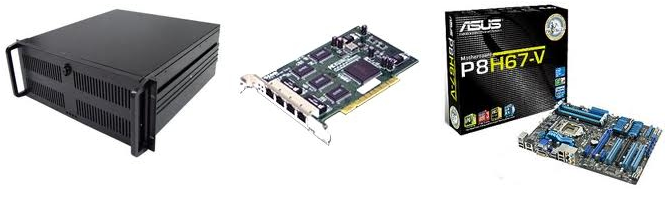
- 1x Codegen 4U-500 19 inch Rack: I like this case because it’s cheap, sturdy and in 19 inch format. If you want you can put this case and the switches in a nice 19 inch rack.
- 1x Asus P8H67-V Motherboard: I bought this one because it has video onboard, 3 PCI slots and 1 PCI-express slot for my serial ports to connect the switches to.
- 1x 8GB DDR3 Corsair memory: In the future I want to run virtual machines on this server as well, just for GNS3 it’s overkill.
- 1x Intel I5 CPU: Same story…for GNS3 a bit too much but if you want to run virtual machines as well it’s nice.
- 1x Corsair Powersupply: Just because I need one, 500 watt should be sufficient.
- 3x D-Link DFE 580TX: These are awesome, 4 FastEthernet ports per PCI-card and not too expensive on Ebay.
- 1x 4-port serial PCI-express card: Very nice card which has 4 serial ports to connect my switches to ( you can also buy 4x USB 2 Serial instead).
- 2x Cisco 3560 Switch.
- 2x Cisco 3550 Switch.
If you are on a low budget just get cheaper hardware. A core 2 duo can run 12 routers with no problem and you don’t need more than 4GB of memory. I wouldn’t recommend getting other Quad NICs than the D-Link DFE580TX since it’s working right out of the box and not too expensive. You can also use 4x 3550’s but keep in mind the QoS of the 3560 is different and there is no way to practice private vlans.
Installing Ubuntu:
Installation of Ubuntu was a piece of cake, the D-Link Quad NICs and the serial port PCI-express card are detected and work out of the box, I didn’t have to install any device drivers. If you install GNS3 from the Ubuntu repositories you’ll have GNS3 0.73 which is working fine for me, there are no features in GNS3 0.74 that I need for this CCIE lab. I don’t have a monitor or keyboard connected to this machine so I decided to configure VNC server which is installed by default in Ubuntu, just configure it and you are ready to go.
Installing ser2net:
Ser2net will make sure you can access your serial ports from the network by telnetting into them, this is what you need to do:
First we will install ser2net, this application will make sure you can access your serial ports by using telnet:
sudo apt-get install ser2net
The next step is to find out which serial ports (tty in linux) are connected to your switch:
dmesg | grep tty
This will tell you which tty lines are in use, for me this was ttyS4, ttyS5, ttyS6 and ttyS7.
Now we need to edit our ser2net configuration file and set the correct ports:
sudo vi /etc/ser2net.conf
This is what my configuration looks like:
4000:telnet:0:/dev/ttyS4:9600 8DATABITS NONE 1STOPBIT banner
4001:telnet:0:/dev/ttyS5:9600 8DATABITS NONE 1STOPBIT banner
4002:telnet:0:/dev/ttyS6:9600 8DATABITS NONE 1STOPBIT banner
4003:telnet:0:/dev/ttyS7:9600 8DATABITS NONE 1STOPBIT banner
If you telnet to port 4000 it will access ttyS4, port 4001 for ttyS5 and so on. By default it will look like “4000:telnet:600” but I changed it to “4000:telnet:0” so there is no timeout.
Before this changes apply you need to restart the service:
sudo service ser2net restart
Excellent that’s all you have to do for ser2net, now if you want to telnet into your serial ports this is what you do:
telnet
And you will have access to your serial port.
Remote access to your GNS3 routers:
If you want remote access to your GNS3 routers it’s possible to telnet directly to the IP address and the correct port number. If you don’t know the port number you can look them up by running GNS3 and typing in “list” in the console at the bottom.
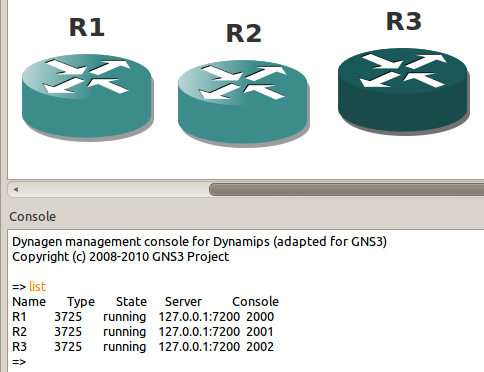
Here you can see that these 3 routers are using port 2000, 2001 and 2003. You can directly telnet into them and you will have access. I highly recommend not doing this because if you lose your connection there is no way to get back in the console and you will be locked out. It’s better to use the “screen” command. Screen will let you open a session on a linux machine which will keep running in the background even when you are disconnected. This is how you use it:
First use SSH to login to your GNS3 server:
ssh
Once you are logged in and see the command-line you can use screen to telnet into a router:
screen -S R1 telnet localhost 2000
This command will start a new “screen” and telnet into port 2000, in my example this is router1.
If your connection fails, just login the GNS3 server using SSH again and check the detached screens:
screen -ls
This will give you an output like this:
10757.R1    (06/18/2011 08:01:15 PM)    (Detached)
10754.R2    (06/18/2011 08:01:12 PM)    (Detached)
Now you can resume your session by using this command:
screen -r R1
And you are back at the console of your router!
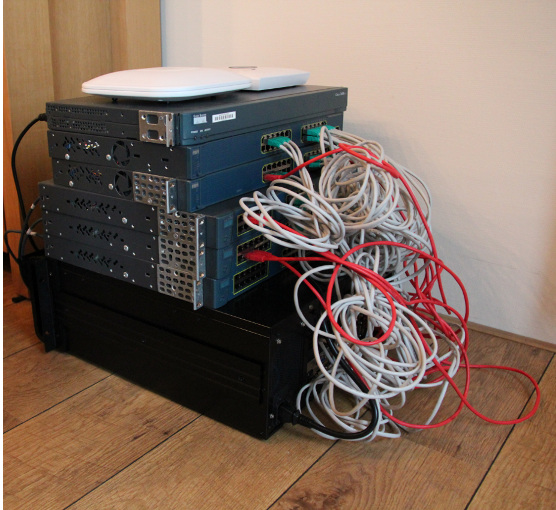 That’s all you need to do to build your own CCIE lab using GNS3 and some real switches. The only thing I still could do is build some scripts that will automatically open all my tabs and ssh / telnet into the devices…you don’t really need it but it’s fun and will save you some time when starting up the lab.
This solution works far better for me than using the breakout switch.
I had some trouble with flapping mac addresses, interfaces on the breakout switch going in err-disabled mode and CDP is troublesome on a cisco 3550 breakout switch. This is working 100% flawless so far!
What do you think? If you have any questions or comments please let me know by leaving a message below.
Update:
Recently I have been running into some trouble with my GNS3 server which I believed was something from the past…IRQ conflicts! The D-link quad nics support IRQ sharing so this is no problem at all. My cheap 4-serial port pci-express card however requires an IRQ per port. Since it was on the same IRQ as one of my Ethernet interfaces the machine decided to crash/become unreachable. Keep this in mind when you are buying hardware, check if it supports IRQ sharing or not.
I fixed this problem by getting rid of the cheap 4-serial port pci express card and I am now using my Cisco router as terminal server for the 4 switches.
I also replaced my motherboard since the one from Asus was causing issues with the PCI cards. I replaced it with a MSI motherboard:
MSI Z68A-G43

The How to Master series helps you to understand complex topics like spanning-tree, VLANs, trunks, OSPF, EIGRP, BGP and more.
Written by René Molenaar - CCIE #41726


Hi Rene, which IOS image do you use for your CCIE lab in GNS3? After replacing you motherboard did you try to use the 4 serial port pci express card? Do they still cause the IRQ conflits in the new motherboard? I’m asking this because I’m thinking about building a home lab using your tutorial. Thanks a lot.
Sorry for not responding to this earlier. I’m using these images:
C3725 Advanced Enterprise K9 12.4(15)T7
C3560-advipservicesk9-mz.122-44.SE1
c3550-ipservicesk9-mz.122-44.SE6
I paid around ~$50-$150 for the Quad NIC cards. The switches I would look up on Ebay…the components I would check on bestbuy.com or something 🙂
I haven’t used the 4x serial port PCI card anymore, using a USB-to-4x serial connector now which is working well!
can i ask how much all of this cost??
Guys what do you think about combination MB bellow (3 legacy PCI quad nics setup )
http://www.newegg.com/Product/Product.aspx?Item=N82E16813182230
with Sun PCI Quad Port Fast Ethernet Network Adpater 501-5406 ? (I already bought this very cheap NICs )
I am mostly interested if there is some BIOS able to resolve IRQ issues (manual settings ) .
Also one more question USB to rs232 require one IRQ per port ?
PS: I choose this board because its only one equipped with 3 legacy PCI and supporting powerful opteron CPUs and 8x memory slots. I hope that it will run smooth without any kind of IRQ conflicts or so. Also there are 2 built in GbE nics, serial port and integrated VGA . ( I will use it mainly for kvm virtualization thats why I need more cores and RAM but gns3 is also mandatory ).
That looks like a good motherboard and the Quad cards probably work fine too.
I’m not 100% sure but I don’t think the USB-to-serial requires IRQs. If you want to know I can check my GNS3 server.
You’ll probably be fine with this setup 🙂
you mention you are not using a keyboard or monitor and you are running vnc. Did you disable the login screen when you boot the server up. I tried to do it on my ubuntu box but recalled i was getting prompted to allow connection.
I configured it for auto-login. It’s not secure but I’m only using this machine on my LAN at home so it doesn’t matter. As long as I can use SSH/VNC I can do anything I want with this machine.
Dear Rene,
I have a PC with asus p8h77-v motherboard, and i’m planning to buy some Dlink DFE-580TX (because it’s cheaper than Intel). what do you think? it’s the best option or it would be a trouble someday 😀
Thanks
Hi Val,
I’m using the Dlink DFE-580TX and they work very well. You won’t regret using those 🙂
Rene
Hi Rene,
Thanks for posting this video teaching us how to create a cheap CCIE lab. I have a question: you mentioned you had problems with the Asus motherboard and replaced it with a new MSI. How is the new motherboard behaving? Are you able to run your ccie labs ok with the new mobo?
Thanks
Joe
Hi Joe,
The new MSI motherboard is flawless. It just runs perfect. The old ASUS motherboard had a chipset that had issues with PCI cards.
I think this is the best method of building a CCIE lab, the other method would be to buy some good USB hubs and USB nics. I think that’ll work as well.
Rene
Hi rene,
i was bought quad nics this model HP A5506-60102
but i can’t fit in motherboard ( asus p8 z68-v pro )
its longer than pci slot !!
do you have a solution ?
thank you
abasaud
Hi Abasaud,
Does it fit in the PCI slot but is the heatsink on the motherboard in the way?
Rene
Hi Rene
tail of lan card out of pci slot !! becaus the card is longer than slot .
and windows 7 64 bit can’t see the quad card ?
is the card needs driver to be installed ?
thank you
abasaud
Hi Abasaud,
It’s ok that it has a "tail" as long as it fits in the PCI slot. It probably requires a driver…doesn’t it show up in device manager somehow? maybe as unknown device?
Rene
Hi rene
i found it as unknown device in device manager , and try to use windows update but it is not work .
now i use ubuntu with one card only because the motherboard has only 2 pci slot , i can’t fit the card in second slot , because the heatsink on the way .
if you know other motherboard has 4 pci slot tell me please .
thank you .
abasaud
Hi Mr.Rene
i found good model
it’s gigabyte p75-d3
its has 4 pci slot and i use 4 card without any problems .
thank you very very much
abasaud
Hi Abasaud,
Good to hear that. You are currently using this motherboard? I’ll add it to the article so others know they can buy this one.
Rene
Which Operating system you are using and in 32 bit or 64 bit
Hi,
I have seen your artical and videos on Youtube.
and started building CCIE LAB, I have purchased
almost all equipments and wating for only few, but now I am confused.
1. I have purchased Intel Motherboard with 3 PCI because ASUS/MSI is not not available here with 3 PCI
http://www.intel.com/content/www/us/en/motherboards/desktop-motherboards/desktop-board-dh67cl.html
2. I have purchased Dlink 570TX instead of 580Tx because of shipping issues.
2×3560
2×3550
Inter Motherboard DH67CL
i5 2550 CPU
3 Dlink 570TX
4 USB to Serial Console
My question is will My motherboard and 4 Port NIC will work in my setup ???
Thanks
Hi,
This setup is looking good to me. The motherboard looks good and the DLink 570TX cards look good!
Rene
Hi Mr.Rene,
Thanks for your confirmation, I am still in process to build lab, waiting for another NIC card and then my Equipment will be complete.
here again, 4 Serial Port Card PCI 1x (because all slots are booked) availability is problem so i am using 4 USB 2 Serial Converters.
I hope they work in Ubuntu
Thanks
Gaurav
Hi Gaurav,
How’s your setup working? The USB-to-serial adapters should work fine.
Rene
Hi,
Finally I collected all Quard Card and all LAB material is ready, I am not Linux Guy, So a bit problem for me. My USB to Serial Converters are not working properly, (Problem is they hang some time and when I unplug them they restart system), now I have configured mgmt IPs in switches and working, LAB is up but not start working.
Will update you soon and more details,
Thanks
Gaurav
Hi,
Setup is complete, cabling is done.
I am not a Linux Guy as I said, so I am facing problem to setup GNS3 and relevent software in Ubuntu
I dont want to work on my GNS3 Server Directly, So I perfer to Access my GNS3 server and work on Windows.
I have a downloaded a software mRemote which work suprising well in local system (windows) gives you router console in tab format. and you can console your GNS3 routers in it.
I am looking same solution for remote system.
I am building INE suggested topology LAB
http://www.ine.com/topology.htm
can anyone share his/her gns3 topology file with me ? who have done Frame-Relay setup which is nightmare for me.
Thanks
I created this topology in GNS3 for my quad-NIC setup. If you mail me i’ll send it to you ok?
May I ask you what exactly 3560 are you using ? I am thinking about buying 3560-24ts-s and upgrade to EMI just not sure if this is possible, came across different opinion.
I believe the EMI is just another IOS version. Any 3560 should be fine.
[quote=abasaud]Hi Mr.Rene
i found good model
it’s gigabyte p75-d3
its has 4 pci slot and i use 4 card without any problems .
thank you very very much
abasaud[/quote]
Which Operating System you are using and in 32 bit or 64 bit
32 or 64-bit shouldn’t matter much. Only matters if you have more than 4GB of memory.
Hello Rene,
first, thank you so much for your site gns3vault.com It is absolutely wonderful and useful site for learning networking. Thank you very much for creating labs and also for posting video solutions to them. This is really awesome.
But here is my question: is there any way how to make D-Link DFE 580TX card to work in Ubuntu 12.04 LTS? I found many articles on the web that it is not working correctly (or not working at all) in Ubuntu 12.04 LTS.
Are you using this version of Ubuntu? If yes, could you write an article (blog post?) how to make it working correctly? If there is no way how to make it working correctly, please advise which quad port NIC should I buy for my lab?
Please understand that I do not want to buy NICs, which will be not usable as I am not Linux guru and do not know how to make it working correctly.
Thank you in advance and wish you all the best with your effort to create new labs and posting solutions to already created labs.
Hi Rene, nice guide!
Can you run .1q trunking on the links between the switches and GNS3?
Thanks again for all the nice information on this website!
Hi,
i buying all your course ware this week but i a question:
how many ports should the 3560 swtiches should have?
Hi Rene,
I got myself 3 * 5 port FNC-0600TXM network cards, (fairly cheap had to wait about a month and half to get them, imported !!!)
my question is how did you manage to assign IP’s to each port or did you assign IP’s to the Switch & Router ports and not the network cards ?
reason I ask is that I can see my network cards (network & sharing in win 7), and can only assign 1 IP to each card.
I got a serial 4-port controller pci card and will have my switches at the end of the month (2 * 3550 and 1 * 3560)
Hi Rene,
If i have 2 Quad Nic and using together with USB NIC is it workable?Because my Motherboard only have 2 PCI slot and 2 PCI-E Slot,i’m not sure the Quad NIC do support the PCI-E slot.
Thanks
gilbertthor
Rene, do you get duplex mismatch messages from the GNS3 routers?
Hi,
yes duplex mismatch is normal issue just hardcode duplex and speed on port
int fa0/0
speed 100
duplex full
exit
Hi Rene, I really appreciate your videos, they’re inspirational. I have a question about the hybrid lab I’m building. I’m lucky to have found a Dell 2850 server with 3 quad nics that I can use for my GNS3 server and of course I have 4 switches. All this gear is running at my work and it’s no problem to VPN in to the lab network from home and access the server. What I really want is to be able to telnet directly into an access server (2509) or similar and have a nice menu set up there to access all the devices, either real or emulated, but I’m stuck on how I can connect to the GNS3 routers through this access server. In other words, what physical connection do I make from the 2509 to the Dell server. Switches no problem of course with physical console cables, but how do I access the routers in the same manner? The server has 1 serial port and 4 usb ports. Is it just a case of using 1 port and the different port numbers?
Thanks for your time…….
Tim
Thank you so much for this site and GNS3!!!!!
Hi, I have a question concerning D-Link DFE 580TX PCI-cards. Will they work with newer version of Ubuntu Linux 13.04?
DFE -570TX are working well,
hopefully 580also work on it
🙂
DO YOU HAVE ANY SOLUTION FOR GNS3 CONNECT TO REAL SIWTCH UNDER WINDOWS SYSTEM HAVE 802.1Q ISSUE.
DO YOU HAVE ANY IDEA TO SOLVE THIS PROBLEM.THANK YOU SO MUCH.
I KNOW MAY BE UBUNTU IS MOST BEST OS TO RUN GNS3.
FOR MY SITUATION I HAVE A LOT DATA IN MY WINDOWS 2008 R2 HOME SERVER. I DON’T WANT TO CHANGE TO UBUNTU.
Hi,
All are using ubuntu because of driver support,
DFE-570 or 580 dont have drivers in windows,
Holy Cow Renee,
I can’t believe I didn’t see this post sooner. I’m almost finished with my setup, and doing much of the same as above.
I was doing a google search for a better interfaces config file to copy and paste, and “Hey, there’s renee’s picture! Funny. If’ I’d have know this post existed I would have gone their weeks ago!
[url=http://gns3vault.com/index.php?option=com_kunena&view=topic&catid=17&id=3189&Itemid=114 ]here[/url]is my initial post when I just starting. Like I mentioned I will probably do a step-by-step, as you did, as some have expressed interest.
Great work, as usual.
Matt
Hallo Rene,
Ik vroeg me af of deze Quad nic’s ook goed zijn:
http://www.amazon.com/CISCO-4FE-66-Port-Ethernet-74-3188-01/dp/B0045JT9L8
Ik weet echter niet wat voor PCI slot dit exact vereist.
Wat denk je? Go for it?
Alvast bedankt,
Mvg,
Edwin
Hi Rene,
as i am full CCNP now i am already chasing my CCIE path. At the moment i am building a lab per your guidlines above. I just wanted to aks you quickly if any of 3 models bellow will work for purpose of this lab:
– Fujitsu Quad Port PCI-X Gigabit Ethernet CA05951-9120
– Sun Quad Port ATLS1QGE Server Adapter Card PCI-E (x8) 4 ports P/N 501-7606-07
-Sun Microsystems 501-6522-07 Gigaswift PCI-X Quad Port Ethernet UTP X4444A
Thank you for you great work and support.
Hi Rene,
I am tired of building a lab like this.
I am trying to build it on Centos 6.4 with Sun quad NIC. and I have failed.
Is there any source from where I can buy one of this ready server? I don’t need Cisco switches or cables.
Please let me know. I am willing to buy a ready server solution with quad NICs and GNS3 installed.
Thanks,
RK
Hi,
only few things you have to know is
1. Motherboard which contain 3 PCI slots
2. 3 Quad NIC Cards (Dlink-570TX or Dlink-580TX will be fine)
3. Cisco L3 Switches (which you have already)
Hi guys,
there is a problem that how should I find out which NIC port is connected to which switch port?
thanks
Mojit,
what OS you are using ?
Hi,
About the PCI Serial cards (4 ports) added to the server. Is the point that you then can manage all switches from the Server GUI ?
Indeed you can use PCI card of 4 -Port Serials to manage your Switches. and now you dont required Serial to USB converter 🙂
What about using ASUS P8B-C/4L ATX instead of ASUS P8H67-V it has 5 PCI slots and quad gigbit lan ports? We can expand the topology by adding more switches. Please comment on this.
Hi..
every thing i have above scenario to prepare the hybrid gns3 lab.. when iam using VM ware quad nic cards are not showing in my pc … vm ware want to use , or directly install in the ubunt in my pc…
this part is very confusing .. pls help me in this issue
Regards,
pradeep
Hello guys…
I have an Intel motherboard with 3 PCI and 2 PCI express slots & i7 processor, 8 GB ram. I have windows 7 32 bit OS installed but 32 bit OS limits the RAM usage only up to 4GB. I want to change the OS to 64 bit to use by RAM up to 8GB but Dlink 570TX or Dlink-580TX drivers are 32 bit, are they compatible with 64 bit windows…. Please help/suggest.
I don’t think there are drivers for 64-bit on Windows.
You might want to try Linux Mint or Ubuntu, these cards are supported natively and work great.
Hi Rene..
Thanks for your response… I have never used Ubuntu but I would like to start learning about it.
Is Ubuntu 64 bit operating system? If it a 32 bit OS, it has any physical memory limitations?
There is a 64-bit version of it so I recommend to use that one. You can also try Linux Mint (MATE version). It’s Ubuntu but with a different (simpler) GUI.