

There are three options to connect your real switches to GNS3:
- The Quad NIC solution.
- The breakout switch solution.
- The cheap USB NIC solution.
I don’t really like the breakout switch solution because I’ve had way too many issues with it. Ports going into err-disabled mode without really understanding why, MAC addresses flapping and other nasty stuff. I spent more time fixing the breakout switch than doing actual labs.
The quad NIC solution works very well and as a result many people are looking for the D-Link DFE-580TX card that is working very well. The downside of this card is that you’ll find them for $150 – $200 on Ebay and for the CCIE lab you’ll need 3 of them. You also need a motherboard that supports 3x PCI slots so most people end up buying a seperate “GNS3 Server” for the Quad NIC solution.
I wanted to see if I could buy some cheap USB NICs and use those instead of my Quad NICS, Here’s what I bought:
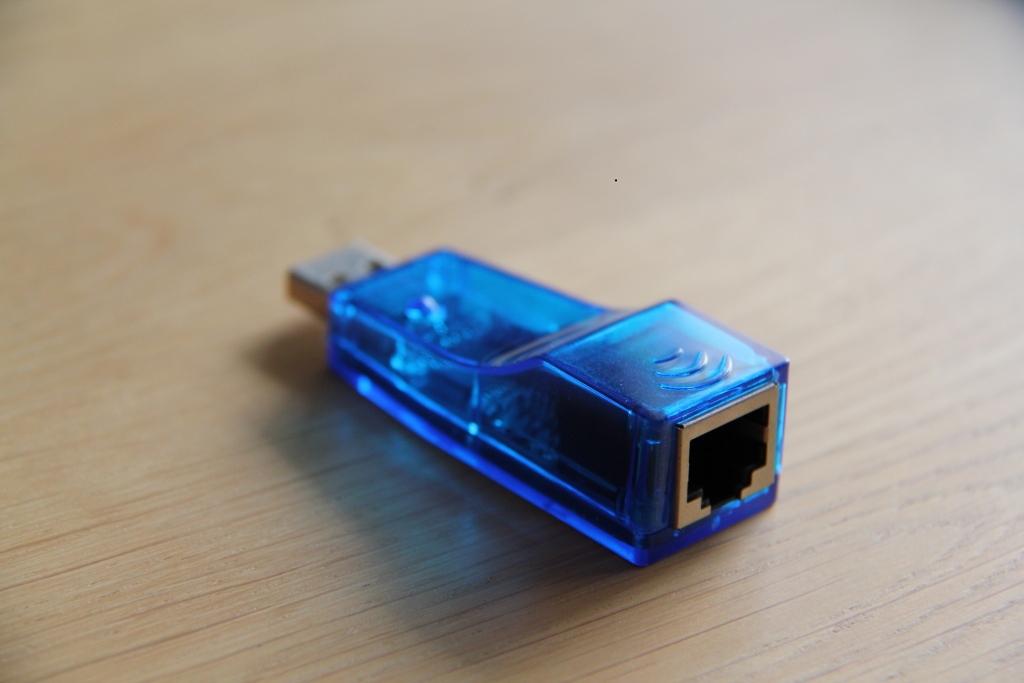
These USB NICs from Dealextreme cost $4.80 a piece at the moment and I bought 12 of them. They support FastEthernet and they can do trunking (802.1Q encapsulation).
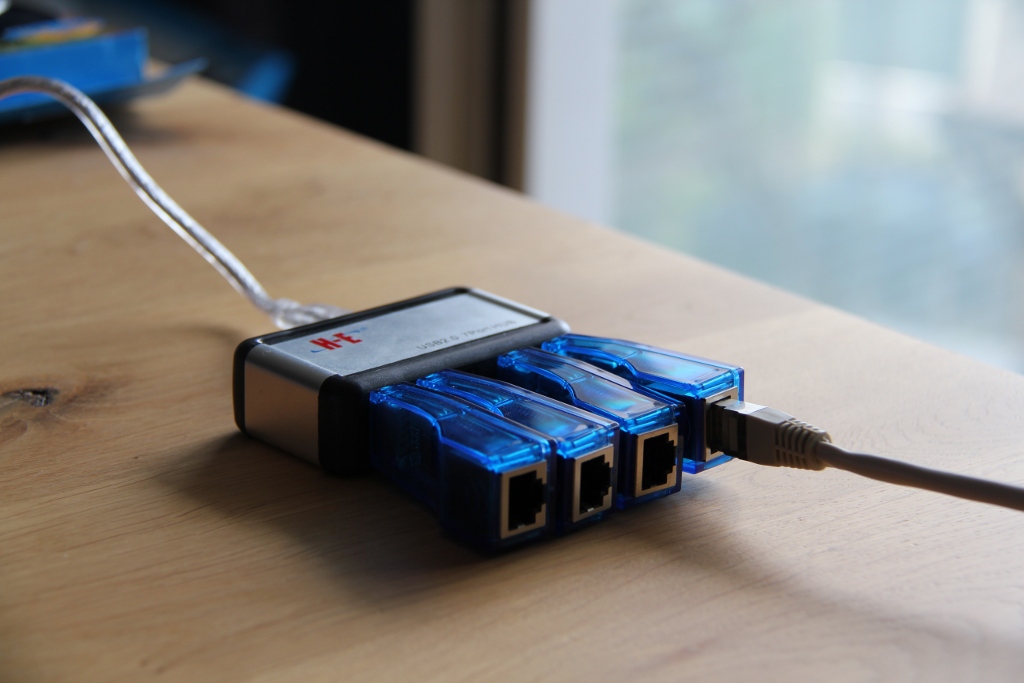
I also bought some USB HUBs from Dealextreme. This one only has 7 USB ports but I found some others on Dealextreme that have 10+ USB ports.
To see if these cheap USB NICs would work I installed Ubuntu to test 802.1Q encapsulation.
renemolenaar@RMCSLP003:~$ sudo apt-get install vlan
First I have to install VLAN support because it is not enabled by default.
renemolenaar@RMCSLP003:~$ modprobe 8021q
Secondly I load the 802.1Q module.
renemolenaar@RMCSLP003:~$ vconfig add eth2 200
I create VLAN 200 for my eth2 interface (one of the USB NICs).
renemolenaar@RMCSLP003:~$ sudo ifconfig eth2.200 1.1.1.1 netmask 255.255.255.0
I configure an IP address on this interface so I can generate some traffic from this interface.
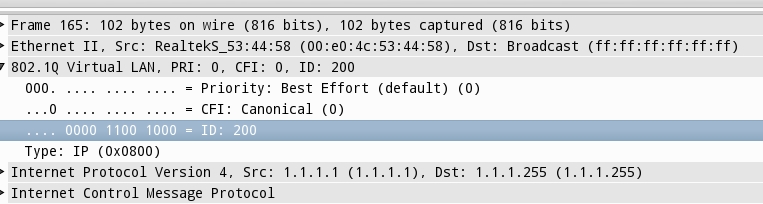
You can see that 802.1Q encapsulation is working. I just sent a ping to the broadcast address to generate traffic. All frames are being tagged with VLAN 200 using 802.1Q encapsulation.
For less than $ 100 you can buy 12 USB NICs and a decent USB HUB. This is all that you need for the CCIE R&S lab (besides 2x 3560 and 2x 3550 switches). Another advantage of this solution is that you can connect it to your laptop so you don’t have to think about a compatible motherboard for your Quad NICs.
If you are thinking about implementing this solution, let me know. I’m looking forward to hear your experience with these USB NICs.
Happy labbing!

The How to Master series helps you to understand complex topics like spanning-tree, VLANs, trunks, OSPF, EIGRP, BGP and more.
Written by René Molenaar - CCIE #41726


Hello,
I am interested in building the "Connect real switches to GNS3 using a Cheap USB NICs"
Although, I am new at this and was wondering if you have a more detail plan/manual on how to get this working?
Example, would 2×3750 work? Do I need to purchase a USB card for my PC?
Also, I am not that strong on ubuntu …
Any addition info on how to build the GNS3 lab with real switches would be much appreciated,
Thanks Mike
Rene, aside from the obvious cost difference, have you noticed any labbing differences from the usb vs the quad nic solution?
So far not, however one thing that you need to fix is making sure that whenever you boot your computer each USB adapter gets the same interface number. If the interface numbers change than suddenly an interface might be connected to the wrong router.
In Linux this is something we can do, I haven’t tried it yet though.
Hi Rene,http://gns3vault.com/index.php?option=com_users&task=registration.activate&token=eeaa04b17a26a0c1ea552f4be3413415
I am currently in preparation for my CCIE, and renting racks can get quite pricy.
I used your thought of buying usb-eth adapters as well as 4 3560 switches and need your help.
I am using ubuntu as a OS, and i created one router one GNS3 confirued a IP and then made a routed port on SW1 – tested basic ping – worked great.
Since linux does not strip dot1Q tags, will it be possible to run router on a stick on Linux. any way to do it? coz it didnt work for me…
p.s am new to linux, like REALLY NEW, so learning as i go along…
thanks
Q
Hi Q,
I think this should work, but it’s best to test it. Do something simple like this:
1) GNS3 Router connected to your USB NIC. Configure a sub-interface with "encapsulation dot1q 10".
2) Create a SVI interface on the switch for VLAN 10.
See if you can ping from your GNS3 router to your SVI interface.
Rene
To – RENE MOLENAAR
Hi, i have built my lab as you have mentioned here with usb nics .So ,i have tested whether those nics has vlan capability or not on my ubuntu box 12.04 lts .But i have found that when i am doing router-on-a stick config,the captured file is showing vlan id in the ethernet frame but when i am configuring switch as an access mode ,the vlan id is getting stripped off from the frame.I need to know ,Suppose i have two devices attatched to a switch with same vlan id as access mode ,in this scenario if i ping from one device to another device and capture the frame then the vlan tag will be there or not .
You will only see the VLAN tag on Trunk links, never on access ports.
Hi Rene,
This looks really like a cost effective solution to those who wants to learn including me. But does this really work for everything that we need to do to pass ccnp and ccie? Any issues so far that you have come across? Cheers.
Hello Rene,
can you specify the model for the USB ethernet adapter and USB hub?
Regards,
Comrie
Hello Rene I’ve purchased the same USB adapters using windows Vista. I’m unable to ping through the cloud. I can ping the my computer from the switch and router but can’t ping router to switch. Are there any special settings for windows? Thanks
Hi Mike,
Did you get any success ? I am stuck with a similar problem. From router I can ping my machine & from switch as well I can ping my machine. Good part is I can see the router in cdp nei on 3560 and I gave enabled cdp run on the virtual router in GNS3 but I do not see my 3560 on gns3 router.
GNS3
R1#sh cdp nei
Capability Codes: R – Router, T – Trans Bridge, B – Source Route Bridge
S – Switch, H – Host, I – IGMP, r – Repeater, P – Phone,
D – Remote, C – CVTA, M – Two-port Mac Relay
Device ID Local Intrfce Holdtme Capability Platform Port ID
R1#
On Physical switch
Switch>sh cdp nei
Capability Codes: R – Router, T – Trans Bridge, B – Source Route Bridge
S – Switch, H – Host, I – IGMP, r – Repeater, P – Phone,
D – Remote, C – CVTA, M – Two-port Mac Relay
Device ID Local Intrfce Holdtme Capability Platform Port ID
R1 Fas 0/1 175 R 7206VXR Fas 0/0.1
Switch>
Problem: I just cannot ping through the cloud. My router and switch cannot ping each other.
Using USB2.0 to Ethernet adapter.
I’m going with this option for my CCIE home lab on Mac OS X (Mountain Lion, 10.8). I am running GNS3.app as root via sudo command script, and I can bind the ethernet adapter to the cloud I create to represent to SW1, but when I then link that to the virtual R1 in my topolgy, it appears dynamips crashes, and I get an error about "unabel to connect to 127.0.0.1 7200". Has anyone else run into this? I’m going to try the 0.8.4 RC2 release tonight to see if that makes a difference.
I wonder how can we connect more than one ethernet cables into a single USB port ? How is it possible ?
Has anyone ran into an issue where there usb nics all show up as the same mac-address? Also, only 1 NIC is named "eth#" and the rest are named "rename#".
I’m using Ubuntu 12.04. Notice eth3, rename28 and rename 29 all have the same mac-address. Extremely weird. I hooked the USB-to-Ethernet NICs onto a Windows box via the same USB hub as I’m using in Ubuntu and I had no issues. All had a completely separate mac-address. Any assistance is greatly appreciated. Thanks!
-Peanut
Here’s a snippet from my ifconfig -a:
peanut@ubeezy:~$ ifconfig -a
eth0 Link encap:Ethernet HWaddr 64:66:b3:02:27:40
BROADCAST MULTICAST MTU:1500 Metric:1
RX packets:0 errors:0 dropped:0 overruns:0 frame:0
TX packets:0 errors:0 dropped:0 overruns:0 carrier:0
collisions:0 txqueuelen:1000
RX bytes:0 (0.0 B) TX bytes:0 (0.0 B)
Interrupt:93 Base address:0x8000
eth1 Link encap:Ethernet HWaddr c8:60:00:0a:17:73
inet6 addr: fe80::ca60:ff:fe0a:1773/64 Scope:Link
UP BROADCAST RUNNING MULTICAST MTU:1500 Metric:1
RX packets:27743 errors:0 dropped:0 overruns:0 frame:0
TX packets:22449 errors:0 dropped:0 overruns:0 carrier:0
collisions:0 txqueuelen:1000
RX bytes:6071539 (6.0 MB) TX bytes:18993996 (18.9 MB)
Interrupt:18 Memory:fb600000-fb620000
eth3 Link encap:Ethernet HWaddr 00:e0:4c:53:44:58
UP BROADCAST MULTICAST MTU:1500 Metric:1
RX packets:0 errors:1 dropped:0 overruns:0 frame:1
TX packets:0 errors:0 dropped:0 overruns:0 carrier:0
collisions:0 txqueuelen:1000
RX bytes:0 (0.0 B) TX bytes:0 (0.0 B)
rename28 Link encap:Ethernet HWaddr 00:e0:4c:53:44:58
BROADCAST MULTICAST MTU:1500 Metric:1
RX packets:0 errors:0 dropped:0 overruns:0 frame:0
TX packets:0 errors:0 dropped:0 overruns:0 carrier:0
collisions:0 txqueuelen:1000
RX bytes:0 (0.0 B) TX bytes:0 (0.0 B)
rename29 Link encap:Ethernet HWaddr 00:e0:4c:53:44:58
BROADCAST MULTICAST MTU:1500 Metric:1
RX packets:0 errors:0 dropped:0 overruns:0 frame:0
TX packets:0 errors:0 dropped:0 overruns:0 carrier:0
collisions:0 txqueuelen:1000
RX bytes:0 (0.0 B) TX bytes:0 (0.0 B)
Hello,
Yes i ran into the same issue, it has to do with :
/etc/udev/rules.d
i am still on it
Here is my dynamic named usb to lan adapter "rename21", which changes everytime i unplug and plug the device, "eth3" is the first usb to lan adapter plugged in :
root@gns3lab /etc $ sudo biosdevname -d
BIOS device:
Kernel name: eth3
Permanent MAC: 00:09:72:83:62:58
Assigned MAC : 00:09:72:83:62:58
ifIndex: 14
Driver: asix
Driver version: 22-Dec-2011
Firmware version: HG20F9 USB 2.0 Ethernet
Bus Info: usb-0000:00:14.0-11
BIOS device:
Kernel name: rename21
Permanent MAC: 00:09:72:83:62:58
Assigned MAC : 00:09:72:83:62:58
ifIndex: 21
Driver: asix
Driver version: 22-Dec-2011
Firmware version: HG20F9 USB 2.0 Ethernet
Bus Info: usb-0000:00:14.0-12
The trick is to write a udev rules to force the name of the device based on the "Bus Info" value, but i tried and i could not succeed in.
Any help ?
hi
Which is better ?
USB 2.0 10 Port Hub = 25 $
OR
7 Port USB 3.0 Hub = 35 $
***SOLUTION***
to connecting cheap usb ethernet adapters to real switches and GNS3
FOR MICROSOFT WINDOWS USERS/ should help linux users as well
———————————————————————————–
Those 4 dollar cheap usb adapters are exactly that. Cheap garbage. If you want a quality lab that will work great with real cisco switches, it is important that you buy the correct types of "cheap" USB Nics…
The idea is to get these adapters but to get different brands that will have different chipsets that the windows registry will see as different devices and not confuse itself. Keep in mind that you may find several usb adapters with chipset names that are almost identical but with one or two letters different. They are still different and windows registry will see them as different adapters so they will not be confused. See example:
ASIX AX88772 USB2.0 to Fast Ethernet Adapter (plugable) brand
ASIX AX88772B USB2.0 to Fast Ethernet Adapter (iocrest) brand
Look at above example. These two adapters have almost identical chipsets but the 2nd one is "different" because of the letter B. Windows or even Linux will see them as different adapters and not get confused.
I make it a point to NOT buy those 4 dollar adapters for several reasons including: they are only about 12mbit and most of them wont work under linux. If you take the next level of cheap up, you can find many usb 2.0 adapters that are compatible with Linux and windows and have different chipsets that support Full 10/100 Mbps. I have bought from ebay several adapters up to about 20.00 usd. ea. Thats not a bad price and for the CCNP tshoot topology, for example, you only need 2 of them.
Keep in mind to buy different brands or models that have different chipsets and you will NOT have problems. Do your research and check the manufacturer’s websites for more info about the chipset used and if the adapter supports full bandwidth. Also, if you search ebay very good (depends on the key words you use to search) you can get some very very good deals on these usb 2.0 adapters. Also, buy a USB 2.0 HUB. I’ve bought the really cheap ones found on ebay that work well with the exception of one problem where the usb cable that it came with was giving me problems so I replaced it with a brand new usb 2.0 cable and problem solved.
Hello,
My name is Israel and i`m from Portugal.
I hope to get same help on this one…
I bought 3 of those USB NICs but they simply do not work on my 3550 switch! I tested them successfully in some 3560 in my work and they also work well in my routers (2600)…but not in the 3550!
Does anyone know the reason?
You need to give more information but here is a tip or two on how to use those usb adapters…
While they are connected to your computer’s USB ports, go to the adapter settings properties of each usb network adapter and un-check client for microsoft networks and TCP/IP. This prevents your host computer from trying to use them and gets GNS3 cloud service to use them. Also run as administrator GNS3. If it worked for your other devices I dont see what the problem would be with any other router or switch. Maybe you configured something differently and dont remember? hope this helps you..[quote=learsi]Hello,
My name is Israel and i`m from Portugal.
I hope to get same help on this one…
I bought 3 of those USB NICs but they simply do not work on my 3550 switch! I tested them successfully in some 3560 in my work and they also work well in my routers (2600)…but not in the 3550!
Does anyone know the reason?[/quote]
Hello pcdocta, thanks for your help and sorry if I was not very precise…
– I have not used the GNS3 yet, what I did was a simple test where I connected one USB NIC and installed it on my laptop and connected to my 3550. The status light of the interface did not turn on…as if nothing was plugged! In my routers works well and also works fine on the 3560 at my work.
All my switches works fine but, for some reason, they do not recognize these USB NICs
The NICs are exactly the same to those in the photos above
The 3550 switches do not support the AUTO-MDIX (auto crossover) feature. You will have to use crossover cables instead.
[quote=learsi]Hello pcdocta, thanks for your help and sorry if I was not very precise…
– I have not used the GNS3 yet, what I did was a simple test where I connected one USB NIC and installed it on my laptop and connected to my 3550. The status light of the interface did not turn on…as if nothing was plugged! In my routers works well and also works fine on the 3560 at my work.
All my switches works fine but, for some reason, they do not recognize these USB NICs
The NICs are exactly the same to those in the photos above[/quote]
It worked!!!
Thanks a lot.
Best regards.
Hello Gary,
I had similar issue, perhaps, you can give me some tips as well. I connected my 3550 to usb ethernet adapter using crossover cable. Switch int is on and green, however the usb adapter is off and says nothing is connected. Is it adapter faulty or there are some configs that I need? I’m on W8.1. Thanks in advance
Glad to help! 🙂
[quote=learsi]It worked!!!
Thanks a lot.
Best regards.[/quote]
I’m looking to purchase the following USB 3.0 -> RJ-45 Adapters. Does anyone have experience with these working under linux and supporting 802.1Q tagging for example? I have looked up the chipset information but could not get a clear answer from the manufacturers website. Also, has anyone had trouble using the USB3.0 v.s. USB2.0 adapters?
http://www.amazon.com/Plugable-Gigabit-Ethernet-Network-Adapter/dp/B00AQM8586/ref=pd_sim_pc_2?ie=UTF8&refRID=1Q6WSYQ7A4YBNX2PNC5A
On my first google search I found this link,
http://www.digchip.com/datasheets/3291810-ax88179-usb-3-0-to-10-100-1000m.html
with info on the chipset ax88179. READ READ READ. The info you are looking for is right there.
[quote=gregalink]I’m looking to purchase the following USB 3.0 -> RJ-45 Adapters. Does anyone have experience with these working under linux and supporting 802.1Q tagging for example? I have looked up the chipset information but could not get a clear answer from the manufacturers website. Also, has anyone had trouble using the USB3.0 v.s. USB2.0 adapters?
http://www.amazon.com/Plugable-Gigabit-Ethernet-Network-Adapter/dp/B00AQM8586/ref=pd_sim_pc_2?ie=UTF8&refRID=1Q6WSYQ7A4YBNX2PNC5A%5B/quote%5D
Thank you pcdocta! That is exactly the information I was looking for. Now the question is do I purchase this particular adapter or look at other options. Do you have any recommendations?
Depends on what you are doing with the adapters. Look towards the top of this page for one of my posts about usb network adapters.. You can buy several different model usb adapters from pluagable. The trick is to not use more than one of the same exact usb network adapter. You want to get adapters having different chipsets. If you want linux compatibility then you have to choose your adapters more carefully. If you will only use gns3 with these adapters, then usb 3.0 wont make a difference where usb throughput is concerned.
[quote=gregalink]Thank you pcdocta! That is exactly the information I was looking for. Now the question is do I purchase this particular adapter or look at other options. Do you have any recommendations?[/quote]
I’ll go ahead and have a look at your post regarding the use of different adapters. For the moment I have purchased 1 of the afformentioned adapters from pluggable and a 7 port Sata 3 USB hub which is good if I don’t want multiples of the same adapters. At the moment I’m only going to be using this for GNS3 and my CCNP studies but I’m sure there will be other projects which will make use of the higher data transfer speeds.
@pcdocta,
1st of all, Im a noob. Please bare with me. Do i have this right?
1. Purchase different usb nics to avoid issues with windows
2. install drivers
3. Once installed, connect physical switch to usb nic
4. In GNS3, drop a cloud and associate the cloud to the new usb nic installed.
Do i have those steps right? Lastly, once i have the physical connections installed, how i open a console window from GNS3 to access the switch? Please feel free to reply here or via email at opreciado@outlook.com.
Also, for anyone interested, I’d be willing to pay for GNS3 services. Basically to get switches up and running if I cant figure it out on my own. I dont have much but whatever we can work out, id be willing to do. Thanx everyone!
The way i did it was with a cisco access server. I had the console ports of the switches connected to the access server and the access server connected to my home wifi router so that i can telnet to it..that way i have access to all switches from the console opened in separate tabs..
If you don have an access server you will have to run a console cable to your switches from the PC.
Check ebay for the access server. Its a router with several rj 45 serial ports.. Google it…
[quote=opreciado]@pcdocta,
1st of all, Im a noob. Please bare with me. Do i have this right?
1. Purchase different usb nics to avoid issues with windows
2. install drivers
3. Once installed, connect physical switch to usb nic
4. In GNS3, drop a cloud and associate the cloud to the new usb nic installed.
Do i have those steps right? Lastly, once i have the physical connections installed, how i open a console window from GNS3 to access the switch? Please feel free to reply here or via email at opreciado@outlook.com.
Also, for anyone interested, I’d be willing to pay for GNS3 services. Basically to get switches up and running if I cant figure it out on my own. I dont have much but whatever we can work out, id be willing to do. Thanx everyone![/quote]
[quote=pcdocta]The way i did it was with a cisco access server. I had the console ports of the switches connected to the access server and the access server connected to my home wifi router so that i can telnet to it..that way i have access to all switches from the console opened in separate tabs..
If you don have an access server you will have to run a console cable to your switches from the PC.
Check ebay for the access server. Its a router with several rj 45 serial ports.. Google it…
Ok, I did. Looks interesting. Im considering it now. So i guess, do all the physical connections and give the AS an IP, then figure out how to access each switch via telnet. Can I access the AS (i keep thinking Autonomous System lol) using Putty? or would it have to be via cmd and then telnet?
This is what Im trying to do… Use GNS3 Routers with 4 3560 switches so that I can prepare for my CCNP. Id like to be able to have full functionality of the switches including the use of 802.1Q tagging for ROS configurations which I’ve read W7 strips. I bought a monster PC with a TB HDD just for GNS3, with 32gbs of RAM (I needed a new PC anyway so i went all out). My PC only has one NIC. Should I be looking into getting another single, double, or quad NIC perhaps?
I’d like to purchase these labs and books I see on here, I’m just stuck and confused on the setup of the switches with GNS. What would you suggest is my best course of action?
I suggest you use:
*(2) 3560 L3 switches
*and (2) 2950 or 2960 switches.
you will need cross over cables to connect to the L3 switches
*(1) Cisco AS2511-RJ 2511 Access Console Server Router (this has 16 RJ-45 ports)
You need to prob make some roll-over cables to connect from the access server to the console ports of the switches. I suggest you make them just for the sake of practice
*(1) AUI Ethernet 10Base-T RJ45 Transceiver
(you will need this to convert the serial port to RJ-45 for your connection to the home wifi router)
You will assign this interface a static ip based on your home wifi subnet and use that ip to telnet to it.
*(2) USB ethernet adapters (is all you will need to break out from Router 4 to the real switches for the CCNP topology)
*you will need Cat-5e patch cords to connect it all up.. length depends on what you need.
* then you will need the access server configured. (google how to do it or I can send you a copy of a config) (recommend to google it for your own learning experience)
*Turn off CDP on the serial port.
To access it is not an issue. I recommend you use superputty or install SecureCRT and use that for your terminal in GNS3 for windows. Once you have your topology loaded and the routers up in the terminal program, open a new tab and telnet to your access server. Assuming you have your computer connected to your wifi. As for your computer, even though its nice to have that powerhouse you bought it was not necessary. I did all that with a dell laptop with 4GB Ram and 500GB HDD (stock setup from dell). You could have used that money for something else…just my opinion though…
[quote=opreciado][quote=pcdocta]The way i did it was with a cisco access server. I had the console ports of the switches connected to the access server and the access server connected to my home wifi router so that i can telnet to it..that way i have access to all switches from the console opened in separate tabs..
If you don have an access server you will have to run a console cable to your switches from the PC.
Check ebay for the access server. Its a router with several rj 45 serial ports.. Google it…
[b]
Ok, I did. Looks interesting. Im considering it now. So i guess, do all the physical connections and give the AS an IP, then figure out how to access each switch via telnet. Can I access the AS (i keep thinking Autonomous System lol) using Putty? or would it have to be via cmd and then telnet?
This is what Im trying to do… Use GNS3 Routers with 4 3560 switches so that I can prepare for my CCNP. Id like to be able to have full functionality of the switches including the use of 802.1Q tagging for ROS configurations which I’ve read W7 strips. I bought a monster PC with a TB HDD just for GNS3, with 32gbs of RAM (I needed a new PC anyway so i went all out). My PC only has one NIC. Should I be looking into getting another single, double, or quad NIC perhaps?
I’d like to purchase these labs and books I see on here, I’m just stuck and confused on the setup of the switches with GNS. What would you suggest is my best course of action?[/b][/quote]
Also, you can use virtual box inside GNS3 to run the client PCs and FTP server PC as in the ccnp topology or use real PCs if you have. You will need more USB adapters for this and patch cords to run from the PC to the switches.. All depends on how all out you wanna go. Possibilities are limited by budget..
[quote=pcdocta]I suggest you use:
*(2) 3560 L3 switches
*and (2) 2950 or 2960 switches.
you will need cross over cables to connect to the L3 switches
*(1) Cisco AS2511-RJ 2511 Access Console Server Router (this has 16 RJ-45 ports)
You need to prob make some roll-over cables to connect from the access server to the console ports of the switches. I suggest you make them just for the sake of practice
*(1) AUI Ethernet 10Base-T RJ45 Transceiver
(you will need this to convert the serial port to RJ-45 for your connection to the home wifi router)
You will assign this interface a static ip based on your home wifi subnet and use that ip to telnet to it.
*(2) USB ethernet adapters (is all you will need to break out from Router 4 to the real switches for the CCNP topology)
*you will need Cat-5e patch cords to connect it all up.. length depends on what you need.
* then you will need the access server configured. (google how to do it or I can send you a copy of a config) (recommend to google it for your own learning experience)
*Turn off CDP on the serial port.
To access it is not an issue. I recommend you use superputty or install SecureCRT and use that for your terminal in GNS3 for windows. Once you have your topology loaded and the routers up in the terminal program, open a new tab and telnet to your access server. Assuming you have your computer connected to your wifi. As for your computer, even though its nice to have that powerhouse you bought it was not necessary. I did all that with a dell laptop with 4GB Ram and 500GB HDD (stock setup from dell). You could have used that money for something else…just my opinion though…
Also, you can use virtual box inside GNS3 to run the client PCs and FTP server PC as in the ccnp topology or use real PCs if you have. You will need more USB adapters for this and patch cords to run from the PC to the switches.. All depends on how all out you wanna go. Possibilities are limited by budget.. [/quote]
Wow, thank you! Ok so first thing is, I actually have 3550s and not 3560s. They’re both L3 so is there anything of a significant difference between the two that I should ditch those? I myself dont think so but you’re obviously more knowledgeable than I am at this point so I defer to you.
Im probably going to go ahead and go with the AS but lets say I just wanted to ditch that and just go with the USB adapters instead. This of course was my original plan. So I guess I would need 4 (or one for every switch that I plan to use) USB adapters, correct? For one, im trying to save as much $$ as I can although Im willing to make the investment if in the end it makes life easier and worth it. And 2, because I just wanna know if I could lol. I have plenty of USB ports on my machine and Id be buying a hub anyway so Im assuming I wouldn’t need a Quad nic, correct? The other reason why is because Im just used to having each device with its own tab in SPutty. If i go the AS route, then it would just be one tab for the AS and access the switches via that same tab through the AS. Not a deal breaker but just my preference.
Making the patch/crossover cables is fine. I just made and ran one in my house over the weekend, no biggy. I actually like doing it, makes me feel like im earning my certs lol.
The config for the AS, i think I may have already found a sample to use. I’m a little thrown off as to what the config means and why that syntax exactly but I only took one look at it so far so I’ll make sure I research some more so that i understand it. If i still need some help with it, I’ll be sure and reach out.
I actually am using virtual box with xp and w7 hosts all setup. I went through the entire CBT Nuggets lab on GNS3 so im good to go there. Keith Barker is the man lol.
I had put off buying a PC for over a year and while doing so I saved a lot of bank so I wanted something that will kick @$$ with tons of storage so that I can just use and not worry about any limitations, at least for a while. It really takes advantage of my 50mb pipe too so I love this thing lol.
A little about me… I have all the CCNA’s except wireless. Which I will work on next. Im a do it yourself’er. I dont just ask for the work to be done for me. Im not afraid to ask for help but while Im doing I like to ask questions so that i know and understand why things are being done. So I want to thank you for your help thus far. I want and will make in the Cisco world and this a huge help. I appreciate it.
PS.. Im thinking to avoid all this mess and just buy some dam routers LOL.
You can use the 3550 switches.. but the ccnp exam is using 3550 and 2950 switches.
I suggested it so you are familiar with them.
If you do not get the access server, you will need console cables
from the switches to your PC. Most likely just get one USB to serial adapter
and move the console cable between switches to make your configs.
Still, the access server is highly recommended..
The USB ethernet adapters are to break out from GNS3 router 4
(from the ccnp topology) to the switches. Only 2 needed for that
A USB 2.0 hub is what you will need to connect all those usb ethernet nics
If you have the access server you can open as many tabs as there are
vty ports configured. Just telnet twice from two separate tabs and connect to each switch
separately. (line vty 0 4) that is 5 ports right there.. (you learned this in CCNA dude)
Thats right man, earn those certs.. Its a good thing!
I suggest you only use windows xp for your labs.. play around with win7
after you get your certs
GNS3 saves you alot of money over buying routers. Believe me you dont need to just yet.
Just switches is all you need for now..
Please when you post more stuff like this if you don’t mind use like a bulleted list
or separate your questions a little..