

Scenario:
This morning you woke up in a cell feeling dizzy and nauseous, it appears you were kidnapped by a mixture of agents from federal agencies. Your task is to finish this security test, if you pass you might end up becoming their next security agent…with blurry eyes you start your task!
Goal:
- All IP addresses have been configured for you, look at the topology picture for the IP addresses.
- OSPF has been configured for full connectivity.
- All routers are running services like HTTP, HTTPS, TELNET and SSH.
- Make sure you use the most specific wildcard for all your access-lists.
- You are only allowed to use extended access-lists.
- Configure the network so traffic from router CIA’s L0 interface towards the HTTP server on 3.3.3.3 is not permitted.
- Configure the network so traffic from router FBI’s L1 interface is only allowed to reach the HTTPS server on IP address 33.33.33.33.
- Configure the network so only users from router NSA’s L1 interface are allowed to telnet into router CIA.
- Configure the network so users from router FBI’s L2 interface are not allowed to ping to router’s NSA L1 interface.
Topology:
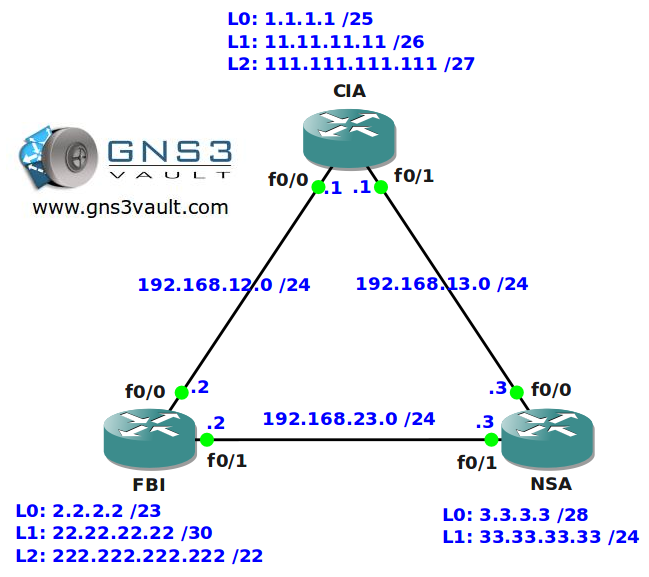
Video Solution:
Configuration Files
You need to register to download the GNS3 topology file. (Registration is free!)Once you are logged in you will find the configuration files right here.

Do you want your CCNA or CCNP Certificate?
The How to Master series helps you to understand complex topics like spanning-tree, VLANs, trunks, OSPF, EIGRP, BGP and more.
Written by René Molenaar - CCIE #41726


I think you reversed the names on the labs.
The “named” lab seems to require extended acl commands
and vice versa
-wbl
Hi wbl,
It’s OK. The only difference with the named access-list is how to configure it, you still need to choose a standard or extended access-list.
The named access-list lab is similar to this one with different tasks.
Rene
Hi Rene,
At first, I read this task incorrectly:
[i]….FBI’s L1 interface is [b]only allowed[/b] (HTTPS)[/i]
After watching your video, I understand want was actually needed.
But now, I am wondering [b]how would I block all traffic (besides 443) from loopback-1 (if that was the task)? Is it possible on the same router?[/b]
I basically created the same extended-access-list, and applied it to all of the interfaces of FBI — but nothing will block traffic from loopback-1.
Here is the access-list from the running-config:
[i]access-list 120 permit tcp 22.22.22.20 0.0.0.3 33.33.33.0 0.0.0.255 eq 443 log
access-list 120 deny ip 22.22.22.20 0.0.0.3 any log
access-list 120 permit ip any any[/i]
Thanks Rene. Love your website. Makes real practice fun and easy.
Hello Mark,
If I get your question right, you are trying to block traffic from Loopback1 on router FBI right?
Your access-list looks fine but you need to keep in mind that there’s a big difference between traffic “created by your router” (locally originated) VS traffic that is flowing through your router.
Traffic that is locally originated by your router will [b]NOT[/b] hit the access-list, only traffic that is flowing [b]THROUGH[/b] the router.
If you want to test this access-list, you should replace the loopback interface for another router, you’ll see that you will get another result 🙂
Was this helpful?
Rene
This answer was REALLY helpful. I was trying to configure the ACL as close as SOURCE as possible, but I couldn’t see any match even with a “permit ip any any”.
Thank you Rene.
Rene,
Thank you for clarifying that for me.
Doesn’t Cisco recommend that you place extended ACL as close to the source as possible. Would you please explain why you choose to place ACL 100 on NASA and not on CIA.
Configure the network so traffic from router FBI’s L1 interface is ONLY allowed to reach the HTTPS server on IP address 33.33.33.33.
Extended IP access list 100
10 deny tcp 1.1.1.0 0.0.0.127 host 3.3.3.3 eq www
20 permit tcp 22.22.22.20 0.0.0.3 host 33.33.33.33 eq 443
21 deny tcp any host 33.33.33.33 eq 443
40 permit ip any any
Plus I think that the whole concept is wrong, as HDEDMUNDO already stated ACL should be place the closest interface to the source not to the destination.
Configure the network so traffic from router CIA’s L0 interface towards the HTTP server on 3.3.3.3 is not permitted
you should make the access-list on CIA’s router because in extended access-list your statement should be as closer as possible to source to not waste traffic and make the link busy for data will not even reach the destination
and it’s tell block traffic towards 3.3.3.3 server not 3.3.3.0 network
so the configuration must be like this i think
[b]
CIA(config)#access-list 101 deny tcp 1.1.1.0 0.0.0.127 eq www host 3.3.3.3
CIA(config)#access-list 101 permit ip any any
CIA(config)#int f0/1
CIA(config-if)#ip access-group 101 out
CIA(config-if)#int f0/0
CIA(config-if)#ip access-group 101 out[/b]
To all the people going on about Cisco recommend that you place extended ACL as close to the source as possible.
Lets look at this logically. This lab has three router which belongs to three different organisations and in reality you would not have access to other organisations hardware. So when working on a specific router, have a mind set that you do not have access to the other routers.
[b]Carrying on from my last post. [/b]
As the three routers belong to different organisations the extended access-list are as close to the source as possible.
So Cisco recommends that you place extended ACL as close to the source within your own network as you don’t have control/access to other organisations network.
Hi Rene,
Doesn’t Cisco recommend that you place extended ACL as close to the source as possible. Would you please explain why you choose to place ACL 100 on NASA and not on CIA.
Thanks
I think the main goal here is that you have access to all three routers. I mean you see all IP’s and interfaces of all router and they are in a single area of ospf configured.
That being said that the correct place to add the access list 100 would be on the CIA outbound.
You will see that trying to test it, will not work as traffic from loopback 0 dont travel through the router and therefor will ignore the access-list.
Rene applied it so that you would be able to see that is blocking on the access-list.
Good Job Rene
Hi Rene,
I’m agree with bluecavalry.router FBI’s L1 interface is only allowed to reach the HTTPS server on IP address 33.33.33.33.I think it means, it doesn’t have permission to access to any destination except HTTPS server on IP address 33.33.33.33.
[color=green]access-list 120 permit tcp 22.22.22.20 0.0.0.3 33.33.33.0 0.0.0.255 eq 443 log
access-list 120 deny ip 22.22.22.20 0.0.0.3 any log
access-list 120 permit ip any any
Int fa 0/0
ip access-group 120 out
int fa 0/1
ip access-group 120 out[/color][i][/i][size=medium][/size]
Just for clarification. It says
Configure the network so traffic from router CIA’s L0 interface towards the HTTP server on 3.3.3.3 is not permitted.
so instead of using the wild card mask can we just use HOST?
access-list 100 deny tcp host 1.1.1.1 host 3.3.3.3 eq www
access-list 100 permit ip any any
int f0/1
ip access-group 100 in
Thanks
Tested below:
CIA(config)#access-list 101 deny tcp 1.1.1.0 0.0.0.127 host 3.3.3.3 eq www
out on all 3 interfaces:f0/0,f1/0 and loopback0
still can reach 3.3.3.3
so Ian is correct!
Hi my friend.. Im Harold From, Venezuela and Im studying for CCNA exam thabks for the Lab and you amazing BOOK “ How to master CCNA“ Do you think writing a CCNP book for the New exman ( 300-101 )
Thanks A lot
Hi Harold,
Nice to meet you! Glad to hear that you like the book.
There are no major changes in the CCNP track, some new items have been added (dmvpn, vrf) so I’ll be updating the books. Currently I’m working on my CCIE written book but once it’s done I’ll update them.
Anyone that buys the CCNP ebooks now gets a free update of course 🙂
Rene
Hi rene
For the task … Configure the network so traffic from router FBI’s L1 interface is only allowed to reach the HTTPS server on IP address 33.33.33.33.
I used the following, is that correct? I have done tests and only FBI’s L1 can connect to NSA’s 443
10 deny tcp 1.1.1.0 0.0.0.127 3.3.3.0 0.0.0.15 eq www
11 permit tcp 22.22.22.20 0.0.0.3 33.33.33.0 0.0.0.255 eq 443
12 deny tcp any 33.33.33.0 0.0.0.255 eq 443
20 permit ip any any
I don’t used …
10 deny tcp 1.1.1.0 0.0.0.127 3.3.3.0 0.0.0.15 eq www
11 permit tcp 22.22.22.20 0.0.0.3 33.33.33.0 0.0.0.255 eq 443
12 deny ip 22.22.22.20 0.0.0.3 any
20 permit ip any any
The alternative I use is correct, or does this can cause some problems which I have not noticed?
I would greatly appreciate your comments
Oscar