

Scenario:
The agency has acquired you as a special network engineer. Within the organization there is a network that is using GLBP as their FHRP (First Hop Routing Protocol). Recently the agency was hit by an EMP (Electromagnetic Pulse) attack and some of the bits on your routers have been flipped. As a result the GLBP configuration is messed up and agents Connery and Brosnan have trouble reaching router Moneypenny. Up to you to shake it up and fix GLBP!
Goal:
- All IP addresses have been preconfigured for you.
- Do not use show run! (this will spoil the fun 🙂 use the appropiate ‘show’ and ‘debug’ commands. This will teach you the skills needed to become a true troubleshooting master.
- Router Dalton and Moore are configured for GLBP but there are issues.
- Make sure router Dalton and Moore are both configured for GLBP Virtual IP address 7.7.7.7 and that they can serve clients.
It took me 1000s of hours reading books and doing labs, making mistakes over and over again until I mastered all the troubleshooting issues for CCNP.
Would you like to be a master of troubleshooting too? In a short time without having to read 900 page books or google the answers to your questions and browsing through forums?
I collected all my knowledge and created a single ebook for you that has everything you need to know to become a master of troubleshooting.
You will learn all the secrets about GLBP, VRRP and HSRP troubleshooting and more.
Does this sound interesting to you? Take a look here and let me show you how to Master CCNP TSHOOT
IOS:
c3640-jk9s-mz.124-16.bin
Topology:
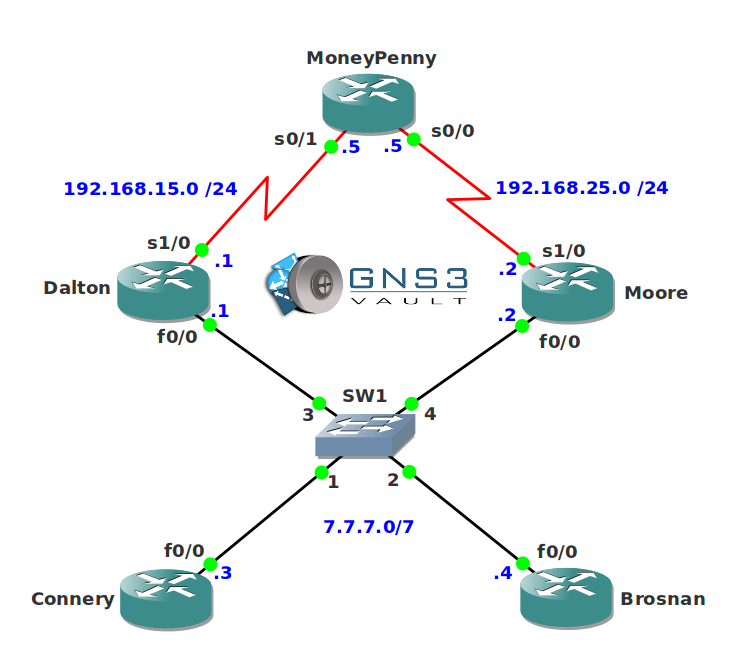
Configuration Files
You need to register to download the GNS3 topology file. (Registration is free!)Once you are logged in you will find the configuration files right here.

The How to Master series helps you to understand complex topics like spanning-tree, VLANs, trunks, OSPF, EIGRP, BGP and more.
Written by René Molenaar - CCIE #41726


This one had me scratching my head – I had end to end connectivity – in that I could ping to Moneypenny, but GLBP was not working right, in fact it was very very odd the way it was operating.
When I figured it out, it was a real eye opener – totally not what I expected at all.
Great Lab.
Glad you liked it 🙂
Hey guys plz help me out what is the reason that both router flips to become ACTIVE & Standby after some interval
Stuck on this lab spent at most 6 hours i’m not able to get a solution. The problem is that in my configurations router Dalton keeps on flapping from Listen and Active state. Need assistance
nice one ….
There is an access list in Fa0/0
You have to take it off
Nice Lab. I just did the ospf and eigrp tshoot labs. Both had access-lists in which I got. You caught me on this one though 😀
Nice Lab.
After HSRP lab, this time access-list wont get me! 😀
Not sure if anyone else had this issue but when applying authentication to match the other router it still gives no stop auth missmtahcing errors. The only way I got this to stop was by removing auth all together which is not ideal. Yes I made sure I was configuring auth for correct interface and instance of glbp.
The rest of the lab was great for me. After doing all the BGP labs I’m just in the habbit of checking access lists and route maps the second I get on a router!