

Scenario
Your have been streaming Star Trek videos by using multicast on your corporate network for quite some time without anyone noticing…recently one of your colleagues found you out…he’s going to tell your boss unless you agree to him and stream some of his favorite Star Wars videos as well. You don’t want to make a lot of changes to the network, but router Spock will not enough capacity to send this much traffic, you will need to change router Kirk to be the Designated Router (DR) for our multicast setup….may the force be with you…
Goal:
- All IP addresses have been preconfigured for you.
- Configure OSPF on all routers, achieve full connectivity.
- Configure sparse-mode multicast on all routers.
- Configure router Picard to be the rendezvous point (RP) in your network, use the loopback0 interface.
- Configure router Picard to be the mapping agent (MP) in your network, use the loopback0 interface.
- Configure router Scotty to join the following multicast group:
224.1.1.1 - Start a ping from router Picard to the multicast group address 224.1.1.1 to generate traffic.
- Make sure router Spock is the Designated Router (DR) and forwards multicast traffic towards router Scotty.
IOS:
c3640-jk9s-mz.124-16.bin
Topology:
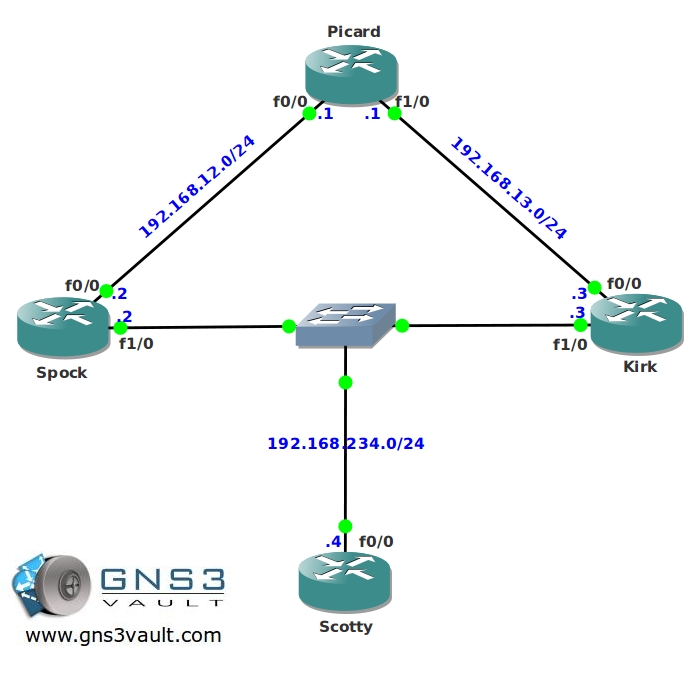
Video Solution:
Configuration Files
You need to register to download the GNS3 topology file. (Registration is free!)Once you are logged in you will find the configuration files right here.

The How to Master series helps you to understand complex topics like spanning-tree, VLANs, trunks, OSPF, EIGRP, BGP and more.
Written by René Molenaar - CCIE #41726


I think the Klingon router is cloaked.
Rene, enjoying the labs so far. I did notice a small issue with this particular lab. I’m not sure why you are configuring a mapping agent in this scenario, which is useful if you have multiple candidtate RPs. The following commands have to do with auto-rp:
ip pim send-rp-announce Loopback0 scope 10
ip pim send-rp-discovery Loopback0 scope 10
Also I believe that auto-rp requires either the interface to be in sparse-dense mode or the ip pim auto-rp listener command.
Since this doesn’t have anything to do with DR election per se, and you are also using a single RP, it might be better to leave auto-rp out of this lab altogether. You’ll notice that the lab operates fine and the election still takes place without these commands. Please let me know if you have any questions or would like to discuss further.
Regards,
Josh B, CCIE 28039