

Scenario:
You are the senior network engineer for a large MPLS provider based in the United Kingdom. 2 of your customers called “Toy” and “Arcade” would like to use your MPLS services to connect their HQ and branch offices. Your MPLS backbone has multiple routers and one of the problems you encounter is that there is no load-sharing within the MPLS cloud. You need to make sure you can offer your customers L3 services and that your MPLS backbone has traffic engineering so you can share the load on all routers…time for some tagging & tunneling!
Goal:
All IP addresses have been preconfigured for you.
- Every router has a loopback0 interfaced configured.
- Configure OSPF Area 0 at the provider side (Router PE1,PE2,P1,P2 and P3).
- Advertise the loopback interfaces as well in OSPF.
- Make sure you advertise the loopback0 interfaces as /24 instead of the default /32 or you will run into trouble.
- Ensure you have full reachability in the OSPF domain.
- Configure MPLS on all physical interfaces in the service provider domain, do not configure MPLS on physical interfaces pointing towards the customer.
- Configure VRF “Toy” on PE1 and PE2 as following:
RD 100:1
Route-target both 1:100 - Configure VRF “Arcade” on PE1 and PE2 as following:
RD 200:1
Route-target both 1:200 - On router PE1 and PE2 add the interfaces pointing towards the customers to the VRFs you just created.
- Ensure you can ping from within the VRF, try this as following on PE1:
ping vrf Toy 192.168.12.1 - Configure OSPF Area 0 on router ToyHQ and ToyBranch. Advertise the loopbacks as well.
- Configure EIGRP AS 2 on router ArcadeHQ and ArcadeBranch. Advertise the loopbacks as well.
- Configure OSPF and EIGRP on router PE1 and PE2 for the correct VRFs.
- Ensure you receive prefixes from the customer routers on your PE routers.
- Configure BGP AS 1 between Router PE1 and PE2.
- Configure the correct BGP address families and make sure communities are sent between neighbors.
- Redistribute OSPF and EIGRP into BGP, use the correct address-family for the VRFs.
- Ensure you have full connectivity for the customer networks. ToyHQ and ToyBranch should exchange OSPF prefixes and ArcadeHQ and ArcadeBranch should exchange EIGRP information.
- At this moment you should have a working MPLS network but all traffic is being sent through P3. We are going to use MPLS traffic engineering to use P1 and P2 as well.
- Configure the loopback10 interfaces on router PE1 and PE2 as the BGP next-hop for VRF Toy.
- Configure the loopback11 interfaces on router PE1 and PE2 as the BGP next-hop for VRF Arcade.
- Configure a tunnel10 interface on router PE1 and PE2 for VRF Toy. Make sure the tunnel is in MPLS traffic engineer mode.
- Configure the hold and setup priority to 1 for the tunnel 10 interface, set the bandwidth to 2000.
- Configure a tunnel11 interface on router PE1 and PE2 for VRF Arcade. Make sure the tunnel is in MPLS traffic engineer mode.
- Configure the hold and setup priority to 1 for the tunnel 11 interface, set the bandwidth to 2000.
- Configure the RSVP bandwidth to 2000 for all links interconnecting the P and PE routers.
- Configure MPLS traffic engineering tunnel support for all links interconnecting the P and PE routers.
- Finish your configuration so traffic for customer Toy is sent from PE1 through P1 and P2.
- Finish your configuration so traffic for customer Arcade is sent from PE1 through P3 and P2.
IOS:
c3725-adventerprisek9_ivs-mz.124-15.T13
Topology:
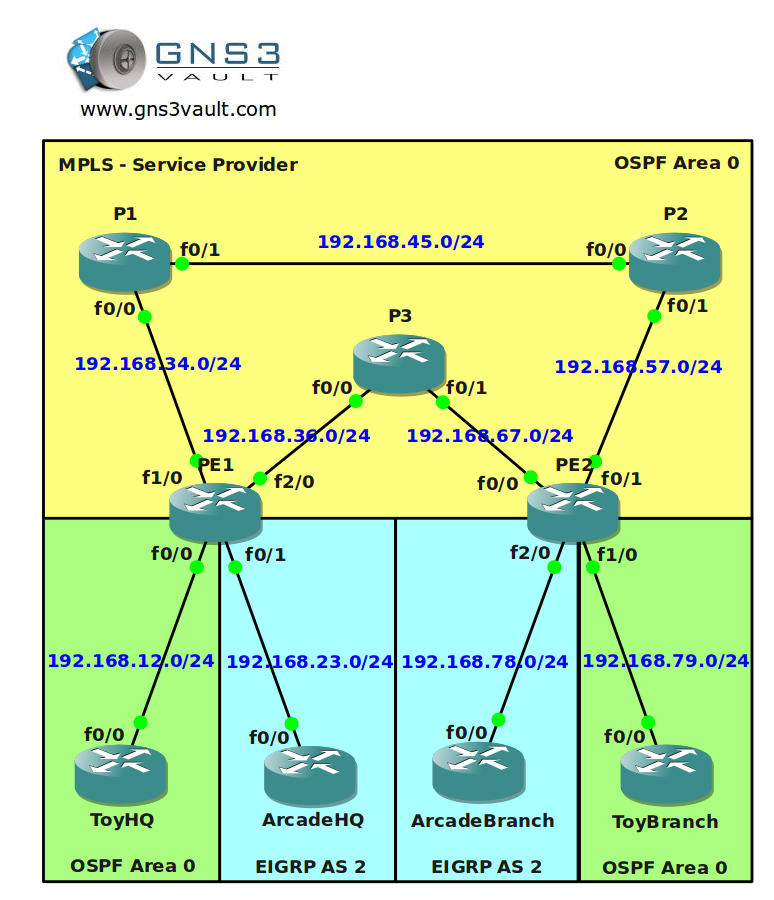
Configuration Files
You need to register to download the GNS3 topology file. (Registration is free!)Once you are logged in you will find the configuration files right here.

The How to Master series helps you to understand complex topics like spanning-tree, VLANs, trunks, OSPF, EIGRP, BGP and more.
Written by René Molenaar - CCIE #41726


Hey,
Would it be possible to get a video solution to this Lab?
Hi Jason,
Probably this week I’ll upload the solution.
Rene
Thanks,
I’m stuck on the BGP section, I’m just starting to learn BGP.
Hi Jason,
If you want to learn MPLS it’s a good idea to start with BGP. If you don’t understand the basics of BGP you’ll run into serious trouble with MPLS ;D
Start with some of the BGP labs to upgrade your BGP knowledge and then come back for MPLS, it’ll be much easier:
http://gns3vault.com/Table/BGP/
Good luck!
Rene
Thanks,
In the BGP labs, any advice on where to start.
I wrote a small article to introduce you to BGP:
http://gns3vault.com/MyBlog/bgp-for-beginners.html
Then do some labs:
– External BGP
– Internal BGP
– BGP Transit AS
– All the BGP Attribute Labs
– Basic & Advanced BGP labs
You can also take a look at my eBook. That’s where I explain BGP in detail including all the show/debug commands and such:
http://gns3vault.com/item/how-to-master-ccnp-route.html?category_id=3
8)
Good luck!
Rene
Rene,
I was wondering in what lab do you explain how to configure MPLS tunnels?
I’ve finished the BGP labs as you suggested but I’m stuck on the tunnel configurations.
PS. I going to buy your CCNP and CCNA books and write my exams.
Hello Jason,
This is the only lab where you will encounter the MPLS tunnels. You only need tunnels for traffic engineering. I don’t have the solution yet. I created this lab but didn’t spend my time to record it since MPLS traffic engineering isn’t on CCNP nor CCIE R&S ;D
Is BGP all clear to you? If you want to start with MPLS try the labs in this order:
– VRF Lite
– VRF Routing
– MPLS LDP
– MPLS Label Filtering
– Frame Mode MPLS
– Basic MPLS VPN
– Both MPLS VPN PE-CE labs
– Advanced MPLS is the ‘grande finale’ ;D
Traffic engineering is the last step in understanding MPLS but unless you plan on doing the MPLS exam from the CCIP track I wouldn’t spend much time at it.
Great to hear you want to buy my books!
Rene
Rene,
Thanks for the advice. I’ve finished most of the MPLS labs except the advanced lab. I’m going to take a break from BGP and MPLS for a while, my head is about to explode.
I’ve purchased both books and I’m now going to spend some time brushing up on my CCNA skills and write my exam next month. CCNP route will be some time after that.
Thanks again for all your advice.
PS. I was thinking of submitting a lab on GET VPN for cisco. Is that something you or anyone else would be interested in?
Hi Jason,
Good idea to take a break. BGP you’ll need for your CCNP ROUTE but you won’t find MPLS there. Nevertheless it’s good to understand it since it’s so popular nowadays.
If you have a nice lab for GET VPN i’d like to have it. If you want you can mail it to me and i’ll add it to the site.
Good luck with your exam!
Rene
This is the one im waiting for the solution.
Hi Salvador,
It will take a while before I have the solution for this one. I’m working on new labs first and then recording everything.
Rene
Hi Rene
Can this lab be done with the IOS image of the 3640? im having issues to get the one for 3725, not sure if there are some features required not available for 3640
thanks
Sal
Hi Sal,
I think the 3640 will be fine, it accepts the MPLS LDP commands and it accepts MPLS tunneling commands.
Rene
Hi Rene.
I hope you can help me.
I have a problem, I don’t ping customer branch from HQ then apply command in tunnel interfaces:
tunnel mpls traffic-eng autoroute announce
Without it command – ok, but traffic going through P3.
My some part listing:
ip vrf XXX
rd 100:1
route-target export 1:100
route-target import 1:100
bgp next-hop Loopback10
!
interface Loopback10
ip address 20.20.20.20 255.255.255.255
!
!
interface Tunnel10
bandwidth 2000
ip unnumbered Loopback10
tunnel destination 7.7.7.7
tunnel mode mpls traffic-eng
tunnel mpls traffic-eng autoroute announce
tunnel mpls traffic-eng priority 1 1
tunnel mpls traffic-eng path-option 1 dynamic
no routing dynamic
ip rsvp bandwidth 2000
!
!
router ospf 1
mpls traffic-eng router-id Loopback0
mpls traffic-eng area 0
router-id 2.2.2.2
log-adjacency-changes
network 0.0.0.0 255.255.255.255 area 0
!
!
address-family ipv4 vrf XXX
redistribute ospf 100 vrf XXX metric 10
neighbor 70.70.70.70 remote-as 1
neighbor 70.70.70.70 update-source Loopback10
neighbor 70.70.70.70 activate
neighbor 70.70.70.70 next-hop-self
no synchronization
network 20.20.20.20 mask 255.255.255.255
exit-address-family
!
ip route 20.20.20.20 255.255.255.255 Tunnel10
Can you tall me that is problem?
Thx
Hi Alexander
That static route is wrong.
It should be pointing to the Loopback of the egress PE (BGP nexthop of the other PE), not the same Loopback10 of the ingress PE as you have here
ip route 20.20.20.20 255.255.255.255 Tunnel10 >>>>
interface Loopback10
ip address 20.20.20.20 255.255.255.255 >>>>>>
Hi Rene, great site!
Would you be able to provide the final configs for this lab?
It would be MUCH appreciated.
Thanks!
George
Hi Guys,
In the next weeks I’m going to add the solution, I haven’t configured this one yet before since traffic engineering is not on the R&S track 🙂
Rene
Hi all!
If anyone is interested, here is my config one PE, it’s work good:
hostname PE1
!
boot-start-marker
boot-end-marker
!
!
no aaa new-model
memory-size iomem 5
ip cef
!
!
!
!
ip vrf XXX
rd 100:1
route-target export 1:100
route-target import 1:100
bgp next-hop Loopback10
!
ip vrf ZZZ
rd 200:1
route-target export 1:200
route-target import 1:200
bgp next-hop Loopback11
!
no ip domain lookup
!
mpls traffic-eng tunnels
multilink bundle-name authenticated
!
!
!
!
!
!
!
!
!
!
!
!
!
!
!
!
!
!
!
!
!
archive
log config
hidekeys
!
!
!
!
!
!
!
!
interface Loopback0
ip address 2.2.2.2 255.255.255.0
ip ospf network point-to-point
!
interface Loopback10
ip address 20.20.20.20 255.255.255.255
!
interface Loopback11
ip address 21.21.21.21 255.255.255.255
!
interface Tunnel10
bandwidth 2000
ip unnumbered Loopback0
mpls ip
tunnel destination 7.7.7.7
tunnel mode mpls traffic-eng
tunnel mpls traffic-eng priority 1 1
tunnel mpls traffic-eng path-option 1 dynamic
no routing dynamic
ip rsvp bandwidth 2000
!
interface Tunnel11
bandwidth 2000
ip unnumbered Loopback0
mpls ip
tunnel destination 7.7.7.7
tunnel mode mpls traffic-eng
tunnel mpls traffic-eng priority 1 1
tunnel mpls traffic-eng path-option 1 dynamic
no routing dynamic
ip rsvp bandwidth 2000
!
interface FastEthernet0/0
ip vrf forwarding XXX
ip address 192.168.12.2 255.255.255.0
speed 100
full-duplex
!
interface FastEthernet0/1
ip vrf forwarding ZZZ
ip address 192.168.23.2 255.255.255.0
speed 100
full-duplex
!
interface FastEthernet1/0
ip address 192.168.34.3 255.255.255.0
speed 100
full-duplex
mpls traffic-eng tunnels
ip rsvp bandwidth 2000
ip rsvp resource-provider none
!
interface FastEthernet2/0
ip address 192.168.36.3 255.255.255.0
speed 100
full-duplex
mpls ip
!
router eigrp 2
no auto-summary
!
address-family ipv4 vrf ZZZ
redistribute bgp 1 metric 100000 100 255 255 1500
network 192.168.23.0
no auto-summary
autonomous-system 2
exit-address-family
!
router ospf 100 vrf XXX
log-adjacency-changes
redistribute bgp 1 metric 10 subnets
network 192.168.12.0 0.0.0.255 area 0
!
router ospf 1
mpls traffic-eng router-id Loopback0
mpls traffic-eng area 0
router-id 2.2.2.2
log-adjacency-changes
network 0.0.0.0 255.255.255.255 area 0
!
router bgp 1
no synchronization
bgp log-neighbor-changes
neighbor 7.7.7.7 remote-as 1
neighbor 7.7.7.7 ebgp-multihop 255
neighbor 7.7.7.7 update-source Loopback0
no auto-summary
!
address-family vpnv4
neighbor 7.7.7.7 activate
neighbor 7.7.7.7 send-community both
exit-address-family
!
address-family ipv4 vrf ZZZ
redistribute eigrp 2 metric 10
no synchronization
exit-address-family
!
address-family ipv4 vrf XXX
redistribute ospf 100 vrf XXX metric 10
no synchronization
exit-address-family
!
ip forward-protocol nd
ip route 70.70.70.70 255.255.255.255 Tunnel10
ip route 71.71.71.71 255.255.255.255 Tunnel11
!
!
thank you!
Hey Rene,
Can you please post the solutions here please
Thanks
kishore
Hi Guys,
I’ll add the config/video once i’m done with all the other stuff. I think this is a good lab but it’s not on the R&S track…I need to put my R&S stuff in the priority queue ;D
Haven’t checked the config of Alexander, might be something to try in the meantime 😉
Rene
Hi Rene,
Looking forward to solution 😀
Thank you.
Ersan
when can we expect a solution to this lab..
Regards
KD
For anyone still waiting a solution, here is an addition to Alexander’s configuration. In order for traffic from the ‘Toy’ customer to take the link PE1 -> P1 -> P2 -> P2, I added an explicit path-option to tunnel 10 with a backup dynamic path-option.
PE1#
interface Tunnel10
bandwidth 2000
ip unnumbered Loopback0
mpls ip
tunnel destination 7.7.7.7
tunnel mode mpls traffic-eng
tunnel mpls traffic-eng autoroute announce
tunnel mpls traffic-eng priority 1 1
tunnel mpls traffic-eng bandwidth 2000
tunnel mpls traffic-eng path-option 1 explicit name TOP-LINK
tunnel mpls traffic-eng path-option 2 dynamic
no routing dynamic
end
ip explicit-path name TOP-LINK enable
next-address 192.168.34.4
next-address 192.168.45.5
next-address 192.168.57.7
Cheers,
Nick.
Thanks for sharing this Nick!
Please upload the video for this lab
Hi ,Can i see the video ….
Plz share/mail updated link on atulbhardwaz@gmail.com
Hi ,Can i see the video ….
Plz share/mail updated link on atulbhardwaz@gmail.com
could anyone please help me with
•Configure the loopback10 interfaces on router PE1 and PE2 as the BGP next-hop for VRF Toy.
•Configure the loopback11 interfaces on router PE1 and PE2 as the BGP next-hop for VRF Arcade.
Rest all is done…
It is possible to have the solution or the final configs for the routers? specially the PEs
can you take the time for create the video please
hi rene… please upload a solution video
thanks
Hii Rene…
i am awaiting for the given LAB solution …..as i working with one MPLS ISP project and this lab gives lots of understanding to me ….when you share the video solution for it…..
hi 2 all
you can find the LAB solution in my weblog , with little changes but the same concepts
http://ciscopersian.blogsky.com/1392/08/11/post-29/MPLS-TE-Per-VRF
I think I’m doing something wrong here? I have registered and logged in, but the message is still there that "You need to register to be able to download the GNS3 Topology File". How do you register?????
guys, do i need to use tunnel vrf XXX under the tunnel interface if i have the routing done on VRF??
Hi All ,
According to the requirement my routes r going properly But when my Tunnel 10 and 11 go down
on PE2 the path is selected from P3 and it dosent go back to Tunnel this problem is because of Priority
or some setting need to be done , If we get VIDEO at least we can come to now where is our mistake .
Thanks & Regards
I cant seem to register on the forum. It says email address blocked regardless of which email address i use.
i have completed the above lab.
The issue that im having is that all traffic from PE1 follows one explicit path and all traffic from PE2 follows the 2nd explicit path. The path is not working on the basis of VRF.
Please help me find out the issue
Below is the config from PE1.
!
ip vrf Arcade
rd 200:1
route-target export 1:200
route-target import 1:200
bgp next-hop Loopback13
!
ip vrf TOY
rd 100:1
route-target export 1:100
route-target import 1:100
bgp next-hop Loopback12
!
no ip domain lookup
!
mpls traffic-eng tunnels
multilink bundle-name authenticated
!
!
archive
log config
hidekeys
!
!
ip tcp synwait-time 5
!
!
interface Loopback0
ip address 11.11.11.11 255.255.255.255
ip ospf network point-to-point
!
interface Loopback12
ip address 12.12.12.12 255.255.255.255
!
interface Loopback13
ip address 13.13.13.13 255.255.255.255
!
interface Tunnel10
ip unnumbered Loopback0
mpls ip
tunnel destination 22.22.22.22
tunnel mode mpls traffic-eng
tunnel vrf TOY
tunnel mpls traffic-eng autoroute announce
tunnel mpls traffic-eng priority 1 1
tunnel mpls traffic-eng bandwidth 2000
tunnel mpls traffic-eng path-option 1 explicit name lamba
no routing dynamic
ip rsvp bandwidth 2000
!
interface Tunnel11
ip unnumbered Loopback0
mpls ip
mpls traffic-eng tunnels
tunnel destination 22.22.22.22
tunnel mode mpls traffic-eng
tunnel vrf Arcade
tunnel mpls traffic-eng autoroute announce
tunnel mpls traffic-eng priority 1 1
tunnel mpls traffic-eng path-option 1 explicit name chota
no routing dynamic
!
interface FastEthernet0/0
description Link to P3
ip address 192.168.36.11 255.255.255.0
duplex auto
speed auto
mpls ip
mpls traffic-eng tunnels
ip rsvp bandwidth 2000
!
interface FastEthernet0/1
description Link to TOY HQ
ip vrf forwarding TOY
ip address 192.168.12.11 255.255.255.0
duplex auto
speed auto
no cdp enable
!
interface FastEthernet1/0
description Link to ARCADE HQ
ip vrf forwarding Arcade
ip address 192.168.23.11 255.255.255.0
speed auto
full-duplex
!
interface FastEthernet2/0
description Link to P1
ip address 192.168.34.11 255.255.255.0
duplex auto
speed auto
mpls ip
mpls traffic-eng tunnels
ip rsvp bandwidth 2000
!
router eigrp 2
auto-summary
!
address-family ipv4 vrf Arcade
redistribute bgp 1 metric 10000 1 255 1 1500
network 192.168.23.0
no auto-summary
autonomous-system 2
exit-address-family
!
router ospf 10 vrf TOY
log-adjacency-changes
redistribute bgp 1 subnets
network 192.168.12.0 0.0.0.255 area 0
!
router ospf 1
mpls traffic-eng router-id Loopback0
mpls traffic-eng area 0
log-adjacency-changes
passive-interface Loopback0
network 0.0.0.0 255.255.255.255 area 0
!
router bgp 1
bgp log-neighbor-changes
neighbor 22.22.22.22 remote-as 1
neighbor 22.22.22.22 update-source Loopback0
!
address-family ipv4
neighbor 22.22.22.22 activate
no auto-summary
no synchronization
exit-address-family
!
address-family vpnv4
neighbor 22.22.22.22 activate
neighbor 22.22.22.22 send-community both
neighbor 22.22.22.22 next-hop-self
exit-address-family
!
address-family ipv4 vrf TOY
redistribute ospf 10 vrf TOY
neighbor 22.22.22.22 remote-as 1
neighbor 22.22.22.22 update-source Loopback0
neighbor 22.22.22.22 activate
neighbor 22.22.22.22 send-community both
no synchronization
exit-address-family
!
address-family ipv4 vrf Arcade
redistribute eigrp 2
neighbor 22.22.22.22 remote-as 1
neighbor 22.22.22.22 update-source Loopback0
neighbor 22.22.22.22 activate
neighbor 22.22.22.22 send-community both
no synchronization
exit-address-family
!
ip forward-protocol nd
!
!
no ip http server
no ip http secure-server
!
ip explicit-path name lamba enable
index 2 next-address 1.1.1.1
next-address 2.2.2.2
next-address 22.22.22.22
!
ip explicit-path name chota enable
next-address 3.3.3.3
next-address 22.22.22.22
Hi Rene,
Request you to please add a video of this topology.
Thanks in advance.
Hi Rene,
Are you gonna upload video solution for this lab?
Thanks
Joseph