

Scenario:
Your MPLS Backbone works like a charm but your security officer still has some issues. He doesn’t like that some of the prefixes are advertised with a label and it’s up to you to fix it….bring on the sticker remover!
Goal:
- All IP addresses on the customer routers have been preconfigured for you.
- OSPF has been configured on all routers and all networks are advertised.
- Configure MPLS on all routers, ensure all prefixes are advertised with a label.
- The prefixes on the loopback interfaces should NOT be advertised with a label.
IOS:
c3640-jk9s-mz.124-16.bin
Topology:
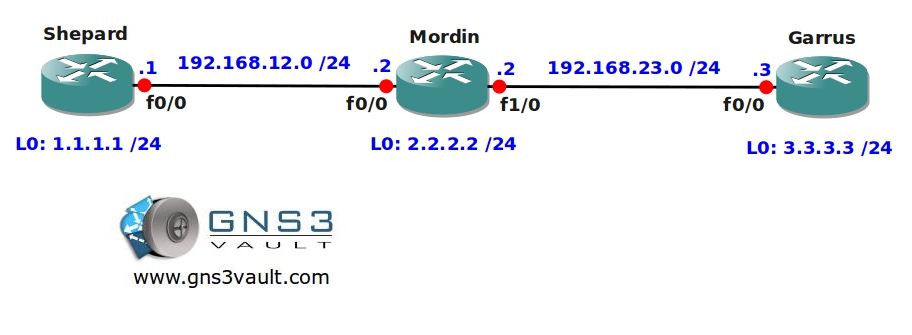
Video Solution:
Configuration Files
You need to register to download the GNS3 topology file. (Registration is free!)Once you are logged in you will find the configuration files right here.

Do you want your CCNA or CCNP Certificate?
The How to Master series helps you to understand complex topics like spanning-tree, VLANs, trunks, OSPF, EIGRP, BGP and more.
Written by René Molenaar - CCIE #41726


hmmm how to config mpls on these routers? are they p, pe or ce routers? adn which command to ensure that the prefixes are advertised with label? show mpl ip binging detail ?
Only on P or PE routers you would enable MPLS, and the command to do this is the same. The CE routers never run MPLS since this on the ‘customer’ side.
show mpls ldp bindings will show you the prefix to label binding. By default all prefixes will have a label.
Good luck!
Rene
so basically i enabled mpls ip on all interfaces connected to the routers, and also enabled mpls ip in global config mode.
after that when i show mpls ldp binding it doesnt show me labels. it just shows something like
show mpls ldp bindings
tib entry: 2.2.2.0/24, rev 4
local binding: tag: imp-null
tib entry: 192.168.12.0/24, rev 2
local binding: tag: imp-null
tib entry: 192.168.23.0/24, rev 6
local binding: tag: imp-null
also i enabled mpls ldp advertise-labels command in global config mode. Ill put the access list later but first i need to see labels :'(
sdfggsf, you are seeing what Mordin has for labels. When you see ‘imp-null’, you are seeing label #3.
The problem looks to be that Mordin doesn’t have LDP adjacencies with Shepard and Garrus.
Type ‘show mpls ldp neighbor’ to see who your adjacent neighbors are.
Also ‘show mpls interface’ will show you which interfaces have LDP enabled and which interfaces are enabled (no shut) themsevles.
[i]-bdk[/i]
Hello!
Wouldn’t the same thing be achieved if on routers Garrus and Shepard we created an access-list that only permitted the fasternetIP that was advertised by Mordin and then issued the command: mpls ldp neighbor Mordin-loopabck labels accept access-list?
For example on Shepard:
mpls ldp neighbor 2.2.2.2 labels accept 1
access-list 1 permit 192.168.23.0 0.0.0.255
Hi Dardoufa,
I’m not 100% sure but the command I used in this lab is to make sure some labels are not advertised. The command you mention is to make sure some labels are not accepted.
The end result will be the same but the difference is in the "sending" or "receiving" of labels.
Rene