

Scenario:
You are working as a network engineer at an ISP called “StoryTellers” and until now you have been responsible for the Frame-Relay network of this service provider. Since MPLS is becoming more popular every day, you are being moved from the Frame-Relay team to the MPLS team…you do need to upgrade your skills though, so it’s time to start with a basic MPLS lab and see what it’s all about.
Goal:
- All IP addresses are preconfigured as specified in the topology picture.
- Configure EIGRP AS 100 and advertise all networks, ensure you have full reachability.
- Perform a traceroute from Router Gepetto to the Loopback0 interface of Pinoccio. Take a good look at this trace so you can compare it to the MPLS traceroute (hint: copy/paste this information into notepad).
- Configure MPLS on all physical interfaces, do NOT configure MPLS on the loopback interfaces.
- Use the “show mpls ldp bindings” command to check what labels are being used for all networks.
- Are these labels the same or different on all routers? why?
- Perform a traceroute from Router Gepetto to Pinoccio’s Loopback0 interface, what is the difference compared to the traceroute you did before?
IOS:
c3640-jk9s-mz.124-16.bin
Topology:
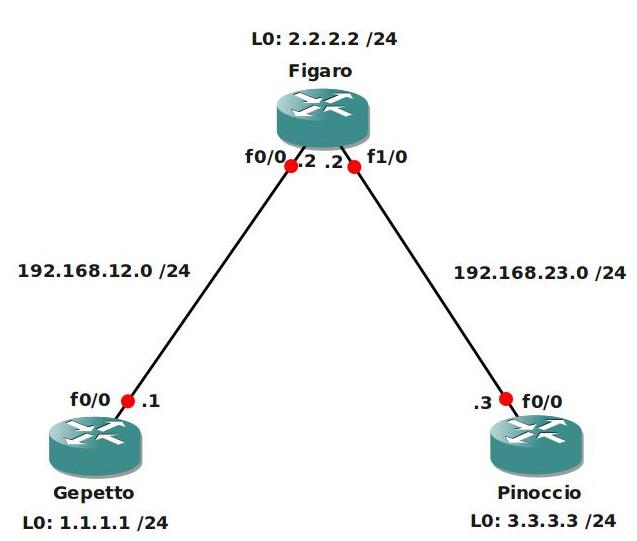
Video Solution:
Configuration Files
You need to register to download the GNS3 topology file. (Registration is free!)Once you are logged in you will find the configuration files right here.

Do you want your CCNA or CCNP Certificate?
The How to Master series helps you to understand complex topics like spanning-tree, VLANs, trunks, OSPF, EIGRP, BGP and more.
Written by René Molenaar - CCIE #41726


:D:D:D:D:D:D:D:D:D
Muahahaha ;D;)
having fun? 8)
Not big job to to my self but it would be nice to have. 😉
Um, only the final configs are posted. Any chance to have the initial configs posted to do the lab?
I think you can use the following.
Gepetto
router eigrp 100
network 0.0.0.0
!
interface Loopback0
ip address 1.1.1.1 255.255.255.0
interface FastEthernet1/0
ip address 192.168.12.1 255.255.255.0
duplex auto
speed auto
mpls ip
Subsequently you can use same principle config on other two routers with the different loopback and phy ip addresses as shown in the diagram.
thank you v761xee
here the 3 initial configs for both the routers:
conf t
hostname Geppetto
router eigrp 100
network 0.0.0.0
!
interface Loopback0
ip address 1.1.1.1 255.255.255.0
interface FastEthernet0/0
no shut
ip address 192.168.12.1 255.255.255.0
conf t
hostname Figaro
router eigrp 100
network 0.0.0.0
!
interface Loopback0
ip address 2.2.2.2 255.255.255.0
interface FastEthernet0/0
no shut
ip address 192.168.12.2 255.255.255.0
interface FastEthernet1/0
no shut
ip address 192.168.23.2 255.255.255.0
conf t
hostname Pinocchio
router eigrp 100
network 0.0.0.0
!
interface Loopback0
ip address 3.3.3.3 255.255.255.0
interface FastEthernet0/0
no shut
ip address 192.168.23.3 255.255.255.0
HTH