

Scenario:
After winning the lottery you thought your networking days would be over…with the millions you have won you bought your own tropical island. After weeks of sipping cocktails you got bored of doing nothing and decided to start your own ISP. Soon after starting the business it didn’t take long before the first customers came along, now it’s up to you to configure the whole MPLS backbone and help your customers setting up their routers. Good luck!
Goal:
-
All IP addresses have been preconfigured for you in the following format:
Ethernet interfaces: 192.168.XY.X /24, for example 192.168.12.X between router 1 and 2.
Loopback interfaces:
L0: X.X.X.X /24, for example: 1.1.1.1 for router 1.
L1: XX.XX.XX.XX /24, for example: 11.11.11.11 for router 1.You can see the router “numbers” if you click on the ‘show hostnames’ button in GNS3.
-
Configure OSPF process 1 on router PE1, P and PE2. Advertise the links between PE1 P PE2.
- Advertise the loopback0 interfaces in OSPF as well.
- Ensure you never send OSPF messages for OSPF process 1 on the links outside the backbone.
- Configure MPLS on router PE1, P and PE2. Make sure you don’t configure MPLS on the links outside the backbone.
- Configure authentication for MPLS, use password “cisco”.
- Configure MP-BGP between router PE1 and PE2, use AS1 and source updates from the loopbacks.
- Configure the correct VPN4 address-family in BGP between router PE1 and PE2.
Your first customer “Palm Club” just signed a contract with you, they have a HQ and 1 Branch office that needs to be connected through the MPLS cloud.
-
Create a VRF called “PALM” on router PE1 and PE2.
- Use a Route Distinguisher (RD) of 111:111.
- Use a Route Target (RT) of 111:111.
- Make sure the interfaces on the PE routers towards the PALM routers are put into the correct VRF.
- Configure RIP on router PalmHQ and PalmBRANCH, advertise the link towards the ISP and the Loopback0 interface.
- Configure RIP on router PE1 and PE2 and use the correct VRF.
- Ensure RIP updates are being exchanged between the customer and the PE routers.
- Configure redistribution between RIP and BGP on the PE routers, make sure you use the correct VRF.
- Ensure you can ping each others loopback0 interfaces from router PalmHQ and PalmBRANCH.
“Melons ‘r’ Us” heard great stories about you from “Palm Club” and decided to sign a contract with you as well. They have a HQ and Branch office as well and there is a link between the 2 sites. Your MPLS connection is much faster so they want to use MPLS as their main connection and the other link for backup.
-
Create a VRF called “MELON” on router PE1 and PE2.
- Use a Route Distinguisher (RD) of 222:222.
- Use a Route Target (RT) of 222:222.
- Make sure the interfaces on the PE routers towards the MELON routers are put into the correct VRF.
- Configure OSPF process 2 on router MelonHQ and MelonBRANCH, advertise the link towards the ISP and the Loopback0 interface.
- Advertise the link between router MelonHQ and MelonBRANCH in OSPF as well.
- Configure OSPF on router PE1 and PE2 and use the correct VRF.
- Ensure OSPF updates are being exchanged between the customer and the PE routers.
- Configure redistribution between OSPF and BGP on the PE routers, make sure you use the correct VRF.
- Ensure you can ping each others loopback0 interfaces from router MelonHQ and MelonBRANCH.
- Increase the ospf cost on the E0/2 interface on both Melon routers to 100.
- Try a traceroute from router MelonHQ towards MelonBRANCH. As you can see all traffic is being sent through the backup link and not the MPLS cloud.
- Ensure all traffic is sent through the MPLS cloud, you are only allowed to make changes on the PE routers.
Your company keeps growing and the third customer “Coco Loco” signed a contract with you. They have 2 sites; a HQ and a branch with 2 routers. Their situation is slightly more complex since they use EIGRP and BGP.
-
Create a VRF called “COCO” on router PE1 and PE2.
- Use a Route Distinguisher (RD) of 333:333.
- Use a Route Target (RT) of 333:333.
- Make sure the interfaces on the PE routers towards the COCO routers are put into the correct VRF.
- Configure EIGRP AS3 on router CocoHQ and the two CocoBRANCH routers, advertise the link towards the ISP and the Loopback0 interface.
- Advertise the link between router CocoBRANCH1 and CocoBRANCH2 in EIGRP as well.
- Configure EIGRP on router PE1 and PE2 and use the correct VRF.
- Ensure EIGRP updates are being exchanged between the customer and the PE routers.
- Configure redistribution between EIGRP and BGP on the PE routers, make sure you use the correct VRF.
- Ensure you can ping each others loopback0 interfaces from router CocoHQ and CocoBRANCH1 & 2.
- The Coco Branch site might cause problems because it’s multihomed, configure the PE routers to filter any duplicate prefix advertisements. (Hint: EIGRP SOO)
- Configure BGP AS3 on router CocoHQ and the two CocoBRANCH routers, advertise the link towards the ISP and the Loopback1 interface. “Coco Loco” wants to use the same AS number on both sites.
- Configure router PE2 so AS3 will accept it’s own AS number.
- Configure router CocoHQ so it will accept it’s own AS number.
- Advertise the link between router CocoBRANCH1 and CocoBRANCH2 in BGP as well.
- Configure BGP on router PE1 and PE2 to connect with the Coco routers, make sure you use the correct VRF.
- Ensure you can ping each others loopback1 interfaces from router CocoHQ and CocoBRANCH1 & 2.
- The Coco Branch site might cause problems because it’s multihomed, configure the PE routers to filter any duplicate prefix advertisements. (Hint: BGP SOO)
You just hired a security officer and the first thing he complained about is that your customers are able to see the IP addresses of the MPLS routers in the Cloud, you need to do something about it…
- Change the configuration of the MPLS Backbone so when you do a trace from router MelonHQ to MelonBRANCH you only see the PE routers.
All your customers are now connected to the MPLS cloud, and they are very satisfied with your services. “Palm Club” and “Melons ‘r’ Us’ decided to become business partners and they need access to each HQ’s.
-
Configure PE1 so PalmHQ and MelonHQ see each others routes. Ensure you have reachability by pinging 2.2.2.2 from PalmHQ using the loopback0 as source interface.
“Palm Club” and “Coco Loco” are complaining that you don’t offer any other services except the MPLS VPN. You decide to install a central server for e-mail. The server is located in the 9.9.9.0 /24 network.
-
Create a VRF called “CENTRALSERVER” on router PE1.
- Use a Route Distinguisher (RD) of 444:444.
- Use a Route Target (RT) of 444:444.
- Make sure the interface on the PE router towards the CENTRALSERVER router is put into the correct VRF.
- Configure OSPF process 3 on router PE1 and CENTRALSERVER, advertise the loopback interfaces on router CENTRALSERVER.
- Create a Route Target (RT) to export the CENTRALSERVER networks, use RT: 123:123
- Create a Route Target (RT) to export the networks of the Palm and Coco routers, use RT: 456:456
- Import the Route Target with the Palm and Coco networks into the CENTRALSERVER VRF.
- Import the Route Target with the CENTRALSERVER network in the Palm and Coco VRF.
- Ensure you have connectivity between Palm and CENTRALSERVER.
- Ensure you have connectivity between Coco and CENTRALSERVER.
- Test this by pinging the 9.9.9.9 IP address from the Coco and Palm sites.
- Ensure Palm and Coco do NOT have connectivity between each other.
- Configure a selective VRF export on router PE1 so the 99.99.99.0 /24 network is not exported.
“Coco Loco” and “Palm Club” ask you if you also offer Internet services through the MPLS cloud, you think this is a good idea so you decide to add a Gateway for Internet access.
-
Create a VRF called “INTERNET” on router PE2.
- Use a Route Distuingisher (RD) of 555:555.
- Create additional route-targets to make sure the Palm Club and Coco Loco sites are able to access the Internet.
IOS:
c3640-jk9o3s-mz.124-16.bin
Topology:
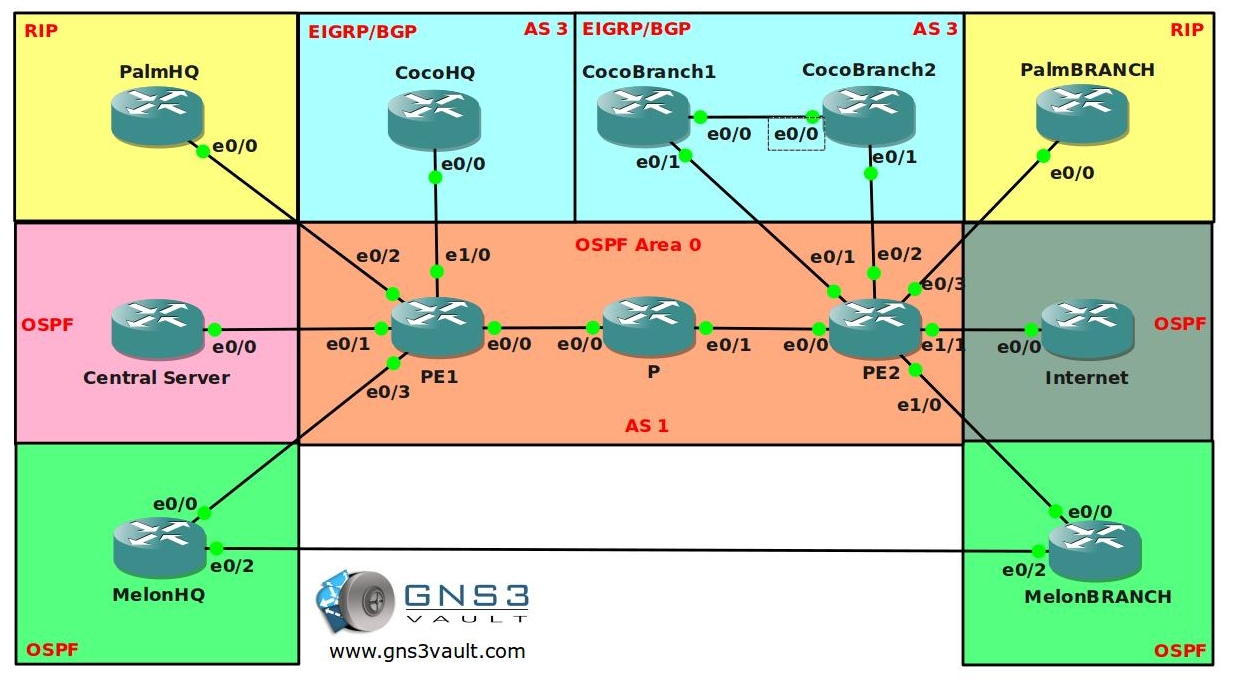
Video Solution:
Configuration Files
You need to register to download the GNS3 topology file. (Registration is free!)Once you are logged in you will find the configuration files right here.

The How to Master series helps you to understand complex topics like spanning-tree, VLANs, trunks, OSPF, EIGRP, BGP and more.
Written by René Molenaar - CCIE #41726


Yeah thank you so much for this topology!
I wanted to put some effort in (re)learning MPLS but never took the right time to build a decent topology and here you come to save my life 🙂
I follow your site almost daily and find it simply GREAT.
You are doing an awesome job helping a lot of people out there to practice via GNS3 🙂
Cheer Lethe.
Hello Lethe,
Thanks for your response 🙂 You are quick…I just uploaded this article, I’m working right now to upload the GNS3 file with basic configs…
Regards,
Rene
Hello All,
This lab is huge…but I think if you are able to finish it, you’ll have a very good understanding about MPLS VPN.
Please let me know if you encounter any errors, typos or when you won the lottery and started your own ISP…;)
Good luck & Have fun!
Rene
Dear Rene
Can you share Video TUT for the above Topology like that basic MPLS will be very helpful.
Thanks
KD
I will perhaps in the weekend, depends how much time I got left since i’m quite busy at the moment with work 🙂 I’ll let you know.
Dear Rene
Waiting for few more labs.Please share some L2MPLS labs also if it is possible.
Thanks
KD
i’ll add some more this week. L2 MPLS is easy to configure though…will do my best 🙂
Hi Rene,
Thanks for the great resource – there might be an IP address typo in the lab. Was that intentional? 🙂
Regards,
Chris Bennett
cgb
I have a question about the statement:
“Ensure all traffic is sent through the MPLS cloud, you are only allowed to make changes on the PE routers.”
I can make this work for all but the Loopback0 subnet – I see how it’s possible to make the MPLS path any more attractive without reconfigure the Melon routers to make the backdoor path a lower cost. Any ideas?
Hi Chris,
Thanks for your message. IP typos are not intentional so please let me know if you find an error 😉
About the OSPF over MPLS part…i’m not sure how you tried to achieve this goal. Try to google for “OSPF Sham Link” and I believe you’ll find the answer quickly.
Let me know if you have any other questions 😉
Hi Rene,
The IP address on E0/0 of R2 (MelonHQ) should be 192.168.23.2, not 192.168.12.2. It was a good typo to have as it added a little troubleshooting to the initial OSPF neighbor establishment 🙂
With respect to OSPF & MPLS, I read all about Sham Links today (MPLS hands-on is new for me as of today.. :)) and got a working configuration. I just couldn’t make the Loopbacks on the customer routers more attractive since the OSPF metric for MelonHQ MelonBrench is 11 (10 + 1) and the lowest you can get the same prefix via the MPLS path is 13 (10+1+1+1). At least that’s the best I can do 🙂 It’s not a big issue for me – but I am curious if there is a way to do it…
Thanks,
Chris
I just fixed the typo in the config, should make life easier for others 😉
About the Sham Link…if you don’t configure the sham-link then all traffic between MelonHQ and MelonBranch will use the direct link in between them…even if the cost is higher then through the MPLS Cloud.
The reason is that they are in the same area, the MPLS backbone is kinda like the ‘Super Area 0 or Super Backbone Area’ to OSPF.
Inter area routes are always chosen before Intra area routes.
If you configure the sham-link it will take the MPLS VPN cloud, but the cost will have to be lower…to fix it, configure the sham-link and increase the cost of the direct link between the 2 Melon routers.
Let me know if that works for you.
If you have configured the lab, it’s good to do it a few more times…you’ll see that the next time it’ll go a lot faster and you’ll memorize the commands.
Good luck!
Rene
Thanks for that – I had already configured the sham-links & had data route via the MPLS path as most preferable, but only for the non-loopback prefixes. Altering the cost on the customer equipment worked for me (the other day) – it just goes against your task description “you are only allowed to make changes on the PE routers.”. Keep up the good work.
You are right about that. I changed the lab article so you have to increase the cost of the link before doing the “PE Only” part. I forgot about the ‘higher cost’ problem.
“Configure router PE2 so AS3 will accept it’s own AS number” can you please provide some more details on this action point.
Sure, BGP has an option which will allow an AS to accept it’s own AS number.
Checking your own AS number is the BGP way of loop-prevention…if you see your own AS in the AS-path you will not accept the information. There’s an option to disable this…
Does anyone have the soultion you tube videos?
Hi, if this right what on PalmHQ and PalmBranch we have equal IP adresses? Lo0 and Lo1 on this routers are in one 11.11.11.0/24 subnet.
Do we really have a way to ping from one loopback to another without any adress translation?
guys please if anyone have done this lab successfully, please mail me the configuration mine didnt workout its a great help thanks
guys please if anyone have done this lab successfully, please mail me the configuration mine didnt workout its a great help thanks krishaan.hassim@gmail.com
If you have equal IP addresses it’s not going to work…you’ll need NAT somewhere. However different customers could have the same IP addresses and it will still work with MPLS (if they don’t communicate with each other) since you are making decisions on MPLS Tags instead of IP prefixes.
I don’t have the solution for this one yet, where are you guys stuck?
Did you see the youtube video for the basic MPLS VPN one? I think it will greatly help you solve this one…
http://www.youtube.com/user/gns3vault#p/search/2/EULFOF__V8c
Kind Regards,
Rene
Hello,
I started working for an operator a week ago and your website has been a ton of help on BGP and MPLS, really, really thanks a lot!! Extremely fun and informative.
I also have a question. I quote you saying: ‘Checking your own AS number is the BGP way of loop-prevention…if you see your own AS in the AS-path you will not accept the information. There’s an option to disable this…’
I desperately need the solution for this answer. I constructed a Lab with MPLS core running BGP and having several customers.
I distribute and redistribute EIGRP, OSPF, RIP or whatever and however between customer locations through different vrf’s through a route reflector.
However, my pain is that when I run BGP on the client side, I cannot make the two separate customer locations talk to each other. When I check the PE router, I can see that the VRF carries all the routes that are active on both customer locations. When I check with:
sh ip bgp vpnv4 vrf CUST_2 neighbors 172.3.0.2 advertised-routes
I also see the correct routes are being advertised. However, they are advertised with the same AS value as the customer, so how do I make the customer ignore this and accept the route-update?
Hopefully you can make sense of all this and respond because we live in the same city….
8):D
[quote]However, they are advertised with the same AS value as the customer, so how do I make the customer ignore this and accept the route-update?
[/quote]
Said, what you are looking for is the ability to configure a PE router to override a site’s ASN with a provider’s ASN. Not to through out the answer but here are some links that you will find helpful in figuring out what that command is and how to use it:
Cisco’s Configuring BGP Guide [url]http://goo.gl/oZYaq[/url]
Cisco’s MPLS VPN Enhancements [url]http://goo.gl/6rHcz[/url]
[i]-bdk[/i]
Hello Said,
Thanks for your comments 🙂 Kinda late reply from my side but i was away on holiday…and been kinda busy.
Anyway to answer your questions:
BGP will check for the AS Path since this is the loop-prevention system. However sometimes this causes problems because it will refuse to accept prefixes. To fix this, you need to use the [i][b]neighbor allowas-in command[/b][/i]. It will override the AS rule and accept any prefix.
You can also play around with the [i][b]neighbor as-overide[/b][/i] command.
About your MPLS problem with BGP at the customer side, did you get OSPF/RIP or EIGRP running OK? Just to make sure that your problem is BGP and not at the MPLS part…
Some very useful articles for you to read:
http://anetworkerblog.com/2008/05/11/neighbor-ce-as-override/
http://mpls-configuration-on-cisco-ios-software.org.ua/1587051990/ch06lev1sec1.html
I think it’s a good idea for me to cook up a MPLS lab with PE-CE BGP…so people can learn how to use these two commands.
Good luck!
Thanks for the reply,
the answer was simple, the only thing wrong was no AS override. Now allready hapily at work and redistributing routes of many different customers connected to our core 🙂
I have recently finished my CCNP route, but BGP remains a focus area. The amount of rules connected to BGP are crazy, but then again, the flexibility is awesome!
btw, thanks again for all your MPLS/BGP stuff on this website. Excellent stuff!!
Very nice 8) You work at an ISP? If so i’m guessing Breda or Den Bosch?
If you encounter some nice real life MPLS situations / scenarios let me know, i’d like to create some more labs for MPLS.
Take care!
Rene
Hello Rene,
I have a question about the Provider core section (first section) of the lab. If I enter the command “show mpls ldp neighbors detail” I see no neighbors. I know that with MPLS you have to increase the MTU size. Where I work we use a standard setting of 1546. On the 3640 you can not change the mtu size of the interface, so the maximum allowable MTU is 1500. Is there a work around for this?
Rene,
I still can not get MPLS neighbors. Please let me know what I am doing wrong.
PE1
mpls label protocol ldp
!
interface Ethernet0/0
ip address 192.168.34.3 255.255.255.0
half-duplex
mpls ip
!
router ospf 1
router-id 3.3.3.3
log-adjacency-changes
passive-interface default
no passive-interface Ethernet0/0
network 3.3.3.0 0.0.0.255 area 0
network 192.168.34.0 0.0.0.255 area 0
!
end
PE1#sh mpls ldp neigh
PE1#sh mpls ldp bind
tib entry: 3.3.3.0/24, rev 6
local binding: tag: imp-null
tib entry: 4.4.4.4/32, rev 10
local binding: tag: 17
tib entry: 5.5.5.5/32, rev 12
local binding: tag: 18
tib entry: 33.33.33.0/24, rev 4
local binding: tag: imp-null
tib entry: 192.168.13.0/24, rev 2
local binding: tag: imp-null
tib entry: 192.168.23.0/24, rev 16
local binding: tag: imp-null
tib entry: 192.168.34.0/24, rev 20
local binding: tag: imp-null
tib entry: 192.168.36.0/24, rev 18
local binding: tag: imp-null
tib entry: 192.168.39.0/24, rev 14
local binding: tag: imp-null
tib entry: 192.168.45.0/24, rev 8
local binding: tag: 16
I don’t think I am doing anything wrong. P and PE2 look very similar to PE1. I don’t know how everyone else got it to work with an MTU of 1500. Any insight would be appreciated.
Just wanted to add if I default PE1, P, and PE2 and start with no config on the boxes I can then get my my mpls neighbor adjacencies.
Andy, can you ping from PE1 to P and PE2?
What is your out put of ‘show mpls ldp discovery’ on both PE1 & P? This will show you which interfaces LDP is enabled on regardless if there are any neighbors answering.
What does the output of ‘debug mpls adjacency’ show?
[i]-bdk[/i]
Thanks for the command ‘show mpls ldp discovery’.. I’m on the right track now. I knew it had to be something simple.
Hi Andy,
Did you get it working? I’ve been busy so sorry for the late reply.
If you try a “debug mpls ldp transport events” do you see anything that could indicate what is going wrong?
Normally I never have trouble with the 3640’s…just a “mpls ip” on the interface and it’ll run.
Hi,
I had the same problem and did a lot of troubleshooting.
I am still figuring out why but when i removed the loopback 1 interfaces of the PE1 and PE2 router a LDP-neighborship was established. For some reason the PE-routers are trying to to TDP instead of LDP. I am also very new to MPLS but this worked for me.
Regards
Stefan
Hi all,
I just booted up this lab to check what the problem was, it’s completely normal behavior…first I took a look at the “P” router:
P#show mpls ldp discovery
Local LDP Identifier:
44.44.44.44:0
Discovery Sources:
Interfaces:
Ethernet0/0 (ldp): xmit/recv
LDP Id: 33.33.33.33:0; no route
Ethernet0/1 (ldp): xmit/recv
LDP Id: 55.55.55.55:0; no route
You can see it says “no route”. If you enable MPLS on the physical interfaces it will still use the IP address of the loopbacks as LDP Router ID. You need to be able to reach the router ID in order to become LDP neighbors.
As soon as you configure OSPF you see this:
P#show mpls ldp discovery
Local LDP Identifier:
44.44.44.44:0
Discovery Sources:
Interfaces:
Ethernet0/0 (ldp): xmit/recv
LDP Id: 33.33.33.33:0
Ethernet0/1 (ldp): xmit/recv
LDP Id: 55.55.55.55:0
That’s all there is to it. @Stefan it made sense it started working after removing the Router ID since it will take the physical IP address as Router ID.
Also be careful what IP address you use on the loopback interfaces, OSPF will by default advertise a /32 even if you have another subnet mask on the loopback.
Good luck guys!
Rene
Hi Rene, I download the Basic MPLS, it was Awsome. Now i am configuring the Advanced but i cannot. Can you pls. Fowared me the Configured Lab, so i can verify my my own configuration. I downloaded the Topology but it is only Ip Configuration.
Thanks.
Aqeel.
Hi Rene,
How to Configure MPLS Authentication.
I configured like this
no ip domain lookup
!
!
mpls ldp neighbor 4.4.4.4 password cisco
!
!
!
!
!
But it is still establishing the neighbour
Aqeel
Aqeel, what part of the lab isn’t working for you?
Anybody (nearly) can copy copy & paste commands to get networks up and running but it takes an extra skill set to methodically trouble shoot a problem to find a solution. Trouble shooting in labs that don’t quite work right helps build the skill set needed to trouble shoot real life issues with these technologies when they fail.
In the real world there are no answer books to look at, either you fix it and become the RockStar or you escalate the problem to someone else and they get all the glory :). So instead of taking a look at the answers why not begin trouble shooting the MPLS setup?
If nothing is working right, start trouble shooting to layer 1/2, make sure that all ports are not shut down and then run a ‘show cdp neighbor’ on each router to see if they can all see each other. If you can see all the routers connected to each other, what happens with you run ‘show mpls ldp discovery’ and ‘show mpls ldp neighbor’.
Let us all know how things go.
[/i]-bdk[/i]
Hi Everybody,
I am stuck here.
23.Configure OSPF on router PE1 and PE2 and use the correct VRF.
I don’t know how to configure OSPF on MPLS.
Following are my Configuration of PE1 and MelonHQ.
PE1
!
!
version 12.4
service timestamps debug datetime msec
service timestamps log datetime msec
no service password-encryption
!
hostname PE1
!
boot-start-marker
boot-end-marker
!
!
no aaa new-model
memory-size iomem 5
!
!
ip cef
no ip domain lookup
!
!
ip vrf MELON
rd 222:222
route-target export 222:222
route-target import 222:222
!
ip vrf PALM
rd 111:111
route-target export 111:111
route-target import 111:111
!
mpls ldp neighbor 4.4.4.4 password cisco
!
!
!
!
!
!
!
!
!
!
!
!
!
!
!
!
!
!
!
!
!
interface Loopback0
ip address 3.3.3.3 255.255.255.0
ip ospf network point-to-point
!
interface Loopback1
ip address 33.33.33.33 255.255.255.0
!
interface Ethernet0/0
ip address 192.168.34.3 255.255.255.0
half-duplex
mpls ip
!
interface Ethernet0/1
ip address 192.168.39.3 255.255.255.0
half-duplex
!
interface Ethernet0/2
ip vrf forwarding PALM
ip address 192.168.13.3 255.255.255.0
half-duplex
!
interface Ethernet0/3
ip vrf forwarding MELON
ip address 192.168.23.3 255.255.255.0
half-duplex
!
interface Ethernet1/0
ip address 192.168.36.3 255.255.255.0
half-duplex
!
interface Ethernet1/1
no ip address
half-duplex
!
interface Ethernet1/2
no ip address
shutdown
half-duplex
!
interface Ethernet1/3
no ip address
shutdown
half-duplex
!
router ospf 1
router-id 3.3.3.3
log-adjacency-changes
passive-interface Ethernet0/1
passive-interface Ethernet1/0
network 3.3.3.0 0.0.0.255 area 0
network 33.33.33.0 0.0.0.255 area 0
network 192.168.13.0 0.0.0.255 area 0
network 192.168.23.0 0.0.0.255 area 0
network 192.168.34.0 0.0.0.255 area 0
network 192.168.36.0 0.0.0.255 area 0
network 192.168.39.0 0.0.0.255 area 0
!
router rip
!
address-family ipv4 vrf PALM
redistribute bgp 1 metric 2
network 192.168.13.0
no auto-summary
exit-address-family
!
router bgp 1
no synchronization
bgp log-neighbor-changes
neighbor 5.5.5.5 remote-as 1
neighbor 5.5.5.5 update-source Loopback0
no auto-summary
!
address-family vpnv4
neighbor 5.5.5.5 activate
neighbor 5.5.5.5 send-community both
exit-address-family
!
address-family ipv4 vrf PALM
redistribute rip
no synchronization
exit-address-family
!
address-family ipv4 vrf MELON
no synchronization
exit-address-family
!
ip http server
no ip http secure-server
!
!
!
!
!
mpls ldp router-id Loopback0
!
control-plane
!
!
!
!
!
!
!
!
!
!
line con 0
line aux 0
line vty 0 4
login
!
!
end
Melon HQ.
!
!
version 12.4
service timestamps debug datetime msec
service timestamps log datetime msec
no service password-encryption
!
hostname MelonHQ
!
boot-start-marker
boot-end-marker
!
!
no aaa new-model
memory-size iomem 5
!
!
ip cef
no ip domain lookup
!
!
!
!
!
!
!
!
!
!
!
!
!
!
!
!
!
!
!
!
!
!
!
interface Loopback0
ip address 2.2.2.2 255.255.255.0
!
interface Loopback1
ip address 22.22.22.22 255.255.255.0
!
interface Ethernet0/0
ip address 192.168.23.2 255.255.255.0
half-duplex
!
interface Ethernet0/1
no ip address
shutdown
half-duplex
!
interface Ethernet0/2
ip address 192.168.122.2 255.255.255.0
half-duplex
!
interface Ethernet0/3
no ip address
shutdown
half-duplex
!
router ospf 2
log-adjacency-changes
network 2.2.2.0 0.0.0.255 area 1
network 22.22.22.0 0.0.0.255 area 1
network 192.168.23.0 0.0.0.255 area 1
network 192.168.122.0 0.0.0.255 area 1
!
no ip http server
no ip http secure-server
!
!
!
!
!
!
control-plane
!
!
!
!
!
!
!
!
!
!
line con 0
line aux 0
line vty 0 4
login
!
!
end
Can anybody help to configure OSPF on MPLS VRF.
Thanks
Aqeel.
Hi Rene
When do you make a tutorialvideo til Advanced MPLS.;D
Hi Rene
I cant crack these tickets.
Configure OSPF on router PE1 and PE2 and use the correct VRF.
• Ensure OSPF updates are being exchanged between the customer and the PE routers.
• Configure redistribution between OSPF and BGP on the PE routers, make sure you use the correct VRF.
Could you send me conf. Thank you
This monday I’m working on the MPLS videos, you can expect them the upcoming week.
That’s final configurations + Youtube solution Videos.
Dear
can u make video on this lab i would be glad if you did
I added the video a few days ago on Youtube but forgot to put it in the article, it’s here now. It took me almost 3 hours to record so i’m curious to see who is going to watch the whole thing ;D
Good luck!
Rene
Aqeel,
You have to use the command [i]router ospf # vrf ‘name'[/i] unlike eigrp or rip where you will use the address family cmd.
hope this is what you asked.
cheers,
Dinesh
Hi, I think that there is an error in the lab requirements or in the solution. The requirement is:
“Configure BGP AS3 on router CocoHQ and the two CocoBRANCH routers, advertise the link towards the ISP and the Loopback1 interface.” But in the solution the router are advertising the lo 0 interface address.
This is a good practise I am learning a lot about mpls
Hi Pako,
I might have picked the wrong loopback 😉 Good to hear it’s useful for you though…
Rene
Thanks you!!
Just finished watching video along with doing the lab. Your labs have been invaluable while studying for CCIE, thanks man!
You are welcome, good luck studying!
Hello,
thanks Rene for this site, is really unbelieve.
I have just finished the OSPF ticket and after configuring the sham-link with success I am wathing the OSPF routes as inter-area on the CE (eth0/2 ifaces are down):
MelonHQ#sh ip route ospf | i O IA
O IA 192.168.122.0/24 [110/120] via 192.168.23.3, 00:03:26, Ethernet0/0
O IA 192.168.125.0/24 [110/11] via 192.168.23.3, 00:03:26, Ethernet0/0
O IA 12.12.12.12 [110/21] via 192.168.23.3, 00:03:26, Ethernet0/0
MelonHQ#sh ip ospf database
OSPF Router with ID (2.2.2.2) (Process ID 2)
Router Link States (Area 0)
Link ID ADV Router Age Seq# Checksum Link count
2.2.2.2 2.2.2.2 442 0x80000009 0x003A4F 3
12.12.12.12 12.12.12.12 1811 0x80000007 0x0072E5 4
192.168.23.3 192.168.23.3 448 0x80000004 0x000313 1
192.168.125.5 192.168.125.5 1004 0x80000003 0x00F479 1
Net Link States (Area 0)
Link ID ADV Router Age Seq# Checksum
192.168.23.3 192.168.23.3 449 0x80000001 0x00EEB8
192.168.125.12 12.12.12.12 1848 0x80000001 0x0017E3
Summary Net Link States (Area 0)
Link ID ADV Router Age Seq# Checksum
12.12.12.12 192.168.23.3 438 0x80000001 0x008677
122.122.122.122 192.168.23.3 438 0x80000001 0x00AE95
192.168.122.0 192.168.23.3 438 0x80000001 0x009D49
192.168.125.0 192.168.23.3 850 0x80000001 0x00361B
MelonBRANCH#sh ip route ospf | i O IA
O IA 2.2.2.2 [110/21] via 192.168.125.5, 00:03:33, Ethernet0/0
O IA 22.22.22.22 [110/21] via 192.168.125.5, 00:03:33, Ethernet0/0
O IA 192.168.23.0/24 [110/11] via 192.168.125.5, 00:03:47, Ethernet0/0
PE1#show ip ospf sham-links
Sham Link OSPF_SL0 to address 55.55.55.55 is up
Area 0 source address 33.33.33.33
Run as demand circuit
DoNotAge LSA allowed. Cost of using 10 State POINT_TO_POINT,
Timer intervals configured, Hello 10, Dead 40, Wait 40,
Hello due in 00:00:01
PE2#sh ip ospf sham-links
Sham Link OSPF_SL0 to address 33.33.33.33 is up
Area 0 source address 55.55.55.55
Run as demand circuit
DoNotAge LSA allowed. Cost of using 10 State POINT_TO_POINT,
Timer intervals configured, Hello 10, Dead 40, Wait 40,
Hello due in 00:00:0
The routers configurations match the final-configs provide by Rene.
Best regards
Sebs
Hi Shumari,
Did you get everything working? If you understand OSPF Sham link it might also be a good idea to read up a bit how EIGRP behaves in a similar situation.
Rene
I cant start your file for this scenerio, because I dont use same IOSes, can you write me names of routers with numbers or initial config which is configured at begining of the lab??
Thank you very much…:D
Hi Behro,
Keep in mind you don’t need 100% the exact same IOS that I’m using. I mostly use a 3640 or 3725 image and another image should do the job as well. If you download my attachment and change the IOS filename to the one you are using it normally works and you should be able to open my topology.
That will save a lot of work because there’s plenty of routers + interfaces in this topology 😛
Rene
Folks,
I initially could not ping PalmBRANCH from PalmHQ and vice versa.
The routes seemed to propagate, but the pings failed. One thing I
did was to send only extended communities between PE’s and then the pings worked. So, I changed:
neighbor 5.5.5.5 send-community both
to
neighbor 5.5.5.5 send-community extended
on both PE’s.
For what its worth …
Frank
Hi Frank,
That’s interesting…I thought "normally" it doesn’t matter if you used both or extended. I’ll try it 🙂
Rene
[b]Hi Rene How are you.I like this lab very much because this lab explains everything about MPLS VPNs .Your lab collection is really
fantastic it helps me to prepare my CCNP exam.
Please provide me some guidelines how to prepare my CCNP Route exam.I am waiting for it.
Hi Piyush,
The best way to approach the CCNP ROUTE exam is to start reading up on all the topics. You can take a look at my "How to Master CCNP ROUTE" exam or pick another book. Once you read about a certain topic it’s time to do the labs….I’ve got plenty of labs to work on here 🙂 In my book I’m also showing which labs to do and in what order.
Good luck for your exam, let me know if you have any more questions!
Rene
Hello Rene how r u
I would like to ask one question that when you configured OSPF in Melon HQ & Branch through MPLS backbone then by operating sh ip route conmand on Melon Branch or HQ it provides OSPF inter-area routes for each other although they are both configured in area 0 why ?
It’s because of redistribution from OSPF into MP-BGP on both sides, you have to view the MPLS backbone as a "superbackbone" to OSPF.
Q. Configure PE1 so PalmHQ and MelonHQ see each others routes. Ensure you have reachability by pinging 2.2.2.2 from PalmHQ using the loopback0 as source interface.
—————-
After configuring Route Target on PE site i am seeing PALMHQ Loopback ip route in MELONBRANCH , I am not able to ping it , but why i am getting PALMHQ routes in MELONBRANCH router.
PALMHQ#sh ip int b
Interface IP-Address OK? Method Status Protocol
Ethernet0/0 192.168.13.8 YES manual up up
Loopback0 8.8.8.8 YES manual up up
———
MELONBRANCH#sh ip route 8.8.8.8
Routing entry for 8.8.8.0/24
Known via "ospf 2", distance 110, metric 1
Tag Complete, Path Length == 1, AS 1, , type extern 2, forward metric 11
Last update from 192.168.125.5 on Ethernet0/0, 00:05:47 ago
Routing Descriptor Blocks:
* 192.168.125.5, from 192.168.23.3, 00:05:47 ago, via Ethernet0/0
Route metric is 1, traffic share count is 1
Route tag 3489660929
If you post the part of your config that shows the importing/exporting of the routes we can take a look to see what’s wrong.
PE1
—————————-
ip vrf COCO
rd 333:333
route-target export 333:333
route-target import 333:333
!
ip vrf MELON
rd 222:222
route-target export 222:222
route-target export 123:123
route-target import 222:222
route-target import 123:123
!
ip vrf PALM
rd 111:111
route-target export 111:111
route-target export 123:123
route-target import 111:111
route-target import 123:123
!
———————
PE2
——————
ip vrf COCO
rd 333:333
route-target export 333:333
route-target import 333:333
!
ip vrf MELON
rd 222:222
route-target export 222:222
route-target import 222:222
!
ip vrf PALM
rd 111:111
route-target export 111:111
route-target import 111:111
!
Hi there,
In the solution video, you encounter a problem with the BGP part where part of the AS path seems to be "lost" during the route propagation. I was wondering if you did find a reason and solution for this?
Hi Ricardo,
It’s been awhile since I recorded this video. What exactly went wrong again? 🙂
Rene
Hi Rene,
Well, during the part when you implement allow-as in and as-override the AS Path doesn’t appear complete. You can view this in the solution video at around 1:25hrs
scorcher of a lab mate.. loved solving this.. thanks
Thanks, glad you enjoyed it!
Hi,
Just wanted to find out if some of you also experiencing an issue where all the routers load and start correct but you cannot console to all of them. I have checked the .net file and there are no duplicate console numbers but yet R5,R6,R7,R8 consoles are not working?
Thanks
First I would check if there are any applications running on your computer that are using some of the console ports. You can also try just to start the routers that are giving you issues and see if it’s possible to access the console then. Most of the times it’s because another application is already using the port…
Route tagging breaks sham-link adjacancy. Spent hours troubleshooting why my link wasn’t establishing. Almost gave up thinking it was a gns3 error. Turned out to be good troubleshooting and a great lesson learned. Very nice exercise. Thank you!
Glad you liked it!
Watched all the youtube video Burps and all. Great lab. Still curious as to how I get a default route to the INTERNET to PALM and COCO
Great lab !
Thanks Rene for the great lab , but I’m doing this lab in GNS3 and I’m having problem with EIGRP I did the same configuration you did in video and I could see the Branch Office network in my HQ router but I can’t ping them and I don’t know what the problem I don’t know if you help with that or any body . Thank’s again Rene for the great resource
Great Lab, So happy to Finally solve it 🙂
Hello,
im having trouble creating the second ospf for the Melon client on the PE2 , the PE1 works correctly and its the same configuration
PE2(config)#router ospf 2 vrf MELON
*Mar 1 01:44:08.051: %OSPF-4-NORTRID: OSPF process 2 failed to allocate unique router-id and cannot start
Regards
very good lab took 6 hrs to complete…
good lab.
2h30 to finish
thx for your good job.
Nice lab
Rene,
Please next time when you upload video try to slow down your typo co we can catch up, it is very hard for slow learner like me 🙂
Thanks,
Hi Rene,
Just a question. If you need to just block loopback1’s address from being advertised, and can be accomplished with vrf import map ALLOWIN on PALM and MELON vrf’s. What is the reason for the SELECTIVE route-map export?
Thanks.
Hi Wiki,
it is much easier to configure export map on one router rather than configuring all the others where you want to block importing of loopback1 address..
Hi,
I’m trying to lab the MPLS to get some exposure. But I have a newbie question, I’m trying to use GNS3 and what IOS images should I use to lab it. To my understanding only some devices support MPLS. Also, could someone navigate me to some link on setting up GNS3
Please advice
For this particular lab I used:
c3640-jk9o3s-mz.124-16.bin
Another good image is this one:
c3725-adventerprisek9-mz.124-15.t10
It supports all commands that you need. Most of the labs I created were made with those two platforms.
Not sure what I’m doing wrong, but the PE routers are not putting labels on routes that are redistributed from RIP into BGP.
So PE2 learns routers from the Palm Branch via RIP. That route gets redistributed into BGP. PE1 has it in the BGP table, but no label for it
The remote PE should have a VPN label for the remote prefix as part of the VPNv4 update. It would be like “mpls labels in/out none/500” or something. What are you seeing?
-Configure PE1 so PalmHQ and MelonHQ see each others routes. Ensure you have reachability by pinging 2.2.2.2 from PalmHQ using the loopback0 as source interface.
I under stand how you solved this in the lab but I was wondering couldn’t we just do:
ip vrf PALM
route-target import 222:222
ip vrf MELON
route-target import 111:111
Maybe I’m missing something obvious??
Badass lab btw, I’ve learned so much about MPLS.
A tough lab with impressive and great effort to get everything clear for the learners.
I can learn a lot of things even from your typos,from the way you attempt and think of
or find out resources to get the problems solved like in
(configuring the selective vrf export).
I saw these two lines below when you open up MPLS book to get help for SELECTIVE vrf issue.
{The import route map is deployed in the receiving vrf.
The export route map is deployed in the originating vrf.}
Then I can straight away resolve it by applying the route-map to filter the specific network
as
PE2(config)#route-map SELECTIVE deny 10
PE2(config-route-map)#match ip add 5
PE2(config-route-map)#exit
PE2(config)#route-map SELECTIVE permit 20
PE2(config-route-map)#exit
PE2(config)#access-list 5 permit 99.99.99.0 0.0.0.255
PE2(config)#ip vrf INTERNET
PE2(config-vrf)#export map SELECTIVE
PE2(config)#ip vrf PALM
[PE2(config-vrf)#import map SELECTIVE
PE2(config)#ip vrf COCO
PE2(config-vrf)#import map SELECTIVE
However you get it done by another way that make me learn some more.
Really appreciate your giving time and for your making effort on this
since your are tired and sleepy nearly at the end of this lab.
Everything is straight for me except to try a few more times for redistributions
between BGP and some other protocols as they didn’t work sometimes.
But it’s not like your labbing in a few hours.
It took me a few days LOL…….. 😀 😉
Have I missed something, was looking for the actual GNS3 download files so I can jump straight into this or do I need to create the topology and then load the configs? from the download files above?
Hi,
I can see for all the vrf’s created on PE1 and PE2, we are using the same RD ?? I understand RD’s have to be unique for VRF’s on PE routers, in order to differentiate the routes recieved from PE’s for duplicate addresses.
Are we using the same RD’s for VRF’s on both the PE’s due to the fact that, the sites on either ends aren’t using any overlapping addresses ???
The RT is what determines VPN membership. RD’s aren’t really relevant for that, and matching them across a common VPN just keeps the BGP table cleaner. It is not required.
RD is used to segregate the IP addresses that u receive from various VRF. For e.g: you can have the same IP address from different VRF., The only way the Router determines that the IP address are separate is by the RD as it gets attached to the IP address.
This was a great Lab! I just finished this baby this morning, not to mention I learned a lot. This was an excellent lab, and there is enough things going on in this lab to mess you up on, and that’s were the learning comes in, we you have to try and figure out why things aren’t working.
You deserve a Sam Adams cherry wheat beer for this lab. Cheers bro.
Help! I really want to do this lab but I don’t see the .gns3 file only a .net and .cfg files…. Did I miss something?
Master Piece!
Thanks