

Scenario:
You are applying for a job at a well-known producer of science-fiction movies, one of the requisites for the job is that you have a CCNA-level of knowledge. To test you the interviewer decides to let you configure a lab and see how you will do, to make it a bit fun he also throws in some different CIDR values so you need to know your subnetting calculations…since you dream about binary numbers every day, this should be no problem…good luck!
Goal:
- All IP addresses have been preconfigured for you as specified in the topology picture.
- Configure PPP encapsulation between Router Luke and HanSolo.
- Configure PPP CHAP authentication, use password “VAULT”.
- Configure OSPF on all routers, put everything in Area 0….there are limitations though:
Router Luke: Use a single network statement to advertise all networks including the loopback.
Router HanSolo: use 2 network statements to advertise all networks.
Router Chewbacca: use 3 network statements to advertise all networks, you are not allowed to use the 0.0.0.255 wildcard. - Ensure you have full reachability, every IP address should be pingable.
- Manually change the Router-ID on Router HanSolo to 22.22.22.22.
- Traffic from router Hansolo to Chewbacca should use the link between router Luke and Hansolo, use “bandwidth” to accomplish this.
- Remove the previous bandwidth command, now use “cost” to accomplish the same goal.
- Configure clear-text authentication between Router Luke and Hansolo.
- Configure MD5 authentication between Router Hansolo and Chewbacca.
- Change the OSPF Hello timer on all routers so hello packets are sent every 6 seconds.
- Advertise a default route in OSPF on Router Luke, you are not allowed to create a static route.
- Optional: If you take a look at the routing table on any router, you will see that the loopback interfaces are advertised as /32’s. Change this so it reflects the real subnet mask that you configured on the loopback interface.
- Configure RIP version 2 between Router Luke and Chewbacca, advertise the loopback interfaces.
- Ensure you see the RIP routes in the routing table for the 1.1.1.0 and 2.2.2.0 network, you are not allowed to make any changes to the OSPF configuration.
- When you type a “debug ip rip” on Router Luke you notice it’s sending updates towards the loopback interface…this makes no sense, fix this while still advertising the 2.2.2.0 network.
- Configure EIGRP between Router Chewbacca and Hansolo, advertise the loopback interfaces as well.
- Create 2 additional loopbacks:
Chewbacca: Loopback1: 172.16.1.1 /24
HanSolo: Loopback1: 172.16.2.1 /24 - Advertise the Loopback1 interface on router HanSolo in EIGRP.
- Ping 172.16.2.1 from Router Chewbacca, make sure this ping works..otherwise check your EIGRP configuration.
- Ping 172.16.1.1 from Router Chewbacca, but this time make sure it’s sourced from it’s Loopback1 interface. Does this ping work or fail? Why could it be different that you are pinging from the Loopback1 interface?
- Change the configuration on Router HanSolo and Chewbacca so reliability is also used as a metric.
- Configure authentication for EIGRP:
key-chain: VAULT
key-id: 1
key-string: WELCOME
It took me 1000s of hours reading books and doing labs, making mistakes over and over again until I mastered all the protocols for CCNA.
Would you like to be a master of networking too? In a short time without having to read 900 page books or google the answers to your questions and browsing through forums?
I collected all my knowledge and created a single ebook for you that has everything you need to know to become a master of CCNA.
You will learn all the secrets about switching, routing, subnetting and more.
Does this sound interesting to you? Take a look here and let me show you how to Master CCNA!
IOS:
c3640-jk9s-mz.124-16.bin
Topology:
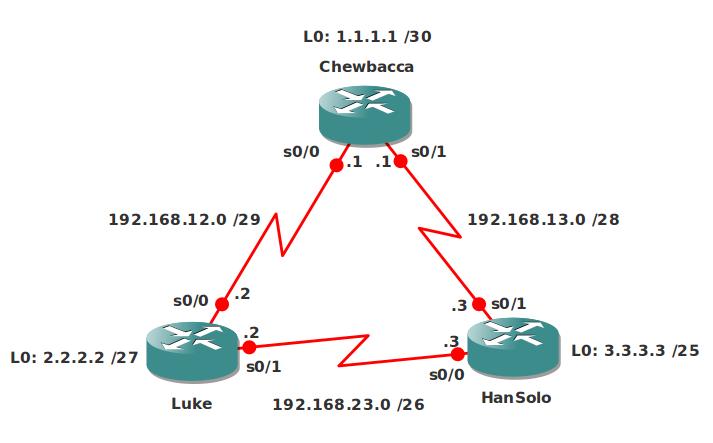
Video Solution:
Configuration Files
You need to register to download the GNS3 topology file. (Registration is free!)Once you are logged in you will find the configuration files right here.

The How to Master series helps you to understand complex topics like spanning-tree, VLANs, trunks, OSPF, EIGRP, BGP and more.
Written by René Molenaar - CCIE #41726


Hi,
I could not open this lab though i placed downloaded IOS, placed it in gns3/images and loaded it to gns3. Error message is ***error :209 unable to start VM instance ghost c3640-jk9s-mz124.bin-localhost-ghost Is this becos the IOS corrupt?
help will be appreciated!
Thanks,
Andy
Hi Renee,
This is the most beautiful LAB for a CCNA and even higher. First time I had such a mega LAB of configuration and troubleshooting. Your step by step tasks are a sure guide to real exam.
Thanks 🙂
Thanks Nikhil,
Glad you like it, I might add some more in the future and I will definitely add a couple later for the CCNP ROUTE or TSHOOT.
good luck!
Rene
i dont think you have task ospf hello timers in ccna
Hey Rene,
I can’t export the page/instructions to PDF… it throws up an error about an invalid .jpg
The exact message is: “TCPDF error: Missing or incorrect image file: images/stories/icnd2 assessment lab.jpg”
Any idea if you can fix this?
Thanks a mil!
The PDF plugin has been bothering for ages, with the new website it’s gone and i’m not sure if I want to introduce it again 😛
do you feel I should add it, is it easier?
If provide authentication between the routers below and no authentication between Luke and Chewbacca you will not have full adjacency in OSPF?
• Configure clear-text authentication between Router Luke and Hansolo.
• Configure MD5 authentication between Router Hansolo and Chewbacca.
OSPF authentication is always between two routers. It’s fine to mix MD5, clear-text or no authentication.
Not a best practice but it’s possible 😛
Hi Rene,
for using reliability as a metric
shouldnt K5 must be 1.
so
instead of, metric weights 0 1 0 1 1 0
it should be, metric weights 0 1 0 1 0 1.
http://www.cisco.com/en/US/docs/ios/12_2/iproute/command/reference/1rfeigrp.html#wp1023638
Thanks
Shoeb
Hi Shoeb,
This should be the correct list for K-values:
metric weights TOS K1 K2 K3 K4 K5
K1 = bandwidth
K2 = load
K3 = delay
K4 = reliability
K5 = MTU
0 1 0 1 1 0 = bandwidth, delay, reliability.
0 1 0 1 0 1 = bandwidth, delay, MTU.
Rene
EIGRP/IGRP also tracks the smallest Maximum Transmission Unit (MTU) along each route, although the MTU is not used in the composite metric calculation.
Ref TCP/IP, Volume I, Jeff Doyle.
Cisco IOS IP Command Reference, Volume 2 of 3: Routing Protocols, Release 12.2
metric weights (EIGRP)
To allow the tuning of the IGRP or Enhanced Interior Gateway Routing Protocol (EIGRP) metric calculations, use the metric weights command in router configuration mode. To reset the values to their defaults, use the no form of this command.
metric weights tos k1 k2 k3 k4 k5
no metric weights
Syntax Description
tos
Type of service must always be zero.
k1k2 k3 k4 k5
Constants that convert an IGRP or EIGRP metric vector into a scalar quantity.
Defaults
tos: 0
k1: 1
k2: 0
k3: 1
k4: 0
k5: 0
Command Modes
Router configuration
Command History
Release Modification
10.0
This command was introduced.
Usage Guidelines
Use this command to alter the default behavior of IGRP routing and metric computation and allow the tuning of the IGRP metric calculation for a particular type of service (ToS).
If k5 equals 0, the composite IGRP or EIGRP metric is computed according to the following formula:
metric = [k1 * bandwidth + (k2 * bandwidth)/(256 – load) + k3 * delay]
If k5 does not equal zero, an additional operation is performed:
metric = metric * [k5/(reliability + k4)]
Usage Guidelines
Use this command to alter the default behavior of IGRP routing and metric computation and allow the tuning of the IGRP metric calculation for a particular type of service (ToS).
If k5 equals 0, the composite IGRP or EIGRP metric is computed according to the following formula:
metric = [k1 * bandwidth + (k2 * bandwidth)/(256 – load) + k3 * delay]
If k5 does not equal zero, an additional operation is performed:
metric = metric * [k5/(reliability + k4)]
Hi,
why do the IP masks on the picture not match the same ones in the config files?
You are right I made a mistake, I used /24’s in the config. It doesn’t matter much but maybe I should change it.
Hi Rene,
your labs are awesome, I really appreciate your job, thank you so much!
One more question, what is the best practice about changing the Router-ID? Do I have to create a Loopback interface with the same IP address before changing the Router-ID? When I issued the command “sh ip protocol” on the routers Luke or Chewbacca I saw that:
[i]Routing Information Sources:
Gateway Distance Last Update
[b]22.22.22.22[/b] 110 16:15:13
1.1.1.1 110 16:16:42
3.3.3.3 110 18:39:31[/i]
But the gateway 22.22.22.22 is unreachable without the Loopback interface with the same IP address on the router HanSolo. Is that correct?
Thanks in advance.
Changing the router ID is a fairly simple process, there are two methods:
– Manually under the OSPF process.
– Creating a new loopback interface with a higher IP address.
You do have to reset OSPF though or the changes won’t take effect. Just do a "clear ip ospf process" and you are ready to go.
Awesome lab this one. It is actually a bit harder than what you’d expect on the ICND2 as its more involved.
True and it’s also a bit harder because a lot of different protocols are mixed into it.
Can you explain why you created an access-list for the loopbacks during the rip section.
By default OSPF information will be seen in the routing table before RIP because the AD of OSPF is 110 and RIP is 120.
I created an access-list that matches the network on the loopback interface and changed the AD for those to 100.
I don’t understand this step with an access-list. You’re creating an access list permit statement pointing to the other routers loopback interface.
Isn’t this some kind of CCNP level configuration, because I haven’t seen it in the books for CCNA.
Nevertheless I do want to understand. So I see your configuration like this:
Rip is hop count based so there isn’t really any metric you can change except the routes you know you should receive through an update every 30 seconds.
So what you do is you create a admin. distance of 100 for every rip route hence the 0.0.0.0 255.255.255.255 in the rip config with an ACL of 1
then you creat a STD ACL 1 and add the loopback interface of the remote router. As soon as RIP advertises this route, this configuration places the rip route in the routing table with an AD of 100 .
Does it work like this?
ps. thanks for these great labs and website. great work!
Dalma
My BW on int s0/0 is 1544Kb but ospf cost is 1562. My question is why ? 1000000/1544 = 672, and not 1562.
When i manually change BW nothing happens, is still 1562. It’s my fault or GNS3 fault ?
This is what you see when you do "show ip ospf interface s0/0" ?
[b]Thank you brother .. you deserve more than "Thanks" WORD
:)[/b]
It says the ip-addresses are preconfigured, but to me it looks like every interface has /24 mask, and that does not match with the topology.
I had to go through each interface and configure the correct subnet masks.
Hi there! I appreciate the labs you make but where can I download the gns3 topology for this lab? Thank you! I cant find the topology download.
I’m new to this, but I am not new to computers. I have the lab running under GNS3 0.8.6 via Fedora 20 and it does not allow me to use the console for any of the routers.
I have tried Gnome terminal, KDE Terminal, putty & xterm, all come up with the connection, but you can not type in it. If you add a different router in behaves normally?
The ICND1 lab did the same thing and I just typed it into a new file.
Thanks
Guess I should have waited on posting.
If you add the ip 127.0.0.1 in place of the localhost in the .net file all is well.
Thanks for having this available.
You haven’t gotten praised in quite some time. I am currently running this lab. It is excellent! I have added some of my own configuration to more accurately reflect the current CCNA, however, it is really good to mix all these routing protocols and authentication methods. I was banging my head on the floor with the ppp authentication username/pass for quite some time. I thought they had to be the same username on each side, however, its the same password and they exchange usernames in the handshake. what a headache that was. Also, the restrictions on the network commands was a fun ‘game’ and really tests your knowledge of how you can advertise and set the wildcards appropriately. I did find it a bit ‘too rough’ to have the eigrp metric in there, although, i guess in the real world people sometimes do actually look at these things (although i was told to leave them alone, probably because im a noob lmao)
Thanks for all you do!
Hey, thanks for sharing this great lab; I just finished working through it and it definitely highlighted a few things I need to work on.
One thing I’d like to point out though, that I didn’t see anybody else mention yet, is this line in the instructions:
“Ping 172.16.1.1 from Router Chewbacca, but this time make sure it’s sourced from it’s Loopback1 interface. Does this ping work or fail? Why could it be different that you are pinging from the Loopback1 interface?”
I think it should say 172.16.2.1 instead, since 1.1 is on Chewbacca, and therefore doesn’t make a difference where you source it from when pinging from Chewbacca. 2.1 on the other hand is what I think you meant, since it is on HanSolo, which doesn’t have a route back to Chewbacca’s new loopback1 interface
Just wanted to check , I am having issues loading the image. Could you please let me know how you guys set it or what version of GNS3 are you guys using
FYI,
I was receiving a:
%DUAL-5-NBRCHANGE: IP-EIGRP(0) 100: Neighbor 192.168.13.1 (Serial0/1) is down: retry limit exceeded
%DUAL-5-NBRCHANGE: IP-EIGRP(0) 100: Neighbor 192.168.13.1 (Serial0/1) is up: new adjacency
consistently on Router HanSolo. I went round and round on this until I took out the ” OSPF cost 500 ” from S0/1. And that seemed to fix it. What caused this?
Some research suggests that the multicast hellos were starting the adjacency but the unicasts were not getting there which causes the neighborship not to fully form. Is that because they were being forcesd out s0/0 due to the cost statement?
Any light on the situation would be appreciated. I can’t stand unknowns. Thanks.
I’m not exactly sure why changing an OSPF cost would affect an EIGRP adjacency. EIGRP unicast messages, like acknowledgements and updates, are link-local. I suppose it’s possible that, with PPP, the peer host-route was learned some other way, but the route is connected /32 which is unbeatable.