

Scenario:
Your colleagues at “BigLabs” are very pleased with your performance so far…you managed to succesfully configure the “Basic GRE” lab and the “Site-to-Site IPSEC VPN” lab. You managed to configure a GRE tunnel and encrypt it with IPSEC. Now your final task will be to configure an IPSEC tunnel and run GRE on top of it, let’s see what you can do this time!
Goal:
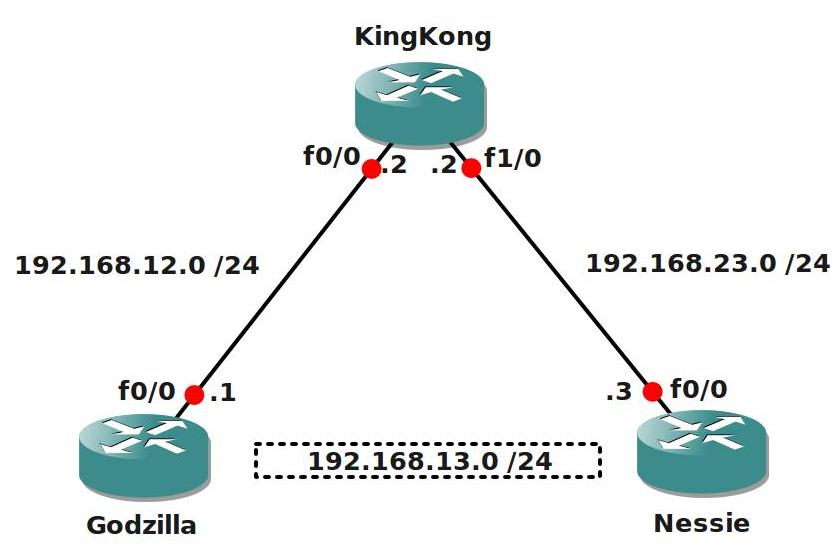
- All IP addresses are preconfigured as specified in the topology picture.
- Router Godzilla and Nessie have the following loopback interfaces:
- Godzilla: Loopback1: 11.11.11.11 /24
- Nessie: Loopback1: 33.33.33.33 /24
- Configure EIGRP AS1 on all 3 routers, only advertise the 192.168.12.0 and 192.168.23.0 network, do not advertise the loopbacks.
- Ensure Router Godzilla and Nessie can ping each other.
- Configure a IPSEC tunnel between Router Godzilla and Nessie.
- Configure the 192.168.13.0 /24 network on the IPSEC tunnel:
- Godzilla: 192.168.13.1
- Nessie: 192.168.13.3
- Ensure you can ping the IP addresses that you configured on the tunnel interface.
- Configure static routes on router Godzilla and Nessie so they can reach each other’s loopback1 interface through the Tunnel interface.
- Create an IKE Policy with the following parameters:
- Authentication: pre-shared-key
- Encryption: AES 256
- Hashing: sha
- DH: Group 5
- Lifetime: 3600
- The pre-shared-key should be “VAULT”.
- Create an IPSEC Transform-set with the following parameters:
- ESP (Encapsulatiing Security Payload)
- Encryption: AES 256
- Hashing: SHA-HMAC
- Create the correct policy profile to finish the IPSEC configuration.
- Verify the IPSEC configuration, you can use the following show/debug commands:
- show crypto ipsec transform-set
- show crypto map
- show crypto ipsec sa
- debug crypto isakmp
IOS:
c3640-jk9s-mz.124-16.bin
Topology:
Video Solution:
Configuration Files
You need to register to download the GNS3 topology file. (Registration is free!)Once you are logged in you will find the configuration files right here.

Do you want your CCNA or CCNP Certificate?
The How to Master series helps you to understand complex topics like spanning-tree, VLANs, trunks, OSPF, EIGRP, BGP and more.
Written by René Molenaar - CCIE #41726


You are Awesome dude….
Thanks for your awesome comment 🙂
enter your message here…
Hi Rene,
Is it possible to use GRE in ASA Firewa?
Appreciate ur reply… thanks
Thanks nice refresher vids. Love it.
Thank you very much!
Cisco says that your configuration is an IPSEC over GRE, not Gre over IPSEC.
Great lab! I see you finally dropped the superfluous Loopback0 interfaces 😉
good simple lab…this is exactly what I was looking for..
Hi Rene,
Where is the GRE tunnel configuration? For what I understood you configured the IPSec tunnel but not the GRE tunnel (over IPSEC tunnel).
Please correct me if I am wrong.
Thanks,
André Claro
i can not runn static route in tunnal it not giving me the route option in tunnal
Great work! Thanks!
by putting :
“tunnel mode ipsec ipv4
tunnel protection ipsec profile PROTECT”
(or crypto map ) on a Tunnel interface you’re setting a IPSEC over GRE configuration (clear text packet from lan > encrypting >putting GRE header > routing). Although your configuration works, it is not “gre over ipsec” as in a production environment these two are clear things (gre over ipsec = clear text packet > + gre header > encrypting + new ipsec header > routing).
…just saying
Are you sure?
Using VTI (tunnel mode ipsec ipv4) should be GRE inside IPsec. Applying a crypto map directly to the tunnel would have IPsec inside GRE, which you mention. But I do not believe VTI and crypto map on tunnel are the same thing.
Guys how do we recognize if this is gre over ipsec or ipsec over gre ?
Thanks.
It depends on the order of operations. If the crypto map goes on the tunnel itself, its IPsec inside GRE, which is undesirable. Using tunnel protection, VTI, or crypto map on the physical interface is GRE inside IPsec, which is what you want. I don’t like using the word “over” because it is harder for me to visualize. “Inside” makes more sense to me.
when i m capturing the treaffic its possible to see the ipsec protocol with this configuration ?
These were great labs, but I’m still trying to visualize in my head what the commands are actually creating.