

Scenario:
Your colleagues at “BigLabs” are very pleased with your performance so far…you managed to succesfully configure the “Basic GRE” lab and the “Site-to-Site IPSEC VPN” lab. Now it’s time to show them who the true networking expert is and teach them how to configure a Secure GRE tunnel. This allows you to send routing protocol updates through the GRE tunnel, and use IPSEC to encrypt this traffic….let’s do it!
Goal:
- All IP addresses are preconfigured as specified in the topology picture.
- Router Godzilla and Nessie have the following loopback interfaces:
Godzilla: Loopback0: 1.1.1.1 /24 Loopback1: 11.11.11.11 /24 - Nessie: Loopback0: 3.3.3.3 /24 Loopback1: 33.33.33.33 /24
- Configure EIGRP AS1 on all 3 routers, only advertise the 192.168.12.0 and 192.168.23.0 network, do not advertise the loopbacks.
- Ensure Router Godzilla and Nessie can ping each other.
- Configure a GRE tunnel between Router Godzilla and Nessie.
- Configure the 192.168.13.0 /24 network on the GRE tunnel:
Godzilla: 192.168.13.1
Nessie: 192.168.13.3 - Ensure you can ping the IP addresses that you configured on the tunnel interface.
- Configure OSPF and use network commands to advertise the network on the GRE tunnel.
- Advertise Loopback1 in OSPF on Router Godzilla and Nessie.
- Ensure you establish a OSPF neighbour relationship and that you see the loopback1 interfaces in the routing table.
- Now it’s time to setup the IPSEC connection!
- Create an IKE Policy with the following parameters:
Authentication: pre-shared-key
Encryption: AES 256
Hashing: sha
DH: Group 5
Lifetime: 3600 - The pre-shared-key should be “VAULT”.
- Create an IPSEC Transform-set with the following parameters:
ESP (Encapsulatiing Security Payload)
Encryption: AES 256
Hashing: SHA-HMAC - Create the correct access-lists to encrypt the GRE tunnel traffic.
- Create the correct crypto-map to finish the IPSEC configuration.
- Verify the IPSEC configuration, you can use the following show/debug commands:
show crypto ipsec transform-set
show crypto map
show crypto ipsec sa - debug crypto isakmp
IOS:
c3640-jk9s-mz.124-16.bin
Topology:

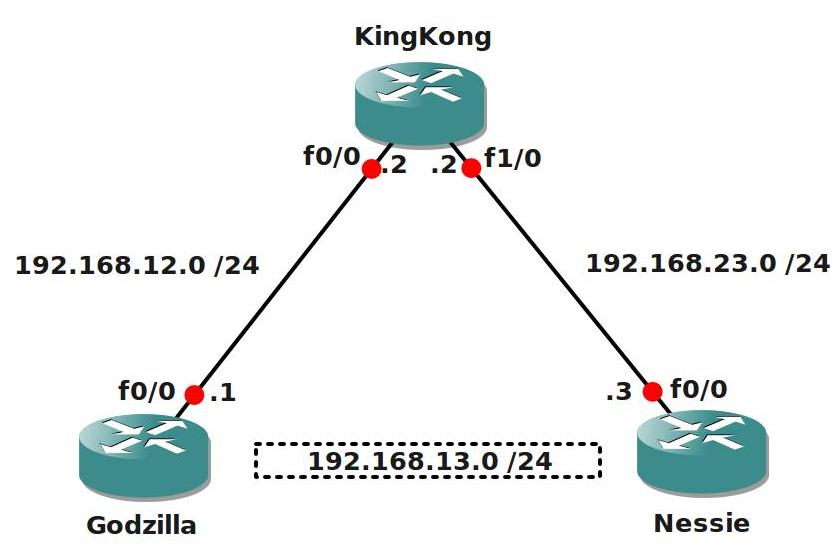
Video Solution:
Configuration Files
You need to register to download the GNS3 topology file. (Registration is free!)Once you are logged in you will find the configuration files right here.

Do you want your CCNA or CCNP Certificate?
The How to Master series helps you to understand complex topics like spanning-tree, VLANs, trunks, OSPF, EIGRP, BGP and more.
Written by René Molenaar - CCIE #41726


***********Godzilla************
host Godzilla
line con 0
logg sy
int f0/0
ip add 192.168.12.1 255.255.255.0
no sh
!
int l0
ip add 1.1.1.1 255.255.255.0
!
router eigrp 1
netw 192.168.12.0 0.0.0.255
!
int tun 0
ip add 192.168.13.1 255.255.255.0
tu so f0/0
tu des 192.168.23.3
cry map mymap
!
int l1
ip add 11.11.11.11 255.255.255.0
!
router ospf 1
!netw 192.168.12.0 0.0.0.255 are 0
netw 1.1.1.1 0.0.0.255 are 0
netw 11.11.11.11 0.0.0.255 are 0
netw 192.168.13.0 0.0.0.255 are 0
!
cryp isa po 10
authe pre
enc aes 256
has sha
gr 5
life 3600
!
cry isa key 0 vault add 192.168.23.3
!
cry ips tra myset esp-aes 256 ah-sha-h
!
cry map mymap 10 ipsec-is
set peer 192.168.23.3
set tran myset
match add 110
!
acc 110 perm ip 1.1.1.0 0.0.0.255 3.3.3.0 0.0.0.255
acc 110 perm ip 1.1.1.0 0.0.0.255 33.33.33.0 0.0.0.255
acc 110 perm ip 11.11.11.0 0.0.0.255 3.3.3.0 0.0.0.255
acc 110 perm ip 11.11.11.0 0.0.0.255 33.33.33.0 0.0.0.255
!
***********KingKong************
host KingKong
line con 0
logg sy
int f0/0
ip add 192.168.12.2 255.255.255.0
no sh
int f1/0
ip add 192.168.23.2 255.255.255.0
no sh
!
router eigrp 1
netw 192.168.12.0 0.0.0.255
netw 192.168.23.0 0.0.0.255
!
***********nessie********
host Nessie
line con 0
logg sy
int f0/0
ip add 192.168.23.3 255.255.255.0
no sh
!
int l0
ip add 3.3.3.3 255.255.255.0
!
router eigrp 1
netw 192.168.23.0 0.0.0.255
!
!
int tun 0
ip add 192.168.13.3 255.255.255.0
tu so f0/0
tu des 192.168.12.1
cry map mymap
!
int l1
ip add 33.33.33.33 255.255.255.0
!
router ospf 1
!netw 192.168.23.0 0.0.0.255 are 0
netw 192.168.13.0 0.0.0.255 are 0
netw 3.3.3.3 0.0.0.255 are 0
netw 33.33.33.33 0.0.0.255 are 0
!
!
cryp isa po 10
authe pre
enc aes 256
has sha
gr 5
life 3600
!
cry isa key 0 vault add 192.168.12.1
!
cry ips tra myset esp-aes 256 ah-sha-h
!
cry map mymap 10 ipsec-is
set peer 192.168.12.1
set tran myset
match add 110
!
acc 110 perm ip 3.3.3.0 0.0.0.255 1.1.1.0 0.0.0.255
acc 110 perm ip 33.33.33.0 0.0.0.255 1.1.1.0 0.0.0.255
acc 110 perm ip 3.3.3.0 0.0.0.255 11.11.11.0 0.0.0.255
acc 110 perm ip 33.33.33.0 0.0.0.255 11.11.11.0 0.0.0.255
!
Hi Kase,
Where did you put the crypto-map on? In my example I put it on the physical interface. Did you try my final config with the access-list that has “GRE” as protocol?
If you use the “permit GRE host” solution you are encrypting the entire tunnel…if you use anything else like your access-list you can select yourself what traffic you want to encrypt, my solution just does the whole GRE tunnel.
Rene
Hi Reene,
i’m a bit confused with this lab. I can’t stablish the isakmp sa with this access-list:
access-list 110 permit gre host 192.168.12.1 host 192.168.23.3
But if I can do it whit this (and can see the ESP packets with Wireshark)
access-list 110 permit ip 11.11.11.0 0.0.0.255 33.33.33.0 0.0.0.255
I guess that the crypto ACL must matched the interesting traffic but I’m not sure… Thanks for your help!!!!
oopss, you are right, I did put on tunnel interface. I will try this way and tell you the results
Hi,
Can you tell me what the difference is between an encrypted GRE tunnel vs the more tradition GRE over IPSEC?? Both methods use IPSEC encryption techniques, so I dont understand in which situations you would use one or the other?
Thanks
Bal
[quote]Hi,
Can you tell me what the difference is between an encrypted GRE tunnel vs the more tradition GRE over IPSEC?? Both methods use IPSEC encryption techniques, so I dont understand in which situations you would use one or the other?
Thanks
Bal[/quote]
Good question and to be honest I’m not 100% sure. I just googled for it and found this post on groupstudy that makes sense:
http://www.groupstudy.com/archives/ccielab/200307/msg00972.html
If anyone else can enlighten me please do.
Wouldn’t it be easier to configure tunnel protection?
Can be found here http://www.cisco.com/en/US/docs/ios/12_3t/12_3t14/feature/guide/gtIPSctm.html
Thanks again
Hi all.
This lab is great .
But I am confusing that, what difference between lab “GRE over IPSec” and “Encrypted GRE Tunnel”.
And result is one? Or it various ways for different purpose?
Hey Rene I appreciate everything you do on this website. It has been extremely helpful. I was wondering if there is a chance can we get all these GRE labs updated. They are not working on the current GNS3. Thanks again for everything you my friend are a network stud!!
Hi Rene,
Thank your for putting efforts in creating such a wonderful lab with solution. Much appreciated.
I tried the above lab with some tweaking to configuratoin. Instead of using FastEthernet interfaces I used the Tunnel interfaces in this lab and the IPSec didn’t work.
I set the remote end tunnel interace IPs as peers in ‘ISAKMP Key’ and ‘IPSec MAP’ for both Godzilla and Nessie and also enabled/configured crypto MAP on Tunnel interfaces instead of FastEthernet. It didn’t work. WHY ?
Here the configuration on Godzilla and Nessie respectively I used.
======
Godzilla
======
!
crypto isakmp policy 1
encr 3des
authentication pre-share
group 2
lifetime 60
crypto isakmp key My2ndIPsecLab address 192.168.13.3
!
!
crypto ipsec transform-set MYSET esp-3des esp-sha-hmac
!
crypto map MYMAP 1 ipsec-isakmp
set peer 192.168.13.3
set security-association lifetime seconds 1800
set transform-set MYSET
match address 100
!
interface Tunnel0
ip address 192.168.13.1 255.255.255.0
tunnel source 192.168.12.1
tunnel destination 192.168.23.3
crypto map MYMAP
!
access-list 100 permit gre host 192.168.13.1 host 192.168.13.3
!
=====
Nessie
=====
!
crypto isakmp policy 1
encr 3des
authentication pre-share
group 2
lifetime 60
crypto isakmp key My2ndIPSecLab address 192.168.13.1
!
!
crypto ipsec transform-set MYSET esp-3des esp-sha-hmac
!
crypto map MYMAP 1 ipsec-isakmp
set security-association lifetime seconds 1800
set peer 192.168.13.1
set transform-set MYSET
match address 100
!
!
!
interface Tunnel0
ip address 192.168.13.3 255.255.255.0
tunnel source 192.168.23.3
tunnel destination 192.168.12.1
crypto map MYMAP
!
—————————————————–
I sent some traffic which was pingalbe but didn’t get encrypted. 🙁
Show commands on Godzilla
===========
Godzilla#show crypto isakmp sa
dst src state conn-id slot status
Godzilla#
===========
Godzilla#show crypto ipsec sa
interface: Tunnel0
Crypto map tag: MYMAP, local addr 192.168.12.1
protected vrf: (none)
local ident (addr/mask/prot/port): (192.168.13.1/255.255.255.255/47/0)
remote ident (addr/mask/prot/port): (192.168.13.3/255.255.255.255/47/0)
current_peer 192.168.13.3 port 500
PERMIT, flags={origin_is_acl,}
#pkts encaps: 0, #pkts encrypt: 0, #pkts digest: 0
#pkts decaps: 0, #pkts decrypt: 0, #pkts verify: 0
#pkts compressed: 0, #pkts decompressed: 0
#pkts not compressed: 0, #pkts compr. failed: 0
#pkts not decompressed: 0, #pkts decompress failed: 0
#send errors 0, #recv errors 0
local crypto endpt.: 192.168.12.1, remote crypto endpt.: 192.168.13.3
path mtu 1514, ip mtu 1514
current outbound spi: 0x0(0)
======================
Why does it only work with FastEthernet Interface and not Tunnel Interface when we have reachability through both interfaces ?