

Scenario:
After months of hard work, studying and doing labs you have the feeling you truly know how routing protocols work. Your boss decides to upgrade your salary and your title from Trainee to Junior network engineer and you will be responsible for daily maintenance for the network. Your senior network colleague (who is a true Guru but also very chaotic) is away for the the day and you are unable to reach him. Some users called you and complained about unreachable servers and slow links. It’s 8:00am and they need to have access to the network by 12:00am. Time to show your boss who the new Guru is and perhaps get another salary upgrade!
Goal:
- All IP addresses have been preconfigured for you as specified in the topology picture.
- OSPF is preconfigured with the areas as specified in the topology picture.
- Do not use show run! (this will spoil the fun 🙂 use the appropiate ‘show’ and ‘debug’ commands. This will teach you the skills needed to become a true troubleshooting master.
- Whenever router Nima tries to ping the FastEthernet0/0 interface of router Kyle traffic is being dropped. Solve the problem by using OSPF commands.
IOS:
c3640-jk9s-mz.124-16.bin
Topology:
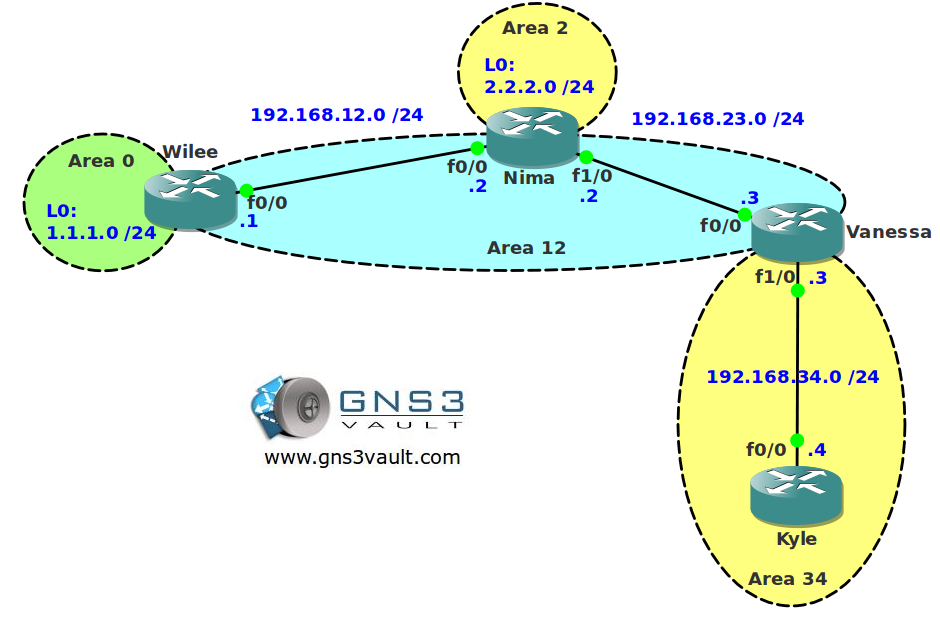
Configuration Files
You need to register to download the GNS3 topology file. (Registration is free!)Once you are logged in you will find the configuration files right here.

The How to Master series helps you to understand complex topics like spanning-tree, VLANs, trunks, OSPF, EIGRP, BGP and more.
Written by René Molenaar - CCIE #41726


Hello Rene!
First of all thank you very much! Your labs are helping me a lot lately! I have a question for you (and hopefully I won’t spoil this lab). No router in this topology is running OSPF… Is that right?
Cheers from Brazil!
Rafael Bianco
Hello Rafael,
You are fast and I messed up lol…got the wrong configuration file. I’ll upload them ASAP so you can start troubleshooting ;D
Rene
Just uploaded the correct configs. Have fun!
You’re the man Rene! Thanks a lot! ;D ;D ;D
Cheers!
Rafael Bianco
I think I got it! WoW! 😮 😮 😮
I’m never thought of that! If this lab came to me during the ROUTE or TSHOOT test I would mess it up for sure! And would lose precious time in it too…
Can’t wait for your video solving/commenting it!
Thanks Rene!
Very nice!
Hey I got that error when opening the topology…
—
Traceback (most recent call last):
File “GNS3NETFile.pyo”, line 577, in import_net_file
File “GNS3Dynagendynagen.pyo”, line 1043, in import_config
File “GNS3DynagenSub.pyo”, line 349, in open_config
File “ntpath.pyo”, line 108, in join
UnicodeDecodeError: ‘ascii’ codec can’t decode byte 0xe1 in position 42: ordinal not in range(128)
Using a virtual link will solve the problem but not the “real issue” that is going on here. There’s a method to fix it without any static routes, GRE tunneling or virtual links. The key to the answer is the name of the lab…[i]OSPF capability transit[/i].
Look it up and you’ll find the answer 😉
Hi, I just solved this. Does it only involve setting up corectly the virtual link? Small catch in doing that, it that all? I feel like I’m missing something. Nima can ping kyle though… Waiting for video solution.
Thanks
Hey Guys,
There is no need to wait for a video solution to this problem because the answer is quiet simple!
ANSWER: Nima contains the “no capability transit” command under the ospf router configuration section. Therefore, simply add the “capability transit” command on Nima.
Nima(config)#router ospf 1
Nima(config-router)#capability transit
Kyle will now ping Wilee’s 1.1.1.1
Cheers,
Rafael Lachowski
Hi Rafael
The statement asks to try not to give show run, but how do you discover these configuration type without using show run?
show ip ospf
That’s an awesome solution Mate…
Hi there..
Also we can make virtual link between Nima and Vanessa…
Don’t forget to remove virtual commands
in Wilee
#area 12 virtual-link 192.168.34.3
In vanessa
area 12 virtual-link 1.1.1.1
then make virtual links between Nima and Veanessa
Capacity transit is an answer.
Other way is to create the virtual link between Wilee and Vanessa in area 12 and GRE Tunnel between Wilee and Kyle to be in area 0 and add the network statement under OSPF process for the network within GRE tunnel.
hello ,
have you a video for the answer please ?
thanks
Another solution (also with GRE tunnels) if somebody likes to create more bizarre configs 😉
1. Create an Virtual Link only between Wille and Nima.
2. Create tunnel between Wille and Vanessa. (as area 0)
3. tune an ospf interfaces costs on Wille and Vanessa. For ex:
Willie: Tu0 – cost 1; fa0/0 – cost 2
Vanessa: Tu0 – cost 1; fa 0/0 – cost 5
Done 😉
We just can remove virtual-link between Nima and Wilee
They directly connected
Why it need?
Nima must be an ABR, and must be part of area 0 since area 2 does not touch area 0 anywhere.