

Scenario:
You are responsible for the frame relay and multicast configuration within the network. You use a lot of hub and spoke topologies and up to now you haven’t seen any problems. Yesterday one of your customers called claiming they are having some problems. There is a videostation behind one of the spoke routers streaming video using multicast. It seems one of the other spoke routers is unable to receive this stream…let’s see what you can do.
Goal:
- All IP addresses have been preconfigured for you as specified in the topology picture.
- OSPF is preconfigured for full connectivity.
- Do not use show run! (this will spoil the fun 🙂 use the appropiate ‘show’ and ‘debug’ commands. This will teach you the skills needed to become a true troubleshooting master.
- Start a ping on router SpokeA to IP address 224.9.9.9 to generate multicast traffic.
- Configure the network so router Receiver can receive this multicast traffic.
- You are not allowed to make any changes to the frame-relay network or change the PIM mode.
IOS:
c3640-jk9s-mz.124-16.bin
Topology:
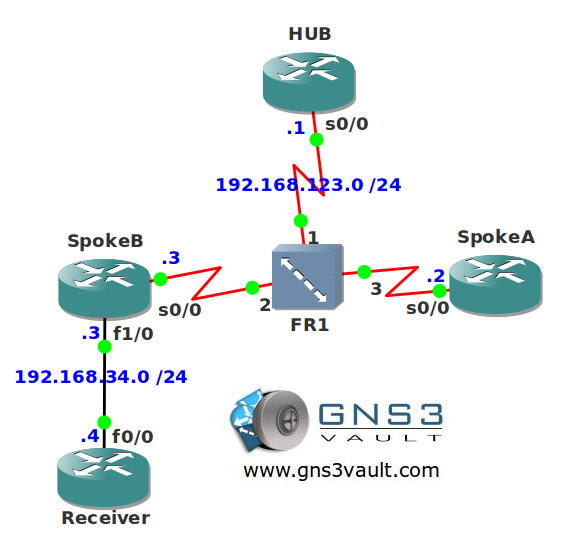
Video Solution:
Configuration Files
You need to register to download the GNS3 topology file. (Registration is free!)Once you are logged in you will find the configuration files right here.

Do you want your CCNA or CCNP Certificate?
The How to Master series helps you to understand complex topics like spanning-tree, VLANs, trunks, OSPF, EIGRP, BGP and more.
Written by René Molenaar - CCIE #41726


after completing the lab, i just changed the senario to sparse mode all accross , and used "ip pim nbma mode" at the hub, however the solution is not working. (i am not using tunnels)
Help me fix this way.
Regards,
Shoeb
Hi Shoeb,
What exactly is working/not working and what did you try?
Rene
Hi Rene,
I configured pim sparse-mode on all the router interfaces.
(after removing dense mode and Tunnels)
then i used "ip pim nbma mode" on HUB router Serial interface.
however i was unable to ping 224.9.9.9 from Spoke A to receiver.
Regards,
Shoeb
Hi Shoeb,
Did you configure a RP (Rendezvous Point)? Do all routers see the RP?
Rene
ya of course.
i configured static rp.
it didn’t worked with any of the router acting as rp (i tried making rp as receiver, spokeB, and hub)
I just tested this to see if anything funky was going on. It’s working now so let me describe what I did:
– Make sure OSPF is working, you need to change the OSPF network type for frame-relay.
– Enable "ip pim sparse mode" on ALL routers, including the receiver.
– Make sure all PIM neighbors are formed.
– Use the "ip pim rp-address" command on all routers to select the HUB as the RP.
– Configure "ip pim nbma-mode" on the HUB.
– Configure "ip igmp join-group" on the Receiver.
Ping from SpokeA to the the multicast group address and it works! If you want to see my configs open a forum post and I’ll post them there ok?
Yes , i have done all that same way, Unfortunately i am not getting it…
i am able to ping from HUB , however ping from Spoke A fails…
SpokeA#pi 224.9.9.9 re 4
Type escape sequence to abort.
Sending 4, 100-byte ICMP Echos to 224.9.9.9, timeout is 2 seconds:
….
SpokeA#
HUB#pi 224.9.9.9 re 4
Type escape sequence to abort.
Sending 4, 100-byte ICMP Echos to 224.9.9.9, timeout is 2 seconds:
Reply to request 0 from 192.168.34.4, 124 ms
Reply to request 0 from 192.168.34.4, 200 ms
Reply to request 1 from 192.168.34.4, 100 ms
Reply to request 1 from 192.168.34.4, 136 ms
Reply to request 2 from 192.168.34.4, 76 ms
Reply to request 2 from 192.168.34.4, 128 ms
Reply to request 3 from 192.168.34.4, 80 ms
Reply to request 3 from 192.168.34.4, 104 ms
HUB#
HUB#s ip os ne
Neighbor ID Pri State Dead Time Address Interface
3.3.3.3 0 FULL/DROTHER 00:01:53 192.168.123.3 Serial0/0
2.2.2.2 0 FULL/DROTHER 00:01:53 192.168.123.2 Serial0/0
HUB#s ip pim ne
PIM Neighbor Table
Neighbor Interface Uptime/Expires Ver DR
Address Prio/Mode
192.168.123.3 Serial0/0 00:31:32/00:01:43 v2 1 / S
192.168.123.2 Serial0/0 00:31:32/00:01:43 v2 1 / S
HUB#
SpokeA#s ip pim ne
PIM Neighbor Table
Neighbor Interface Uptime/Expires Ver DR
Address Prio/Mode
192.168.123.1 Serial0/0 00:30:10/00:01:34 v2 10/ DR S
SpokeA#
PIM Group-to-RP Mappings
Group(s): 224.0.0.0/4, Static
RP: 1.1.1.1 (?)
SpokeA#
HUB#s ip mroute 224.9.9.9
…
(192.168.123.2, 224.9.9.9), 00:02:12/00:02:57, flags: PT
Incoming interface: Serial0/0, RPF nbr 0.0.0.0
Outgoing interface list: Null
HUB#sh run int Serial0/0
Building configuration…
Current configuration : 179 bytes
!
interface Serial0/0
ip address 192.168.123.1 255.255.255.0
ip pim dr-priority 10
ip pim nbma-mode
ip pim sparse-mode
encapsulation frame-relay
serial restart-delay 0
end
HUB#
You can find my configs here:
http://gns3vault.com/Forum/General-Discussion/Multicast-Sparse-Mode-over-NBMA-example.html
I can ping from any router.
its working in ospf POINT_TO_MULTIPOINT mode
earlier i had configured ospf NON_BROADCAST mode on FR, in which it do not work.
Thanks Rene.
however ideally this should not happen as it is Protocol Independent multicast.
Your multicast configuration is fine but your OSPF configuration probably has an error, there are two things to check here:
– The non-broadcast network type requires the election of a DR. Make sure the HUB has become the DR and not one of the spokes or you’ll have reachability issues.
– Check your next-hop IP addresses and see if you have all the required frame-relay mappings.
If you check/fix that then it will work perfectly fine with OSPF non-broadcast.
Keep in mind the "independent" part of PIM doesn’t mean it does not require a routing protocol. It means it’s not "dependent" on 1 routing protocol and that it can use "any" routing protocols you choose. PIM requires a routing table but doesn’t care where the information in it came from, that’s why it’s called "independent".
certainlly, i made sure that there is no error in my ospf config.
as u can see in above pasted serial interface config, i made sure HUB becomes DR
also i added frame relay map ip dlci on each spoke for the other.
also , to form neighbours i added explicit neighbour command for spokes on the HUB router.
even then the multicasting was not working.
you can try modifing your final config.
Hmm interesting, I’ll give this a testdrive.
Once again, I think adding a frame-relay map is changing the frame-relay configuration…just saying…
Awesome Bro !!!!