

Scenario:
You are the senior network engineer for a global company and responsible for the routing of the network. You have worked very hard to improve the network, helpdesk calls have been brought back to a minimum and the network is at peak performance. Your boss wanted to reward you for your excellent input and pays for your holiday, meanwhile the other network engineers took over support. You just got back at the job after your excellent holiday and your mailbox has exploded with trouble tickets! Time to throw the flower necklace in the corner and get back to business!
Goal:
- All IP addresses have been preconfigured for you as following:
192.168.XY.X /24 where X = router1 and Y = router2.
for example: 192.168.58.5 between router5 and router8. - Every router has 1 or 2 loopback interfaces as following:
Loopback0: x.x.x.x /24 for example: 1.1.1.1 for router1.
Loopback1: xx.xx.xx.xx /24 for example: 11.11.11.11 for router1. - EIGRP is preconfigured with the AS numbers as specified in the topology picture.
- Do not use show run! (this will spoil the fun 🙂 use the appropiate ‘show’ and ‘debug’ commands. This will teach you the skills needed to become a true troubleshooting master.
- One of your colleagues created the frame-relay connection for a new branch office. The branch office is using R3 and the frame-relay switch configuration seems to be ok. No problems are reported between R1 and R2. Since the network engineer at the branch office is out of town you only have access to R1 to solve the problem.
- After solving the problem between R1 and R3 some of the users on the 3.3.3.0 network are complaining they are unable to connect to a server located on 2.2.2.0. You look on R1 and see the route in the routing table. You are unable to make changes at R2 or R3, but you are able to telnet into R2 from R1 and use the ‘show ip route’ command. The telnet password is ‘branch2’.
- One of the junior network engineers added R5 recently to the network but for some reason the neighbor adjacency with R1 and R5 isn’t working. R1 and R5 are working fine however. See if you can solve the problem.
- Somebody of the other routing-team decided to redistribute between the RIP network 44.44.44.0 and EIGRP on R4. When you look at R1 you don’t see any entries though, you need to fix the problem on R4.
- After you fixed the redistribution on R4 you can see the 44.44.44.0 network in the routing table of R1. For some reason you still don’t see it in R5, up to you to solve the problem.
- Yesterday night R6 crashed and was replaced by your overworked/stressed out colleague. There was no backup of the running-config so he created a new config. Users from the 4.4.4.0 network are complaining that they are unable to reach the 6.6.6.0 network. Your colleague is not here at the moment so you need to fix the problem.
- The network engineer from R7 also experienced problems with R6 and got impatient. He made some changes to R7 to solve the problem but now there’s no connectivity at all with R6…he has no idea how to fix it so you need to help him out.
- One of the new trainees in the network team added a network command on R1 to advertise the 11.11.11.0 network. When you look on R2 or R3 you don’t see this network in the routing table, you need to help him out. You are only allowed to make changes on R1.
- Some of the users are complaining in AS 467. Computers located in the 172.16.1.0 network are unable to communicate with the 172.16.2.0 network. You test if this is true by sending a ping from R6 towards the 172.16.1.0 network and using the loopback1 interface as the source and confirm the problem. See if you can fix it.
- Between R5 and R8 there should be an EIGRP neighbor adjacency but something seems to be wrong. The security team made some changes yesterday but they claim everything went ok.
- R8 has been configured to redistribute RIP into EIGRP AS58. However, for some reason you don’t see the 88.88.88.0 network in the routing table in R5 which is also in AS58. R8 is an older router and you want to make sure it doesn’t get overburdened by queries from R5 looking for lost prefixes.
- Users in AS145 are supposed to have access to a server located in network 88.88.88.0. Make the appropriate changes on R5 so this is possible.
IOS:
c3640-jk9s-mz.124-16.bin
Topology:
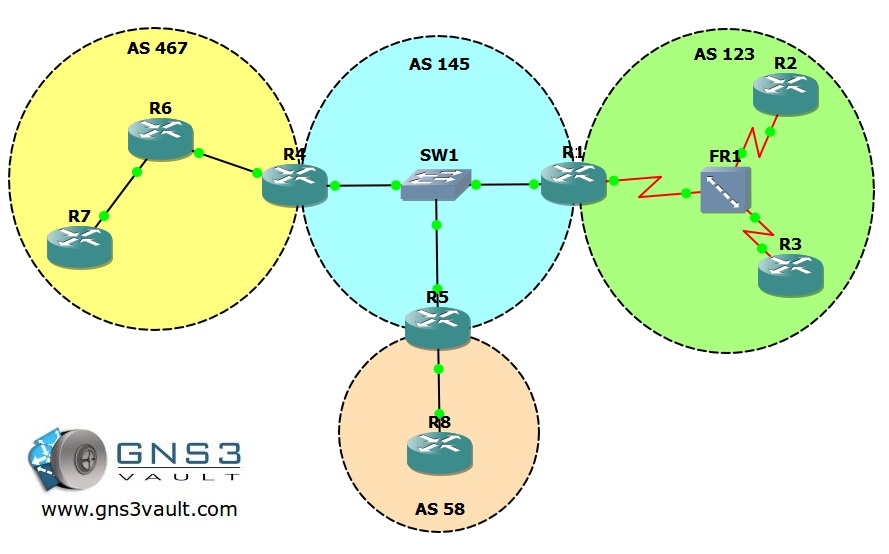
Video Solution:
Configuration Files
You need to register to download the GNS3 topology file. (Registration is free!)Once you are logged in you will find the configuration files right here.

The How to Master series helps you to understand complex topics like spanning-tree, VLANs, trunks, OSPF, EIGRP, BGP and more.
Written by René Molenaar - CCIE #41726


A very good lab!
Came across a lot of new stuff and managed to pull it off 🙂
I really appreciate your efforts on this.
Thanks a bunch
🙂
And can we have labs like these for RIP, OSPF and BGP?
😀
Glad you like it. I got a OSPF and BGP one i’m finishing…should create one for RIP as well.
They take a lot of time to create because first I need to think of a lab….then configure it and then think about “stuff” to break so you can fix it in a chronological order 8)
I use these in my troubleshooting courses, most people like them 🙂
I just completed all 3 of the Ascolta classes, I have all the materials. I’m most interested in the TSHOOT labs. The topology diagrams I have don’t seem to match anything I’ve seen on the web. I would be happy to send all the topo maps, configs, etc. I have everything. This is all for the new CCNP track.
Having just completed the TSHOOT course at Ascolta, I was wondering why all the topology diagrams I see on the net don’t seem to correspond to what I saw in class. I have all the diagrams, configs, books, you name it. I would like to see someone who’s more familiar with GNS3 create the labs exactly as they appear in the books, so I could practice them. Anyone interested?
@Rene
Regarding the task:
After solving the problem between R1 and R3 some of the users on the 3.3.3.0 network are complaining they are unable to connect to a server located on 2.2.2.0. You look on R1 and see the route in the routing table. You are unable to make changes at R2 or R3, but you are able to telnet into R2 from R1 and use the ‘show ip route’ command. The telnet password is ‘branch2’.
After issuing the no ip split-horizon eigrp 123 and pseudo broadcast on s0/0, R2 still not learning 3.0.0.0 routes. ;D
When trying to get through the first question, eigrp on R1 keeps erroring “retry limit exceeded” and no joy. Those configs in the pack are the solved ones or the raw?
@Jem
Do you see anything in debug output why the route is not being installed in the routing table?
@Nonsense
The configs are the “startup-configs” Expect this error and many more nasty errors…it’s a troubleshooting lab after all 😉
Good luck!
thanks 🙂
Is there a possibility to get the solved configs somehow?
@rene
Thanks Rene! It took me 2 hours to solve this issue!
Mar 1 03:05:18.927: IP-EIGRP(Default-IP-Routing-Table:123): 3.3.3.0/24 – denied by distribute list
*Mar 1 03:05:19.631: IP-EIGRP(Default-IP-Routing-Table:123): 2.2.2.0/24 – denied by distribute list
At first, I issued debug command but nothing happens until issuing clear ip eigrp neighbors and debug output came.
@Nonsense
My goal is to have a final config + youtube video for every lab on the site…this is gonna take a lot of time, if you look at some of the “OSPF” labs you’ll see an example. For the moment, if you have any questions you can ask them on the forum/comments here and i’ll answer them.
@Jem
Nice job…this is exactly the goal of the Troubleshooting labs, using the show/debug commands to pinpoint the problem. Keep in mind it’s not about the end but practice to train your “debug” and troubleshoot skills…keep on going! 🙂
Rene
Hello!
How to show current values of “metric weights” without “sh run”?
Thanks!
Current values of “metric weights” or K-value show command “sh ip protocols”
Good one! 🙂 Thank you.
Make you wonder the people that run this network are total Muppets, they obviously havent studied with GNSvault, Id Sack them !! Ive met better MCSEs . Ive corrected all the faults now.
Must admit couldnt stick to the no show run rule!! Im weak… maybe next year !
Nice job Oliver..now see if you can do the OSPF one as well.
I can’t figure out why the redistributed rip routes aren’t in r5 topology or routing table… I’ll keep looking however.. :/
ok i figured it out.. :/
Not a bad lab to start with. Drawed from my CCNA days.. esp frame-relay which i dont get alot of time with anyways.
Took a while but finished the entire EIGRP TSHOOT lab. Trying to find out why R5 could not get the 44.44.44.44 address was a real headache but learned the router-id is under the eigrp topology command and the “sh ip eigrp event” command which gave me the answer (almost used sh run). GREAT LAB, I learned a lot and thank you for your hard work when creating these labs.
I really like the “Router ID” problem in EIGRP. If you managed to solve this lab without using show run you did a very good job!
This was the tough one, could not help myself to no to use show run for EIGRP section. At least I will not forget for future where to look next time.. show ip eigrp topology 😉
Very nice lab.
Hello Rene.
After I apply the no-split horizon on s0/0 on R1 I can see the 3.0.0.0 route on R2 like you show in the video, but I can’t ping it, so it is still unreachable. I also did a “show ip route” on R3 and 2.0.0.0 is present but also not pingable. I’m not sure as I can’t see running configs on R2 and R3 but I think they need an extra map statement so they can reach each other.
Thanks a lot for the new labs and videos.
Hi Allex,
Check if the next-hop IP address for those prefixes is reachable, it’s probably not. If so check your frame-relay mapping statements because you probably don’t have an entry there for the next-hop IP address. Add it and you should be able to reach the other side.
Rene
Hi Rene,
First i want thank you for this really great site 🙂
I have the same problem as Allex1 and cant figure out the fault…
R1#show ip route
2.0.0.0/24 is subnetted, 1 subnets
D 2.2.2.0 [90/2297856] via 192.168.123.2, 01:03:25, Serial0/0
3.0.0.0/24 is subnetted, 1 subnets
D 3.3.3.0 [90/2297856] via 192.168.123.3, 01:00:38, Serial0/0
R2>show ip route
3.0.0.0/24 is subnetted, 1 subnets
D 3.3.3.0 [90/2809856] via 192.168.123.1, 00:16:28, Serial0/0
R2>ping 192.168.123.1
Type escape sequence to abort.
Sending 5, 100-byte ICMP Echos to 192.168.123.1, timeout is 2 seconds:
!!!!!
Success rate is 100 percent (5/5), round-trip min/avg/max = 16/21/36 ms
R3>show ip route
2.0.0.0/24 is subnetted, 1 subnets
D 2.2.2.0 [90/2809856] via 192.168.123.1, 00:20:53, Serial0/0
R3>ping 192.168.123.1
Type escape sequence to abort.
Sending 5, 100-byte ICMP Echos to 192.168.123.1, timeout is 2 seconds:
!!!!!
Success rate is 100 percent (5/5), round-trip min/avg/max = 20/25/36 ms
Where is my fault? 🙁
Thank you.
Hi Rene,
Thank you for the really fast answer!
You assume it right, i can ping the next hop (Router 1) but not the loopback.
Ping Router 2 -> 3 Loopback and Router 3 -> 2 Loopback isn’t working.
Problem is, i dont have access to the lab acctually, but maybe the problem is that Router 2 doesn’t know a route to Router 3 source interface. I will check this later 🙂
Regards
Richard
Ok, some more Information.
I can Ping 2.2.2.2 from Router3 with source 3.3.3.3
R2#ping 3.3.3.3 source 2.2.2.2
Type escape sequence to abort.
Sending 5, 100-byte ICMP Echos to 3.3.3.3, timeout is 2 seconds:
Packet sent with a source address of 2.2.2.2
!!!!!
If i do a normal ping i see this behaviour:
*Mar 1 00:04:10.191: ICMP: echo reply sent, src 2.2.2.2, dst 192.168.123.3
*Mar 1 00:04:12.215: ICMP: echo reply sent, src 2.2.2.2, dst 192.168.123.3
*Mar 1 00:04:14.183: ICMP: echo reply sent, src 2.2.2.2, dst 192.168.123.3
*Mar 1 00:04:16.179: ICMP: echo reply sent, src 2.2.2.2, dst 192.168.123.3
*Mar 1 00:04:18.199: ICMP: echo reply sent, src 2.2.2.2, dst 192.168.123.3
So the problem is R1 can’t reach R3 via Framerelay direct (Ping 192.168.123.3) doesnt work. Is this correct??…
Thanks in advance
Regards
Richard
Hi Richard,
In your output I can see that they know about each others loopback networks. You can ping the next hop IP address but you can’t ping the loopbacks? Is that right?
If your next hops are reachable then your frame-relay mappings are OK.
Which ping is not working?
Rene
Sorry for the tripple post, but i think i figured it out on my own 😉
There is no Frame-Relay Map on R2 so there is no chance it can reach R3 via 192.168.123.3 in anyway. So a Ping should (and will) only work from 2.2.2.0/24 to 3.3.3.0/24 and other way, but never direct from the switch.
I think i just read the question not good enough 😀
May you can tell me if im right or wrong with my final statement?
Hi Richard,
I think you got it right. When you are facing problems like this, I always check this in the following order:
1. Can I reach the network, in your case 3.3.3.0/24.
2. If it’s unreachable, I try to reach the next hop for that 3.3.3.0/24 network.
3. If the next-hop is unreachable you need to check your frame-relay map and fix it.
Keep in mind you need to do this on BOTH routers. It’s possible that your router knows how to send traffic but the receiving router doesn’t know where to send it’s IP packets and drops the traffic.
A good command to test this is “debug ip packet”. Don’t use this on a production network ;D It will show you what the router does with incoming or outgoing IP packets. Best thing to do is to combine “debug ip packet” with an access-list.
Rene
Just getting back to TSHOOT study after Xmas break. Great Lab! just what I needed to get back into the Swing of things. Hoping to tackle TSHOOT exam in next 2/3 weeks.OSPF tommorow.
Top Man
Cheers
I’m glad you like it! I think you’ll like the OSPF troubleshooting as well, it’s pretty good.
Just finished with this lab which I’m using to prepare for TSHOOT. I really liked this one! Keep up the good work 🙂
Good job 🙂 Try the OSPF troubleshooting as well…..i’ll see if I can make one for BGP as well.
Thank you very much, Rene
I solved all problems except the last one,,,took from me 2 hours..But it was interesting.
Strong effort.
Thank you
If you managed to work your way through this by yourself it proves that your EIGRP knowledge is excellent 🙂 good job!
Lab is not able to open ….
Take a look at this article:
http://gns3vault.com/Faq/203-bad-number-of-parameters-1-with-minmax22.html
It should fix your problem.
Excellent lab. I really enjoyed utilizing the show/debug commands which helped me rely less on my skills of reading through config files to make a proper assessment of the network topology.
The one problem I found the most enjoyable was the R5-R8 EIGRP problem isolation. Key tip *security team….lol….
Have a great day everyone.
MJ!
Glad you enjoyed it MJ. This is one of those labs where you really need to use the show/debug commands. Just comparing the configurations doesn’t do the job 🙂
@ Rene
Nice work , I really enjoyed and completed the lab. need more Eigrp Labs!!!!he he
Thanx alot again
Your welcome! I’ll add more when I have time 😉
This was another awesome lab! I almost gived up not to use sh run! It took me a while but got it solved. I actually found the EIGRP Troubleshoot lab harder than the OSPF one, took me almost 3 hours! :0
By the way Rene, are you thinking of throwing out a BGP Troubleshooting lab? Im really interested in taking a good BGP practice, plus there are a lot of stuff that can go wrong in BPG 😉
Thanks for you exelent labs! 😉
Looking forward to solving another of you cool labs!
@Rene What an awesome lab .. I loved it ,, it really test tshoot skills … i wish you all the best … THANK YOU and keep it up
Hi, Rene
cannot open tshoot labs on gns3. "Open:permission denied"
Sorry, Problem with new Gns3 8.0.2. it’s ok wth GNS3 version 7
Great lab! really enjoyed this!
I am logged in but I cannot see the topology download link…
[quote=fraczekl]I am logged in but I cannot see the topology download link…[/quote]
nevermind, all is good after I logged off and logged back in…
Hi Rene, It’s a good EIGRP lab , also with the video.
very good work.
Thanks
Pinging 3.3.3.3 from R2 wont be possible since neither R3 nor R3 has got a map to each other. Having a route to 2.2.2.2 being sent to R3 by R1 by turning the splt-horizon off will push the 2.2.2.2 into R3 routing table of course , but those two guys R2 and R3 still need a map to exchange packets with each other.
Rene mentions in his video solution only the "no split-horizon", but it wont be sufficient a R2-R3 map is needed for R3 to ping R2
Cheers, MB
Outstanding lab, Rene! Thanks alot )
This one looks life fun. I think I’ll record a video and post on my YouTube channel. RobRikerCiscoTraining if anyone is interested.
I’m also going to start going through these labs to find where I’m weak. All the labs look straightforward but you wont know till you do them
This was a difficult but interesting lab. I believe it goes beyond the CCNP to the CCIE level. The only thing that stumped me was the RouterID issue (don’t want to give the solution away). I had to research the possible problems and then it hit me. Made the change and the route propagated. I’m definitely gonna do more labs. Keep em’ coming!
wow, super Challenging lab 🙂 made it through the end without using the show run command!
Thank you very much Rene. By the way, i saw your books now available on paper copy!! congratulations.
i am stuck in R5 and R1 .
resolve the issues uncommon subnet and advertised the correct network 17.16.0.0 but unable to ping R1.
debug ip packet shows
*Mar 1 01:33:31.211: IP: s=172.16.145.4 (FastEthernet0/0), d=224.0.0.10, len 60, rcvd 2
*Mar 1 01:33:31.607: IP: s=5.5.5.5 (local), d=224.0.0.10 (Loopback0), len 60, sending broad/multicast
*Mar 1 01:33:31.611: IP: s=5.5.5.5 (Loopback0), d=224.0.0.10, len 60, rcvd 2
*Mar 1 01:33:32.023: IP: s=172.16.145.5 (local), d=172.16.145.1 (FastEthernet0/0), len 68, sending
*Mar 1 01:33:32.027: IP: s=172.16.145.5 (local), d=172.16.145.1 (FastEthernet0/0), len 68[b], encapsulation failed[/b]
debug ip eigrp ::::
*Mar 1 01:43:39.619: IP-EIGRP: 5.5.5.0/24 – do advertise out FastEthernet0/0
*Mar 1 01:43:39.619: IP-EIGRP: Int 5.5.5.0/24 metric 128256 – 256 128000
*Mar 1 01:43:39.623: IP-EIGRP: 172.16.145.0/24 – do advertise out FastEthernet0/0
*Mar 1 01:43:40.227: IP-EIGRP: 192.168.58.0/24 – do advertise out FastEthernet1/0
any clue.
Regards.
Popular TSHOOT lab! this was fun Rene! you really messed up this one for us 🙂
I downloaded the file and it has the configurations. How can I download the network pre-configured?
Great Lab Rene.
Just a point that may be silly but… I do not see why R8 is not receiveing any route from eigrp 58.
In any case, when I remove the ACL, stub config, etc. it is still not receiving any route.
Thanks.
HI Ren, i configured eigrp troubleshooting lab all in one
it took me 3 hours because k value mismatch gave me a headache
to over come. Console messages were flooding and i couldn’t just
get the globle mode.
i did not take a look students comment wich would help me alot
to disable the console message
over all i configured Eigrp neighbour troubleshooting and Eigrp
all in one troubleshooting lab using my own Ren’s recommended
way to troubleshoot!!
thanks Ren all the time
HELLO REN, PLEASE DO RIP TROUBLESHOOTING LAB
SO WE GET FULL KNOWLEDGE OF ALL THE PROTOCOLS AND MASTER THEIR TROUBLESHOOTING.
YOU’VE ALREADY MADE EIGRP,OSPF,AND BGP
SO JUST PLEASE DO RIP FOR THE STUDENTS
THANKS FOR YOUR EFFORT REN,
REAGARDS
SAID
Thanks Rene for the excellent labs.
I was really having a difficult time understanding why the 3 network was not being learned on router 2 even after I added the "no ip split-horrizon" command. Then I started using the debugs, did a soft reset of the EIGRP neighbors and there it was.
I really can see how, with your help, I am well on my way to mastering CCNP and beyond!
Hi
First of all a million thanks to RENE…… for this "headache" lab …
which is very helpful .for leaning eigrp , by brain storming ……..
I fully agree with Renee and also suggest not to use "show run" command …
I took me while to solve { never used show run } ….but it was fun
You can see the duplicate router-id in the following command.
show ip eigrp events.
This is generally used for Cisco TAC and is a hidden command.
It is very useful, use it and see what is going on. It tells you about a duplicate router-id in there…
enter your message here…
Hey buddy, I am unable to load this topology in GNS3, any issues with this topology currently?
@ Zafar which IOS Version ur GNS3 is running on? it should be ios 3640….
Hi Rene, This was an awesome challenge 🙂 really a pretty crazy config messup… I did enjoy my time spent troubleshooting this lab 🙂 to success ….
Thanks so much for your work 🙂
Hi,
excellent lab, very hard and tought as supposeto be, nice work
Thanks so much
Great lab I aced it!
Nice warm up lab got my CCNP TSHOOT on Saturday currently working through your book which is excellent. Keep up the good work and thanks for all the effort!
Hi Rene,
I’ve downloaded the startup config but I cannot see a topology file, I can see a file called eigrp-troubleshooting-startup-configs.gns3 but its not loading into GNS3 properly, am I missing something?
Thanks
Nathan
Ah see you updated all lab topologies I see this must be the issue, will try updating my GNS3 thanks!
Hi Rene,
Thanks so much for this lab. Its such a good one. It was a lil hard at first doing without “show run” but I scaled through anyways. Really tough one.
Thanks also for all the lab files for old version of GNS you sent to me. Really rocking my labs with it without going thru d headache and hassles of resolving the errors in new version.
I’ll have 2 wait a little until the new version is very stable before installing.
Thanks Rene.
After troubleshooting my routing table was fine in R2 but I am not abe to ping 3.3.3.3 but why
Anyone getting an enable password on R3?
Great lab! The part with the user-id 44.44.44.44 was a doozy. I hope the TSHOOT exam creators aren’t as ruthless as you are. :p
Awesome Bro !!!