

Scenario:
For this lab you need REAL hardware. You can’t use switches in GNS3!
Minimum Equipment needed: (Or use rack rentals…)
- Core Switches: Cisco 3560 or Cisco 3550 (3550 can’t do Private Vlan)
- Distribution Switches: Cisco 3560 or Cisco 3550 (doesn’t matter which one) perhaps a 2950 could do.
- Access Layer: Cisco 2950
- Clients: PC or router connected to the access switches, this is optional however.
You never liked hierarchy and so routing isn’t your way to go….who needs a subnet mask anyway!? Switching is what you love and that’s why you became the senior network engineer responsible for all of the switches in the Hotel you work for. Multiple users are depending on you to keep the network running so you need to know what to do. You decide to get some new switches and start your configuration!
Goal:
- This topology is very similar to what you will find in the CCNP SWITCH material.·
- C1 and C2 are the Core layer switches.
- D1 and D2 are the Distribution layer switches.
- A1 and A2 are the Access layer switches.
- Delete all configurations from your switches, don’t forget the vlan database by typing in “del flash:vlan.dat”.
- All links between switches with the following exceptions:
– Do not form a trunk between C1 and D1.
– Use a Cisco Protocol to form a trunk between D1 and A1.
– The link between D1 and A2 should use a dynamic mode to form a trunk.
– The link between C1 and D1 should never negotiate to form a trunk, setting the port to ‘access’ mode is not the answer to this question. - All redundant links should be bundled in a portchannel.
- Use a standard-based protocol for the portchannel between C1 and C2.
- C1 should start the portchannel negotiation.
- C2 should only form a portchannel when C1 requests it.
- Configure the port channel between C2 and D2 to use a Cisco protocol.
- Configure the port channel between C2 and D2 never to use negotiation.
- C1 should be able to create all new vlans, the domainname should be VAULT.
- All other switches only need to synchronize to the latest vlan information, they are not able to create/modify/delete vlans.
- D2 should be configured so it does not sync with the latest vlan information but forwards advertisements to other switches.
- Create vlan 10,20,30,40,50 and 500.
- Take 2 ports on A1 with nothing connected to it. These ports will be used in the future for clients…make sure that any client connected to these ports are unable to communicate with each other. They should be able to communicate with any other port on the switch.
- To enhance security R1 and R2 should only be able to communicate with each other and interface fax/x (pick an interface with nothing connected to it). The routers should be in vlan 50 and you are allowed to use vlan 500 for your configuration.
- There have been complaints about the convergence time of your network. Choose another STP protocol which has a better convergence time and creates a spanning-tree instance per vlan.
- C1 should be the root bridge for vlan 10, C2 should be the backup.
- C2 should be the root bridge for vlan 20, C1 should be the backup.
- Your security officer comes to you and has some requests…
- BPDU packets coming from one of the client interfaces on A1 should be filtered, when it receives a BPDU it should be filtered.
- BPDU packets coming from one of the client interfaces on A2 should be error disabled when you receive a BPDU.
- D2 will be used as a default gateway for the clients on vlan 10. Use the IP addres 10.10.10.10 for the default gateway address.
- The link between C1 and C2 should become a routed port. Change the portchannel so it’s a layer3 link instead of layer2. You can use the 192.168.12.0 / 30 subnet. C1 can use .1 and C2 can use .2
- Create a VACL (Vlan access-list) on D2 so IPv6 traffic will be dropped in vlan 30.
- There is a (fictional) DHCP server behind R1. Make sure you protect vlan 20 on A2 from fake DHCP replies.
- There have been reports of ARP poisoning, configure A2 so invalid ARP-replies are blocked.
- Configure A1 on interface Fx/x (pick any interface with nothing or a client connected to it) so it only allows 2 mac addresses. The port should not be error-disabled but you should see the counter increase when mac address number 3 shows up. Mac addresses should be learned dynamically.
- Configure D2 so A1 and A2 can never become the root· bridge. Test this by setting the priority to a lower value on A1 or A2.
- Configure A2 so port fax/x (pick an interface with nothing connected to it) skips all STP states and goes to forwarding immediately.
It took me 1000s of hours reading books and doing labs, making mistakes over and over again until I mastered all the protocols on the switches.
Would you like to be a master of networking too? In a short time without having to read 1000 page books or google the answers to your questions?
I collected all my knowledge and created a single ebook that has everything you need to know to master switching and pass the CCNP SWITCH exam if you want.
You will learn all the secrets about spanning-tree, vlans, trunking, etherchannels and much much more.
Does this sound interesting to you? Take a look here at my ebook “How to Master CCNP SWITCH”.
IOS:
Basic IOS for the switches should be sufficient. No special features needed.
Topology:
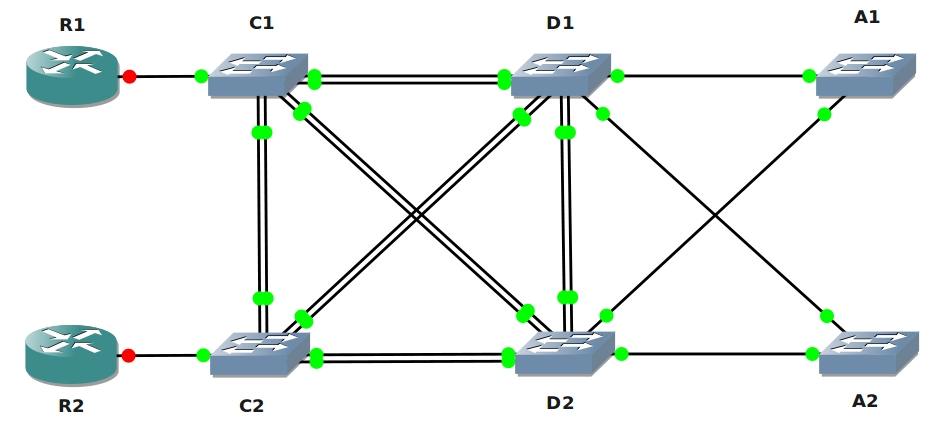

The How to Master series helps you to understand complex topics like spanning-tree, VLANs, trunks, OSPF, EIGRP, BGP and more.
Written by René Molenaar - CCIE #41726


Is there a lab file link?
thank you!
Hello Scott,
You can’t run switches in GNS3…you need real hardware to do this lab (or get a rack rental).
Rene
Guys can I get hands on experience with 2 3550s and 2 2950s.
Can we integrate routers on gns3 with these real Switches, coz it pumps down our lab budget drastically.
Or shall I go with 1-3550, 1-Cisco 3750, 2- 2950 and a high performance computer, that have mulitple eth ports?
Hi Anudeep,
The 3550 switch is more than enough to practice anything you need to know for your CCNP. You can do all the layer 2 + 3 stuff.
There’s only 1 thing you cannot do on the 3550 and that’s Private VLANs. You’ll need a 3560 or 3750 to do this but i doubt the price difference is worth it just to configure private VLANs.
The 2950’s are fine but can only do layer2 stuff…they are nice for the access-layer to practice vlan / spanning-tree.
Rene
but can’t we simulate switch with [i] vlan database [/i] command on the router in gns3 and practice ?
You can use the NM16-SW module and do some of the vlan/switching stuff in GNS3. However it’s kinda different compared to using a real switch. I’d recommend getting Cisco 2950’s (layer2) or 3550’s (layer3) switches if you want to study switching for CCNA or CCNP.
Glad to hear you passed your ROUTE exam.
About the switches, using the NM16-SW isn’t the same as configuration of a switch…some of the commands are not there or work differently.
I’m not too fond of using GNS3 for switches, if you use the real switches you’ll gain the experience needed for beating the SWITCH exam or real life experience. Besides switches are cheap…
You would only need 2-3 switches to test everything you need for your CCNP.
Rene
Hi Rene,
Just cleared my CCNP Route exam last week and I have to thank your labs for it. They have been very informative.
I am now preparing for CCNP Switch exam. I see you have mentioned that we may have to buy Cisco 2950 or 3550 for the same. Aren’t the NM16-SW on GNS3 enough for the same?
Thanks
If you are going to take the CCNP Multilayer switching course then I really think you should buy a c3550 and one c2950 on eBay or somewhere similar. It’s very handy and you get real hands on practice. But do not buy routers becuase they can be simulated in GNS3.
To connect for example a c3550 switch to a simulated router you can find some guides on the Internet, but I think you need a network card (1-4) that supports 802.1Q tagging. Then you can create a VLAN trunk or just a regular network connection from the switch to your PC.
When I say that you gain the most out of your education if you buy some real switches is becuase I have experience from that. When I studied Computer Networks and Advanced Routing & Switching in Halmstad University in Sweden, I lived 100km away from the school and then I didn’t have all the time in my life to stay at school in the evening to practice, because of the time spent to travel by train to the university. I found Dynamips and then GNS3, the best software ever which saved a lot of time. But in the Multilayer switching course I bought some switches, which I’ll never regret. I learned so much more when I also could study the hardware and configuration at home.
In the university they had c3560 that could to private vlan and at home I had my c3550 and two c2950, including GNS3. Perfect combination.
GNS3 can still handle some switching in the 16-module for the 3640 routers but I think it’s not enough. You miss alot of the fun stuff.
Now I have the following and I bought one c26xx router to support real VoIP. I bough some cheap stuff from IKEA and built my own lab rack. Maybe this setup is not for you but i pretty nice to have the possibility to practice. I am also thinking about renting my hardware via Internet access but that is another story.
– 2x c3550 (4x GBIC’s)
– 3x c2950
– 1x 2509 (terminal server; every Cisco course should have this one)
– 2x 2502 (very old routers I got from a friend)
– 1x 2620XM (mostly for VoIP; with one FXS and one FXO)
– 2x Wireless AP Aironet 1200
– 2x VoIP Cisco Phone 7940
Total cost: about 1300$ USD but it’s worth it becuase I can sell it in the future for maybe half that cost or more.
I am a very big Cisco fan but I have started to also look at Juniper’s solutions. Why? Becuause Cisco is not the only one and it’s good to know multi-vendor networks. Then you can’t use EIGRP and maybe have to choose OSPF instead. Juniper’s JUNOS can be simulated in GNS3 and this morning I got OSPF working between a c3640 and JUNOS 8.3R2, nice!
Challenge yourself, try multi-vendor networks like Cisco, Juniper and HP. You don’t have to buy hardware but it always good to have.
Nice post Waschman. I agree 100% with you.
I’m currently “upgrading” my CCIE lab to a mixed virtual/physical lab. I have all the routers/switches here but i’m getting sick of cabling (serial links ugh) and after my frame-relay switch died yesterday morning I decided to change things a bit.
If you have 4 physical switches and a computer that can do 802.1Q trunking you can hook up the gns3 routers to the switches.
I’ll post an article once i’m done 🙂
Can you post a video for the solution?
Thanks
I have request ..please someone can upload the way configure this lab as video..It will help most learners ..Thanks
hi friend Rene ,i want to ask about remote lab i mean if i can setup a lab then i let pepole use it just like packetlife.net and nil.com, is the cost will be high and what i need to make this step and i wish if you put a video for connecting real switch with gns3(like a manual )
hi ,sorry i asked before searching in the website, i found what iam looking for
thank you
Hi Rene…how do I find out if my NIC supports 802.1q tagging? cheers
I think the best way is by actually trying if your NIC can tag frames. Grab a Ubuntu boot CD and try the following:
http://gns3vault.com/Faq/connect-real-switches-to-gns3-using-a-breakout-switch.html
If it works you’ll know for sure that it can do 802.1Q.
Rene, can this be practiced using packet tracer?
Hmm I think some of the commands won’t work in packet tracer.
Is it possible for you to upload the final running configs to use as a reference guide.
I guess you might have to draw up the topology including port numbers so it will all make sense.
Yes but I’ll have to re-cable my lab. I don’t have 6 switches connected like this at the moment 😉
What is the possible solution for this one Pls.
Assigning these two port to 2 Different VLAN, am i right ?
Take 2 ports on A1 with nothing connected to it. These ports will be used in the future for clients…make sure that any client connected to these ports are unable to communicate with each other. They should be able to communicate with any other port on the switch.
Not to ruin it for you but i’m pretty sure what the objective is a switch security feature. private VLANs are overkill to solve it, besides its not possible on the access layer in this topology. what other security features are available?
Ugh, now i need to rewire my lab. very well, its for a good cause.
keep up em good labs Rene. the whiff of the CCIE is becoming stronger and stronger.
i can’t see the lab file
Would anyone have a list of configs available for a final comparison for this lab. I have all the required equipment and have done most of this lab but it would be good to have a yard stick to measure against.
Lab video helps for this but I know that time is always against us and this site is so awesome already that i can’t really complain about that !!!
thanks Rene for your efforts
I don’t have real hardware, I’m using Packet Tracer 6.0 to do the topology, however, I’m not able to enable the port-channel to become a routed port. I’m using 3560 multilayer switch as C1 and C2.
I tried tto issue the command no switchport, but I doesn’t work, and I can’t issue ip address on the port-channel as it is not recognized.
Can anyone help me with this?
Thanks in advance
cunha is use IOU web configure
Cunha, did you try using the no switchport command under the portchannel interface? Whatever you do to the portchannel effects all member interfaces, if you modify the interfaces individually they won’t have identical config and the portchannel will be broken. You can use the range command, if you want the L3 portchannel, go under the portchannel for those config options.
-Rob CCNP, CCNA Security, VCA-DCV
Hi, RENE
I choose IPV4 tunnelling over IPV6 for my final semester project.
Which stimulate is best for this project.
Noman..
This would be a pretty uncommon situation. The opposite would be more realistic, using IPv4 as your underlay for tunnel reachability with IPv6 encapsulated within. If you want your project to be relevant, put IPv6 inside IPv4.
but some IOS can perform some basic switch functions?
It can, yes. Add the NM-16 module and you’ll see.
i86bi-linux-l2-ipbasek9-15.1f.bin with GNS3 and IOU can emulate everything in this lab?
Can this be done in the new GNS3? using IOU. Can I have the copy of the config?
Thanks
Hello Rene,
Can you please include configuration files for this lab?
Thank you,
-Rouzbeh
Hello Rene, Just adding to my previous comment , if all of these lab configuration and explanations are gathered in a book please leYt me know where I can buy it.
Thank You,
-Rouzbeh