

Scenario:
The Company you are currently working for has recently bought a smaller organization and now needs to connect the 2 networks together. Company policy specifies that only OSPF can be used as a routing protocol and it’s physically impossible to connect the Louie router to the Huey router. Up to you to find a good solution…!
Goal:
- All IP addresses have been preconfigured for you.
- Configure OSPF on all routers, configure the areas as specified in the topology picture.
- Area 2 has no direct connection to Area 0, solve this by using OSPF commands.
- Ensure you have full reachability.
- Create some extra loopbacks on router Louie and advertise them in area 2:
Loopback0: 172.16.0.1 /24
Loopback1: 172.16.1.1 /24
Loopback2: 172.16.2.1 /24
Loopback3: 172.16.3.1 /24 - Make sure router Huey only sees 172.16.0.0/22 in it’s routing table, you are only allowed to make changes to router Dewey.
It took me 1000s of hours reading books and doing labs, making mistakes over and over again until I mastered all the protocols for CCNP.
Would you like to be a master of networking too? In a short time without having to read 900 page books or google the answers to your questions and browsing through forums?
I collected all my knowledge and created a single ebook for you that has everything you need to know to become a master of CCNP.
You will learn all the secrets about OSPF virtual links, summarization and more.
Does this sound interesting to you? Take a look here and let me show you how to Master CCNP ROUTE!
IOS:
c3640-jk9s-mz.124-16.bin
Topology:
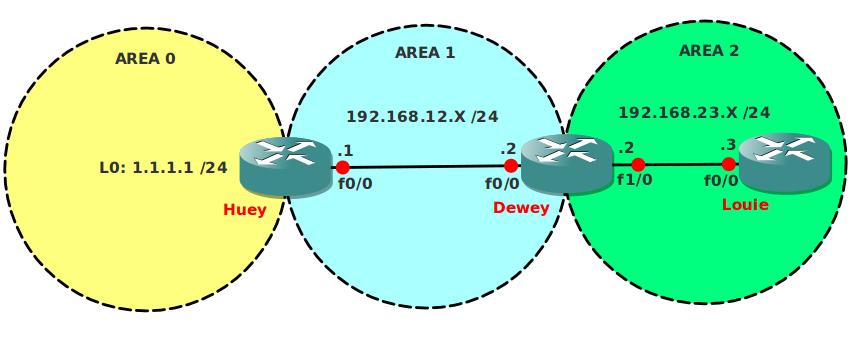
Video Solution:
Configuration Files
You need to register to download the GNS3 topology file. (Registration is free!)Once you are logged in you will find the configuration files right here.

The How to Master series helps you to understand complex topics like spanning-tree, VLANs, trunks, OSPF, EIGRP, BGP and more.
Written by René Molenaar - CCIE #41726


when i try to add this topology in latest GNS3 it won’t load and give error 203 bad number of parameter pls fix it for all labs
Hi Praveen,
Did you see our forum? Some other people had trouble with this. Did you fix it?
Rene
Richard Bowman
I had the same problem when I used the uncompressed ios.image file. I switched to the compressed ios.bin file and it loaded fine. Troubleshooting is all great fun.
I just spent 1 hour trying to configure the summerization [b]NOT[/b] from router dewey !! i thought the question said [b]NOT[/b] allowed , but it was totally worth it 🙂
try it 😉
hehe well at least you learned a valuable lesson there! ;D
Hi, if you want more challenge configure MD5 authentication for Virtual link in addition. Not big task but good to know.
The virtual link addresses are different in the video and in the final configs. In the video it’s between 1.1.1.1 and 192.168.12.2, in the final configs it’s between 1.1.1.1 and 192.168.23.2.
I “passed” this lab using the second solution (I didn’t peak, I swear :)), then I changed the virtual links when I verified my work by watching the video, and received this error:
[quote]&#xOS;PF-4-ERRRCV: Received invalid packet: mismatch area ID, from backbone area must be virtual-link but not found from 192.168.12.2, FastEthernet0/0[/quote]
Hello Andras,
It depends on the router ID of your OSPF router. OSPF will create a router ID by looking at the highest IP address on a loopback interface. If you don’t have a loopback interface it will use the highest IP address on an active interface. Router ID is not preemptive which means it will keep the same router ID unless you reset the OSPF process.
If you configure a Virtual Link you need to configure it between the OSPF ROUTER ID. Not the IP addresses on the interface. That’s why it might be different for my or your config. I think I uploaded the final configuration at another day then recording the video which is why the router ID might be different.
Good luck!
Rene
I tried to advertise those loopback addresses via the redistribute connected subnets command in router Louise but for some reason router Huey will not receive the summarized /22 network. You need to specifically advertize the loopbacks via the network command for the summarization to work!! Interesting
Dewey will only generate a summary(the /22) if there is at least one of the subordinate routes in the routing table.
It should not matter in any way what you did on Louie. You just need to advertise those loopbacks in area 2 and do the sumarization on Dewey then.
OSPF can be fun to play with 🙂 Keep in mind what Alexandru said, you need at least one route in your routing table in order for OSPF to advertise the summary. This applies to all routing protocols.
I had the same problem as IP5, misunderstanding the question! Spent the last 30 mins trying to figure out why summarization does not occur when running the area 2 range 172.16.0.0 255.255.252.0 on R3 (Louie).
This lab was amazing for me increase my summarization skills 🙂
First, I tried redistribute the connected loopbacks from Louie to Dewey and enabled [b]area 2 range 172.16.0.0 255.255.252.0 [/b]command on Dewey, but it not worked.
So we have two options for summarization:
1 – Advertise all Louie loopback interfaces with [b]network[/b] and create the summary with [b]area 1 range 172.16.0.0 255.255.252.0[/b] command in Dewey, since this router is an ABR
2 – Redistribute all Louie loopback interfaces with [b]redistribute connected subnets[/b] command and summary these address in Louie with command [b]summary-address 172.16.0.0 255.255.252.0[/b], since with [b]redistribute connected subnets[/b] Louie can be considered an ASBR. 🙂
Hi RENE ! so far i have learnt a lot from you . You are my virtual teacher 🙂
This lab works fine but my question is ” What if we add another router attached with LOUIE and configure Area 3 on that , so how can we give a Virtual Link to that Area” ?
I hope You could understand what i am asking 😉
That sort of design with virtual-links is not supported. You could use tunneling as a method of extending area 0 across the network, assuming you already had IP connectivity between sites. So, an area 0 tunnel (GRE or IP in IP, as an example) between Huey and Louie would probably work. This is very poor network design, of course, as every single router is now an ABR and the benefit of using areas to segment an OSPF domain is lost.
Excellent. Spent about 30 minutes but eventually Victory!!
hey i didnt find .net file. Can anyone help me