

Scenario:
This lab is a follow-up of the OSPF Stub lab. I’d recommend you configure that lab before this one.
The company specialized in selling Fantasy E-books is becoming more popular everyday and after your trainee period they decided to offer you a job. They still don’t have any money to upgrade their network equipment and they are still experiencing problems with big routing tables… time to tune OSPF some more!
Goal:
- All IP addresses have been preconfigured for you.
- Configure OSPF on both routers, use the Area’s as specified in the topology picture.
- Router Algrim: Loopback0 should be in Area0
- Achieve full connectivity.
- Router Algrim: create additional loopbacks:
L1: 172.16.0.1 /24
L2: 172.16.1.1 /24
L3: 172.16.2.1 /24
L3: 172.16.3.1 /24 - Advertise these networks into OSPF Area 0.
- Take a look at the routing table of Router Barik, you should see all 4 networks. Make sure you can ping them.
- Change the area type of Area 1 so you don’t see the 4 networks anymore but only 1 default route.
- Make sure you can still ping the 4 networks.
It took me 1000s of hours reading books and doing labs, making mistakes over and over again until I mastered all the protocols for CCNP.
Would you like to be a master of networking too? In a short time without having to read 900 page books or google the answers to your questions and browsing through forums?
I collected all my knowledge and created a single ebook for you that has everything you need to know to become a master of CCNP.
You will learn all the secrets about OSPF special area types like stub, totally stub and more.
Does this sound interesting to you? Take a look here and let me show you how to Master CCNP ROUTE!
IOS:
c3640-jk9s-mz.124-16.bin
Topology:
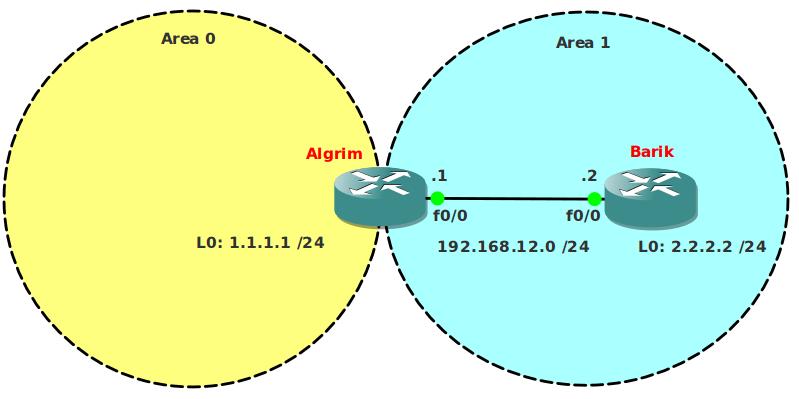
Video Solution:
Configuration Files
You need to register to download the GNS3 topology file. (Registration is free!)Once you are logged in you will find the configuration files right here.

The How to Master series helps you to understand complex topics like spanning-tree, VLANs, trunks, OSPF, EIGRP, BGP and more.
Written by René Molenaar - CCIE #41726


Hi,
I observe that there is no ospf configuration in the attached router’s configs
I’ll fix it.
Hi,
Is it necessary to add the area 1 no summary command to both routers or can it be applied to the ABR (Algrim) only?
The no summary command only has to be applied to the ABR. Not sure what I did in the video but we only need it on the ABR.
Hi Rene,
The way I was taught to do a Totally sub area was to do the no summary command on the ABR and then just the stub command on the other routers. I can see both ways achieve the same thing.
I understand as well for neighbours to form the Stub flag needs to match.
That is correct, you only need the "no-summary" on the ABR because that’s the one generating the default route. The normal area routers can be normal "stubs".
I have all of the config correct Except the [color=green]Totally Stub c[/color]ommand… I can not make out what the Video is showing… Could some one post Exactly what to type into R1…. Thanks
“area 1 stub no-summary” under OSPF configuration mode
Nice Rene,
Thanks
I just wanna point that totally stub (with no summary at the ABR only) blocks type 3 LSAs but only inject a single default (summary) route into the area. This is quite confusing at first because the summary is still a Type 3 LSA…
My 2 cents
Thanks Rene
Hi all,
In this lab if router barik is not set in ospf area 1 stub no-summary, it does not work.
In the video is done "area 1 stub no-summary" command in both routers while in the books is said it is only necessary in the ABR.
If it is only done in the ABR, barik is not getting any default route.
Does any one experience the same behaviour?
Thanks
Yes I noticed as well but Barik needs to be a stub! for it to work ie applying the (area 1 stub no-summary) on the ABR router.
What is the difference between total stub lab and stub lab? I don’t see any? Even if I don’t advertise or redistribute loopback networks still one should be able to ping any of these loopback addresses from ABR router. Because as soon as you declare the area as stub or total stub, default route gets installed in ABR.
I have tested both labs without advertising networks using `network command` and also using `redistribute connected subnets` command.
in both case I can ping the loopback addresses.
For the purposes of simply pinging a loopback, there is no difference. But a totally stubby area only allows that ABR to generate a single LSA3 to represent the default route, and no others.