

Scenario:
AsianFish inc. is expanding their business towards Europe so they need to expand their network as well. You are responsible for the performance of the network and decided that OSPF would be a suitable candidate for a routing protocol. Because the network at this moment is still small, you decided a single area OSPF should be enough. It’s up to you to make it work!
Goal:
- All IP addresses have been preconfigured for you.
- The following loopback interfaces have been configured:
HongKong: 1.1.1.1 /24
Amsterdam: 2.2.2.2 /24
Barcelona: 3.3.3.3 /24 - HongKong: Configure OSPF (process-id 1) and advertise all networks by using a single network statement. Use area0
- Amsterdam: Configure OSPF (process-id 1) and advertise all networks by using 2 network statements, area0.
- Barcelona: Configure OSPF (process-id 1) and advertise all networks by using 3 network statements, area0.
- Optional: the loopback interfaces appear as /32’s in the routing table, make sure they appear as /24’s just as you configured them.
- Amsterdam: change the router-id to 22.22.22.22, make sure you see this change from Barcelona by using show commands.
- Traffic from Barcelona to HongKong should use the link between Amsterdam-Barcelona, use the cost command to achieve this.
- Remove the previous change with the cost-command, achieve the same goal by using the bandwidth command.
- Enable clear-text authentication between Amsterdam and HongKong. Use “vault” as a password.
- Enable MD5 authentication between Barcelona and HongKong. Use “Safe” as a password.
- Change the OSPF timers on the link between Amsterdam and Barcelona so hello packets are being sent every 5 seconds.
- The HongKong router will have access to the Internet in the future, you need to advertise a default route in OSPF so Amsterdam and Barcelona will send traffic for unknown networks to HongKong.
It took me 1000s of hours reading books and doing labs, making mistakes over and over again until I mastered all the protocols for CCNA.
Would you like to be a master of networking too? In a short time without having to read 900 page books or google the answers to your questions and browsing through forums?
I collected all my knowledge and created a single ebook for you that has everything you need to know to become a master of CCNA.
You will learn all the secrets about switching, routing, subnetting and more.
Does this sound interesting to you? Take a look here and let me show you how to Master CCNA!
IOS:
c3640-jk9s-mz.124-16.bin
Topology:
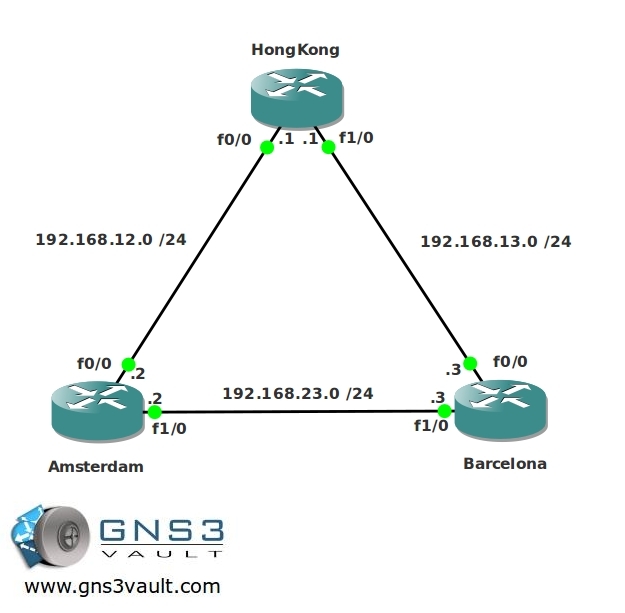
Video Solution:
Configuration Files
You need to register to download the GNS3 topology file. (Registration is free!)Once you are logged in you will find the configuration files right here.

The How to Master series helps you to understand complex topics like spanning-tree, VLANs, trunks, OSPF, EIGRP, BGP and more.
Written by René Molenaar - CCIE #41726


Hi Rene,
This lab is fun8). However, i have two questions, what feature make loopback interfaces appear /32 in the routing table and does this have any benefits?
regards,
michael
Hi Michael,
If you are working on this lab I’m guessing you are studying for CCNA?
OSPF uses multiple “network types”. You will learn about those in CCNP. One of them is “loopback” and OSPF will always advertise a loopback as /32. Type the [b]show ip ospf interface loopback0[/b] command and it will show you the OSPF network type.
In a way it makes sense because there is nothing more than a single IP address on a loopback interface. Even though you configure a /24 you won’t find 200+ IP addresses there.
It will save you some address space (we don’t care about that all that much with private IP address space) but it could be useful when you play with most specific routing.
Good luck!
Rene
I want to thank you to give us small review in OSPF. I have forgot the LOOPBACK and Authentication and how to control them.:):)
Thanks Omar!
Hi Rene . Earlier there was an option to download the PDF. Its no longer available. Have you removed all the PDFs?
thanks
Hi Affy,
The PDF plugin that generates PDF files from articles was/is really buggy. I would like to add the feature but it’s a pain to implement it 😉
Rene
Bought one of your books and found reading and practicing the labs on this website to be a great help!
Thanks for sharing this message and good to hear that it’s useful to you 🙂
Hello Rene
Nice Lab
But I came across a small problem I wonder if you can help
when I do a
R2#sh ip ospf neighbor
Nothing appear
Did you came across this problem before?
Thanks for your reply
There are many things that could go wrong so OSPF doesn’t establish the "neighbor adjacency". On a fastethernet network it’s probably because you don’t have the correct network commands.
Do a "show ip protocols" to see which networks are enabled for OSPF. Also use a "show ip ospf interface fastethernet" to check if it’s enabled for the particular interface.
Thanks for you reply Rene
The probleme is solved
I had to restart the program (GNS3)
thanks again
Completed Lab:
Here is my solution, [url=http://pastie.org/4236555]Barcelona[/url], [url=http://pastie.org/4236554]Amsterdam[/url] and [url=http://pastie.org/4236549]HongKong[/url]
Hi Rene,
thanks for the great labs
regards,
Jack
You are welcome Jack.
awesome work with the labs 🙂
just wanted to check why my outputs differ from yours…
[youtube vid 13:03]
Barcelona#sh ip ospf
Routing Process “ospf 1” with ID 3.3.3.3
Start time: 00:04:38.244, Time elapsed: 00:53:23.192
Supports only single TOS(TOS0) routes
Supports opaque LSA
Supports Link-local Signaling (LLS)
Supports area transit capability
Router is not originating router-LSAs with maximum metric
Initial SPF schedule delay 5000 msecs
Minimum hold time between two consecutive SPFs 10000 msecs
Maximum wait time between two consecutive SPFs 10000 msecs
Incremental-SPF disabled
[color=red][b] Minimum LSA interval 5 secs[/b][/color]
Minimum LSA arrival 1000 msecs
LSA group pacing timer 240 secs
Interface flood pacing timer 33 msecs
Retransmission pacing timer 66 msecs
Number of external LSA 0. Checksum Sum 0x000000
Number of opaque AS LSA 0. Checksum Sum 0x000000
Number of DCbitless external and opaque AS LSA 0
Number of DoNotAge external and opaque AS LSA 0
Number of areas in this router is 1. 1 normal 0 stub 0 nssa
Number of areas transit capable is 0
External flood list length 0
Area BACKBONE(0)
Number of interfaces in this area is 3 (1 loopback)
Area has no authentication
SPF algorithm last executed 00:00:55.988 ago
SPF algorithm executed 24 times
Area ranges are
Number of LSA 6. Checksum Sum 0x03BDD8
Number of opaque link LSA 0. Checksum Sum 0x000000
Number of DCbitless LSA 0
Number of indication LSA 0
Number of DoNotAge LSA 0
Flood list length 0
I went through each step but the show output still differs..
apart from the above everything works fine, just confused with show ip ospf command
V
The minimum LSA interval is nothing to worry about, it’s probably different for some IOS versions. Normally it’s not something we tinker with.
what is meant by these..?? plz help
advertise all networks by using a single network statement
advertise all networks by using 2 network statements
advertise all networks by using 3 network statements
I explain it in the video, you’ll see how and why I implement this.
ok i got it ….thanxxx
i am not sure what i am missing, but i am getting two DR’s in this topology. Should you not only have one DR in an area?
I think i worked this out, you can only have one DR and BDR per shared segment not area. So i have on Barcelona i have fa1/0 as BDR for the 192.168.23.0 network and fa0/0 as DR for the 192.168.13.0 network.
The DR/BDR election is PER multi-access segment and not for each area.
So wonderful, i completed it successfully
Thanks Rene, you are magician.
Hi Rene,
Thanks a lot, this is wonderful
Hi Rene
Nice LAB thanks
Thanks
Ael Irsal
Thanks.
Just made me understand ospf path selection better.
Nice Labs
Renee,
I keep getting the errors
206-unable to creat UDP NIO
208-unable to find object R1
How can I fix this it makes it tough to use. I would like to do the labs instead of watch. Any help would be greatly appreciated.
Brad
Just started doing these labs and enjoying them, thanks for all the time you have put in designing them.
Renne….you my friend are a freakin life saver. Appreciate it the hard work and the labs. Thank you!
HI Renne, where can i download the IOS?
c3640-jk9s-mz.124-16.bin
i could not find in your zip file.
can you please sendme ?
seri.p2b@gmail.com
Thank you
Hi Renee,
I managed to download the bin for this lab, when click play and console , all works but I am able to go futher more for this lab, even an enter did not work. can you help please?
Hi Renee,
I managed to download the bin for this lab, when click play and console , all works but I am NOT able to go futher more for this lab, even an enter did not work.MEAN I cannot even type anything on that, can you help me please?
seri.p2b@gmail.com
Hi !
I am practicing on the lab and here what I got when I issue a show ip ospf neighbor command over Barcelona router :
Neighbor ID Pri State Dead Time Address Interface
2.2.2.2 1 FULL/DR 00:00:39 192.168.23.2 FastEthernet1/0
1.1.1.1 1 FULL/DR 00:00:32 192.168.13.1 FastEthernet0/0
Is it normal to obtain this output ? Normally we are in a point to point network betwenn all the links so there is no election of any DR or BDR ????
Please can anyone help me with an explanation ?
Thanks !
Well Fortunately I found (by myslef i am quite proud) the answer to my question which is that there are three Ethernet segments. And in each one of them there will be an election of a DR and BDR.
Thank you René for your lab, it helped me to not fear and to face the problem till the solution is found !
Great job with the labs. Good refresher for me. Just an FYI, in your Final Configurations, Amsterdam only has 1 network statement. I believe it should be 2 and might help to not confuse people.
These labs are great. Helping me alot for my CCNP preparation. Thanks Rene.
Learned something interesting on this. On changing the cost using bandwidth. I thought I would be smart and enter “ip ospf cost 1” changing the cost back to it’s default value. Well the bandwidth command has no effect if you do that. I assume you are still telling ospf that “I want that interface to be a cost of 1 regardless”. However if I negated the command “no ip ospf cost 1” then everything thing worked as it should. lol
Hi Rene
I am a big fan of yours and have studied all of your books. Can you please let me know that what is your plan to update the ccnp books for new outline (CCNP V2). Your response will be highly appreciated.
Thanks
Ghulam Qadir
When I open this project with the latest version of GNS3 on Linux Mint all of the configs are defaults.
Well – I manually specified the config file from the node configuration and its working fine.
HI Rene
Having problems opening this lab, i am running GNS1.2 and when i start the routers up all i get is this. I am using the image c3640-jk9s-mz.124-16.bin.unpacked
Any help appreciated.
Connected to Dynamips VM “R1” (ID 1, type c3600) – Console port
Press ENTER to get the prompt.
ROMMON emulation microcode.
Launching IOS image at 0x80008000…
Smart Init is dis abled. IOMEM set to:
HI, not to worry, its OK this morning.
Hello Nav.. how did you get it to work? I’m getting the same thing. Also, how do load the configs?
Thanks
hi Rene, i have a 2911 router which i want to set to serve as a dhcp server, please can you guide me on this? please your candid explanation is appreciated
Hi Rene,
Thanks for this. Question for the exams , do you recommend drawing out the topology and using it as a reference or just try and go back and forth? It would not seem time efficient to draw it but I like to look at the topology as I configure it. Thanks.
Drawing a quick topology with routers, links, and areas should take about 60 seconds. I would do it.
Hi Rene,
Thanks for this fantastic lab.
HongKong: Configure OSPF (process-id 1) and advertise all networks by using a single network statement. Use area0
–> I am wondering if we configure as network 0.0.0.0 0.0.0.0 area 0 instead of 0.0.0.0 255.255.255.255. Please explain what if we got difference in output of command.
hi Rene .. thanks a lot
Can anyone suggest to me why the cost command isn’t working for me? even after changing the cost of the int the traffic still takes the same route. Thanks
Did you change the cost sufficiently to influence path selection? If the best route has cost 10, and the backup path has 20, increasing the best path’s cost by 9 or less has no effect, for example.
Hi Rene, Thnx alot for such a wonderful material you’ve put together.