

Scenario:
As the senior network engineer for a Dutch fishing company you are responsible for connecting all the different branch offices to the main network. The WAN technology you are using is Frame Relay, and you need to run OSPF over this WAN connection. It’s impossible to broadcast on this WAN connection.
Goal:
- The frame-relay switch has been preconfigured for you, as you can see in the topology picture the following PVC’s has been configured:
Router Barracuda to Salmon:
Barracuda: DLCI 102
Salmon: DLCI 201Router Barracuda to Herring:
Barracuda: DLCI 103
Herring: DLCI 301
- Router Barracuda is the “Hub” router and the other 2 routers are the “Spoke” routers.
- Do not change any configuration on the Frame-Relay switch.
- Configure the following IP addresses:
Router Barracuda:
S0/0: 192.168.123.1 /24
L0: 1.1.1.1 /24Router Salmon:
S0/0: 192.168.123.2 /24
L0: 2.2.2.2 /24Router Herring:
S0/0: 192.168.123.3 /24
L0: 3.3.3.3 /24 - Configure all serial interfaces for encapsulation Frame-Relay.
- Disable Frame-relay inverse arp on all serial interfaces.
- Configure the correct frame-relay map statements on all routers and make sure you can ping every IP address. You are not allowed to use the “broadcast” command.
- Configure the OSPF network type to “point-to-multipoint non-broadcast” on all serial interfaces.
- Configure OSPF on all 3 routers, make sure you have full connectivity. All IP addresses including the loopbacks should be reachable.
It took me 1000s of hours reading books and doing labs, making mistakes over and over again until I mastered all the protocols for CCNP.
Would you like to be a master of networking too? In a short time without having to read 900 page books or google the answers to your questions and browsing through forums?
I collected all my knowledge and created a single ebook for you that has everything you need to know to become a master of CCNP.
You will learn all the secrets about OSPF network types, frame-relay settings and more.
Does this sound interesting to you? Take a look here and let me show you how to Master CCNP ROUTE!
IOS:
c3640-jk9s-mz.124-16.bin
Topology:
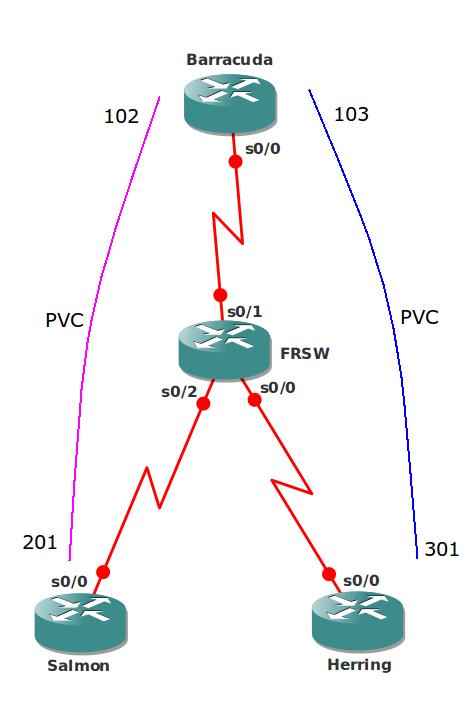
Video Solution:
Configuration Files
You need to register to download the GNS3 topology file. (Registration is free!)Once you are logged in you will find the configuration files right here.

The How to Master series helps you to understand complex topics like spanning-tree, VLANs, trunks, OSPF, EIGRP, BGP and more.
Written by René Molenaar - CCIE #41726


I’am sorry, but “OSPFoverFRPtoMPNB-FinalConfigs” not final.
And preconfigure configuration without configure DLCI.. as wrote in goal.
🙁
Hi Rene,
The frame-relay map is not showing anything. i’ve configured the dlci’s and map statements, but nothing in the fr map. I tried to see the final config, but its even not there.
By default Inverse ARP is enabled which will do the frame relay mapping automatically. By default it will also send broadcast traffic through the PVC.
You don’t see anything when you try “show frame-relay map” ? What about “show frame-relay pvc” does it show active?
Router Barracuda to Herring:
Barracuda: DLCI 103
Salmon: DLCI 301
should be
Router Barracuda to Herring:
Barracuda: DLCI 103
[b]Herring[/b]: DLCI 301
Thank you for all this great information. I’ve been doing labs the last 5 days and I follow your Master ROUTE book which is easily the best book on CCNP Route that I have come across!!
Hi Daniel,
Thanks for this comment 🙂 Just edited the lab…made a small mistake with too much copy/pasting ;D
Good that you like the book 8) any plans for the exam yet? If you read the books and do all the labs yourself you’ll get there!
Rene
I had my exam planned for Jan 16th, but not with reading your book I might take a shot at it earlier (I’m halfway through).
What I’ve always valued are people that can help me provide ‘lightbulb’ moments… the moments of clarity where you say to yourself ‘Ah, now I get it!’. Your book is like a constant spotlight. You’ve assembled all the lightbulb moments into one amazing resource!
Thanks again. Now I have to get back to studying! 🙂
I am confuse during I apply this lab without reading and listening your video.
But after reading carefully I got it
Thanks for the labs & videos. Its been very rewarding going through the labs and i am on the track (route exam), just reading your book & doing the labs. I grasped concepts very well only by your Route book & labs.
Thanks Rene once again!!!
Thank you for your kind words and you are welcome 🙂
Hi Rene
what is the use of using command " frame-relay map statements" when we can achieve the goal just using neighbor command .
thanks
Frame-relay map is required to map the layer 2 address (DLCI) to a layer 3 IP address. We also use this command to emulate broadcast or multicast traffic over the frame-relay network.
You can use the neighbor command because this will tell OSPF to use unicast instead of multicast. It’s another method of getting OSPF to work on a frame-relay network.
Hi rene,
why do disabled the Inverse Arp
To keep things interesting. Inverse ARP does the layer 2 (DLCI) to layer 3 (IP) mapping for us automatically and also adds broadcast capability for frame-relay. By disabling it we have to worry about it ourselves.
Agree with mq-defiler
"I’am sorry, but "OSPFoverFRPtoMPNB-FinalConfigs" not final."
Probably this is a correct solution:
[quote]Hello – 30 sec, Dead timer – 120 sec
Adjacency manual neighboors
No DR/BDR Election
Unicast updates
###
HUB
interface Serial0/0
ip address 192.168.123.1 255.255.255.0
encapsulation frame-relay
ip ospf network point-to-multipoint non-broadcast
frame-relay map ip 192.168.123.2 102
frame-relay map ip 192.168.123.3 103
no frame-relay inverse-arp
!
router ospf 1
network 192.168.123.0 0.0.0.255 area 0
neighbor 192.168.123.3
neighbor 192.168.123.2
SPOKE1
interface Serial0/0
ip address 192.168.123.2 255.255.255.0
encapsulation frame-relay
ip ospf network point-to-multipoint non-broadcast
frame-relay map ip 192.168.123.1 201
frame-relay map ip 192.168.123.3 201
no frame-relay inverse-arp
!
router ospf 1
network 192.168.123.0 0.0.0.255 area 0
SPOKE2
interface Serial0/0
ip address 192.168.123.3 255.255.255.0
encapsulation frame-relay
ip ospf network point-to-multipoint non-broadcast
serial restart-delay 0
frame-relay map ip 192.168.123.1 301
frame-relay map ip 192.168.123.2 301
no frame-relay inverse-arp
!
router ospf 1
log-adjacency-changes
network 192.168.123.0 0.0.0.255 area 0[/quote]
I am not able to ping the ip on the serial interface s0/0 on any one of the local router. But was able to successfully ping other ip’s in the n/w. Does frame relay behaves differently?