

Scenario:
As a network engineer you are familiar with the concepts of OSPF and single-area implementations, however you never tried to create a multi-area ospf configuration. You have heard about different area types like stubby, not so stubby but never encountered them in real life. You boot up your good old routers and prepare for the lab to change this once and for all.
Goal:
- All IP addresses have been preconfigured for you.
- Configure OSPF on all routers, achieve full connectivity. Make sure you can ping any IP Address from all routers. All networks should be in Area 0.
- Manually set the Router-ID of R1 to 1.1.1.2, make sure if you look at R2 or R3 that you really see the new router ID.
- Change OSPF so R3 becomes the designated router on the 192.168.34.X segment.
- Change the metric on the link between R1 and R2, do not use the ip ospf cost command for this.
- Change the reference bandwidth on all routers to 1500.
- Enable cleartext authentication between R2 and R4.
- Enable MD5 authentication between R3 and R4.
- On the link between R2 and R4, change the hello timer to 10 seconds and the dead-interval to 60 seconds.
- Insert a default route on R4 so that you see a 0.0.0.0/0 route in the routing table of R1, R2 and R3.
- Shutdown the link between R2 and R4.
- The link between R1 and R2, and R2’s loopback interface should be configured as area 1.
- Configure area 1 as a not so stubby area (nssa).
- Configurea R4’s loopback0 interface as area 2.
- Create 4 loopbacks on R4:
Loopback10: 172.16.0.1 /24
Loopback11: 172.16.1.1 /24
Loopback12: 172.16.2.1 /24
Loopback13: 172.16.3.1 /24 - Advertise these networks in OSPF area 2 but make sure you only see a single entry (172.16.0.0 /22) in the routing table of R1,R2 and R3.
- Create another loopback on R4:
Loopback14: 172.16.4.1 /24 - You are not allowed to advertise this loopback in OSPF or by using redistribution. Ensure other routers can reach this loopback.
It took me 1000s of hours reading books and doing labs, making mistakes over and over again until I mastered all the protocols for CCNP.
Would you like to be a master of networking too? In a short time without having to read 900 page books or google the answers to your questions and browsing through forums?
I collected all my knowledge and created a single ebook for you that has everything you need to know to become a master of CCNP.
You will learn all the secrets about OSPF, metrics, authentication, area types and more.
Does this sound interesting to you? Take a look here and let me show you how to Master CCNP ROUTE!
IOS:
c3640-jk9s-mz.124-16.bin
Topology:
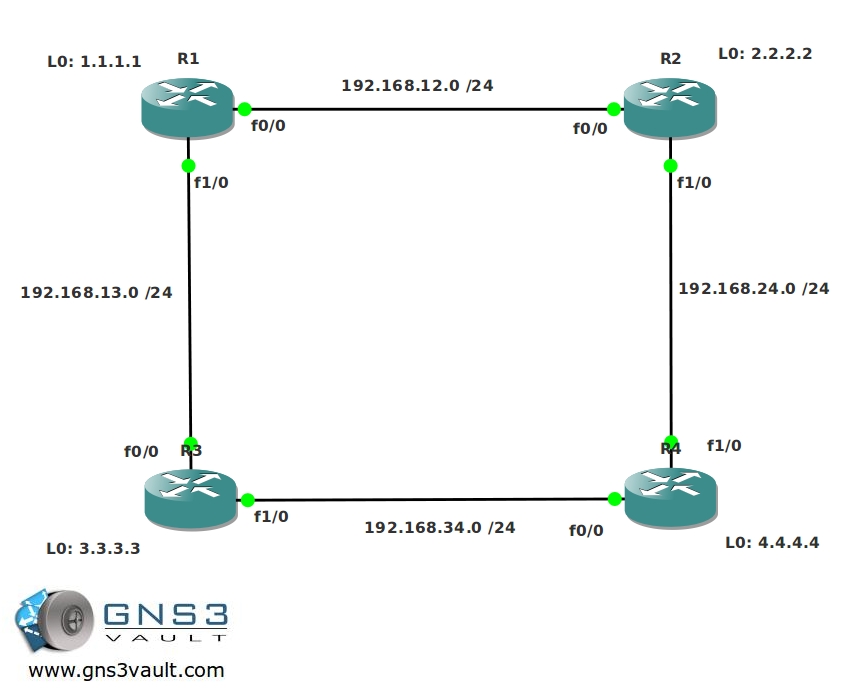
Video Solution:
Configuration Files
You need to register to download the GNS3 topology file. (Registration is free!)Once you are logged in you will find the configuration files right here.

The How to Master series helps you to understand complex topics like spanning-tree, VLANs, trunks, OSPF, EIGRP, BGP and more.
Written by René Molenaar - CCIE #41726


i would suggest a last task:
create a loopback on R4 without adding it to the ospf process and without redistribution.
ensure that you have reachability to it from all other routers.
Reason:
to test that the nssa area type does not allow by default the injection of default route towards R3.
Thanks for another great lab!
In the video solution, to make R3 the DR on the 3-4 link, you increased the priority on R4’s interface to 200. This would actually make R4 win the election, since the router with the highest OSPF priority on a segment will become the DR for that segment.
The reason that R3 became the DR is because you cleared the OSPF process on R4. While this was happening, R3 became the DR. When the OSPF process on R4 started up again, R3 was already the DR, and since OSPF does not preempt, R3 stayed the DR.
@Bogdan
Good thinking! I added this one…i like it 8)
@Doug
You are totally right..I messed up 😉 So people keep in mind:
– The DR is preemptive.
– Higher priority will become the DR.
Thanks for this!
I have got the Loopback14 on R4 pingable from all routers. Just to confirm if I am doing it as intended, can we use the “ip default-network” command?
ip default-network will advertise the default route and ensure reachability, so yes this is perfectly fine. You’ll have reachability without using advertising or redistributing. 8)
I can’t get R2 to see the default route and hence ping 172.16.4.1. My thoughts are this is because area 1 is a NSSA and so doesn’t pass Type 5 LSAs. All other routers can ping it, just not R2.
comparing my config to yours it doesn’t seem to differ other than the mask I’ve got on 172.16.4.1.
Key part of my R4:
router ospf 1
log-adjacency-changes
auto-cost reference-bandwidth 1500
area 2 range 172.16.0.0 255.255.252.0
network 4.4.4.4 0.0.0.0 area 2
network 172.16.0.0 0.0.3.255 area 2
network 192.168.34.4 0.0.0.0 area 0
default-information originate always
When I change the network statement to have the /16 mask for 172 the route from R2 to Loopback14 on R4 works but I do not see a default route on R2. Is this correct?
sh ip route:
Gateway of last resort is not set
C 192.168.12.0/24 is directly connected, FastEthernet0/0
1.0.0.0/32 is subnetted, 1 subnets
O IA 1.1.1.1 [110/151] via 192.168.12.1, 00:06:06, FastEthernet0/0
O IA 192.168.13.0/24 [110/300] via 192.168.12.1, 00:06:06, FastEthernet0/0
2.0.0.0/32 is subnetted, 1 subnets
C 2.2.2.2 is directly connected, Loopback2
3.0.0.0/32 is subnetted, 1 subnets
O IA 3.3.3.3 [110/301] via 192.168.12.1, 00:06:06, FastEthernet0/0
4.0.0.0/32 is subnetted, 1 subnets
O IA 4.4.4.4 [110/451] via 192.168.12.1, 00:06:06, FastEthernet0/0
172.16.0.0/16 is variably subnetted, 2 subnets, 2 masks
O IA 172.16.4.0/24 [110/451] via 192.168.12.1, 00:00:09, FastEthernet0/0
O IA 172.16.0.0/22 [110/451] via 192.168.12.1, 00:00:04, FastEthernet0/0
O IA 192.168.34.0/24 [110/450] via 192.168.12.1, 00:06:07, FastEthernet0/0
@ Steve
Allowing the 172.16.0.0 /16 to be advertised on R4 is against the lab objectives.
What I did was to go in to R1 and issue this command under the OSPF process:
R1(config-router)#area 1 nssa default-information-originate
This will make R1 advertise the default-route it knows from R4 in to area 1.
R2 will have a route in its routing table looking like this:
O*N2 0.0.0.0/0 [110/1] via 192.168.12.1, 00:24:53, FastEthernet0/0
I don’t know if this is considered against the lab objectives, but I would think that using the already existing default-route in the OSPF network in the NSSA area would be “right” way.
This also scales well compared to some other solutions like adding a static route on R2, which, again, is not against the lab objectives.
Just my 2 cents.
Hi Derry,
Your way sounds correct but I still can’t get that R2 router to see the default route.
R1 ospf config:
router ospf 1
router-id 1.1.1.2
log-adjacency-changes
auto-cost reference-bandwidth 1500
area 1 nssa default-information-originate
network 1.1.1.1 0.0.0.0 area 0
network 192.168.12.1 0.0.0.0 area 1
network 192.168.13.1 0.0.0.0 area 0
R2 ospf config:
router ospf 1
log-adjacency-changes
auto-cost reference-bandwidth 1500
area 1 nssa
network 2.2.2.2 0.0.0.0 area 1
network 192.168.12.2 0.0.0.0 area 1
network 192.168.24.2 0.0.0.0 area 0
R1 shows the default route but R2 shows no default at all (but all other routes)
Hello everybody,
I’ve encountered the same peculiarity that Steve did while doing my lab. It seems that despite being a default route to 0.0.0.0, OSPF regards it as an External Type 2 route. Since you cannot advertise a type 5 (external) route into NSSA, we don’t get the default route in there.
However, this should not be a problem, if you mark the area as a Totally NSSA on R1:
[i]area 1 nssa no-summary[/i]
That would do it, and it also seems the right way to do it, because, after all, Area 1 is just a stub area with only one exit, albeit being an NSSA kind.
Cheers for the nice labs!
Hi Guys,
Let me sum up some of the differences between the stub areas which will help you to beat these OSPF labs.
If you use a stub area it will block all type 5 external LSAs. This means you cannot have an ASBR within the stub are because those are blocked.
If you want an ASBR within the stub are you need to convert it into a NSSA (not-so-stubby-area) which uses type 7 external LSAs. This way you can have external routing information within the stub area.
The “totally” stub types will do the exact same thing but they also block type 3 summary LSAs in the area.
Getting the following error when trying to get to the PDF.
TCPDF error: Missing or incorrect image file: images/stories/ospf intermediate.jpg
I have to say Rene, great work and great labs. Thank you for your time and effort. It really helps when you can find quality free labs especially in this economy.
One other thought. Have you considered zipping up all the files into one that includes the Lab PDF, Topology, Configs, and final configs. It would be great to download just one file.
@Rene
On the PDF I just wanted to make sure it was not just me.
On the zipping of the files, it was just an idea maybe going forward. You do enough work keeping this site going and I think you for that.
If I was to work on zipping some of the exiting labs for you would that be OK? If so where could I send them?
In Configuring R4’s loopback0 interface as area 2:
you forgot to do this command:
network 192.168.24.0 0.0.0.255 area 0
@Mike The PDF plugin keeps failing on me…it’s a pain to get it working 😛 Zipping everything sounds like a good idea but it means I’ll have to generate a pdf and replace all 100+ lab files so it’s not something i’m going to do (soon).
@Usama what do you mean? [b] network 4.4.4.0 0.0.0.255 area 2[/b] is used on R4 to get this loopback in area 2.
Hi Mike,
It’s cool to hear that you want to zip the files but I think i’ll wait for a moment and first get all the labs out of the way. There’s about 300 labs left I want to build so everything is on CCIE R&S level. If i’m going to do it I think I can do it without too much trouble with a script on the webserver command-line ;D appreciate the help though!
I’ll try to fix the PDF plugin, I don’t like that its not working but it takes so much time fixing it 😛
About the last requirement to reach the 172.16.4.1 address.
R4 is already doing a default-information originate.
So a 0/0 is already out there in the routing table.
The problem is that R2 will not be able to get to R4s loop because the 0/0 is a E2(by default) and thus it will not get into the routing table of R2 since area 1 is NSSA.
To solve the problem I found two ways:
1. Easy way with a static route on R2 for 172.16.4.1
or
2. Since this is a OSPF lab, configure Area 1 as a Totally NSSA so R2 gets a 0/0 from R1 since it can’t learn the 0/0 from R4.
I think this is what Bogdan had in mind when he suggested this little trick :).
This lab touched on a little bit everything to do with OSPF. Thanks great work once again Rene.
Getting Error while open this lab
error 203-bad numbers of parameters 🙁
@James glad you like it!
@Hemant + everyone else that has the 203 bad number of parameters error, here’s the solution:
http://gns3vault.com/FAQ/203-bad-number-of-parameters-1-with-minmax22.html
Thanks Rene 🙂
its working,,, now i can open all my downloaded LAB 😉
I have an MultiArea ospf configuration lab can u help me i want to upload this lab ex. but how to upload i dont know 🙁
What exactly do you want to do? 🙂
Dear Rene,
kindly check, the router 4 config, is it completing the requirement.
[b]
interface Loopback0
ip address 4.4.4.4 255.255.255.0
!
interface Loopback10
ip address 172.16.0.1 255.255.255.0
!
interface Loopback11
ip address 172.16.1.1 255.255.255.0
!
interface Loopback12
ip address 172.16.2.1 255.255.255.0
!
interface Loopback13
ip address 172.16.3.1 255.255.255.0
!
interface Loopback14
ip address 172.16.4.1 255.255.255.0
!
interface FastEthernet0/0
ip address 192.168.34.4 255.255.255.0
ip ospf authentication message-digest
ip ospf message-digest-key 1 md5 TEST
duplex auto
speed auto
!
interface FastEthernet0/1
ip address 192.168.24.4 255.255.255.0
ip ospf authentication
ip ospf authentication-key vault
ip ospf dead-interval 60
duplex auto
speed auto
!
router ospf 1
log-adjacency-changes
auto-cost reference-bandwidth 1500
summary-address 172.16.0.0 255.255.252.0
network 4.4.4.0 0.0.0.255 area 2
network 172.16.0.0 0.0.255.255 area 2
network 192.168.24.0 0.0.0.255 area 0
network 192.168.34.0 0.0.0.255 area 0
default-information originate always
!
ip forward-protocol nd
!
!
ip http server
no ip http secure-server[/b]
!
summary-address 172.16.0.0 255.255.252.0 wont work.
Use [b]area 2 range 172.16.0.0 255.255.252.0[/b] command.
Also static route 0.0.0.0 0.0.0.0 towards null0 is missing here for default-route propagation.
Sorry, i missed the [b]always[/b] word in [b]default-information originate always[/b] command.
It will definitely generate a default route w/o any further condition of having a default-route already.
Completed the lab. Just for clarity: We redistribute routes of any area X to other areas from ABRs using [b]area X range[/b] command. Not sure what is the purpose of command [b]summary-address[/b] in [b]router ospf[/b] mode.
the [b]summary-address[/b] command is used to summarize redistributed routes.
Thanks Rene 🙂
Ok, so I ran into the same issue that others have mentioned about getting the default route that is being advertised on R4 to the routing table on R2.
I do agree that making the Area 1 stub a totally NSSA works and decreases the size of the routing table on R2, but the instructions specifically say to create a NSSA (not totally NSSA).
For this reason, I believe the appropriate method per instruction would be to use the [i]area 1 nssa default-information-originate[/i] on R1 as someone else pointed out in the comments.
Rene, were you going for a specific method for this? I looked over the final configs that were posted which showed neither totally NSSA or default-information-originate, but there was also no Loopback14 on R4 to need either of these commands for.
Last part got me for a few minutes, then I realised that I had used default-information originate and the only router which couldn’t ping the address was R2. Not suprising, as NSSA does not inject a default route. Had to change it to a NSSA no-summary before the magical default route was injected and all was dandy. Nice lab, but it would be great if there was virtual link and virtual link authentication somewhere!
i made area 1 nssa totally stubby area..
u rekcon that is a good practice? afterall the exit point for R2 to get "outside" is R1 anyway and R2 is not connected to any other external routes, i reckon it is the solution which can be used..any comments?
cheers.
If running R1(config-router)#area 1 nssa default-information-originate didn’t push default route to R2, check OSPF router type on R1. If show ip ospf contains line -[i] It is an area border and autonomous system boundary router [/i]- well it is 🙂 Just shutdown int fa 1/0 on R1, R1 will become internal router and you’ll get your desired O*N2 0.0.0.0/0 [110/1] via 192.168.12.1, 00:10:01, FastEthernet0/0
Very nice.
Nice concepts ….
Nice lab, covers a few interesting concepts. I just went for the simple static route for the final task. My view is that you should always make config as simple as possible unless specifically required by the objectives. This not only makes it easier for yourself but also helps any other engineers who may need to fix something later on down the line.
hey
Create another loopback on R4:
Loopback14: 172.16.4.1 /24
You are not allowed to advertise this loopback in OSPF or by using redistribution. Ensure other routers can reach this loopback.
here i dnt need to put any configuration in my router because default address will do automatically solve this issue. Due to default adsdess i am able to ping from R1 to this loopback address.
Am i right ????
Was thinking the same thing. i’d concider it a done deal and objective met.
@Mayank
In that situation you would not have attained the objective as you will not be be able to ping 172.16.4.1 from R2.
@Rene.. Would you advise i am not able to get the default route in thr R2’s routing table.
I can achive that using a static route but I am looking for a way in which I can
R1#sh run | sec ospf
router ospf 1
router-id 1.1.1.2
log-adjacency-changes
auto-cost reference-bandwidth 1500
[b] area 1 nssa default-information-originate[/b]
network 1.1.1.0 0.0.0.255 area 0
network 192.168.12.0 0.0.0.255 area 1
network 192.168.13.0 0.0.0.255 area 0
R1#
R2#sh run | sec ospf
ip ospf authentication
ip ospf authentication-key vault
ip ospf dead-interval 60
router ospf 1
log-adjacency-changes
auto-cost reference-bandwidth 1500
area 1 nssa
network 2.2.2.0 0.0.0.255 area 1
network 192.168.12.0 0.0.0.255 area 1
network 192.168.24.0 0.0.0.255 area 0
R2#
R4#sh run | sec ospf
ip ospf authentication message-digest
ip ospf message-digest-key 1 md5 gns3
ip ospf authentication
ip ospf authentication-key vault
ip ospf dead-interval 60
router ospf 1
log-adjacency-changes
auto-cost reference-bandwidth 1500
area 2 range 172.16.0.0 255.255.252.0
network 4.4.4.0 0.0.0.255 area 2
network 172.16.0.0 0.0.0.255 area 2
network 172.16.1.0 0.0.0.255 area 2
network 172.16.2.0 0.0.0.255 area 2
network 172.16.3.0 0.0.0.255 area 2
network 192.168.24.0 0.0.0.255 area 0
network 192.168.34.0 0.0.0.255 area 0
default-information originate always
R4#
If you slowed down, you might not screw up as much.
[quote=Doug]
In the video solution, to make R3 the DR on the 3-4 link, you increased the priority on R4’s interface to 200. This would actually make R4 win the election, since the router with the highest OSPF priority on a segment will become the DR for that segment.
The reason that R3 became the DR is because you cleared the OSPF process on R4. While this was happening, R3 became the DR. When the OSPF process on R4 started up again, R3 was already the DR, and since OSPF does not preempt, R3 stayed the DR.[/quote]
so it should be like this?
R4
R4(config)#interface fastEthernet 0/0
R4(config-if)#ip ospf priority 0
after clear ip ospf 1 process R4 is not DR
I solve the problem with O*N2 0.0.0.0/0 [110/1] via 192.168.12.1, 00:00:17, FastEthernet0/0
on router R2. It was an error because of the legacy of the first configuration, when all the routers was in area 0. In show ip ospf was appeared “Area BACKBONE(0) (Inactive)”. So, when i configured in router cfg on R2: “no area 0” (before I put f1/0 and loopback0 in area 1) , puff problem solved, now it appeare O*N2 0.0.0.0/0.
Hello guys,
I have a question about final part?
Create another loopback on R4:
Loopback14: 172.16.4.1 /24
You are not allowed to advertise this loopback in OSPF or by using redistribution. Ensure other routers can reach this loopback.
Can I use following commad or it is considered redistribution?
int lo14
IP OSPF 1 AREA 2
Thanks,
You are not allowed to use that command because you are enabling OSPF on the interface. This is not redistribution. The solution may have something to do with modifying prefix lengths …
hey can you give the answer for that one,
Try R4:
router ospf 1
default-information originate always
fun lab
R2#debug ip routng
R2(config)#int f0/1
R2(config-if)#shut
R2(config-if)#
R2#
RT: del 0.0.0.0 via 192.168.24.4, ospf metric [110/1]
RT: delete network route to 0.0.0.0/0
RT: default path has been cleared
R2(tcl)#PING
1.1.1.1 ok
2.2.2.2 ok
3.3.3.3 ok
4.4.4.4 ok
192.168.12.1 ok
192.168.12.2 ok
192.168.13.1 ok
192.168.13.3 ok
** FAIL ** 192.168.24.2 (F)
192.168.24.4 ok
192.168.34.3 ok
192.168.34.4 ok
172.16.0.1 ok
172.16.1.1 ok
172.16.2.1 ok
172.16.3.1 ok
** FAIL ** 172.16.4.1 (F)
R2(tcl)#exit
R1(config)#router ospf 1
R1(config-router)#area 1 nssa default-information-originate
R1(config-router)#
R2#debug ip routng
R2#
RT: updating ospf 0.0.0.0/0 (0x0):
via 192.168.12.1 Fa0/0 1048578
RT: add 0.0.0.0/0 via 192.168.12.1, ospf metric [110/1]
RT: default path is now 0.0.0.0 via 192.168.12.1
R2#
R2(tcl)#PING
1.1.1.1 ok
2.2.2.2 ok
3.3.3.3 ok
4.4.4.4 ok
192.168.12.1 ok
192.168.12.2 ok
192.168.13.1 ok
192.168.13.3 ok
** FAIL ** 192.168.24.2 (F)
192.168.24.4 ok
192.168.34.3 ok
192.168.34.4 ok
172.16.0.1 ok
172.16.1.1 ok
172.16.2.1 ok
172.16.3.1 ok
172.16.4.1 ok
R2(tcl)#
for creating R2 in NSSA, use this command to propagate default-route as type-7 into R2 from R1 for Last Point.
R1(config-router)#area 1 nssa default-information-originate
config of R1:
———————————–
R1#sh runn | sec ospf
ip ospf network point-to-point
router ospf 1
router-id 1.1.1.2
log-adjacency-changes
auto-cost reference-bandwidth 1500
area 1 nssa default-information-originate
network 1.1.1.1 0.0.0.0 area 0
network 192.168.12.0 0.0.0.255 area 1
network 192.168.13.0 0.0.0.255 area 0
Config of R2
———————————————-
R2#sh runn | sec ospf
ip ospf authentication
ip ospf authentication-key vault
ip ospf dead-interval 60
router ospf 1
log-adjacency-changes
auto-cost reference-bandwidth 1500
area 1 nssa
network 2.2.2.2 0.0.0.0 area 1
network 192.168.12.0 0.0.0.255 area 1
network 192.168.24.0 0.0.0.255 area 0
——————
LSA Data of R1.
R1#sh ip os database
OSPF Router with ID (1.1.1.2) (Process ID 1)
Router Link States (Area 0)
Link ID ADV Router Age Seq# Checksum Link count
1.1.1.2 1.1.1.2 330 0x80000011 0x0031D3 2
3.3.3.3 3.3.3.3 1670 0x80000011 0x008C27 3
4.4.4.4 4.4.4.4 906 0x80000018 0x00923A 1
Net Link States (Area 0)
Link ID ADV Router Age Seq# Checksum
192.168.13.1 1.1.1.2 1463 0x80000005 0x00EABD
192.168.34.3 3.3.3.3 1911 0x80000002 0x002B57
Summary Net Link States (Area 0)
Link ID ADV Router Age Seq# Checksum
2.2.2.2 1.1.1.2 315 0x80000001 0x007AC3
4.4.4.4 4.4.4.4 906 0x80000002 0x0060BA
172.16.0.0 4.4.4.4 906 0x80000003 0x0082ED
192.168.12.0 1.1.1.2 1309 0x80000001 0x00963B
Router Link States (Area 1)
Link ID ADV Router Age Seq# Checksum Link count
1.1.1.2 1.1.1.2 325 0x80000012 0x00DE52 1
2.2.2.2 2.2.2.2 858 0x80000011 0x00E133 2
Net Link States (Area 1)
Link ID ADV Router Age Seq# Checksum
192.168.12.2 2.2.2.2 1321 0x80000003 0x003F66
Summary Net Link States (Area 1)
Link ID ADV Router Age Seq# Checksum
1.1.1.0 1.1.1.2 332 0x80000002 0x00EE3E
3.3.3.3 1.1.1.2 332 0x80000002 0x001FF5
4.4.4.4 1.1.1.2 332 0x80000002 0x00877A
172.16.0.0 1.1.1.2 332 0x80000002 0x00ABAC
192.168.13.0 1.1.1.2 332 0x80000002 0x005E4D
192.168.34.0 1.1.1.2 332 0x80000002 0x000D7A
Type-7 AS External Link States (Area 1)
Link ID ADV Router Age Seq# Checksum Tag
0.0.0.0 1.1.1.2 332 0x80000001 0x00E8C3 0
Type-5 AS External Link States
Link ID ADV Router Age Seq# Checksum Tag
0.0.0.0 4.4.4.4 911 0x80000005 0x00BAE3 1
OSPF Intermediate lab has not been updated to the new GNS3 1.x format. Can you please update? Thanks
Hi Shawn,
No problem, I’ll upload it tomorrow.
Rene
Hi Rene,
This is first time I am writing to you. Great labs my friend and I bought your ROUTE book and its equally brilliant, detailed and to the point.
I am sorry for being lazy but can you convert this lab into new GNS3 format as well please. I would really appreciate it.
Many thanks and keep up the good work.
Ali
+1 for being a great LAB !
(only small suggestion that you change the last task to read something like — ….. make sure ALL routers can ping 172.16.4.1 – try use an OSPF command to achieve this)
Looking forward to the next challenge
Create another loopback on R4:
Loopback14: 172.16.4.1 /24
You are not allowed to advertise this loopback in OSPF or by using redistribution. Ensure other routers can reach this loopback.
I believe that without advertising this loopback, other routers can reach it based on default route orginating from R4.
Ping test from R2.
R2#show ip route
Codes: C – connected, S – static, R – RIP, M – mobile, B – BGP
D – EIGRP, EX – EIGRP external, O – OSPF, IA – OSPF inter area
N1 – OSPF NSSA external type 1, N2 – OSPF NSSA external type 2
E1 – OSPF external type 1, E2 – OSPF external type 2
i – IS-IS, su – IS-IS summary, L1 – IS-IS level-1, L2 – IS-IS level-2
ia – IS-IS inter area, * – candidate default, U – per-user static route
o – ODR, P – periodic downloaded static route
Gateway of last resort is 192.168.12.1 to network 0.0.0.0
C 192.168.12.0/24 is directly connected, FastEthernet0/0
1.0.0.0/32 is subnetted, 1 subnets
O IA 1.1.1.1 [110/2] via 192.168.12.1, 00:03:39, FastEthernet0/0
O IA 192.168.13.0/24 [110/16] via 192.168.12.1, 00:03:39, FastEthernet0/0
2.0.0.0/24 is subnetted, 1 subnets
C 2.2.2.0 is directly connected, Loopback0
3.0.0.0/32 is subnetted, 1 subnets
O IA 3.3.3.3 [110/17] via 192.168.12.1, 00:03:39, FastEthernet0/0
4.0.0.0/32 is subnetted, 1 subnets
O IA 4.4.4.4 [110/32] via 192.168.12.1, 00:03:40, FastEthernet0/0
O IA 192.168.24.0/24 [110/46] via 192.168.12.1, 00:03:40, FastEthernet0/0
172.16.0.0/22 is subnetted, 1 subnets
O IA 172.16.0.0 [110/32] via 192.168.12.1, 00:03:40, FastEthernet0/0
O IA 192.168.34.0/24 [110/31] via 192.168.12.1, 00:03:41, FastEthernet0/0
O*N2 0.0.0.0/0 [110/1] via 192.168.12.1, 00:03:41, FastEthernet0/0
R2#
R2#
R2#ping 172.16.4.1 sou lo0
Type escape sequence to abort.
Sending 5, 100-byte ICMP Echos to 172.16.4.1, timeout is 2 seconds:
Packet sent with a source address of 2.2.2.2
!!!!!
Success rate is 100 percent (5/5), round-trip min/avg/max = 20/45/72 ms
R2#