

Scenario:
As a true coffee addict and network junkie you are working on the network of a world famous coffeeshop. Today your caffeine rush kicks in and you have a sudden desire to clean up some of the routing tables on the company routers. Let’s see what you can do here with a couple of prefix-lists. Black……no sugar, no milk!
Goal:
- All IP addresses have been preconfigured for you.
- EIGRP AS12 has been preconfigured for you.
- Router Mint advertises a bunch of prefixes to router Vanilla, take a quick look at the routing table to see them.
- You are only allowed to use one prefix-list.
- Create a single prefix-list statement to filter out all /32 networks in the 1.0.0.0 range, as a result the 1.0.0.0 /30’s should still be in Vanilla’s routing table.
- Create a single prefix-list statement to filter out any subnet in the Class B network range.
- Create a single prefix-list statement to filter out any subnet in the Class C network range that has a subnetmask of /25, /26 or /27. As a result all the Class C subnets with /24 or higher than /27 should still be in Vanilla’s routing table.
- Create a single prefix-list statement to filter out all subnets in the 2.0.0.0 range which has less than 256 IP addresses.
- Change your prefix-list so that only the default-route is allowed, as a result only the default route should be in Vanilla’s routing table.
It took me 1000s of hours reading books and doing labs, making mistakes over and over again until I mastered all the routing protocols for CCNP.
Would you like to be a master of routing too? In a short time without having to read 900 page books or google the answers to your questions and browsing through forums?
I collected all my knowledge and created a single ebook for you that has everything you need to know to become a master of routing.
You will learn all the secrets about BGP, filtering, prefix-lists, route-maps and more.
Does this sound interesting to you? Take a look here and let me show you how to Master CCNP ROUTE
IOS:
c3640-jk9s-mz.124-16.bin
Topology:
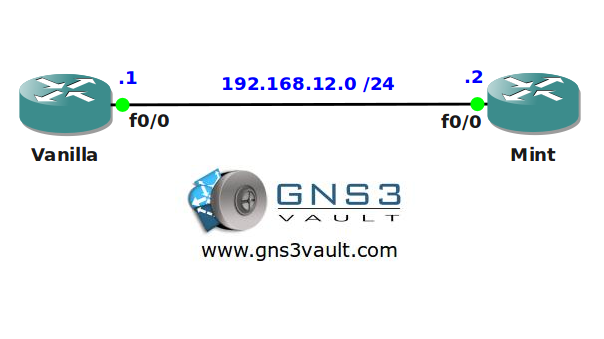
Video Solution:
Configuration Files
You need to register to download the GNS3 topology file. (Registration is free!)Once you are logged in you will find the configuration files right here.

The How to Master series helps you to understand complex topics like spanning-tree, VLANs, trunks, OSPF, EIGRP, BGP and more.
Written by René Molenaar - CCIE #41726


Hi,
[quote]Create a single prefix-list statement to filter out any subnet in the Class B network range.[/quote]
I’ve set this up using [code]ip prefix-list deny 128.0.0.0/2 le 32[/code] and it worked as expected, i.e. the ip route on Vanilla is the same as in the video. My thinking is that the prefix indicated is 128.0.0.0-191.255.255.255, and the prefix length takes care of all subnet masks of the entire Class B range.
Kindly indicate what is the thinking behind making the config in the tutorial [code]ip prefix-list deny 128.0.0.0/2 ge 17[/code]
Many thanks for this lab!
rgds
Hi Marthin,
Good question and there’s a good answer to it:
[code]ip prefix-list deny 128.0.0.0/2 ge 17[/code]
The class B address space starts with 128.0.0.0 and has 16 bits for the network address and 16 bits for the host address. In binary it starts with “10”.
We start with 128.0.0.0/2 because we want to match on the “10”. This will match all class B networks.
Anything with a /16 mask in the class B range is a “network”.
Anything with a /15, /14 or larger mask in the class B range is a “summary” or “supernet”.
Anything with a /17 or smaller mask in the class B range is a “[b]subnet[/b]”.
[code]ip prefix-list deny 128.0.0.0/2 ge 17[/code]
Now look again at this prefix-list. It will match on everything in the 128.0.0.0/2 range (class B) and the subnet can be everything between /17 and /32. This will match “[b]all subnets[/b]” within the class B range.
[code]ip prefix-list deny 128.0.0.0/2 le 32[/code]
And look again at your prefix-list. It matches on the class B range but matches on subnet masks of /32 and larger. This will include:
Subnets ( /17 and smaller)
Class B networks ( /16)
Summaries / Supernets ( /15 and larger)
Does this make sense?
Thanks for your good explanation Rene,
Referencing [url=]http://en.wikipedia.org/wiki/Classful_network#Introduction_of_address_classes[/url] together with your explanation is starting to make sense to me. Although I have to read it again and again and … 🙂
I think the the entire classful concept when working with subnets is foreign to me.
thanks again
Marthin
Your welcome. In the "beginning" we only had classful networks:
Class A,B,C
A: 10.0.0.0/8
B: 172.16.0.0 – 172.31.255.255 /16
C: 192.168.0.0 /24
This meant you had to "pick" a suitable subnet. So even if you only required 10 IP addresses you would pick a Class C network that gives you 256 IP addresses. If you required 1000 IP addresses you would pick a class B network that gives you 65k something IP addresses.
Classless means you can pick any subnet mask you like. Nowadays we really don’t care anymore about Class A,B or C.
Technically 192.168.1.0 /24 is a network, 192.168.2.0 /24 is also a network. 192.168.1.0 /27 is a "subnet" of the 192.168.1.0 /24 network.
172.16.0.0 /16 is a network and 172.16.1.0 /24 is a subnet of the 172.16.0.0 /16 network. Most people use "network" and "subnet" interchangeably however.
VLSM (Variable Length Subnet Mask) is just a funky name to say that we can use "any" subnet mask you like…../20, /28, /12 or whatever you want 🙂
Great answer Rene.
I was having the same question. 🙂
Cheers,
Andrei
yeaa, am starting to get it:
Class B per definition means that 128.0.x.x through 191.255.x.x is networks. The subnets can be allocated from there as /17 or higher when using VLSM,
BUT
per definition Class B only has /16 networks to be allocated.
THAT is why classless/VLSM was implemented.
I think I’m close. Passed CCNA but classful vs classless was very much an academic excercise.
Another excellent lab !
Hartelijk dank Rene.
what a fantastic lab !! i love it
Hi Rene,
I have 1 question to that point:
[quote]Create a single prefix-list statement to filter out all subnets in the 2.0.0.0 range which has less than 256 IP addresses.[/quote]
In video you’ve also denied /24 subnets. Why? To be precise, /24 subnets have exactly 256 addresses (with net and broadcast) so it is still not less. It’s equal. Maybe you had in mind host addresses? If you had, it should be emphasized in text, because now it could be a bit confusing 🙂
Thanks for your great job! Labs are very helpful in preparing to exam.
[quote=czyn]Hi Rene,
To be precise, /24 subnets have exactly 256 addresses (with net and broadcast) so it is still not less. It’s equal. Maybe you had in mind host addresses?[/quote]
Yep agree. I think the author thought its self-explanatory that broadcast addresses cannot be used.
Great lab Rene. From reading your ROUTE book and doing this lab, I think I got the hang of prefix-lists. Thank you Rene!
Eddie