

Scenario:
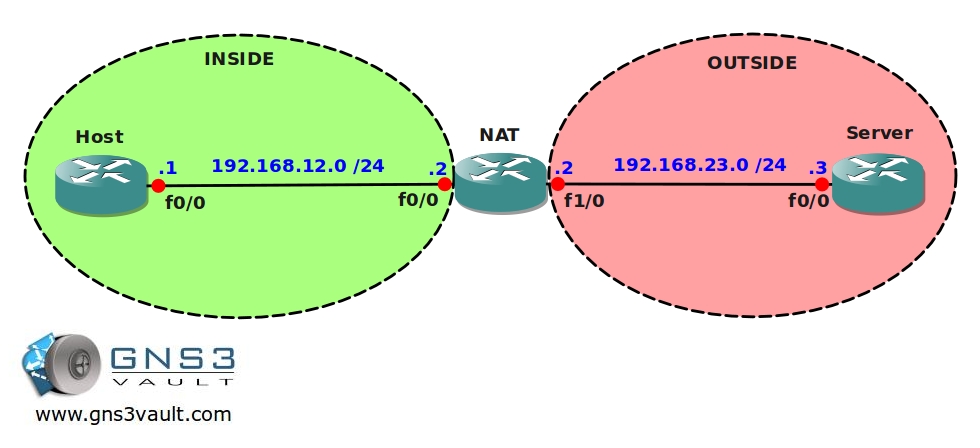
As one of the network engineers for a small company you are responsible for all network operations. One of the branch offices has a single host PC that needs access to a server located on the internet. You only have private IP addresses for your internal network so you need to configure network address translation (NAT). Since there is only a single host a static NAT will be sufficient.
Goal:
- IP addresses have been preconfigured as specified in the topology picture.
- Create a static NAT configuration on router NAT to translate the 192.168.12.1 IP address into the 192.168.23.2 IP address.
- You are not allowed to translate any port numbers.
It took me 1000s of hours reading books and doing labs, making mistakes over and over again until I mastered all the protocols for CCNA.
Would you like to be a master of networking too? In a short time without having to read 900 page books or google the answers to your questions and browsing through forums?
I collected all my knowledge and created a single ebook for you that has everything you need to know to become a master of CCNA.
You will learn all the secrets about NAT, PAT and more.
Does this sound interesting to you? Take a look here and let me show you how to Master CCNA!
IOS:
c3640-jk9s-mz.124-16.bin
Topology:
Video Solution:
Configuration Files
You need to register to download the GNS3 topology file. (Registration is free!)Once you are logged in you will find the configuration files right here.

The How to Master series helps you to understand complex topics like spanning-tree, VLANs, trunks, OSPF, EIGRP, BGP and more.
Written by René Molenaar - CCIE #41726


hello,
i think i am going to enjoy GNS3. i download NAT Static lab. the routers are not configured. do i need to setup something to load the configuration?
thanks, rizzas
Hello rizzas,
In the attachment there are startup-configs for all routers. The routers should have IP addresses on them. If not you can always copy/paste the config in the terminal session but it should auto-load when you open the topology in GNS3.
Rene
Hi Rene,
I was able to follow the lab and understood the nat process, however, I’m curious why the server was able to ping the host or vice versa even if they don’t have the routes to each other (e.g., route from server to host).
when you do show ip route on either server or host, shows no route to each other.
Hi Rito,
Good question. If you look at the startup config of the “host” router you can see I disabled “IP Routing”. This ensures it doesn’t build a routing table and becomes an ordinary host. I also configured a default-gateway on it so it uses the NAT router.
The server doesn’t require a default gateway after NAT translation because it’s “talking” with IP address 192.168.23.2 which is on the same LAN.
Do a “debug ip packet” on the server and send a ping from the host. You’ll see the source and destination IP address. Useful for checking NAT…
Hello,
I installed GNS3 and it’s working fine. I downloaded the zip file but i’m getting an error when I’m trying to open them up.
Error reads:
Local IOS Image/Data/OS Images/c3640-jk9s-mz.124-16.bin cannot be found for hypervisor localhost:7200
Is the instructor using 7200 router with 3640 image on it?
It’s probaby because GNS3 is unable to find the IOS image, take a look at this article it should probably fix your problem:
http://gns3vault.com/Faq/203-bad-number-of-parameters-1-with-minmax22.html
I only use the 3640 or 3725 IOS images, I’m not using the 7200 ones.
I couldn’t get this to work with loopback interfaces, I suspect an IOS bug on my version
You mean using the subnet on the loopback as the pool to translate to?
Yes, it only worked using the physical interface connected to other routers as your topology shows.
[quote=ReneMolenaar]You mean using the subnet on the loopback as the pool to translate to?[/quote]
Ok that’s interesting, maybe a bug.
I can’t figure out what your doing. You go so fast, and you don’t explain very well what your typing.
When I download the final configuration, it s look like the startup configuration, Why?
Hi Hassan,
I just fixed it, seems this is something I forgot when I migrated the website.
Rene
By the way, I bought all your book
Thanks for your support 🙂 I really appreciate it!
Hi, this should work without the ip nat inside and ip nat outside commands as well. Is there are reason we should define inside and outside interface?
Al
If the server did not have a route back to the source, NAT would be a viable solution as the lab shows. What were you thinking? Do you have another solution?