

Scenario:
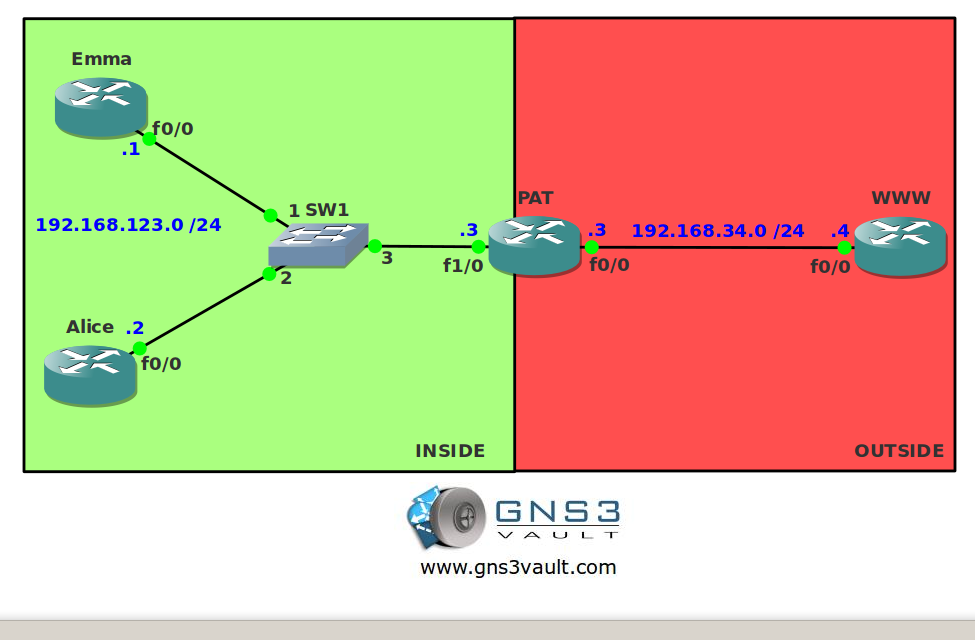
Emma and Alice are in trouble. They just got a new Internet connection but they forgot to mention to the Internet provider that they required two public IP addresses so they both can access the Internet at the same time. Can you help the damsels in distress?
Goal:
- All IPv4 addresses have been preconfigured for you.
- IP Routing has been disabled and a default gateway is configured on router Emma, Alice and WWW.
- Configure PAT so when router Emma or Alice sends an IP packet to router WWW the source address is translated to the IP address on the F0/0 interface of router PAT.
It took me 1000s of hours reading books and doing labs, making mistakes over and over again until I mastered all the protocols for CCNA.
Would you like to be a master of networking too? In a short time without having to read 900 page books or google the answers to your questions and browsing through forums?
I collected all my knowledge and created a single ebook for you that has everything you need to know to become a master of CCNA.
You will learn all the secrets about NAT, PAT, overload and more.
Does this sound interesting to you? Take a look here and let me show you how to Master CCNA!
IOS:
c3640-jk9s-mz.124-16.bin
Topology:
Video Solution:
Configuration Files
You need to register to download the GNS3 topology file. (Registration is free!)Once you are logged in you will find the configuration files right here.

The How to Master series helps you to understand complex topics like spanning-tree, VLANs, trunks, OSPF, EIGRP, BGP and more.
Written by René Molenaar - CCIE #41726


(IP Routing has been disabled and a default gateway is configured on router Emma, Alice and WWW) I tried doing this but didnt work when i tried with a default route It works
Did you add a default gateway on these devices? You have two options:
1) Enable IP routing and configure a default route.
2) Disable IP routing and configure a default gateway.
when configuring host remember to use two commands to ping ISP device
no ip routing
!
ip default-gateway 192.168.123.3