

Scenario:
Your network has two connections to the outside world. One is used for the Internet and the other one connects to a partner. You are using NAT to translate the IP addresses of your LAN but you want to ensure the correct IP addresses will be used…time to combine route-maps with NAT!
Goal:
- All IP addresses have been preconfigured for you.
- Configure router NAT so when router Jack communicates with router WWW it will be translated to an IP address in the 192.168.23.0 /24 range.
- Configure router NAT so when router Jack communicates with router Partner it will be translated to an IP address in the 192.168.24.0 /24 range.
IOS:
c3640-jk9o3s-mz.124-16.bin
Topology:
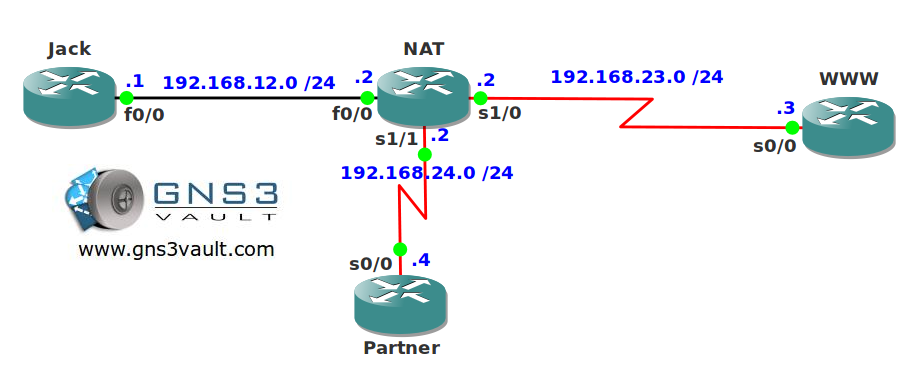
Video Solution:
Configuration Files
You need to register to download the GNS3 topology file. (Registration is free!)Once you are logged in you will find the configuration files right here.

Do you want your CCNA or CCNP Certificate?
The How to Master series helps you to understand complex topics like spanning-tree, VLANs, trunks, OSPF, EIGRP, BGP and more.
Written by René Molenaar - CCIE #41726


The ACLs are missing
The same result can be achieved in this way:
!
interface FastEthernet0/0
ip address 192.168.12.2 255.255.255.0
ip nat inside
ip virtual-reassembly
duplex auto
speed auto
!
interface Serial1/0
ip address 192.168.23.2 255.255.255.0
ip nat outside
ip virtual-reassembly
serial restart-delay 0
!
interface Serial1/1
ip address 192.168.24.2 255.255.255.0
ip nat outside
ip virtual-reassembly
serial restart-delay 0
!
!
ip nat inside source route-map PARTNER interface Serial1/1 overload
ip nat inside source route-map WWW interface Serial1/0 overload
!
access-list 100 permit ip 192.168.12.0 0.0.0.255 192.168.23.0 0.0.0.255
access-list 101 permit ip 192.168.12.0 0.0.0.255 192.168.24.0 0.0.0.255
!
route-map PARTNER permit 10
match ip address 101
!
route-map WWW permit 10
match ip address 100
!
!