

Scenario:
The Agency has created a new security policy and since you are part of the security team you need to help them implement them. Whenever anything funky happens on the network you want to ensure a RMON alarm informs the logging server what is going on.
Goal:
- All IP addresses have been preconfigured for you.
- Optional: You can use the cloud interface to connect your router to a free syslog server like Kiwi Syslog Server (also works for SNMPv2).
- Configure router Ripley to track the packet rate on the FastEthernet 1/0 interface.
- When the packet rate is above 50 packets you need to send a SMTP trap with the message “too much!”.
- When the packet rate falls below 50 packets you need to send a SMTP trap with the message “ah much better!”.
- Use SNMP community string “VAULT”.
- Configure router Bishop to check the CPU average each 5 minutes. When it’s above 85% it should generate a message “hot hot!”. When it falls below 30% it should generate the message “Cool”.
- Send these messages to SNMP server 192.168.12.2.
IOS:
c3640-jk9s-mz.124-16.bin
Topology:
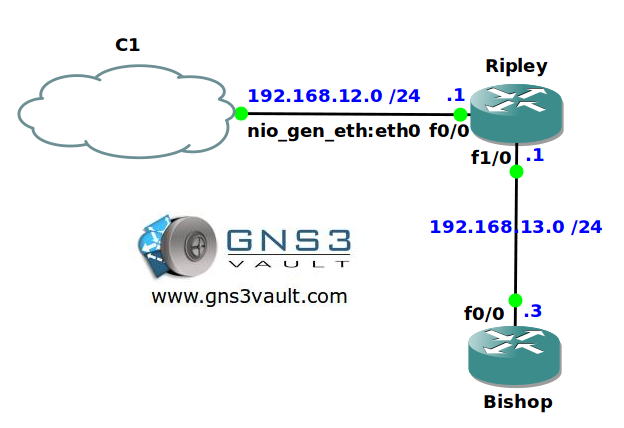
Configuration Files
You need to register to download the GNS3 topology file. (Registration is free!)Once you are logged in you will find the configuration files right here.

Do you want your CCNA or CCNP Certificate?
The How to Master series helps you to understand complex topics like spanning-tree, VLANs, trunks, OSPF, EIGRP, BGP and more.
Written by René Molenaar - CCIE #41726


Hello Rene,
i`m not sure how to find lifEntry fro interface. Please correct me If I`m wrong.
We can check snmp MIB DB
snmp#sh snmp mib | i ifEn
And int binding
snmp#sh snmp mib ifmib ifindex
FastEthernet0/0: Ifindex = 1
Null0: Ifindex = 4
VoIP-Null0: Ifindex = 3
FastEthernet1/0: Ifindex = 2
Sorry but i cant find Sample interval for 1st question section and
i did it arbitrary 1 minute
rmon alarm 1 ifEntry.11 60 delta rising-threshold 51 1 falling-threshold 49 2 owner VAULT
rmon event 1 log trap VAULT description "too much!"
owner VAULT
rmon event 2 log trap VAULT description "much better!"
owner VAULT
In case of cpu better to use absolute function because we don`t care about delta value, only real time load is important.
rmon alarm 1 cpmCPUTotalEntry.3.0 300 absolute rising-threshold 85 1 falling-threshold 30 2 owner me
rmon event 1 log trap VAULT description "hot hot!" owner VAULT
rmon event 2 log trap VAULT description "Cool" owner VAULT
Regards
Anton
Sorry, forgot snmp-server config
snmp-server ifindex persist
snmp-server host 192.168.12.2 version 2c VAULT