

Scenario:
You are working as a network engineer for a Charity helping homeless people. At one day the webserver crashes and you don’t have any spare equipment lying around. The website is used to download food coupons.
Goal:
- All IP addresses have been preconfigured for you.
- Configure router TFTP as a TFTP server.
- Configure router TFTP so only network 192.168.12.0 /24 is allowed to access the TFTP server.
- When router Client tries to download a file called “config” it should receive the configuration file of router TFTP.
- Test your configuration by copying the “config” file from router Client by using TFTP.
IOS:
c3640-jk9s-mz.124-16.bin
Topology:
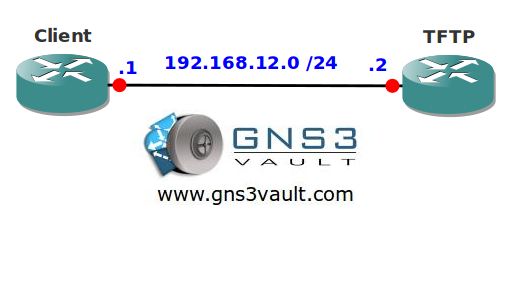
Video Solution:
Configuration Files
You need to register to download the GNS3 topology file. (Registration is free!)Once you are logged in you will find the configuration files right here.

Do you want your CCNA or CCNP Certificate?
The How to Master series helps you to understand complex topics like spanning-tree, VLANs, trunks, OSPF, EIGRP, BGP and more.
Written by René Molenaar - CCIE #41726


hi,
i see nothing on he client (show flash) after the download, have you an idea?
thanks
GNS3 doesn’t use the flash but a disk0 drive if I’m correct. Try to copy to the disk0 drive and see if it shows up there?
instead of run-config type in startup-config
TFTP#copy startup-config flash:
Destination filename [tftp-confg]?
Erase flash: before copying? [confirm]
worked for me and left off just where Rene does