

Scenario
Being a big table tennis fan and professional network engineer you decide to enhance your company’s network by adding Multicast. This way everyone can enjoy the latest video replays of your sports action. Multicast Dense might burden the network with too much multicast traffic so you decide to implement Multicast Sparse Mode, hopefully your boss won’t find out…
Goal:
- All IP addresses have been preconfigured for you.
- Configure OSPF on all routers, advertise all networks. Achieve full connectivity.
- Configure sparse-mode multicast on all routers.
- onfigure all routers manually so that router Pong is the Rendezvous Point (RP).
- Configure router VideoReceiver to join the multicast group 224.4.4.4 on it’s FastEthernet interface.
- Make sure you can ping the 224.4.4.4 group address from router VideoServer.
IOS:
c3640-jk9s-mz.124-16.bin
Topology:
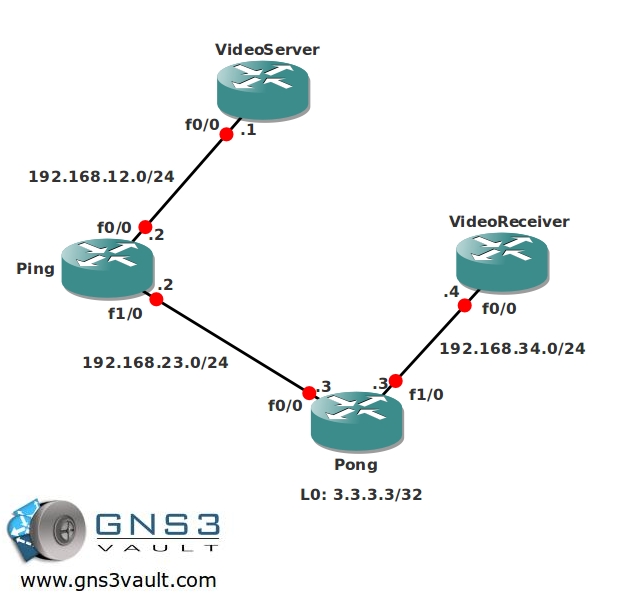
Video Solution:
Configuration Files
You need to register to download the GNS3 topology file. (Registration is free!)Once you are logged in you will find the configuration files right here.

Do you want your CCNA or CCNP Certificate?
The How to Master series helps you to understand complex topics like spanning-tree, VLANs, trunks, OSPF, EIGRP, BGP and more.
Written by René Molenaar - CCIE #41726


Hi Rene,
i have watched the video. I can see that on the router ping, you can see Multicast group (*,224.4.4.4). But what about on the router videoserver? I can not see this multicast group on the Videoserver. But the ping works. Is this normal behaviour that we can not see the multicast group on every device between source and destination, including source and destination devices?
A second question is more simple I believe. Do we have to use a loopback IP for the RP-address configuration? I have seen some other configs and everyone uses loopback. I have used Fa1/0 of the Pong router. What kind of difference I have created by doing this?
Thanks for your answers. Thanks for the lab!
Thanks as always