

Scenario:
As a volunteer working at a huge Monkey Reserve located in The Netherlands you decide to capture videos of all the monkeys and send them over the network to interested paying customers. This way you can aid the Reserve with some of the financial problems they have been dealing with…time for some Monkey Business!
Goal:
- All IP addresses have been preconfigured for you.
- Configure OSPF on all routers, advertise all networks. Achieve full connectivity.
- Configure sparse-dense-mode multicast on all routers.
- Configure all routers manually so that router Gibbon is the Rendezvous Point (RP) only for the 224.4.4.4 multicast group. Use the loopback0 interface as the IP address for the RP.
- Configure router Drill to join the multicast group 224.4.4.4 on it’s Fastethernet interface.
- Configure router Drill to join the multicast group 239.4.4.4 on it’s Fastethernet interface.
- Make sure you can ping the 224.4.4.4 group address and 239.4.4.4 group address from router Orangutan.
IOS:
c3640-jk9s-mz.124-16.bin
Topology:
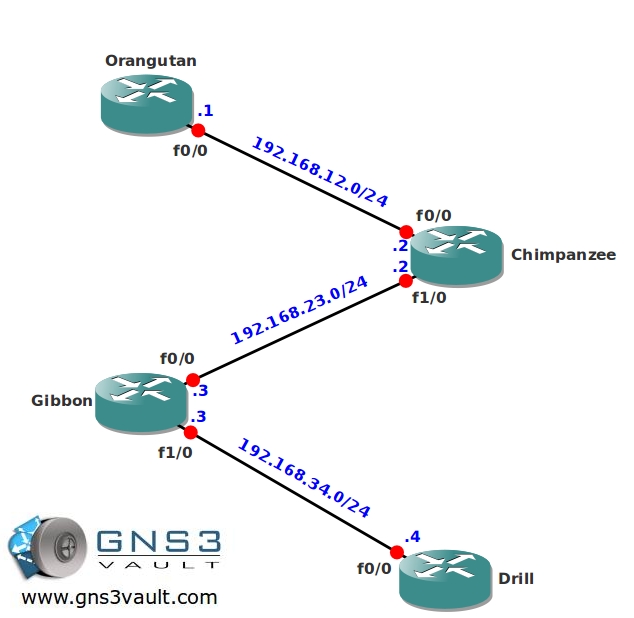
Video Solution:
Configuration Files
You need to register to download the GNS3 topology file. (Registration is free!)Once you are logged in you will find the configuration files right here.

Do you want your CCNA or CCNP Certificate?
The How to Master series helps you to understand complex topics like spanning-tree, VLANs, trunks, OSPF, EIGRP, BGP and more.
Written by René Molenaar - CCIE #41726


Thanks for the lab and for the video. 🙂
Thank you for the video! It was very informative.