

Scenario:
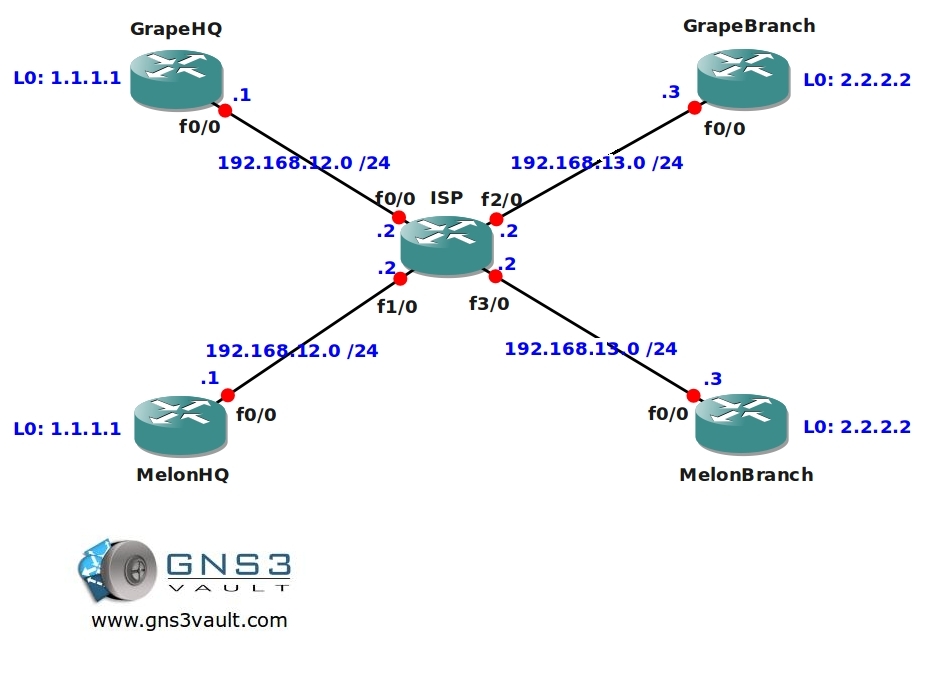
You are running a small ISP on a tropical location somewhere in the pacific, recently two new customers have arrived and they both have 2 sites to connect. There’s a headquarters (HQ) and a branch office and they want to use OSPF as the routing protocol. One of the problems you are facing is that both customers are using the same IP addressing scheme and it’s impossible to change this. You also have to make sure that there is NO connectivity between the two companies. You believe vrf might be the solution to your problems…if you are able to pull this off you’ll be rewarded with an infinite amount of grapes and melons from your customers…time to work!
Goal:
- All IP addresses on the customer routers have been preconfigured for you.
- You are not allowed to change the IP addressing scheme in this topology.
- Configure the ISP router so you can ping router MelonHQ and MelonBranch.
- Configure the ISP router so you can ping router GrapeHQ and GrapeBranch.
- Configure OSPF Area 0 on router ISP, MelonHQ and MelonBranch, advertise all networks.
- Configure OSPF Area 0 on router ISP, GrapeHQ and GrapeBranch, advertise all networks.
- Router MelonHQ and MelonBranch should see each other’s loopback networks.
- Router GrapeHQ and GrapeBranch should see each other’s loopback networks.
- The Melon and Grape routers should NOT see each others routes and there should be no connectivity between them.
IOS:
c3640-jk9s-mz.124-16.bin
Topology:
Video Solution:
Configuration Files
You need to register to download the GNS3 topology file. (Registration is free!)Once you are logged in you will find the configuration files right here.

The How to Master series helps you to understand complex topics like spanning-tree, VLANs, trunks, OSPF, EIGRP, BGP and more.
Written by René Molenaar - CCIE #41726


ok so i think its working. i created 2 diff vrf’s for melon and grape. inserted the command ip vrf forwarding “vrf name” in the interface pointing towards the customer. defined ospf area 0 in each vrf. and the way i can tell that each vrf cannot see the other is thru show ip route vrf “name”. in each name i c the same ip addresses but thru diff interfaces.
In the pic above, the branch offices IPs are x.x.23.x when in the GNS config they are x.x.13.x. Had me for a loop because I was configuring via the above image and not the GNS3 drawing.
Good lab, was able to complete it without having to look at commands….
[i]-bdk[/i]
@Talal seems right to me, you create multiple vrfs and with the “show ip route vrf” command you can see the different routing tables.
@BDK thanks for letting me know, just changed the picture.
Hi Rene,
This is the coolest LAB I’ve ever done so fast. Much much easier than it seems. Flawlessly executed.
Great work and thanks
Thanks Nikhil I’m glad you like it 8)
Hi Mauro,
This problem with OSPF is normal. Your loopback has an IP address but when it’s not in the same VRF as your OSPF process it cannot be used for the router-ID. VRFs are pretty much the same as VLANs but on a layer 3 level.
Rene
After configured the various router ip ospf x process vrf forwaring x. They did made adjacency. After : SP#sh ip ospf neighbor
&#xOS;PF: Router process 3 is not running, please configure a router-id
although i’had used l0 interfaces. Solved using under every process manual conf
router-id process L0 ip address
Ty .
This is so cool… 2 thumbs up… Great job Rene Molenaar!!! ;D
Thanks glad to hear you like it ;D
Thank you!
Thank you too for your message 🙂
Hi Rene,
Thank you for this LAB, very nice and easy to understand the basic concept.
Regards,
Jarek
You are welcome!
Cool, thank you very much!
Hi Rene,
Seriously, nice explanation , awesome!
but I have a question, In the video, you configured OSPF
by copy paste, in all routers, even in MELON router.
router ospf 1 <—————————————————- only ospf 1
network 0.0.0.0 255.255.255.255 area 0
But in the ISP router , you have used
router ospf 2 vrf MELON <———————————-ospf 2
is this right? please explain?
MPLS L3VPN notwithstanding, the OSPF PID is irrelevant. For L3VPN the PID is used for the initial domain-id value which has relevance for sham links.
What version of GNS3 can I open this LAB? I have GNS3 0.8.6, I try to edit in txt but its different of what I used to edit.
For example:
“properties”: {
“aux”: 2101,
“chassis”: “3640”,
“console”: 2001,
“idlepc”: “0x6059c528”,
“image”: “c3640-jk9s-mz.124-16.bin”,
“name”: “R1”,
“slot0”: “NM-1FE-TX”,
“startup_config”: “C:\Users\user\Desktop\MPLSVPNPECE\MPLSVPNPECE-files\dynamips\configs\i1_startup-config.cfg”
},
“router_id”: 1,
“server_id”: 1,
“type”: “C3600”,
“x”: -230.989898732,
“y”: 120.8355698
But I used to edit in this way
[127.0.0.1:7200]
workingdir = C:\Users\user\AppData\Local\Temp
udp = 10001
[[3725]]
image = C:\Users\user\Desktop\IOS Cisco\c3725-adventerprisek9-mz.124-15.T5.image
ram = 128
idlepc = 0x62830124
sparsemem = True
ghostios = True
[[ROUTER R4]]
model = 3725
console = 2104
aux = 2504
f0/0 = R3 f0/1
cnfg = configs\R4.cfg
x = 41.0
y = 97.0
z = 1.0
Thanks and sorry my english.