

Scenario:
One of the largest service providers in The Netherlands has been succesfully implementing MPLS in their backbone. The last years they have been serving customers with PE-CE setups without any problem. Yesterday a new customer specialized in selling Bananas arrived who is not looking for a PE-CE solution but rather would see an end-to-end Ethernet solution. Since the ISP has never configured this before they ask you; A respected Cisco Guru to implement MPLS AtoM (Any Type over MPLS) for them. Let’s see if you can pull this one off!
Goal:
- All IP addresses have been preconfigured for you.
- All ISP routers have a loopback0 interfaced configured as following:
PE1: 2.2.2.2 /25
P: 3.3.3.3 /25
PE2: 4.4.4.4 /25 - Configure OSPF Area 0 at the provider side (Router PE1, PE2 and P).
- Advertise the loopback interfaces as well in OSPF.
- Make sure you don’t send any OSPF Hello packets towards the customer.
- Ensure you have full reachability in the OSPF domain.
- Configure MPLS on all physical interfaces in the service provider domain, do not configure MPLS on physical interfaces pointing towards the customer.
- Configure the PE routers to encapsulate every frame in a MPLS packet and to forward it to the other PE router using VC ID 15.
- Make sure router BananaHQ and BananaBranch can ping each other.
IOS:
c7200-adventerprisek9-mz.124-20.T.bin
Topology:
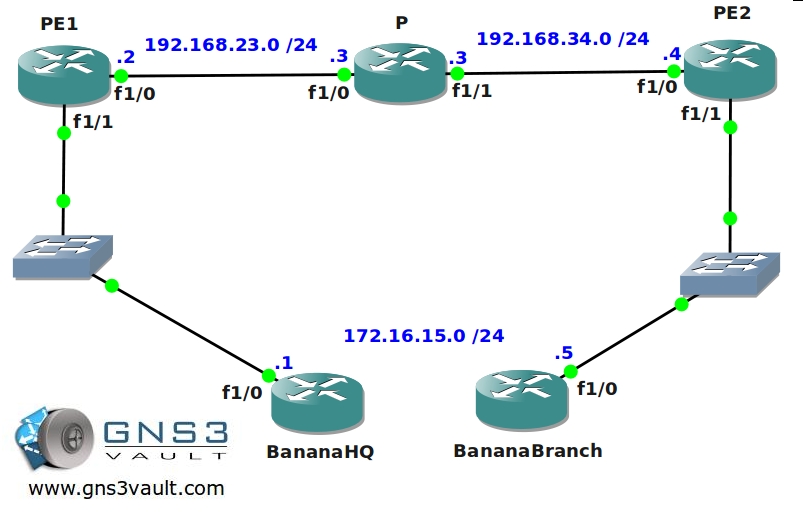
Video Solution:
Configuration Files
You need to register to download the GNS3 topology file. (Registration is free!)Once you are logged in you will find the configuration files right here.

The How to Master series helps you to understand complex topics like spanning-tree, VLANs, trunks, OSPF, EIGRP, BGP and more.
Written by René Molenaar - CCIE #41726


good one
I’ve tried it but unfortunally i cant ping back to back? from the 2 CEs
Do you think i have any missing config.
please check the PE config as below
PE1
PE1#sh run
Building configuration…
Current configuration : 1471 bytes
!
upgrade fpd auto
version 12.4
service timestamps debug datetime msec
service timestamps log datetime msec
no service password-encryption
!
hostname PE1
!
boot-start-marker
boot-end-marker
!
logging message-counter syslog
!
no aaa new-model
ip source-route
ip cef
!
!
!
!
no ip domain lookup
ip vrf banana
rd 1:1
route-target export 1:1
route-target import 1:1
!
no ipv6 cef
!
multilink bundle-name authenticated
mpls label protocol ldp
!
!
!
!
!
!
!
!
!
!
!
!
!
!
!
archive
log config
hidekeys
!
!
!
!
!
l2 vfi test point-to-point
!
!
!
!
!
interface Loopback0
ip address 2.2.2.2 255.255.255.0
!
interface FastEthernet0/0
no ip address
shutdown
duplex half
!
interface FastEthernet1/0
ip address 192.168.23.2 255.255.255.0
duplex auto
speed auto
mpls ip
!
interface FastEthernet1/1
no ip address
duplex auto
speed auto
xconnect 4.4.4.4 1 encapsulation mpls
!
interface FastEthernet2/0
no ip address
shutdown
duplex auto
speed auto
!
interface FastEthernet2/1
no ip address
shutdown
duplex auto
speed auto
!
router ospf 1
router-id 2.2.2.2
log-adjacency-changes
network 2.2.2.2 0.0.0.0 area 0
network 192.168.23.2 0.0.0.0 area 0
!
ip forward-protocol nd
no ip http server
no ip http secure-server
!
!
!
logging alarm informational
!
!
!
!
!
!
mpls ldp router-id Loopback0
!
control-plane
!
!
!
!
!
!
!
gatekeeper
shutdown
!
!
line con 0
exec-timeout 0 0
logging synchronous
stopbits 1
line aux 0
stopbits 1
line vty 0 4
login
!
end
—————————————————————————
PE2
PE2#
PE2#sh run
Building configuration…
Current configuration : 1188 bytes
!
upgrade fpd auto
version 12.4
service timestamps debug datetime msec
service timestamps log datetime msec
no service password-encryption
!
hostname PE2
!
boot-start-marker
boot-end-marker
!
logging message-counter syslog
!
no aaa new-model
ip source-route
ip cef
!
!
!
!
no ip domain lookup
no ipv6 cef
!
multilink bundle-name authenticated
!
!
!
!
!
!
!
!
!
!
!
!
!
!
!
archive
log config
hidekeys
!
!
!
!
!
!
!
!
!
interface Loopback0
ip address 4.4.4.4 255.255.255.0
!
interface FastEthernet0/0
no ip address
shutdown
duplex half
!
interface FastEthernet1/0
ip address 192.168.34.4 255.255.255.0
duplex auto
speed auto
mpls ip
!
interface FastEthernet1/1
no ip address
duplex auto
speed auto
xconnect 2.2.2.2 1 encapsulation mpls
!
router ospf 1
router-id 4.4.4.4
log-adjacency-changes
network 4.4.4.4 0.0.0.0 area 0
network 192.168.34.4 0.0.0.0 area 0
!
ip forward-protocol nd
no ip http server
no ip http secure-server
!
!
!
logging alarm informational
!
!
!
!
!
!
mpls ldp router-id Loopback0
!
control-plane
!
!
!
!
!
!
!
gatekeeper
shutdown
!
!
line con 0
exec-timeout 0 0
logging synchronous
stopbits 1
line aux 0
stopbits 1
line vty 0 4
login
!
end
My configuration is the same as yours and the ping fails even though the p2p is up between PEs. I’m looking for the right conf for 2 days now.
The debug all (thank you Dynamips) shows an error that I could’nt manage to find any related issues.
Ok I’ve solved my problem. I hope the solution will help you. Just verify that your PE’s loopbacks used in the “mpls ldp router-id loopback 0 force” global are configured with a /32 mask.
😀
Yeap.. here it go. 🙂 its working 🙂
the Mask was the issue! thanks alot but why do you think the /24 would not make it work!?
Be careful with OSPF and MPLS. OSPF will ALWAYS advertise the loopback ip address as /32 even though you have a /24 configured. This will give LDP errors since there’s a mismatch in the subnet mask. 2 ways to fix this:
– Make sure you configure a /32 for the IP address on the loopback interface.
OR
– Use the “ip ospf network” command on the loopback interface so it advertises the /24 instead of the /32.
Have fun!
Rene
Hey! Thanks for this excellent lab, It gave me a lot of good troubleshooting training. In the end the only way to get the Bananas ping each other was by making the lo addresses /32. For some reason using ip ospf network point-to-point did not solve the problem..
To save people an IOS headache, I thought that I would present my problem to help others out.
c7200-adventerprisek9-mz.124-6.T.bin – DOES NOT SUPPORT MPLS ENCAP’D PSEUDOWIRE!
I can configure a pseudowire-class:
Router(config)#pseudowire-class atom2
Router(config-pw-class)#encap mpls
Router(config-pw-class)#
But when I try to apply that pseudowire class I get:
Router(config-pw-class)#int f1/0
Router(config-if)#xconn 1.2.3.4 5 pw atom2
MPLS encap is not supported on this circuit
Router(config-if)#
I tested an Advanced IP Services 12.4-9 and that allows MPLS encapsulation but the Advanced Enterprise 12.4-6 doesn’t. Weird? Not too weird as someone else ahd roughly the same issue [url]http://7200emu.hacki.at/viewtopic.php?p=27269&sid=77cab6cd9d822361f00a5dc9c7fdf0f6[/url]. Right now Cisco’s IOS compare site is extremely slow, so when in doubt, try another IOS version.
[i]-bdk[/i]
Hello Thanks for your Super COOL videos .. I want VPLS videos .. If Possible … many many thanks what you have given to us .. and I realy want VPLS video .. Thanks
I’m glad you like it. Would love to add VPLS but it can’t be done in GNS3. Maybe something for the future 🙂
Excellent lab. Is there a way to have a lab that incorporates VLL, virtual leased lines? Or does this accomplish that technology?
Here is how i did it. I set this up to look more like a service provider network using qinq on the switches. I snipped out the useless configs.
BananaBranch#sh run
Building configuration…
Current configuration : 938 bytes
!
!
hostname BananaBranch
!
!
interface FastEthernet0/0
no ip address
duplex full
!
interface FastEthernet0/0.10
encapsulation dot1Q 50
ip address 172.16.15.5 255.255.255.0
!
!
end
————————————-
BananaHQ#sh run
Building configuration…
!
hostname BananaHQ
!
!
interface FastEthernet0/0
no ip address
duplex full
!
interface FastEthernet0/0.10
encapsulation dot1Q 50
ip address 172.16.15.1 255.255.255.0
!
!
end
————————————–
PE1#sh run
Building configuration…
!
hostname PE1
!
!
!
interface Loopback0
ip address 2.2.2.2 255.255.255.128
ip ospf network point-to-point
!
interface FastEthernet0/0
no ip address
duplex auto
speed auto
!
interface FastEthernet0/0.10
encapsulation dot1Q 10
xconnect 4.4.4.4 15 encapsulation mpls
!
interface FastEthernet0/1
ip address 192.168.23.2 255.255.255.0
duplex auto
speed auto
mpls ip
!
!
router ospf 1
log-adjacency-changes
passive-interface FastEthernet0/0
network 2.2.2.2 0.0.0.0 area 0
network 192.168.23.0 0.0.0.255 area 0
!
!
end
—————————–
P#sh run
Building configuration…
Current configuration : 1181 bytes
!
!
hostname P
!
!
!
interface Loopback0
ip address 3.3.3.3 255.255.255.128
ip ospf network point-to-point
!
interface FastEthernet0/0
ip address 192.168.23.3 255.255.255.0
duplex auto
speed auto
mpls ip
!
interface FastEthernet0/1
ip address 192.168.34.3 255.255.255.0
duplex auto
speed auto
mpls ip
!
!
router ospf 1
log-adjacency-changes
network 3.3.3.3 0.0.0.0 area 0
network 192.168.0.0 0.0.255.255 area 0
!
!
end
———————————
PE2#sh run
Building configuration…
!
hostname PE2
!
!
!
interface Loopback0
ip address 4.4.4.4 255.255.255.128
ip ospf network point-to-point
!
interface FastEthernet0/0
ip address 192.168.34.4 255.255.255.0
duplex auto
speed auto
mpls ip
!
interface FastEthernet0/1
no ip address
duplex auto
speed auto
!
interface FastEthernet0/1.10
encapsulation dot1Q 10
xconnect 2.2.2.2 15 encapsulation mpls
!
!
router ospf 1
log-adjacency-changes
passive-interface FastEthernet0/1
network 4.4.4.4 0.0.0.0 area 0
network 192.168.34.0 0.0.0.255 area 0
!
!
end
Hello folks, I’m trying to do this using only iBGP on the isp side but doesn’t work, is there some rule to do so, or is this impossible, must I use ospf mandatory. pardon my lack of knowledge.
Hello,
Im using this ios C3725-ADVENTERPRISEK9-M
When i put the configuration, the mpls option does not appear
PE1(config-if)#xconnect 4.4.4.4 24 encapsulation ?
l2tpv3 Use L2TPv3 encapsulation
Dont know if its an ios problem
Regards
3725 IOS dose not support encap mpls, tried it a couple ways to see if was just a order of operations thing. I am running c2691-spservicesk9-mz.124-15.T8.bin no issues. like stated above I had to change my loop0 mask to /32 even with ip os net p2p on the interface, and add “mpls ldp router-id Loopback0 force” to get my vc to go “up”
Not sure did I miss out anything?
PE1(config)#connect PE1-PE2 serial 2/0 105 l2transport
Serial2/0 DLCI 105 is not a switched PVC
%CONN: Invalid Command
Hello,
The lab says lo0 on your PE and P routers are /25, but in the configuration they are all setup as /24
Hello,
I did a ping and capture between PE2 and P router, but I did not see any VC 15 on the capture, but it had something that said PW ETHERNET CONTROL WORK sequence number 0. Is the VC 15 only significant on the local router, in other words how is the traffic classified as a PW by looking at the capture?
If you look at the VC details, there will be labels assigned (the VPN label).