

Scenario
As a CCNA candidate you are familiar with the concept of Frame-Relay, although you do not need to configure the Frame-Relay switch. Since you are working your way to becoming the ultimate networking Guru, you are prepared to do a full Frame-Relay config….that includes the Frame-Relay Switch! Configuring a point-to-multipoint and point-to-point PVC and having ip connectivity is your goal.
Goal:
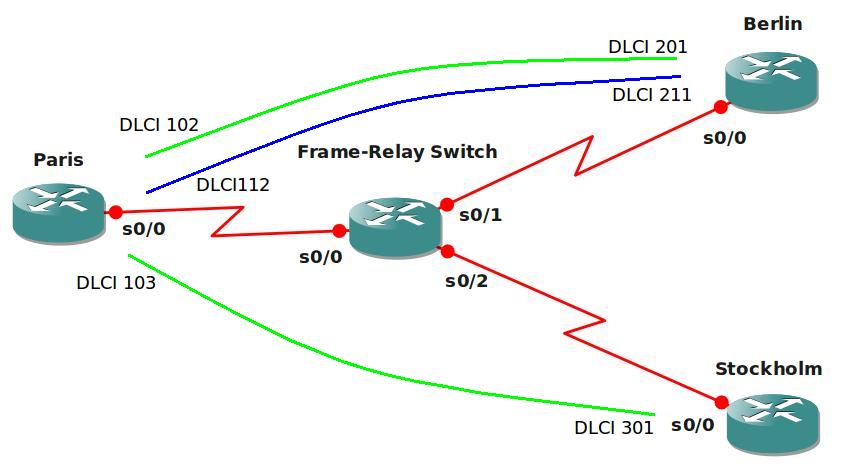
- Take a good look at the topology before you start configuring.
- The green lines are PVC’s (Permanent Virtual Circuit) and this is supposed to be a point-to-multipoint.
- Paris should be the “hub” and Berlin and Stockholm are “spoke” routers.
- The blue line is a point-to-point PVC between Paris and Berlin.
- DLCI numbers are shown on the topology picture.
- Use the 192.168.123.0 /24 subnet for the point-to-multipoint connection, use a subinterface.
- Use the 192.168.12.0 /24 subnet for the point-to-point connection, use a subinterface.
- Achieve full IP connectivity, all ip addresses should be pingable.
It took me 1000s of hours reading books and doing labs, making mistakes over and over again until I mastered all the protocols for CCNA.
Would you like to be a master of networking too? In a short time without having to read 900 page books or google the answers to your questions and browsing through forums?
I collected all my knowledge and created a single ebook for you that has everything you need to know to become a master of CCNA.
You will learn all the secrets about frame-relay, PVCs, subinterfaces and more.
Does this sound interesting to you? Take a look here and let me show you how to Master CCNA!
IOS:
c3640-jk9s-mz.124-16.bin
Topology:
Video Solution:
Configuration Files
You need to register to download the GNS3 topology file. (Registration is free!)Once you are logged in you will find the configuration files right here.

The How to Master series helps you to understand complex topics like spanning-tree, VLANs, trunks, OSPF, EIGRP, BGP and more.
Written by René Molenaar - CCIE #41726


just joined the site. and the labs exercises are awesome. love ’em, thanks. right now, I’m preparing for my CCNP ROUTE new exam. I’m trying to do this lab and I was able to configure Paris, Berlin, and Stockholm. but was unable to achieve full IP connectivity. maybe I didn’t read properly, but do we need to also configure the frame relay switch – I previously thought it was pre-configured. thank you.
never mind, I managed to get full IP connectivity, by replacing the centre router with the frame relay switch, thanks.
Hello!
I did configure all my device in this lab. I speak about frame-relay multipoint network (192.168.123.0/24). And achieved IP connectivity btw all routers, but all routers can’t ping ip address of own frame-relay multipoint interfece.
This is normal?
Not being able to ping your own IP address with frame relay is normal, if you want to be able to do so you must create a frame relay “map” for your own IP address.
I don’t know why don’t you put a frame relay switch in the middle.
Not on even CCIE R&S you need to configure a router as a frame relay switch
kind regards
I’d rather take the “Cisco” solution for the frame relay switch than the “gns3” solution. It works perfect but this way people can learn how to configure one if they have a real cisco router as well.
Unless you have an older computer running an extra router shouldn’t be a problem.
I actually enjoyed learning how to configure a Frame Relay switch thanks for adding that extra challenge 🙂
Missing Config.
I first solved it, then compared my souliton with your final Configs and found something missing.
Berlin#pi 192.168.123.1
Type escape sequence to abort.
Sending 5, 100-byte ICMP Echos to 192.168.123.1, timeout is 2 seconds:
!!!!!
Success rate is 100 percent (5/5), round-trip min/avg/max = 52/72/80 ms
Berlin#
Berlin#pi 192.168.123.3
Type escape sequence to abort.
Sending 5, 100-byte ICMP Echos to 192.168.123.3, timeout is 2 seconds:
…..
Success rate is 0 percent (0/5)
Berlin#
Stockholm(config)#interface Serial0/0.301
Stockholm(config-subif)#frame-relay map ip 192.168.123.2 301 broadcast
Berlin(config)#interface Serial0/0.201
Berlin(config-subif)# frame-relay map ip 192.168.123.3 201 broadcast
Berlin(config-subif)#^Z
Berlin#
Berlin#
*Mar 1 00:02:46.195: %SYS-5-CONFIG_I: Configured from console by console
contd…
Berlin#pi 192.168.123.3
Type escape sequence to abort.
Sending 5, 100-byte ICMP Echos to 192.168.123.3, timeout is 2 seconds:
!!!!!
Success rate is 100 percent (5/5), round-trip min/avg/max = 120/131/148 ms
Berlin#
Thanks
Shoeb
Hi Rene,
These are my output for this frame-relay basic lab:
I have a problem in pinging from PARIS to Stockholm
here is my output:
Router#sh frame-relay map
[b]Serial0/0.102 (up): ip 192.168.123.2 dlci 102[/b](0x66,0x1860), static,
broadcast,
CISCO, status defined, active
[b]Serial0/0.102 (up): ip 192.168.123.3 dlci 103[/b](0x67,0x1870), static,
broadcast,
CISCO, status defined, active
Router#ping 192.168.123.2
Type escape sequence to abort.
Sending 5, 100-byte ICMP Echos to 192.168.123.2, timeout is 2 seconds:
!!!!!
Success rate is 100 percent (5/5), round-trip min/avg/max = 20/42/60 ms
Router#ping 192.168.123.3
Type escape sequence to abort.
Sending 5, 100-byte ICMP Echos to 192.168.123.3, timeout is 2 seconds:
[b]…..[/b]
Success rate is 0 percent (0/5)
And also i coudint able to ping from Stockholm to PARIS
outputs:
Router#sh frame-relay map
Serial0/0.301 (up): ip 192.169.123.1 dlci 301(0x12D,0x48D0), static,
broadcast,
CISCO, status defined, active
Router#ping 192.168.123.1
Sending 5, 100-byte ICMP Echos to 192.168.123.1, timeout is 2 seconds:
[b]…..[/b]
Success rate is 0 percent (0/5)
I believe that is due to frame-relay static router map which we
have created in Paris router bcoz you gave both the routes under
the 102 sub interface. But still i dont know how its working for you.
Plz help.
Hi and thanks for the lab Rene
Just a quick question.
I configured the spoke ends(Berlin and Stockholm) as point to point interfaces and still got it to work. The Paris end has to be multipoint but I thought the spokes only need to be point-to-point
here is the example of the serial interface configs on the spokes
Berlin:
interface Serial0/0.201 point-to-point
ip address 192.168.123.2 255.255.255.0
frame-relay interface-dlci 201
Stockholm:
interface Serial0/0.301 point-to-point
ip address 192.168.123.3 255.255.255.0
frame-relay interface-dlci 301
I configured Loopbacks on all routers too
[b]PARIS#[/b]ping 2.2.2.2
Type escape sequence to abort.
Sending 5, 100-byte ICMP Echos to 2.2.2.2, timeout is 2 seconds:
!!!!!
Success rate is 100 percent (5/5), round-trip min/avg/max = 4/14/32 ms
[b]PARIS#[/b]ping 3.3.3.3
Type escape sequence to abort.
Sending 5, 100-byte ICMP Echos to 3.3.3.3, timeout is 2 seconds:
!!!!!
Success rate is 100 percent (5/5), round-trip min/avg/max = 4/8/16 ms
[b]BERLIN#[/b]ping 1.1.1.1
Type escape sequence to abort.
Sending 5, 100-byte ICMP Echos to 1.1.1.1, timeout is 2 seconds:
!!!!!
Success rate is 100 percent (5/5), round-trip min/avg/max = 8/8/8 ms
[b]STOCKHOLM#[/b]ping 1.1.1.1
Type escape sequence to abort.
Sending 5, 100-byte ICMP Echos to 1.1.1.1, timeout is 2 seconds:
!!!!!
Success rate is 100 percent (5/5), round-trip min/avg/max = 8/9/12 ms
cheers and thanks again
Geoff
Thank you for the great lab
for point-to-point
* multiple point-to-point sub-interfaces per interface
for multipoint
* just one multipoint sub-interface per interface
right ???
Hi I think the .5kb zip file is missing the basic config files. When I open the console it just sits there. Pressing enter doesn’t help I got these errors tryng to save the project.
Dynamips error 206 unable to extract config of vm r0
I get the above error for all 4 routers
Hi Rene.
I first done the lab and then watched the solution. I inserted the
frame-relay interface-dlci 102
frame-relay interface-dlci 103
in the multipoint sub interface to map dynamically so I don’t have to create maps statically, except to ping from berlin to Stockholm.
You mentioned that these commands need to be entered with point to point.
Is it wrong to use it for multipoint too?
Thanx for the LABs. Having a great time working through them.
Ian
Hi Rene,
where can I find c3640-jk9s-mz.124-16.bin for GNS 3
We cannot supply IOS images here. They are Cisco copyrights.
Check it: [link removed]
I hope have helped you..
Check it: http://sobek.su/Cisco/IOS/36xx/3640/
I hope have helped you..
Don’t want to be a smart ass, but don’t we need a static route on Stockholm to be able to ping 192.168.12.2?
It seems you’d need it to reach anything in 192.168.12.0/24, so you are probably right.
Hello Rene! About the full connectivity, we can’t pinging from Berlin to Stockholm, until we configure one more frame-relay map between these two.