

Scenario:
As the senior security officer you decide all routing protocols should be configured as secure as possible. The company you work for has a single vendor policy and since you only have Cisco equipment you are running EIGRP (Enhanced Interior Gateway Routing Protocol). EIGRP has more advanced features for authentication since it uses a key-chain. The key-chain supports rotating keys which makes it more secure than having a single static key. Before implementing this for your whole organization you decide to test your enhanced security in a lab environment.
Goal:
- All IP addresses have been preconfigured for you.
- EIGRP has been preconfigured for you (AS12).
- Enable EIGRP authentication between router Jack and Johnson. Use the following parameters:
Key-chain should be called: GNS3VAULT
Key1: password VAULT
Key2: password SAFE - Key1 should be sent until 9:00AM on the 2nd of february 2020 and should be accepted 15 minutes past this time.
- Key2 should be valid from 8:50AM on the 2nd of february 2020 and should be valid till the 1st of february 2021.
- Make sure routing adjacencies do not drop when the keys are switched.
It took me 1000s of hours reading books and doing labs, making mistakes over and over again until I mastered all the protocols for CCNA.
Would you like to be a master of networking too? In a short time without having to read 900 page books or google the answers to your questions and browsing through forums?
I collected all my knowledge and created a single ebook for you that has everything you need to know to become a master of CCNA.
You will learn all the secrets about EIGRP, authentication, key-chains and more.
Does this sound interesting to you? Take a look here and let me show you how to Master CCNA!
IOS:
c3640-jk9s-mz.124-16.bin
Topology:
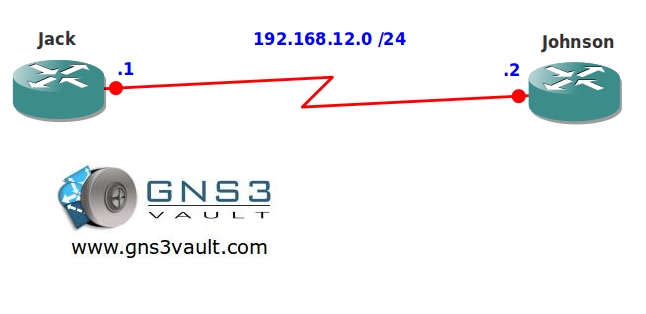
Video Solution:
Configuration Files
You need to register to download the GNS3 topology file. (Registration is free!)Once you are logged in you will find the configuration files right here.

The How to Master series helps you to understand complex topics like spanning-tree, VLANs, trunks, OSPF, EIGRP, BGP and more.
Written by René Molenaar - CCIE #41726


Is it possible that adjacencies do not flap when changing keys?
If the keys are overlapping the adjacency should not flap. Did you check it?
Thanks for the reply.
Yeah they are overlapping but I still see flapping adjacencies when applying the ip authentication command on the serial interfaces..
The file seems crash?
What do you mean by ‘crash’ william?
The winrar reports file name issue and it generate two similar folders. One is ‘EIGRP Authentication Rotating Key’ and another one is ‘EIGRP Authentication Rotating Key_’ The first one is empty and I just found that the second one has the files I want. I am not sure why. It might be my computer’s problem. But I still get the topology file. Thank you!
Hi william,
Not sure what went wrong, just checked the file and it seems to be fine!
Rene
Hi Rene,
I absolutely love all these videos and labs that you’ve created for those of us who want to educate ourselves. Quick question, though… I couldn’t help but notice that this video is in a slightly different resolution than the others, and I honestly cannot read what you are entering at the CLI.
I was wondering if there was any way that this video could be re-made in the same resolution as the others so that the text is more readable? None of my CCNA books mention EIGRP keys, let alone rotation, so I’m eager to review the video so I can learn the commands, but I just have a hard time seeing what you’re doing on this one. A humongous “Thanks!” if there’s anyway you could do it, and I’d like to think that others would be appreciative as well.
Thanks again for everything you do, Rene!
Hello Barry,
Thanks for your message! I accidently rendered it with super-low quality instead of 1080p ;D
When I get home i’ll replace it with the 1080p version so you can see it. You can also try it yourself if you like, just download the final configuration and do this:
– Enable debug EIGRP packets
– Change the time by using the clock command.
You will see that the neighbor adjacency doesn’t drop and will switch from MD5 key1 to key2.
Or wait a day and i’ll have the video for you 8)
Hi Rene
Your GOLES state for key 1:
•Key1 should be sent until 9:00AM on the 2nd of february 2020 and should be accepted 15 minutes past this time.
Your final config files which I downloaded shows the following for key 1:
key chain GNS3VAULT
key 1
key-string VAULT
accept-lifetime 00:00:00 Jan 1 1995 09:15:00 Feb 2 2020
send-lifetime 00:00:00 Jan 1 1995 09:00:00 Feb 2 2020
Isn’t it supposed to be:
key chain GNS3VAULT
key 1
key-string VAULT
accept-lifetime 09:15:00 feb 2 2020 infinite
send-lifetime 09:00:00 feb 2 2020 infinite
I put infinite, as you didn’t specify when the key is to end.
GRATE JOB YOU ARE DOING HERE.
Hello Lee,
The goal says “Key1 should be sent [b]until 9:00AM on the 2nd of february 2020[/b] and should be accepted 15 minutes past this time.”
It doesn’t say from what moment it is valid, only until which date/time it is valid. At 9:00AM on the 2nd of february 2020 this key will expire.
Your example will accept they key on this day until forever ;D
Thanks for your comment!
hi rene can u please help me with the commands as i am poor with them
The best advice I can give you is to grab one of the "Portable Command Guide" for CCNA and/or CCNP. They offer a structured approach to all the commands you need to know.
I am trying to open EIGRPAuthentication Rotating, the files are zipped and I am trying extract all files but it asks for a password, I have tried my GNS3 password but that does not work.
How can I extract the files?
Can someone help URGENLTY please.
many thanks
Gurmit
Hi Gurmit,
I just checked the ZIP files…there’s no password on them. I can extract them without any issues. Could you try another ZIP extractor maybe? Winrar?
Rene
IDLE PC is irritating me, Do you have any commands pls, that i can set value in config mode on the router?
IDLEPC happens outside of your router. It’s best to do this:
1) Open GNS3.
2) Click and drag just ONE router.
3) Start it and open the console.
4) Hit Enter a couple of times, make sure you are at the console and that the router is doing nothing.
5) Calculate an IDLEPC and select one with an asterisk.
6) Check if your CPU load has been reduced.
7) Close GNS3, click and drag a couple of routers and start them. See if your CPU load remains low.
If not restart at 1. It’s annoying but once you have a value that is working you don’t have to do this again! (for each IOS you have to do this).
Nice little lab. Never did rotating keys before, and just figured it out stumbling through the IOS Key Chain Help commands. Really fun stuff! Was able to get everything working as intended. However, I do have one question:
I configured Key 1 to send until 09;00 while key 2 was configured to begin sending at 08;50. Why was I not seeing key 2 md5 authentication packets in the debug EIGRP packets output until Key 1 stopped advertising exactly at 9;00? Is the IOS limited to sending only 1 key at a time? Or is this expected?