

Scenario:
During the day you are working as a junior network engineer studying CCNA. During the night you are active as a respectable fighter and many of your matches are recorded on video. Some of your fans have requested your videos and you want to make sure you can deliver them over the network. You are going to configure OSPF for full connectivity…keep your fans happy, deliver the videos and study for CCNA at the same time! See if you can fight your way through this one…
Goal:
- All IPv4 addresses have been preconfigured for you.
- Each router has a loopback0 interface.
- Configure OSPF area 0 on router Durden, Paulson and Chesler. Advertise the loopback0 interfaces and make sure you have connectivity.
- Configure OSPF area 1 on router Singer, Bird and Dent. Advertise the loopback0 interfaces.
- You should now have full connectivity for your OSPF network. Make sure you can ping all interfaces including the loopback0 interfaces.
- Change the router ID of router Singer to 44.44.44.44. Make sure you can see the change by using the appropiate show command.
- Question: which router is the DR (Designated Router)and BDR (Backup Designated Router) that is connected to SW2? Can you explain why?
- Change the network so router Chesler will be the DR. Test this by resetting OSPF and using the appropiate show command.
- Enable MD5 authentication on the serial link between router Bird and Dent.
- Enable plaintext authentication on the fastethernet link between router Bird and Dent.
- Make sure all routers in area 0 send a hello packet every 4 seconds. If they don’t hear anything from their neighbor after 17 seconds they should drop the neighbor adjacency.
- Advertise a default route on router Durden in OSPF. Test this by checking reachability of its loopback1 interfaces from other routers. Do not advertise the loopback1 interface in OSPF.
- Configure router Dent so it will load-balance over the serial and fastethernet link for all networks.
It took me 1000s of hours reading books and doing labs, making mistakes over and over again until I mastered all the protocols for CCNA.
Would you like to be a master of networking too? In a short time without having to read 900 page books or google the answers to your questions and browsing through forums?
I collected all my knowledge and created a single ebook for you that has everything you need to know to become a master of CCNA.
You will learn all the secrets about OSPF, authentication, hello timers and more.
Does this sound interesting to you? Take a look here and let me show you how to Master CCNA!
IOS:
c3640-jk9s-mz.124-16.bin
Topology:
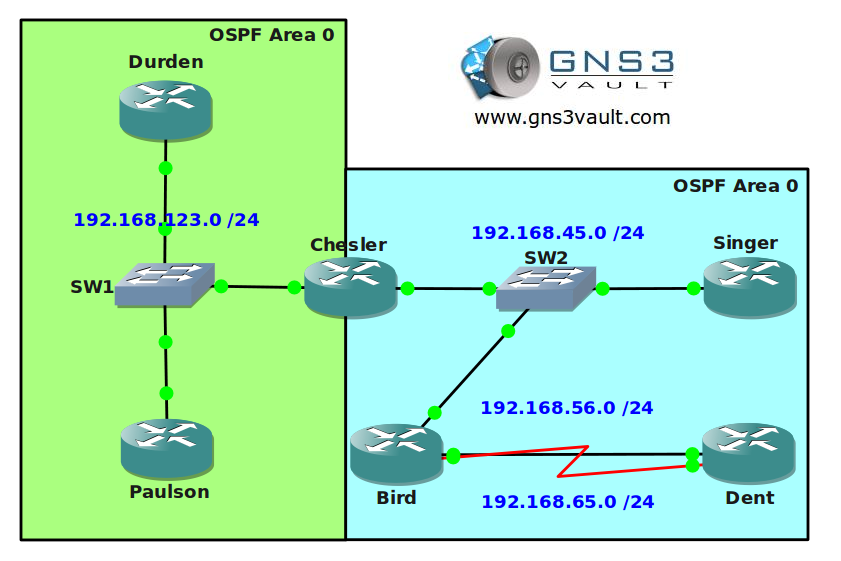
Video Solution:
Configuration Files
You need to register to download the GNS3 topology file. (Registration is free!)Once you are logged in you will find the configuration files right here.

The How to Master series helps you to understand complex topics like spanning-tree, VLANs, trunks, OSPF, EIGRP, BGP and more.
Written by René Molenaar - CCIE #41726


Hey Rene,
I can’t export the page/instructions to PDF… it throws up an error about an invalid .jpg
The exact message is: “TCPDF error: Can’t open image file: /var/www/vhosts/gns3vault.com/httpdocs/libraries/tcpdf/images/stories/ospfforccna1.png”
Any idea if you can fix this?
Thanks a mil!
On the right you mean OSPF area 1 instead of 0 I suppose 🙂
Great lab though!
ummm whoops! yup that’s area 1 😀
what is the difference ?
network 192.168.123.0 255.255.255.0 ( this is what was being used in eigrp labs )
and
network 192.168.123.0 0.0.0.255
thanks
It’s the same thing but 0.0.0.255 is the wildcard for /24 and 255.255.255.0 is the subnetmask for /24.
Thing is OSPF and EIGRP require a wildcard but if you accidently type in a subnetmask (which I do sometimes) it will automatically change it into the wildcard 😉
Thnks For the lab rene, It is one of the best lab for ospf
Thanks and you are welcome!
Rene, your scenario writing is great! You bring a human element of fun to your labs, but still have all of the technical angles covered. Love it!
Thanks 🙂 I like to keep things fresh and fun, no need to be serious all the time. Sometimes it takes more time to think up the stories than the lab itself though 😛
Hi Rene,
i just have a question about DR (Designated Router)and BDR (Backup Designated Router) that is connected to SW2.
after changing Router Singer’s router-id to 44.44.44.44 (and clearing the ospf process), why didn’t this router get elected as DR? it clearly has the highest RID. Why would you need to change the interface priority to 200?
Hi Rene,
i just have a question about DR (Designated Router)and BDR (Backup Designated Router) that is connected to SW2.
after changing Router Singer’s router-id to 44.44.44.44 (and clearing the ospf process), why didnt this router get elected as DR? it clearly has the highest RID.
Thank you
Hi, I have downloaded the topology but ip addresses are not proconfigured in my topology. how can I fix that?
Can you post a copy of the routers running config.
Are these still good for the updated ICND1/2 ?
I am sure there will be a certain amount of overlap so it wont do any harm to go through the Gns3 Vault.
Remember you can never do too many labs.
Kudos to Rene,
I have gone through your CCNA BOOK and I was able to complete this lab without stress…. Great!
Hello
Is this enough to do all Ospf configuration on CCNA exam ?
Just completed this lab thanks
read the book do the labs (y) this la is missing some loopback address
How do I download the topology / project files for your labs or is it a matter of having to build them manually? The configuration files on this lab for example don’t have any meaningful names:
i3_startup-config.cfg
i4_startup-config.cfg
etc etc etc
Great scenarios! How do i load the router configs though? After i download the file how do i load them into routers on GNS3 ?
Great labs, I really appreciate the hard work you put into making them.
+1 on this lab – many thanks Renee!
–the gns3 files all worked fine for me – I usually find of I am having issues with a topology is it is the basic problems – (image file name, gns3 already open etc etc)
WHere is topology file in this so called startup conf. ? What is the point if we can not open anything ?