

Scenario:
Tillywood is where all the famous blockbuster movies are created in Tilburg, The Netherlands. This year there is a convention and all big star actors will be there. Cisco is promoting the event and thus you are going to use EIGRP as the routing protocol of choice to get connectivity. Since you are close to passing your CCNA exam this should be no problem for you…get to work!
Goal:
- All IPv4 addresses have been preconfigured for you.
- Each router has a loopback0 interface.
- Configure EIGRP AS 1 on the frame-relay network connecting router Bates, Bond and Corleone. Advertise the loopback0 interfaces.
- You notice that router Bond and Corleone do not see each others loopback interfaces in the routing table. Configure router Bates to solve this.
- Configure EIGRP AS 1 on both fastethernet links connecting router Bates and oHara.
- Change the bandwidth on the fastethernet 1/0 interfaces so only fastethernet 0/0 is used for successor routes.
- Configure EIGRP AS 1 on router Dobbs and Corleone.
- Make sure you disable auto-summary for EIGRP AS 1.
- At this point you should have full connectivity for all networks and loopback0 interfaces.
- Create a summary on interface serial0/0 of router Dobbs so it advertises 5.5.0.0 /16 with an administrative distance of 85.
- Change the EIGRP K-Values so only delay will be used as a metric.
- Ensure router Bates can use the frame-relay network as a feasible successor route to network 4.4.4.0 /24.
- Make sure you see this feasible successor route not only in the topology table but also in the routing table.
- Enable authentication between router Dobbs and Corleone. Use a keychain called “VAULT” and password “LABS”.
It took me 1000s of hours reading books and doing labs, making mistakes over and over again until I mastered all the protocols for CCNA.
Would you like to be a master of networking too? In a short time without having to read 900 page books or google the answers to your questions and browsing through forums?
I collected all my knowledge and created a single ebook for you that has everything you need to know to become a master of CCNA.
You will learn all the secrets about EIGRP, frame-relay, summarization, successors, feasible successors and more.
Does this sound interesting to you?
IOS:
c3640-jk9o3s-mz.124-16.bin
Topology:
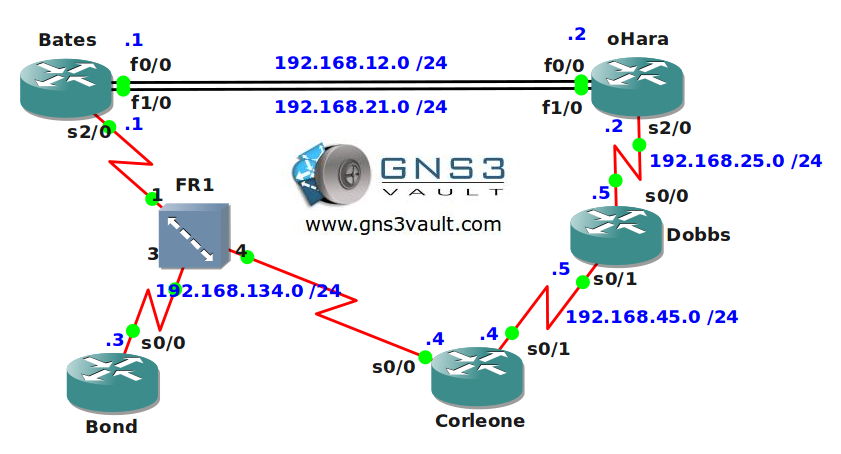
Video Solution:
Configuration Files
You need to register to download the GNS3 topology file. (Registration is free!)Once you are logged in you will find the configuration files right here.

The How to Master series helps you to understand complex topics like spanning-tree, VLANs, trunks, OSPF, EIGRP, BGP and more.
Written by René Molenaar - CCIE #41726


Hey Rene,
I can’t export the page/instructions to PDF… it throws up an error about an invalid .jpg
Any idea if you can fix this?
Thanks a mil!
use save as pdf extension in firefox
I am trying this lab out in GNS3 and not able to connect serial cables to FR1. Is there something I am missing about this switch or is there a config for this device that was not included in the download???
@Adrian yes this is something I still have to fix. The PDF plugin is kinda buggy… 😀
@Sallie the frame relay switch in this topology is emulated, it’s not a Cisco router. If you download my topology than the serial links should be connected already, it should work right away.
nice lab
Heading in.. Going to try this lab. thanks Rene
Can someone help me out for run this GNS3 Topology File in my GNS 3 which i have downloaded from the above link.
Because when, i try to do that it is showing and prompt like:
"Local IOS image /Data /IOS Images/c3640-jk903s-mz.124-16.bin
cannot be found for hipervisor localhost:7200
Please select an alternate image:
127.0.0.1:D:\Networking\Emulator Software\IOS images\c3640-jk903s-mz.124-16a.image"
then i click ok its prompting:
open: permission denied.
Any idea/sugession
Take a look at this article:
http://gns3vault.com/Faq/203-bad-number-of-parameters-1-with-minmax22.html
It fixes most issues.
Very informative and nice lab! Thanks!
You are welcome 🙂
Rene… while I try to open this lab, I get the following error: "Exception detection, stopping importation…" Any ideas
Greetings, GNS3 does not seem to be able to open this file and window remains blank. It is indeed able to open previously configured topologies. Any tips?? Thanks
am getting this messgae……
209- unable to start VM instance ‘ghost-C3640.BN-localhost.ghost’
i don’t see 3640 router in my GNS3……..only 3600…….how to fix this?
Hi Rene,
Excellent lab. Thank you for the hard work you put into this. I had one question. For the step "Ensure router Bates can use the frame-relay network as a feasible successor route to network 4.4.4.0 /24." would it be simpler to increase the delay on S2/0.1 rather than decreasing the delay through the other path? This seemed to work for me.
Thanks,
Michael
very useful lab thanx a lot
thanks
When completing the EIGRP CCNA 1 lab, the serial link between Dobbs and Corleone remain up/down. I assume that this is a bug in GNS3 – just wondered if anyone else has experienced this and, if so, did they manage to resolve the issue ? Reloaded devices/PC and recreated the serial link etc, to no avail.
Really good lab, prepairing for CCNP route exam in a few months time. Good to refresh this stuff first. Nice work.
What program open .cfg files ?
Hi, use Notepad or right click on the file and select view file. Good luck
Corleone#
*Mar 1 00:05:05.807: %DUAL-5-NBRCHANGE: IP-EIGRP(0) 1: Neighbor 192.168.134.1 (Serial1/0) is up: new adjacency
Corleone#
*Mar 1 00:08:10.355: %DUAL-5-NBRCHANGE: IP-EIGRP(0) 1: Neighbor 192.168.134.1 (Serial1/0) is down: retry limit exceeded
I tried a few IOS and chassis, it looks like GNS3 bug, which version are you using?
I have two questions.
Firstly, I gather I use the topology.net file and the final cfg from the other file.
Lastly, I can’t seem to get the cfg file to work with the routers. I am using the same router and IOS as you. I do have the two in a folder in the right place I believe.
I think this site is amazing and all that you are doing to help others. But I’ve run into confusion. You have two zip files to download but no information on why there are two and no description. Not even on your lab do you explain which file to use…
EIGRPforCCNA1 – Final Configs.zip
EIGRPforCCNA1.zip – EIGRPforCCNA1.zip
@ntguy73- the final configs.zip is the config file once the lab has been completed. it’s what your config should look like once you’ve done the lab successfully. it’s posted so you can cross-check.
the eigrpforccna1.zip contains the topology pre-built for this lab. using gns3, you open the topology file. make sure you’ve imported the ios image referred to here: IOS: c3640-jk9o3s-mz.124-16.bin
without that ios though, the lab may not function according to spec.
Video Solution..?? there is nothing
I am new to GNS3 and don’t know how to use it, i can’t open the files which i have dowloaded from here.
I opened toplogy file but don’t know how to add other Configs and to run them
Hi,
Why does split horizon have to be disabled for router Bond and router Corleone to see each others networks?
Thanks! 🙂
Rene – You have done a magnificent job working thru these topics. I was wondering if you could also do some coaching?
I’m going from a old CCNA to my CCNP, and it would be great to have a schedule to follow. Something like:
Week 1 EIGRP Packets and metrics > Lab (Example) Packets and metrics
Week 2 EIGRP Authentication and Advanced features. > Lab XXXXXXX
Week 3 OSPF > Lab XXXXXXXX
It would be great for me on my journey to know that I am progressing with competency. If I can walk thru your labs on EIGRP and then do them on my own with confidence, I feel like I can move on to the next section/subject.
The time line helps me set a expectation of progress. If I can bite off the whole CCNP course material (with labs) in XX weeks I can schedule that and know if I am on schedule of behind.
Just a thought.
Really appreciate the content.
Mark
This is a great Lab I just successfully working on but I really wonder whether if one could Create a summary on interface serial0/0 of router Dobbs so it advertises 5.5.0.0 /16 with an administrative distance of 85. knowing well that there is no EIGRP configuration between router Dobbs and router oHara
I’m new to this. can someone tell me where to get or download c3640-jk9o3s-mz.124-16.bin? can I use another IOS image that I have access to? thanks.
IOS images are licensed by Cisco. We cannot share them here, sorry.
Excellent lab, thanks a lot
TIP – > If you want to control the routing table you need to configure the delay in sub interface not on the physical interface.
Hi when i dowload this topology the devices are not pre-configured as the lab states. I can’t save my own configs. Please help.
Thanks.
The configs are in the startup-config ZIP file. Are you sure GNS3 opens them? Take a look at them in notepad, you’ll see that they are there.
Rene I think there is a problem because does not open, no error but just empty
Hi Lucas, I ran into the same issue with the configs not populating but like Rene says it’s no big deal. That is the beauty of cisco configs anyways is you can just copy and paste the whole config into your topology then save it as a new project. I save three states including: initial (with the copied configs), inProgress, and final. That way when you want to do the lab again just go back to the initial so your not having to deal with the continuous copy and past.
Hello friends ..
Please help me. I can’t open this lab. I realized this lab was saved with the new version of the gns3 1.1 which has the extension (.gns3). I tried opening it on my flawless 0.8.6 version, but it didn’t run. I eventually had to install the new version 1.1. but it still didn’t work. It keeps giving an error (Traceback (most recent call last): with some plenty jargon that I don’t understand. Am I missing something? please help. This is seriously standing in the way of CCNP route study. Please any assistance will be very much appreciated
Precisely this error
Traceback (most recent call last):
File “C:\Python33-64bit\lib\site-packages\cx_Freeze\initscripts\Console3.py”, line 27, in
File “gns3-gui/gns3/main.py”, line 222, in
File “gns3-gui/gns3/main.py”, line 87, in main
File “C:\Python\64-bit\3.3\lib\argparse.py”, line 1708, in parse_args
File “C:\Python\64-bit\3.3\lib\argparse.py”, line 2364, in error
File “C:\Python\64-bit\3.3\lib\argparse.py”, line 2334, in print_usage
File “C:\Python\64-bit\3.3\lib\argparse.py”, line 2345, in _print_message
AttributeError: ‘NoneType’ object has no attribute ‘write’
Tomorrow I’ll upload the old topology files as well. Not sure if this error is a “GNS3 1.X” error or a result of my conversion from the old > new files. I’ll take a look and see what is wrong…
I just tried this file on my Windows 7 machine and it’s working…I’ve seen this “cx_Freeze” error a couple of times now with GNS3 but never experienced it myself. Maybe check the GNS3.com forum to see how to fix it?
If I know a solution I’ll let you know.
So, the topologies uploaed just fine in GNS3 1.X on Ubuntu but the pre-configured IPs didn’t populate on the configs. Do you happen to know what the loopback addresses where supposed to be? I can deduce everything else from the pre-existing labels. This is also the first lab I’ve ran in GNS3 for a while so I could possible be doing something wrong.
Hi Rene,
I’m unable to open .gns file in gns3 how can i open i’m using 0.8.4 gns3 version
awaiting your reply
It’s best to get the latest 1.X version from gns3.net but you can also use the old topology files that I uploaded here:
http://gns3vault.com/forums/topic/gns3-0-8x-old-lab-topology-files/
Hi the frame relay seems not be working
What are you seeing?
When setting up eigrp, you don’t put a wild card mask on the main network statement, so why do you put a wildcard on the network statement for the loopback address?
Classful network boundaries don’t require the mask to be added because EIGRP assumes it.
Hello Rene,
Thanks very much for this and all the work you have put into this site !I have piles of books to do the CCNA, but I really think doing it this way has far more benefits. I’m running GNS3 1.2.3 on Windows 7 Professional 64 bit and I did not have any issues running through this lab. ( with your help of course!) I made sure that I had the same IOS image file imported first, and was up and running in no time.
Cheers
Steve
how can i oppen this file .i cant open..please help me guys
Rene, I need your helop please. I have the GNS ver 1.2.3 and downloaded these lab files. I keep getting error
=> Server error [-3200] : Dynamips executable C:\Program Files\GNS3\dynamips doesn’t exist
Server error [-3200] : Dynamips executable C:\Program Files\GNS3\dynamips doesn’t exist
Server error [-3200] : Dynamips executable C:\Program Files\GNS3\dynamips doesn’t exist
It wont let me add the links because it says the devies are not configured. I have checked the path for IOS images, it seems ok. By the way the devices on the topology had letters E and S in Red. Not sure if that means anything,. Thanks
CPU hog! Thanks Rene for the lab!
I’m able to run this lab just fine, after I define the correct IOS. I’m using Windows 7 Professional. The IdlePC works great for this box.
Only problem, the topology doesn’t match the website diagram, so I changed the router names, connections, etc, to agree with the diagram listed on the web site.
Thanks
None of the labs work for me. What I get is this message:
Launching IOS image at 0x80008000…
Smart Init is disabled. IOMEM set to: 5
Using iomem percentage: 5
hello sir
i want a question about goals which u achieved in your video tutorial….
Ensure router Bates can use the frame-relay network as a feasible successor route to network 4.4.4.0 /24
to achieve this u change delay with FE int and serial int, of bates, ohara, dubbs etc.
my question is can we change the delay of bates s2/0 int, to achieve this goal….
actually i did.and its works fine..
please tell me is i am right or wrong, and what is the effect will happen when i do with my way…