

Scenario:
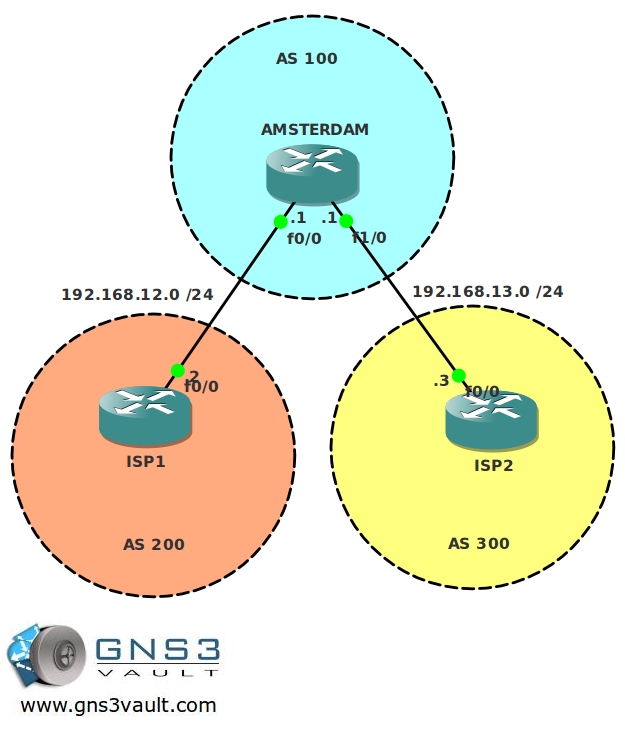
You are responsible for the Internet connection of a company called “Wooden Shoe Corp”. Their main site is located in Amsterdam and is currently connected with a single connection to an ISP. Because the Internet connection is critical to the company, you decided to become multi-homed by connecting to another provider. To connect to both providers and be ready for the future you decide to implement BGP.
Goal:
- All IP addresses have been preconfigured for you.
- Configure BGP on all routers, use the Autonomous System (AS) numbers as specified in the topology picture.
- The ISP routers have the following loopbacks:
ISP1 Loopback0: 2.2.2.2 /24
ISP2 Loopback0: 3.3.3.3 /28 - Advertise these loopbacks in BGP and ensure you have reachability from the Amsterdam router.
- Achieve full connectivity, only use BGP to achieve this.
It took me 1000s of hours reading books and doing labs, making mistakes over and over again until I mastered all the routing protocols for CCNP.
Would you like to be a master of routing too? In a short time without having to read 900 page books or google the answers to your questions and browsing through forums?
I collected all my knowledge and created a single ebook for you that has everything you need to know to become a master of routing.
You will learn all the secrets about BGP, routing, external BGP and more.
Does this sound interesting to you? Take a look here and let me show you how to Master CCNP ROUTE
IOS:
c3640-jk9s-mz.124-16.bin
Topology:
Video Solution:
Configuration Files
You need to register to download the GNS3 topology file. (Registration is free!)Once you are logged in you will find the configuration files right here.

The How to Master series helps you to understand complex topics like spanning-tree, VLANs, trunks, OSPF, EIGRP, BGP and more.
Written by René Molenaar - CCIE #41726


Nice lab!! Thanks for you job!!
Nice lab! would be nice to see the same lab with 2 CE routers and a WAN demarc 😉
You have to be careful with BGP, check your next-hops for the different prefixes to make sure packets know their way to the destination and how to return.
Thanks for the labs guys it’s really great. Just wondering tho you say Full Connectivity, although the BGP sessions come up there is no connectivity between ISP 1 and ISP 2 unless the 192.168 networks are added.
Very nice LABS, welldone Rene. Very nice of you offering us this kind of stuff. Really Really Appreciste.
I can ping to ISP2 and ISP1 from Amsterdam. I can see the route to ISP2 from ISP1 . But they can’t not ping each other. Why?
ISP2#sh ip rout | be Gat
Gateway of last resort is not set
C 192.168.13.0/24 is directly connected, FastEthernet0/0
2.0.0.0/24 is subnetted, 1 subnets
B 2.2.2.0 [20/0] via 192.168.13.1, 00:17:30
3.0.0.0/28 is subnetted, 1 subnets
C 3.3.3.0 is directly connected, Loopback0
ISP1#sh ip rout | b Ga
Gateway of last resort is not set
C 192.168.12.0/24 is directly connected, FastEthernet0/0
2.0.0.0/24 is subnetted, 1 subnets
C 2.2.2.0 is directly connected, Loopback0
3.0.0.0/28 is subnetted, 1 subnets
B 3.3.3.0 [20/0] via 192.168.12.1, 00:15:14
ISP1#ping 3.3.3.3
Type escape sequence to abort.
Sending 5, 100-byte ICMP Echos to 3.3.3.3, timeout is 2 seconds:
…..
Success rate is 0 percent (0/5)
ISP1#
Try the following and try to explain why it is working:
Ping from ISP1 or ISP2 and do this “ping source loopback0.
You will see that it is working, can you explain why?
If you do a regular ping without specifying the loopback as source it will fail. Why do you think this is?
If you do a ping it will send it from the IP address on your FastEthernet link, this network is unknown at the other side so the ping will fail. If you advertise the network between the ISP and Amsterdam it’ll be fine.
Keep in mind that with BGP having a prefix in the routing table or BGP table does not automatically mean it’s reachable.
Good luck!
Rene
Would below commands help fix this issue?
-ebgp-multihp
-update-source loopback
typo:
ISP2 Loopback1: 3.3.3.3 /28
should be
ISP2 Loopback0: 3.3.3.3 /28 ??
@Sahell
You are right this was a typo. Just fixed it.
gran lab, de igual manera, es interesante implementar otras formas de anunciar redes, por ejemplo con redistributed connected y un route map que solo permita la loopback.
Hi,
I design the topology exactly the same way & also connected the Amsterdam router with a cloud which is connected to my PC loopback address.
Now the configuration I did as follows:-
Amsterdam-
interface FastEthernet0/0
ip address 192.168.12.1 255.255.255.0
duplex full
speed auto
!
interface FastEthernet0/1
ip address 192.168.13.1 255.255.255.0
duplex auto
speed auto
!
interface FastEthernet1/0
description ****CONNECTION TOWARDS CLOUD****
ip address 10.10.10.1 255.255.255.0
duplex auto
speed auto
router bgp 100
no synchronization
bgp log-neighbor-changes
network 10.10.10.0 mask 255.255.255.0
neighbor 192.168.12.2 remote-as 200
neighbor 192.168.13.3 remote-as 300
no auto-summary
=================================================
ISP 1
interface Loopback0
ip address 2.2.2.2 255.255.255.0
!
interface FastEthernet0/0
ip address 192.168.12.2 255.255.255.0
duplex auto
speed auto
!
interface FastEthernet0/1
no ip address
shutdown
duplex auto
speed auto
!
router bgp 200
no synchronization
bgp log-neighbor-changes
network 2.2.2.0 mask 255.255.255.0
neighbor 192.168.12.1 remote-as 100
no auto-summary
!
==================================================
ISP 2
interface Loopback0
ip address 3.3.3.3 255.255.255.240
!
interface FastEthernet0/0
ip address 192.168.13.3 255.255.255.0
duplex auto
speed auto
!
interface FastEthernet0/1
no ip address
shutdown
duplex auto
speed auto
!
router bgp 300
no synchronization
bgp log-neighbor-changes
network 3.3.3.0 mask 255.255.255.240
neighbor 192.168.13.1 remote-as 100
no auto-summary
================================================
Now I have three questions:-
1: When I do ping from ISP1 i.e.
ISP1#ping 192.168.13.1 source loopback 0
Type escape sequence to abort.
Sending 5, 100-byte ICMP Echos to 192.168.13.1, timeout is 2 seconds:
Packet sent with a source address of 2.2.2.2
…..
Success rate is 0 percent (0/5)
& ISP 2 same result happened? why?
2. I am unable to keep the fas0/0 interface duplex to auto in Amsterdam router. It is taking only half/full duplex. Why?
3. I advertise the n/w 10.10.10.0 in Amsterdam router as follows:-
network 10.10.10.0 mask 255.255.255.0
so from ISP routers I can ping 10.10.10.1 interface which is the Amsterdam interface directly connected to cloud.
Is there any other way I can also advertise this?
Please help & thanks in advance.
[quote]& ISP 2 same result happened? why?[/quote]
If you advertised the link between Amsterdam and your PC in BGP then this route probably shows up on ISP1 and ISP2 correct? is it in the routing table? If so ISP1 and ISP2 know where to forward the packets.
[quote]
2. I am unable to keep the fas0/0 interface duplex to auto in Amsterdam router. It is taking only half/full duplex. Why?[/quote]
No idea but my guess is that the duplex negotiation between a virtual router and a physical network card is buggy…just configure it as full duplex yourself and don’t think about it too much 🙂
[quote]3. I advertise the n/w 10.10.10.0 in Amsterdam router as follows:-
network 10.10.10.0 mask 255.255.255.0
so from ISP routers I can ping 10.10.10.1 interface which is the Amsterdam interface directly connected to cloud.
Is there any other way I can also advertise this? [/quote]
This sounds good but have you thought yet about the PC? Your computer receives IP packets from another subnet…where does it send it to? Probably your default gateway..do a "route print" from the command line and you probably find the answer there 🙂
Hi Rene,
Thanks for the reply. Please find the routing tables in the routers:-
AMSTERDAM#sh ip route | be BGP
Codes: C – connected, S – static, R – RIP, M – mobile, B – BGP
D – EIGRP, EX – EIGRP external, O – OSPF, IA – OSPF inter area
N1 – OSPF NSSA external type 1, N2 – OSPF NSSA external type 2
E1 – OSPF external type 1, E2 – OSPF external type 2
i – IS-IS, su – IS-IS summary, L1 – IS-IS level-1, L2 – IS-IS level-2
ia – IS-IS inter area, * – candidate default, U – per-user static route
o – ODR, P – periodic downloaded static route
Gateway of last resort is not set
C 192.168.12.0/24 is directly connected, FastEthernet0/0
C 192.168.13.0/24 is directly connected, FastEthernet0/1
2.0.0.0/24 is subnetted, 1 subnets
B 2.2.2.0 [20/0] via 192.168.12.2, 00:02:36
3.0.0.0/28 is subnetted, 1 subnets
B 3.3.3.0 [20/0] via 192.168.13.3, 00:02:06
10.0.0.0/24 is subnetted, 1 subnets
C 10.10.10.0 is directly connected, FastEthernet1/0
=================================================
ISP1#sh ip route | be BGP
Codes: C – connected, S – static, R – RIP, M – mobile, B – BGP
D – EIGRP, EX – EIGRP external, O – OSPF, IA – OSPF inter area
N1 – OSPF NSSA external type 1, N2 – OSPF NSSA external type 2
E1 – OSPF external type 1, E2 – OSPF external type 2
i – IS-IS, su – IS-IS summary, L1 – IS-IS level-1, L2 – IS-IS level-2
ia – IS-IS inter area, * – candidate default, U – per-user static route
o – ODR, P – periodic downloaded static route
Gateway of last resort is not set
C 192.168.12.0/24 is directly connected, FastEthernet0/0
2.0.0.0/24 is subnetted, 1 subnets
C 2.2.2.0 is directly connected, Loopback0
3.0.0.0/28 is subnetted, 1 subnets
B 3.3.3.0 [20/0] via 192.168.12.1, 00:01:47
10.0.0.0/24 is subnetted, 1 subnets
B 10.10.10.0 [20/0] via 192.168.12.1, 00:02:17
=================================================
ISP2#sh ip route | be BGP
Codes: C – connected, S – static, R – RIP, M – mobile, B – BGP
D – EIGRP, EX – EIGRP external, O – OSPF, IA – OSPF inter area
N1 – OSPF NSSA external type 1, N2 – OSPF NSSA external type 2
E1 – OSPF external type 1, E2 – OSPF external type 2
i – IS-IS, su – IS-IS summary, L1 – IS-IS level-1, L2 – IS-IS level-2
ia – IS-IS inter area, * – candidate default, U – per-user static route
o – ODR, P – periodic downloaded static route
Gateway of last resort is not set
C 192.168.13.0/24 is directly connected, FastEthernet0/0
2.0.0.0/24 is subnetted, 1 subnets
B 2.2.2.0 [20/0] via 192.168.13.1, 00:01:00
3.0.0.0/28 is subnetted, 1 subnets
C 3.3.3.0 is directly connected, Loopback0
10.0.0.0/24 is subnetted, 1 subnets
B 10.10.10.0 [20/0] via 192.168.13.1, 00:01:00
==================================================
Now the ping response from the ISP1 loopback, to ISP2 as follows:-
ISP1#ping 192.168.13.3 source loopback 0
Type escape sequence to abort.
Sending 5, 100-byte ICMP Echos to 192.168.13.3, timeout is 2 seconds:
Packet sent with a source address of 2.2.2.2
…..
And also ping response from the ISP2 loopback, to ISP1 as follows:-
ISP2#ping 192.168.12.2 source loopback 0
Type escape sequence to abort.
Sending 5, 100-byte ICMP Echos to 192.168.12.2, timeout is 2 seconds:
Packet sent with a source address of 3.3.3.3
…..
Success rate is 0 percent (0/5)
Hi Sibaram,
I’m looking at your routing tables but you are missing something.
[quote]ISP1#ping 192.168.13.3 source loopback 0
Type escape sequence to abort.
Sending 5, 100-byte ICMP Echos to 192.168.13.3, timeout is 2 seconds:
Packet sent with a source address of 2.2.2.2
…..[/quote]
ISP1 doesn’t have the 192.168.13.0 /24 in its routing table.
[quote]ISP2#ping 192.168.12.2 source loopback 0
Type escape sequence to abort.
Sending 5, 100-byte ICMP Echos to 192.168.12.2, timeout is 2 seconds:
Packet sent with a source address of 3.3.3.3
…..
Success rate is 0 percent (0/5)[/quote]
And ISP2 doesn’t have 192.168.12.0/24 in its routing table.
Advertise those into BGP and try it again 🙂
Rene
Rene,
I think your last statement is a bit misleading, it says "Achieve full connectivity, only use BGP to achieve this." If I follow your instruction exactly the way you have it, it doesn’t ensure full connectivity. From my understand, full connectivity means, from anywhere all IPs must be reachable but when I tried to ping 192.168.13.2 from ISP1 F0/0 or loopback int, it wouldn’t work.
Even the statement below wouldn’t work:
ISP1#ping 3.3.3.3
Type escape sequence to abort.
Sending 5, 100-byte ICMP Echos to 3.3.3.3, timeout is 2 seconds:
…..
Success rate is 0 percent (0/5)
ISP1#ping 3.3.3.3 source 2.2.2.2
Type escape sequence to abort.
Sending 5, 100-byte ICMP Echos to 3.3.3.3, timeout is 2 seconds:
Packet sent with a source address of 2.2.2.2
!!!!!
Am I missing something or you ignore that statement, maybe you can revise it. Otherwise you are doing a great job
Hi Bgajadar,
[quote]ISP1#ping 3.3.3.3
Type escape sequence to abort.
Sending 5, 100-byte ICMP Echos to 3.3.3.3, timeout is 2 seconds:
…..
Success rate is 0 percent (0/5)[/quote]
This probably doesn’t work because the 192.168.13.0/24 network wasn’t advertised on router ISP2 or Amsterdam. If I forgot to do this I’ll slap myself in the face because you are right 😛
[quote]
SP1#ping 3.3.3.3 source 2.2.2.2
Type escape sequence to abort.
Sending 5, 100-byte ICMP Echos to 3.3.3.3, timeout is 2 seconds:
Packet sent with a source address of 2.2.2.2
!!!!![/quote]
This works because the source IP address (the loopback) has been advertised in BGP. Thanks for pointing this out!
Rene
So Rene,
Does it mean that source ip address is always being advertised in BGP routing table & it works(ping from another bgp router) & physical IP addresses do not work even if the prefix is already there in the routing table?
Am I talking sense or my question is clear to you?
Because as per the ISP1 router we have configured the following:-
ISP 1
router bgp 200
no synchronization
bgp log-neighbor-changes
[b]network 2.2.2.0 mask 255.255.255.0[/b]
neighbor 192.168.12.1 remote-as 100
no auto-summary
===========================================
ISP 2
router bgp 300
no synchronization
bgp log-neighbor-changes
[b]network 3.3.3.0 mask 255.255.255.240[/b]
neighbor 192.168.13.1 remote-as 100
no auto-summary
=================================================
So when we do ping from ISP1 source loopback address to ISP 2 loopback address it does work & vice versa.
But when we do ping from ISP1 source loopback address to ISP2 physical address it does not work & vice versa.
As per my understanding to ping the physical IP addressses from one ISP router to another ISP router “neighbor IP address remote as” command must be configured with the required IP address.
But it is still a strange thing for me that even the loopback address of the other routers are not being advertised with each other still they can ping each other from their loopback address only.
Thanks for now & please clarify my doubts or correct me in my points if you feel so.
BGP by default does not advertise [b]anything[/b] to a neighbor. This is important to remember.
[quote]So when we do ping from ISP1 source loopback address to ISP 2 loopback address it does work & vice versa.[/quote]
This works because you advertised the loopbacks in BGP. Once ISP1 sends a ping to ISP2 this is what your IP Packet looks like:
SOURCE IP: 2.2.2.2
DEST IP: 3.3.3.3
ISP1 knows how to reach 3.3.3.3 so the packet makes it to ISP2. ISP2 will respond with ICMP and creates it’s own IP packet that looks like this:
SOURCE IP: 3.3.3.3
DEST IP: 2.2.2.2
ISP2 knows how to reach 2.2.2.2 and so the IP packet will make it’s way back home. This makes sense so far?
[quote]
But when we do ping from ISP1 source loopback address to ISP2 physical address it does not work & vice versa.[/quote]
Look at the IP packet for this one:
SOURCE IP: 2.2.2.2
DEST IP: 192.168.13.3
This one will fail right away because ISP1 does not have network 192.168.13.0/24 in its routing table. It has no clue where to send it.
Let’s look at 1 more example…sending a ping from ISP1 to the loopback of ISP2 without specifying a source IP address:
SOURCE IP: 192.168.12.2
DEST IP: 3.3.3.3
The IP packet will make it’s way to ISP2 because 3.3.3.0/24 is in the routing table of ISP1. As a result ISP2 will respond and create it’s own IP packet that looks like this:
SOURCE IP: 3.3.3.3
DEST IP: 192.168.12.2
ISP2 will do a lookup in it’s routing table and sees that it has no clue where 192.168.12.2 is….the packet will be dropped.
Are you following me so far?
[quote]As per my understanding to ping the physical IP addressses from one ISP router to another ISP router "neighbor IP address remote as" command must be configured with the required IP address.[/quote]
The "neighbor IP address remote AS" command only does 1 thing…..creating a BGP peering between two routers. Nothing more, nothing less. It does not advertise any networks and doesn’t have anything to do with being able to ping another router or not 🙂
[quote]But it is still a strange thing for me that even the loopback address of the other routers are not being advertised with each other still they can ping each other from their loopback address only.[/quote]
Your loopbacks are advertised with the "network 2.2.2.0" and "network 3.3.3.0" commands and thus they are in the BGP table and routing table. You can confirm this by typing "show ip bgp" and "show ip route".
If it’s in the routing table your router knows where to send stuff to.
Does this clarify your doubts?
Rene
Great lab and explanation on pinging the ISPs. Thank you!
Thank you for the lab and question-Answer.
Just want to share that you can study more by below commands during configuration:
debug ip bgp update
debug ip bgp out
(both 2 debug shows info about prefix and attribute send-received. you can study how the AMSTERDAM received prefix from ISP1 and send out to ISP2 and notice other attributes)
show ip bgp neighbor ( you can see number of recieved/send route and more info)
show ip bgp [prefix]
Thank you for sharing this, this will be helpful to others as well.
Hi Rene,
Would it be a bad idea to just issue the “redistribute connected” command under the routing process?
Good question….yes and no 🙂
If you just type "redistribute connected" then it will redistribute all directly connected interface, if you add another one in the future then it will also be advertised through BGP. You can solve this by configuring a distribute-list that filters routing information though.
The second thing (less important) is that BGP path selection prefers advertised networks over redistributed ones:
W Weight (Highest)
L LOCAL_PREF (Highest)
[b]O Originate (local) routes that are advertise through the "network" command or redistributed from an IGP.[/b]
AS AS_PATH (shortest)
O ORIGIN Code (IGP > EGP > Incomplete)
M MED (lowest)
P Paths (External > Internal)
R RID (lowest)
hi
I got the same config as you suggested
however, my Amsterdam is not able to reach ISP2 Loopback (3.3.3.3)
[b]Amsterdam is only able to reach ISP1 loopback (2.2.2.2)… but not the ISP2…[/b]
AMSTERDAM#sh ip route
192.168.12.0/30 is subnetted, 1 subnets
C 192.168.12.0 is directly connected, FastEthernet1/0
192.168.13.0/30 is subnetted, 1 subnets
C 192.168.13.0 is directly connected, FastEthernet1/1
2.0.0.0/24 is subnetted, 1 subnets
[b]B 2.2.2.0 [20/0] via 192.168.12.2, 11:38:58
[/b]
also,
I already did the ping source command…
nothing happened…
I don’t see 3.3.3.0 /24 in your routing table? Is it in the BGP table? Is the next hop IP address reachable?
Hi Rene,
Thanks for the LAB .. but i do not have c3640-jk9s-mz.124-16.bin IOS & also Cisco has also removed this IOS, I tried Lower & later IOS also of this particular platform, but no luck.
Can u plz also upload the IOS also Or if u can give some alternate.
Thanks in advance!!
Nice Lab!!!!
Thank you
thank you for all , how can run this lab?
Hi Rene,
I am not able to open BGP basic .net file in gns3 , it is giving error" connecting R1 f0/0 to R2 f0/0 results in : 206-unable to create UDP NIO". Please advice how to rectify it?.
Hi Rene ,
I am not able to see videos clearly on youtube or this site .
Thanks for the nice videos
I cannot download the gns3 file eventhough I am a registered user
Pinging from ISP1 or ISP2 is possible if we add these two commands in router R1 :
1. network 192.168.0.0 mask 255.255.0.0
and a static route with null interface .
2. ip route 192.168.0.0 255.255.0.0 null0
ISP1#ping 192.168.13.3
Type escape sequence to abort.
Sending 5, 100-byte ICMP Echos to 192.168.13.3, timeout is 2 seconds:
!!!!!
Success rate is 100 percent (5/5), round-trip min/avg/max = 28/42/48 ms
[quote=networkhole]Pinging from ISP1 or ISP2 is possible if we add these two commands in router R1 :
1. network 192.168.0.0 mask 255.255.0.0
and a static route with null interface .
2. ip route 192.168.0.0 255.255.0.0 null0
ISP1#ping 192.168.13.3
Type escape sequence to abort.
Sending 5, 100-byte ICMP Echos to 192.168.13.3, timeout is 2 seconds:
!!!!!
Success rate is 100 percent (5/5), round-trip min/avg/max = 28/42/48 ms[/quote]
the above solution doesn’t work in both direction…
you have to add “network 192.168.12.0” on ISP1 and “network 192.168.13.0” on ISP2 and no need for the static route because the link it’s direct connected
Great lab! Nice typo with the loopbacks mask, ISP1 2.2.2.2/24 and ISP2 3.3.3.3/28, because you understand that the “network” command must be set exactly with the mask, otherwise it won’t be advertised.
Thank you!
this is really a fun lab… even more so if you color outside the lines a little 🙂
just for fun, implemented PBR on ISP1 and ISP 2 to rewrite the next-hop instead of advertising the 192.168.X.X routes into BGP… voila, connectvity.
ISP1
access-list 1 permit host 2.2.2.2
route-map TEST permit 10
match ip address 1
set ip next-hop 192.168.12.1
ip local policy route-map TEST
ISP2
access-list 1 permit host 3.3.3.3
route-map TEST permit 10
match ip address 1
set ip next-hop 192.168.13.1
ip local policy route-map TEST
ISP2#ping 2.2.2.2
Type escape sequence to abort.
Sending 5, 100-byte ICMP Echos to 2.2.2.2, timeout is 2 seconds:
!!!!!
Success rate is 100 percent (5/5), round-trip min/avg/max = 56/69/92 ms
ISP1#ping 3.3.3.3
Type escape sequence to abort.
Sending 5, 100-byte ICMP Echos to 3.3.3.3, timeout is 2 seconds:
!!!!!
Success rate is 100 percent (5/5), round-trip min/avg/max = 36/61/88 ms
Many thanks Rene;
Nice Lab…
Great lab for getting started with BGP. Thanks again, Rene.
Thanks Rene. May the force be with you
Hello Rene,
By mistake I discovered your site, but there is a lot of information to find here to try and learn about.
Unfortunately the startup config isn`t downloadable anymore. Do you still have it?
How can I download topology?
Thanks for this! Will recommend.
i have added network command to advertize loopback’s
and got ping from all the routers
Awesome thank you. please slow down lol.
Hi,
I know it’s maybe not specified but the answer to this lab could also be to use the same command on both ISP1 and ISP2 to achieve connectivity.
!
router bgp x00″
… output omitted …
redistribute connected
!